Meituan App: Food Delivery, Hotels, Travel & More

Ever found yourself hungry in China but don’t know where to order food online? Or maybe you want to try a hotpot place locals love, but you’re not sure where to find deals? That’s where Meituan comes in.
It’s like having a local friend in your pocket, helping you order food, book restaurants, or find authentic experiences without paying tourist prices. It has saved so much time and money.
I’ll show you how to download Meituan, how to order food, and how to find great local deals easily. Let’s get you ready for your trip.
What Is Meituan App?
Meituan is a popular app in China that locals use to order food, buy dining deals, and book services like massages or haircuts, even for hotel bookings. It almost covers everything you need in daily life.
You might have heard of Dianping App, which is great for checking reviews and seeing what’s good nearby. Meituan works well with Dianping but focuses more on ordering and grabbing deals. It’s like having a local discount card and food delivery app in one.
Key Services of Meituan App
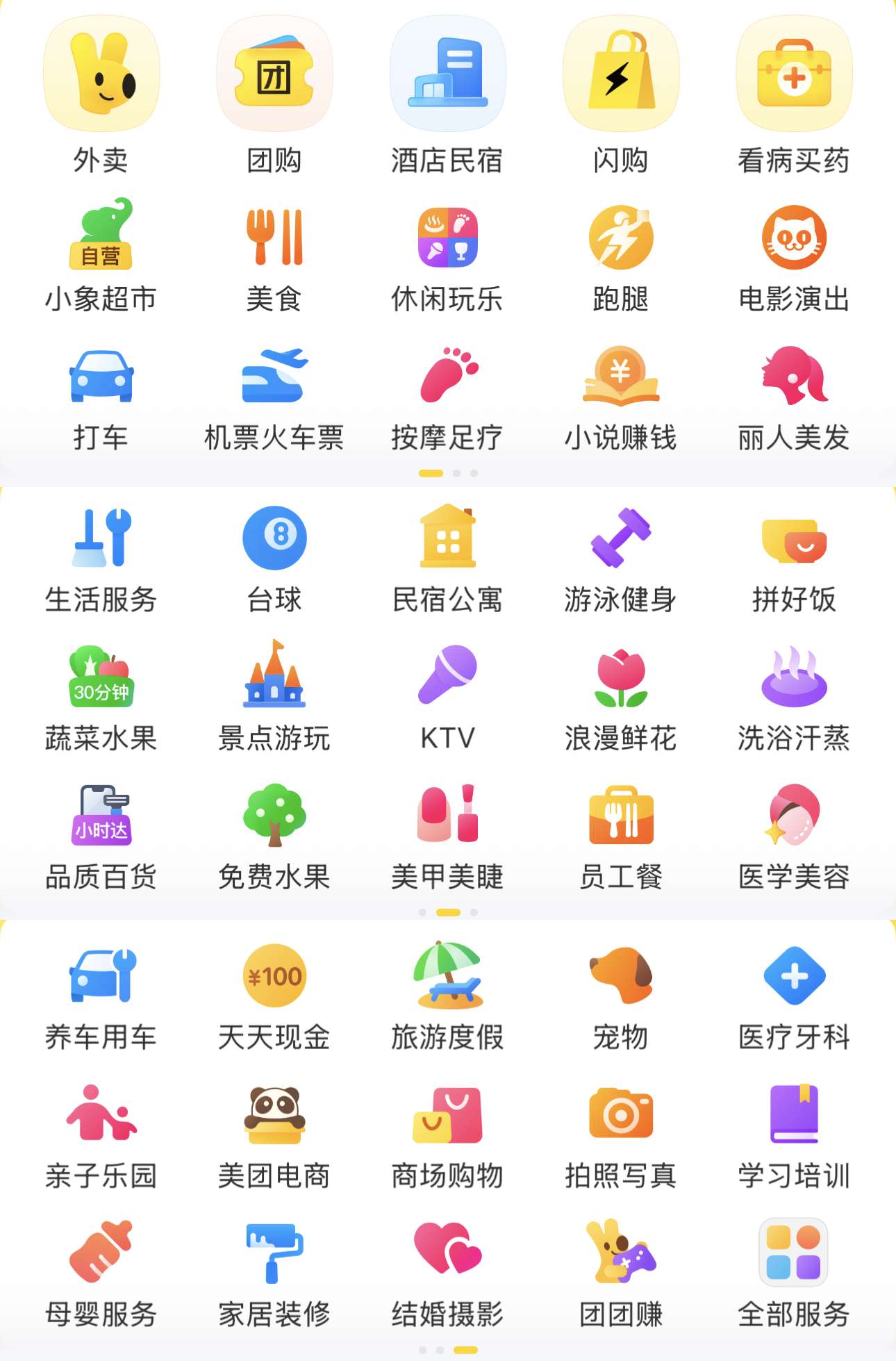
Order food delivery: Craving noodles, bubble tea or late-night snacks? Meituan delivers to your hotel often within 30-45 minutes.
Buy dining deals: Get vouchers for hotpot, dim sum or BBQ at discounted prices. Pay in the app, show the code at the restaurant, and enjoy your meal for less.
Book local services: Need a massage, haircut or even laundry while travelling? Meituan lets you book these easily at local prices.
Grab attraction tickets: You can buy tickets for museums, parks or shows directly on the app. It's often cheaper than buying at the door.
Grocery delivery: If you’re staying longer, you can order fresh fruits, snacks and drinks to your stay.
Ride-hailing: In some cities, Meituan also offers ride-hailing. It's another option besides Didi or taxis.
Hotel and short-stay bookings: It's Uueful for last-minute stays or day-use rooms during layovers.
Book Flights to China Now


How to Download and Set Up Meituan App?
1. Find the App
On iPhone: Change your App Store region to China (if needed), then search “美团” or “Meituan.”
On Android: Use the multi‑region Play Store or download from app storee. You may also use APK sites. Just be sure it’s a reputable source.
Note: Meituan usually defaults to Chinese. There’s no full English version. You can use translation feature, or use a translator overlay app to help on first use.
2. Create an Account
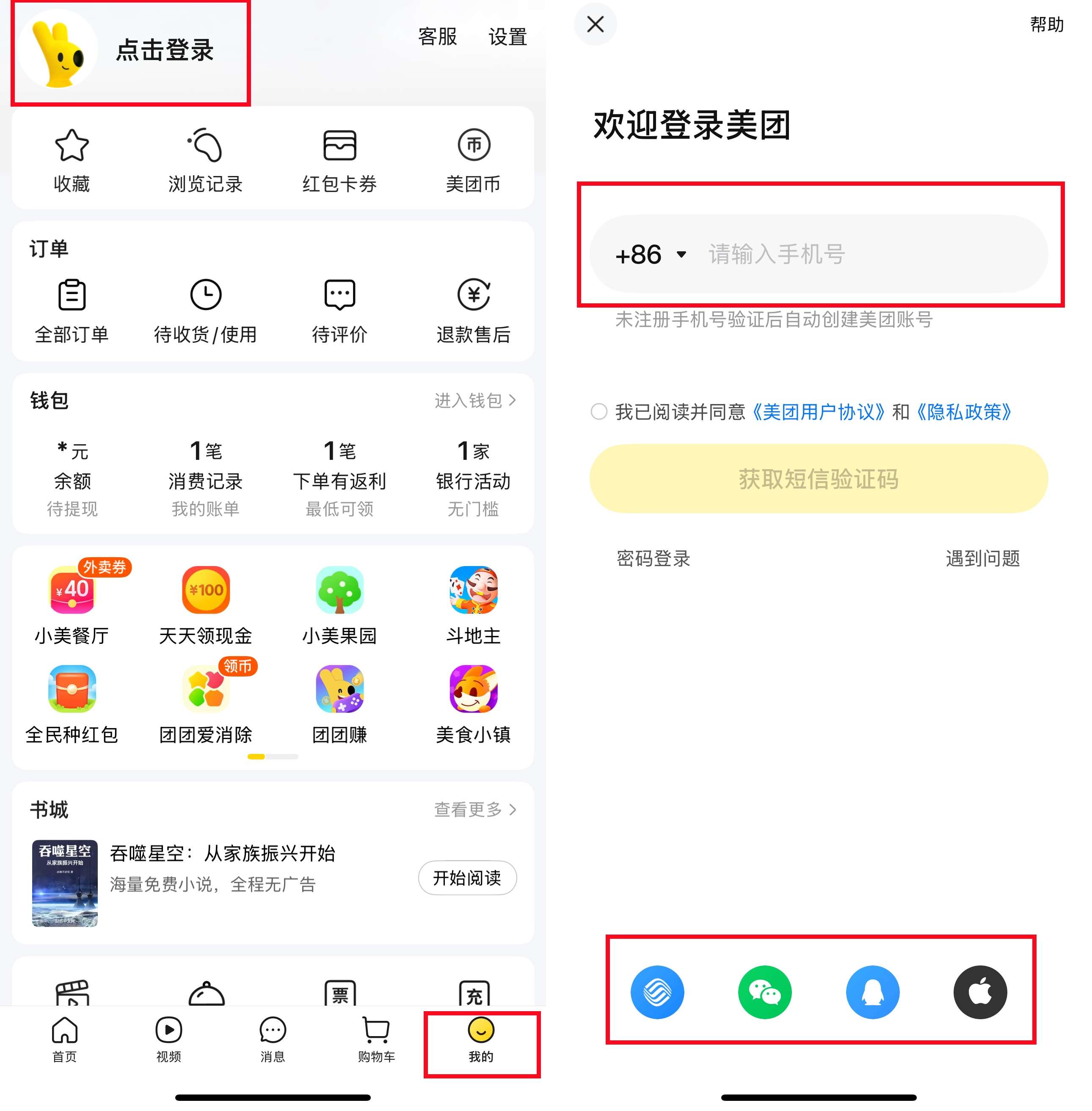
You’ll need a phone number to register. Just go to "我的" (My) and click "点击登录" (Click to Login). Many users sign up with their overseas number and receive a verification SMS. If you already have one for data or SIM, you can use that too.
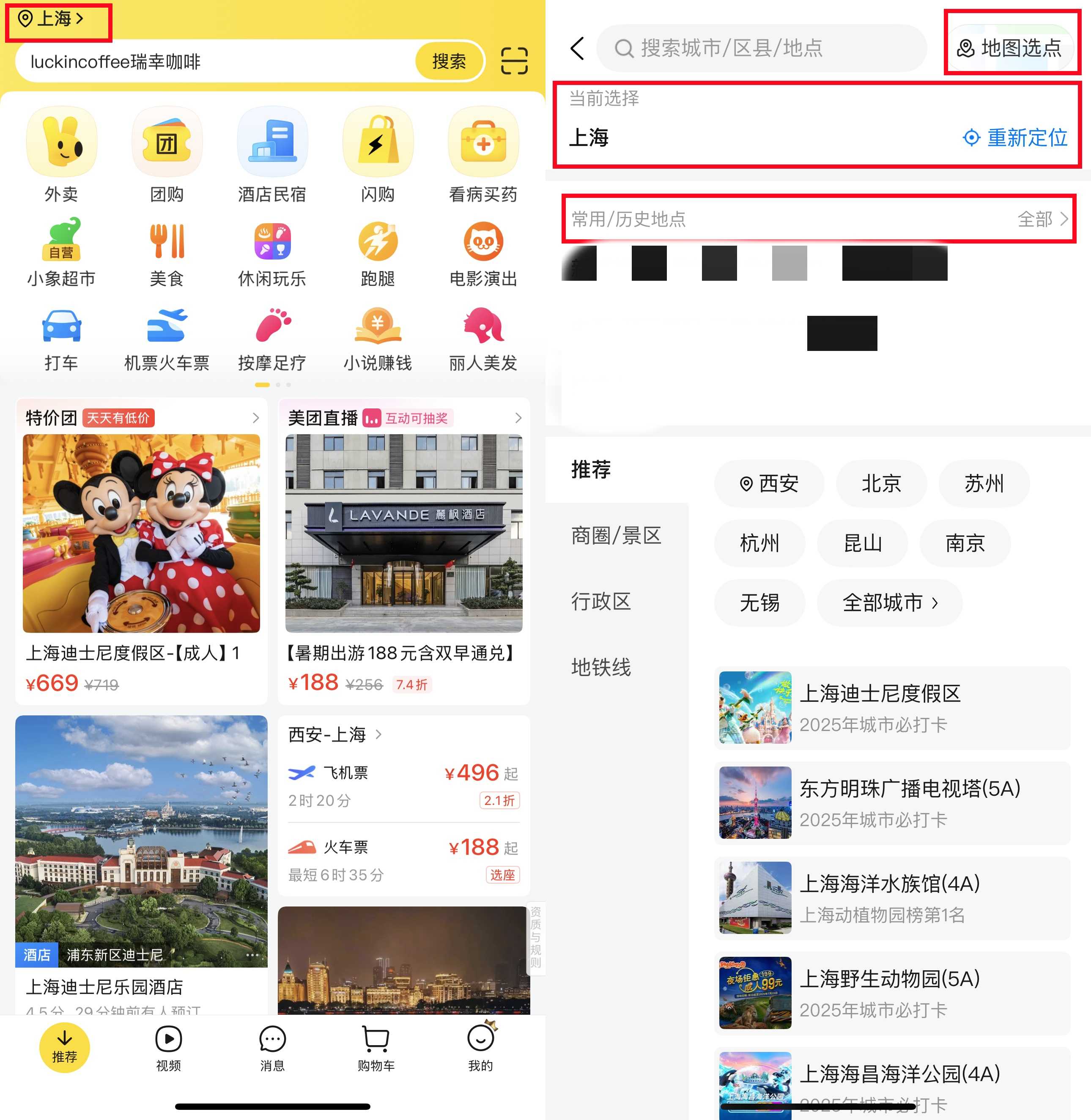
3. Set Your City and Delivery Address
Use the map pin or type out the address. If you’re not confident with Chinese, just copy‑paste the address in both Chinese and English.
4. Link a Payment Method
Meituan works with WeChat Pay or Alipay. Both of the payment methods support foreign credit cards or China-issued cards.
You’ll need to top up your wallet or link your card in those apps first. Once linked, payments in Meituan are seamless.
That’s it! You’re set up and ready to browse food, deals, services, and more.
Buy China eSIM Now
 2036594 booked


How to Use Meituan App for Food Delivery?
After downloading and setting up Meituan App, please double-check that your address is correct. If you move to another city, remember to update it.
1. Find Food Delivery Service
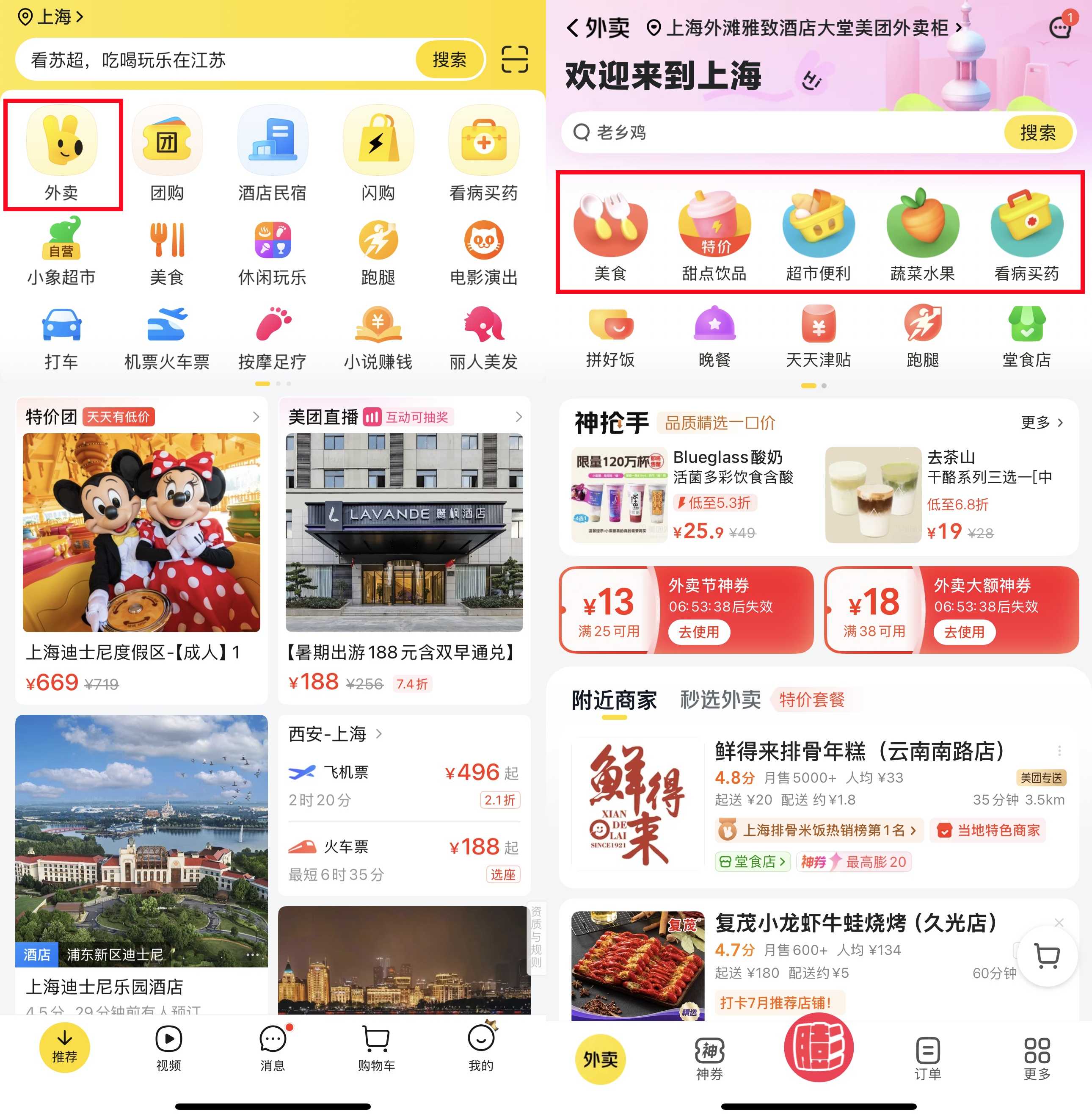
Tap on the food delivery icon “外卖” (usually the first one you see).
2. Browse or Search
You can scroll to see restaurants nearby or type in what you feel like eating.
Tip: Look for places with higher ratings (yellow stars) and delivery times under 45 minutes.
3. Check Delivery Fees and Minimum Spend
Some places have a small delivery fee (¥3–¥6). Many require a minimum order, but it’s usually easy to hit with a drink and a main.
4. Place Your Order
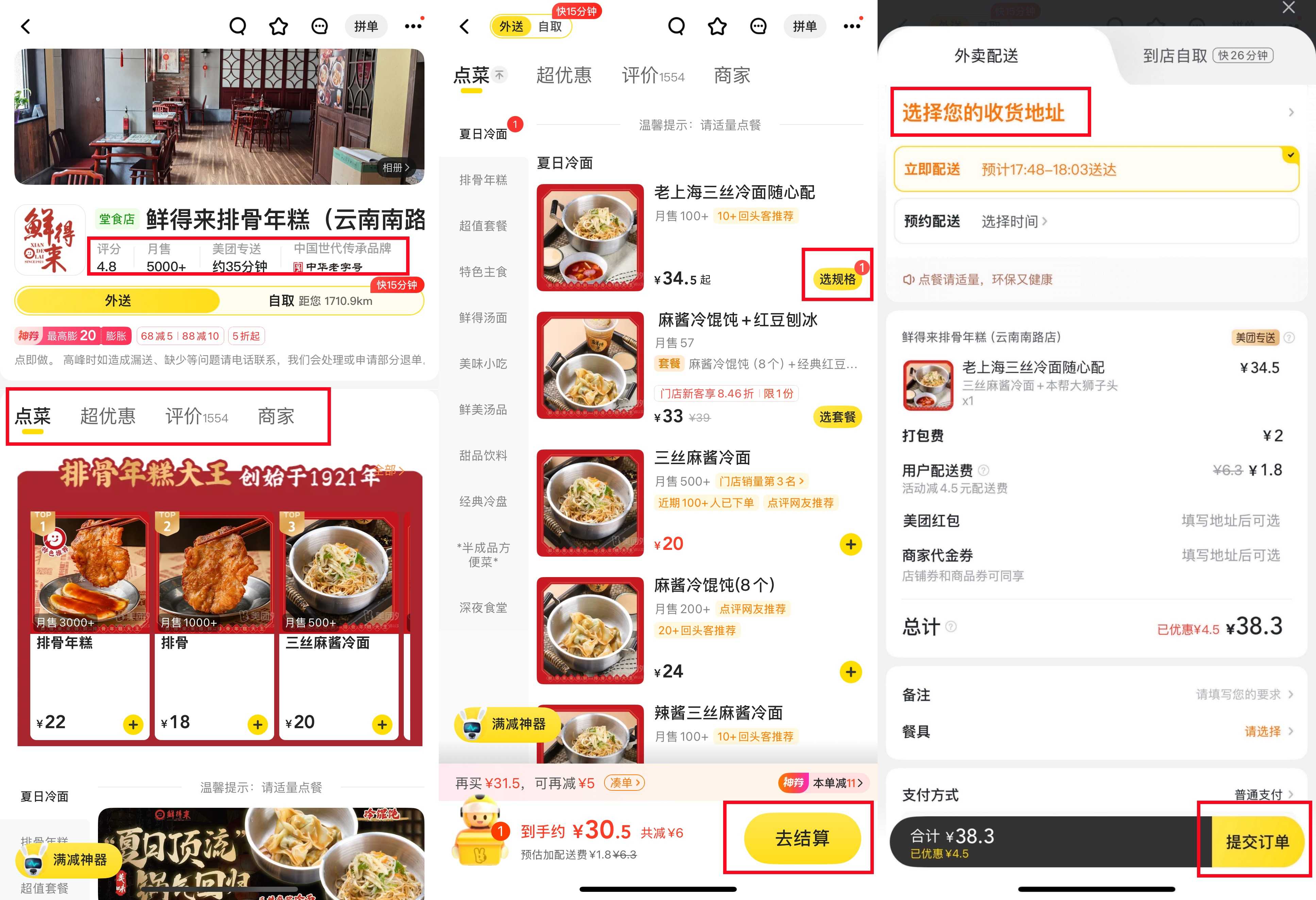
Tap “选规格” on the dishes you want. Check your cart before confirming. Then click "去结算" and make payment. If you have coupons or vouchers, they will be applied automatically or can be selected before payment. You can also leave notes for the restaurant or the Meituan delivery rider. Click "提交订单" to place your order.
5. Pay
Payment is fast using WeChat Pay or Alipay. You’ll get a confirmation once it’s successful.
6. Track Your Order
You can see your driver’s progress on the map, similar to GrabFood. Many drivers will call you upon arrival. If you don’t speak Chinese, you can ask hotel staff to help, or message the driver with “我在大堂” (I am in the lobby).
7. Leave a Review
After you get your food, you can leave a simple star rating and a comment. This helps other users and keeps your Meituan account active for future discounts.
How to Use Meituan App for Dining Deals?
1. Find the Dining Deals Section
Tap on the dining deals section (look for the icon with a fork & chopsticks or voucher symbol).
2. Search or Browse
You can search for a type of food or check what’s popular nearby. Deals often show the discount clearly.
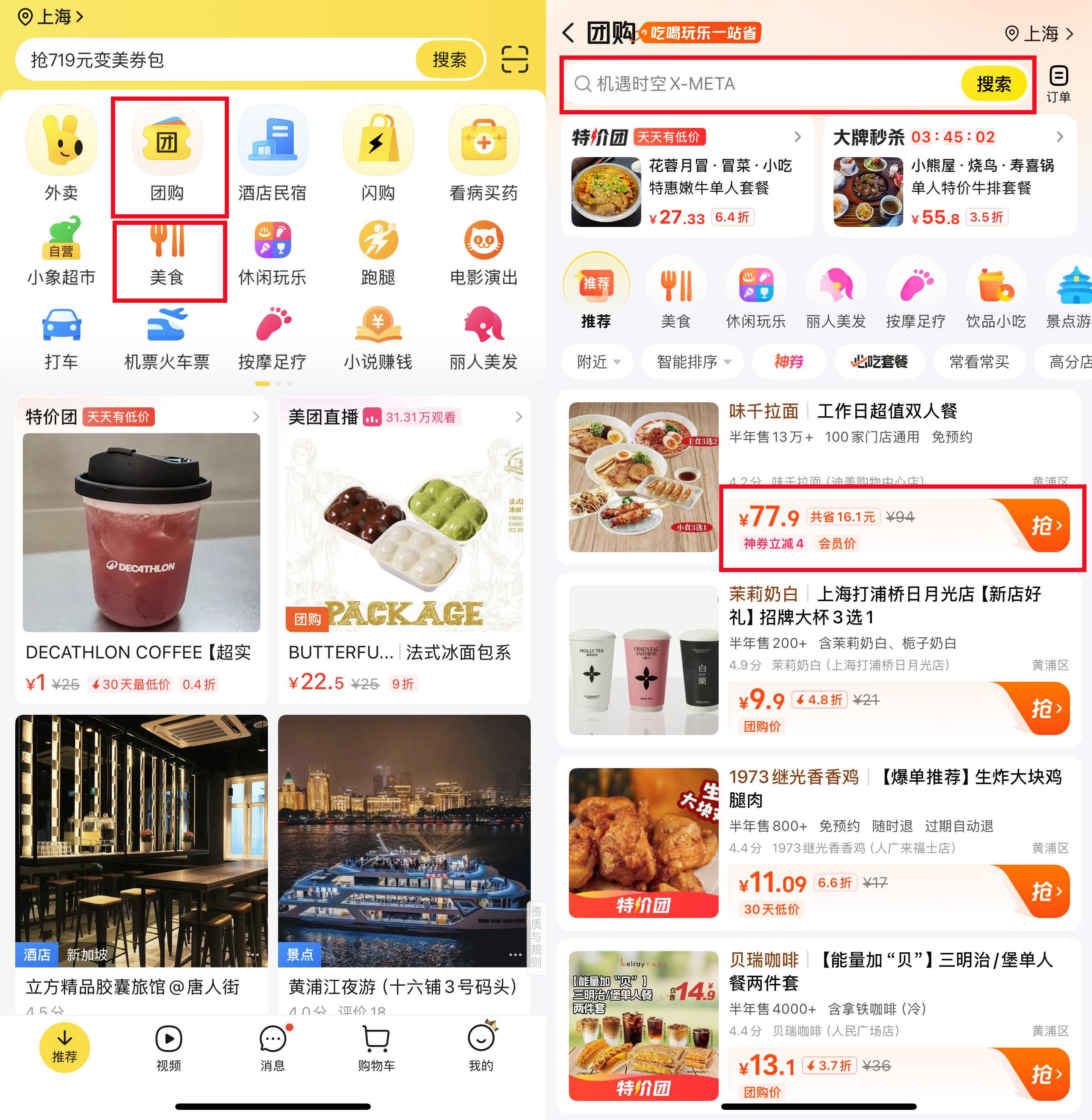
3. Check the Details
Before buying, check:
- What’s included in the deal.
- Any time limits (some are lunch-only or weekdays only).
- Whether a reservation is needed.
4. Buy the Deal
Tap to pay using WeChat Pay or Alipay. The voucher will appear in your “待收货/使用” section.
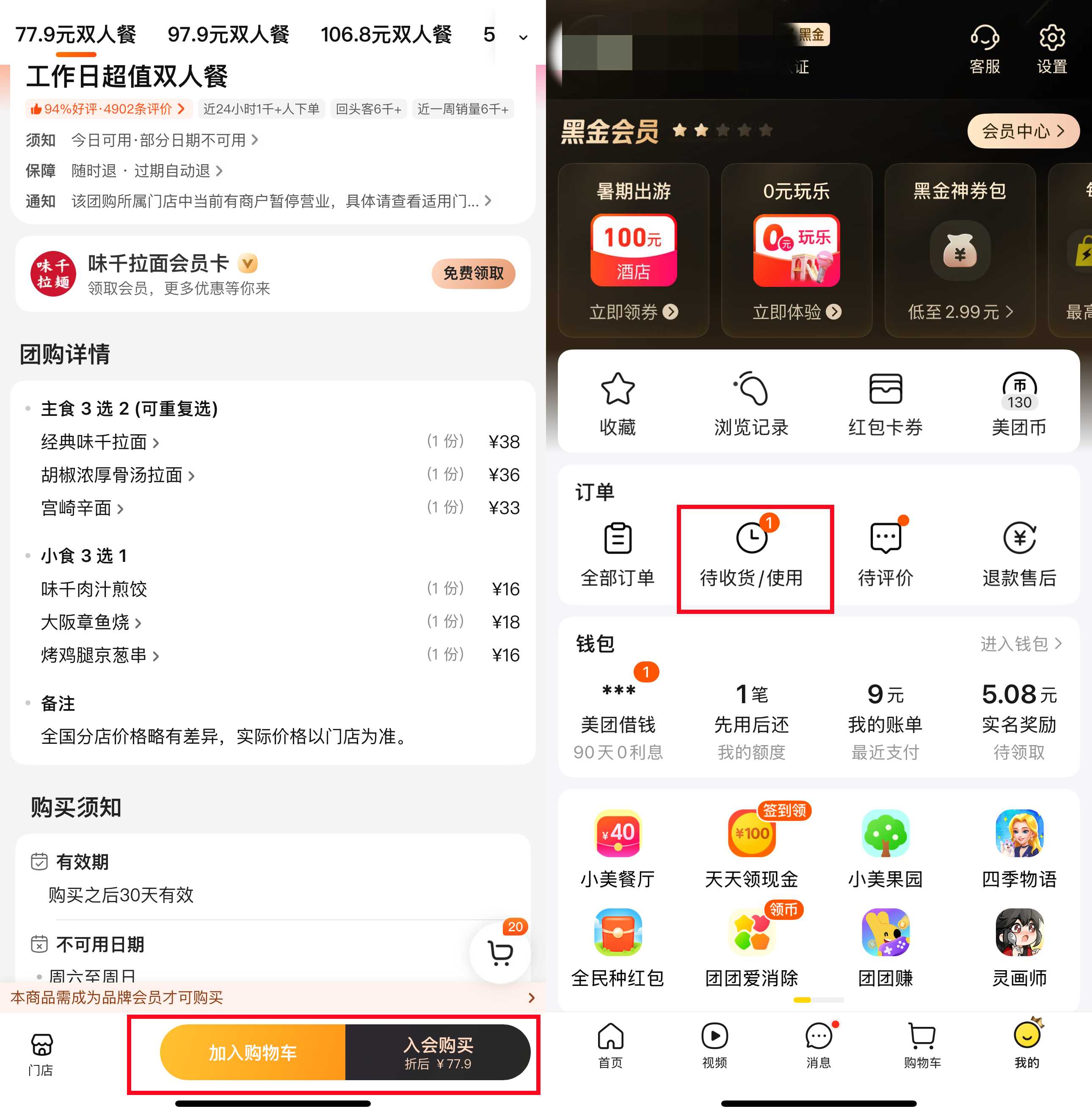
5. Go to the Restaurant
Show your voucher code to the staff before ordering. They will scan it or enter the code into their system.
6. Enjoy Your Meal and Save
Use the voucher value towards your bill. You usually just pay the extra amount if your bill goes over the voucher.
How to Use Meituan App for Ride-Hailing?
1. Find the Ride-Hailing Section
Find the ride-hailing section (a car icon).
Note: Meituan ride-hailing is not available in all cities, but works well in many major cities.
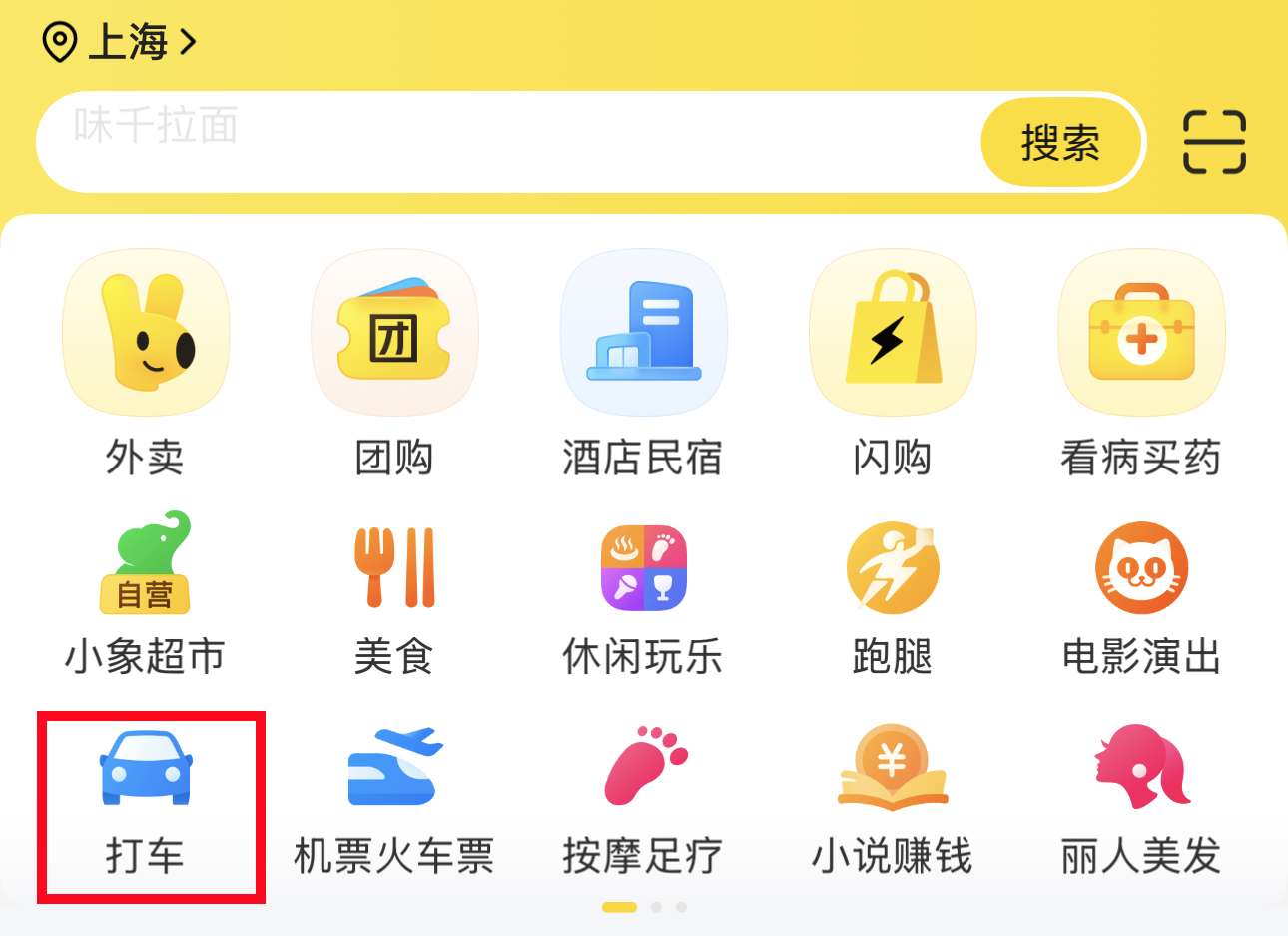
2. Set Your Pick-Up Location
The app will auto-locate you, or you can pin your location on the map.
3. Set Your Destination
Type in your destination in Chinese or copy-paste the address from Google Maps.
4. Choose Your Car Type
Options include standard, comfort, or larger cars if you have luggage.
5. Check Estimated Fare and Wait Time
You’ll see the estimated cost and how long it will take for a driver to arrive. Tap to confirm.
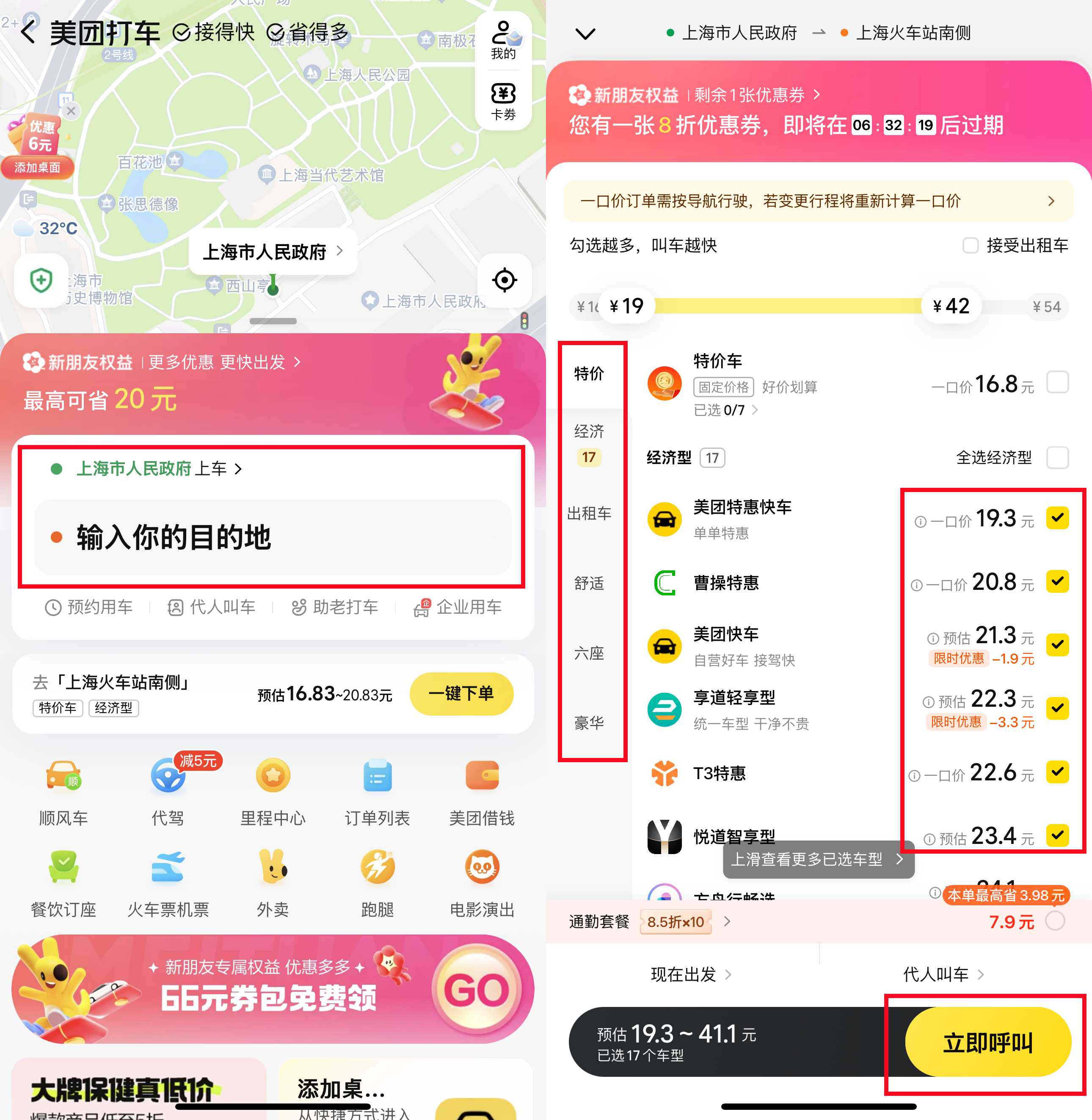
6. Track Your Driver
Watch your driver’s location on the map. If they call and you don’t speak Chinese, you can send a message like “我在这里” (I am here) or ask your hotel staff for help.
7. Confirm and Pay
Payment is usually automatically deducted after the ride.
Book Hotels in China Now






















Other Services on Meituan You Can Try
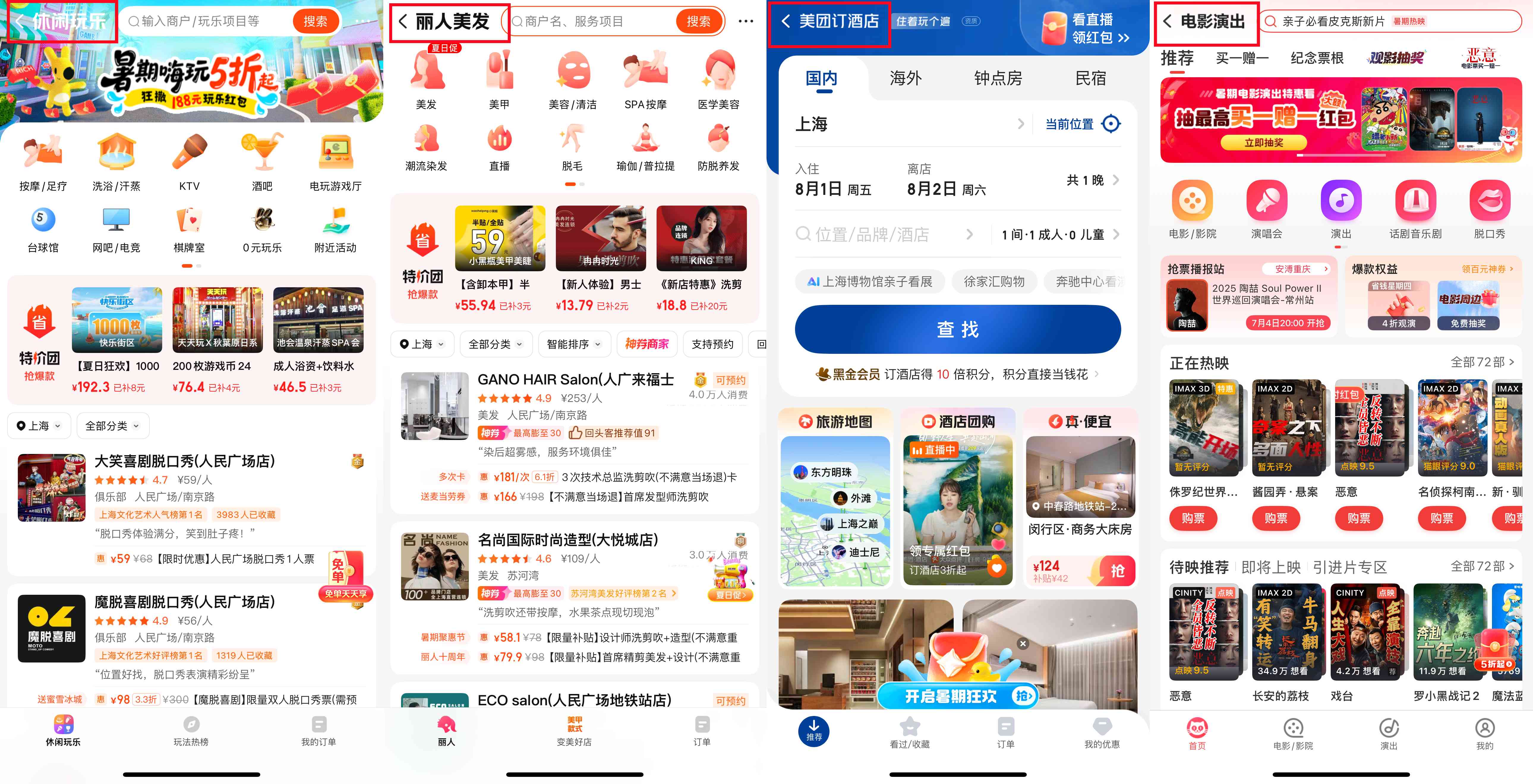
Meituan isn’t just for food and rides. You can also book all kinds of local services like massages, haircuts, laundry, movie tickets, or even workshops.
To use these services, just browse the relevant section in the app, pick what you want, and check the details like time and location. When you arrive, simply show the QR code or voucher to the staff. Just like the dining deals.
Is Meituan Worth Using in China?
Absolutely! If you want to eat well, save money, and enjoy local life without the usual hassle, Meituan is a must-have app.
Sure, it might take a little time to get used to the language and setup, but once you do, it makes your trip much smoother.
So yes, whether you’re a foodie, a busy traveller, or just want convenience, Meituan is definitely worth trying on your next trip to China. Give it a go before your next trip, and you might find yourself using it more than you expected!
More Essential Apps to Use in China
FAQs About Meituan App
-
How do I get coupons or discounts on Meituan?
-
Can I cancel an order after placing it?
-
Does Meituan food delivery have a minimum order amount?
Trending Researches
-
Popular Content
-
Top Flight Links
-
Popular Hotels
-
Popular Things to Do
-
Featured guides
-
Trip.com links
- Trip.com Customer Service
- Trip.com VIP Lounge
- Buy Now Pay Later
- Trip.com Contact
- Trip.com Cancellation Policy
- How to Use Trip com Promo Codes
- Best Credit Cards
- Singapore Airlines Baggage Allowance
- scoot-baggage-allowance
- luggage size cabin
- How to Book a Student Flight Ticket
- Singapore Airlines Change Flight
- Best Day to Book Flights
- Trip.com Flight Refund
- Flight Classes Explained
- CA490 Flight Status
- SQ869 Flight Status
- MU7705 Flight Status
- ZG053 Flight Status
- MU2434 Flight Status
- QG523 Flight Status
- CA1651 Flight Status
- Plane tickets from Singapore to Kuala Lumpur
- Plane tickets from Singapore to Fukuoka
- Cheap flights from Singapore to Shanghai
- Plane tickets from Singapore to Bangkok
- Cheap flights from Singapore to Seoul
- Cheap flights from Singapore to Manila
- Cheap flights from Singapore to Tokyo
- Plane tickets from Singapore to Chengdu
- Hotels near Hefeinan Railway Station
- Hotels near Johor Bahru Senai International Airport
- Hotels near Hongcun Aju Theater
- Hotels near Zixiao Palace
- Hotels near Beijing Road
- Chengdu Hotels
- Tokyo Hotels
- Kuala Lumpur Hotels
- Kunming Hotels
- Phu Quoc Island Hotels
- Hotel Les Matins de Paris
- Ramada by Wyndham Seoul Dongdaemun
- Mercure Guangzhou Beijing Road Pedestrian Street Hotel
- Airport International Hotel (Xuzhou Guanyin Airport)
- Atour Hotel (Chengdu Taikoo Li)
- Malaysia 5G eSIM | Supports mainstream apps including TikTok, Google Maps & ChatGPT | Day Pass/Total Package | 24H Billing | 1-30 days | QR code
- Singapore 4G eSIM | Supports Google Maps / ChatGPT | Daily/Total Data Plans | 24-Hour Billing | 1–30 Days | QR Code
- Vietnam Airport VIP Fast Track Service
- VIP Fast Track service for immigration clearance at Tan Son Nhat Airport in HCM
- Foreign Tourist Day Tour: Panda Valley / Dujiangyan / Mt Qingcheng / Blue Tear / Chengdu
- Huanglongjiuzhai Railway Station - Jiuzhaigou | Departure/Return | Rideshare/Private Charter | Bus/Nanny/5-9 Seater Business | Shuttle Bus | Vehicle Type Optional | Any Combination | T
- Guilin Yangshuo Impression Liu Sanjie Landscape Performance + Complimentary Exclusive Coffee Drink - Pick Up at Designated Restaurant
- Mainland China 5G eSIM | Dual Network • All AI & TikTok | 1–365 Days | QR Code
- Koh Larn Yacht Charter
- Cebu Connectivity Solutions
- Water Activities in Kuwait
- Toronto Group Tours
- Mueang Samut Songkhram Transportation
- Beijing Spa & Massage
- Leshan Activities
- China Power Bank Limit
- Trip.com Customer Service
- train to kl from singapore
- Shanghai Metro
- China Train Map
- China Entry Requirements
- Hong Kong Public Holidays 2027
- train from singapore to jb
- China Plug
- Thailand Plug
- universal studios singapore tickets
- Renew Autopass Singapore
- Taiwan Plug
- Vietnam Arrival Card
- Singapore Malaysia Cross Border Taxi
- Frankfurt Airport to City
- Osaka Station to Kyoto Station
- Bangkok to Pattaya
- Trip.com Promo Code
- Trip.com Flight Deals
- Trip.com Credit Card Promotions
- How to Book Cheap Hotels
- How to Book Cheap Flights
- Trip.com Member Rewards
- Trip Weekly Hotel Sales
- Online Hotel Booking
- Online Flight Booking
- Trip.com Travel Guide
- Book China Train Tickets
- Trip.com Seat Selection
- Singapore Public Holidays 2027
- Trip.com 优惠码
- Trip.com Travel Guides
- Trip.com 10.10 Mega Sale