Scoot Baggage Allowance: Singapore Guide(2026)

Author's Profile Picture
scoot baggage allowance singapore

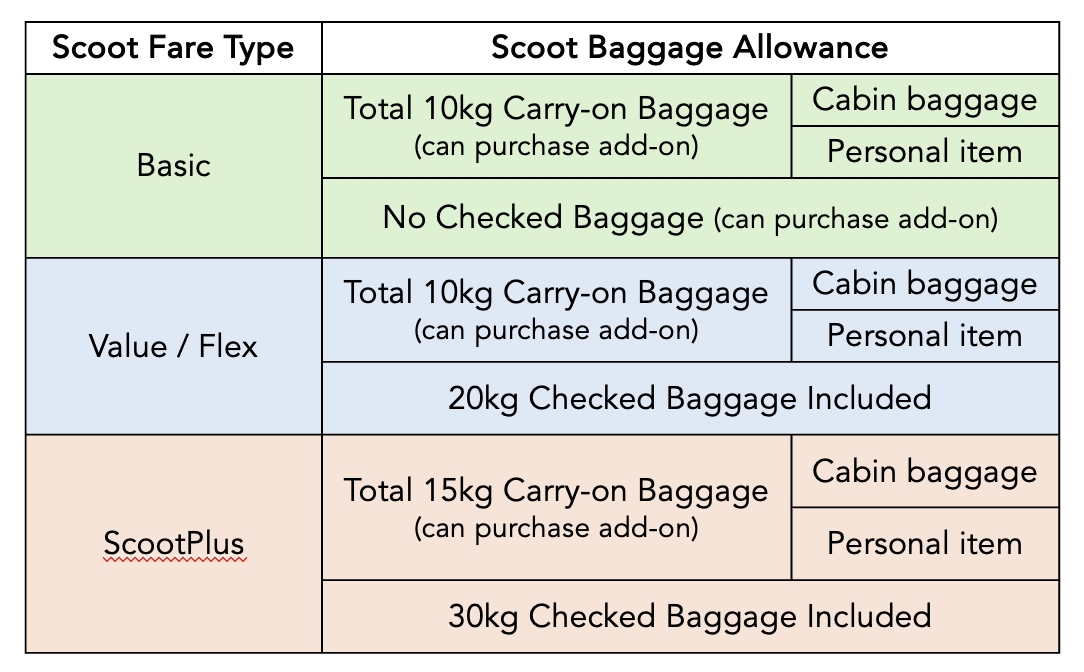
🌟  Scoot Baggage Rules at a Glance

scoot baggage allowance summary

🎒  Understanding Scoot Cabin Baggage Allowance

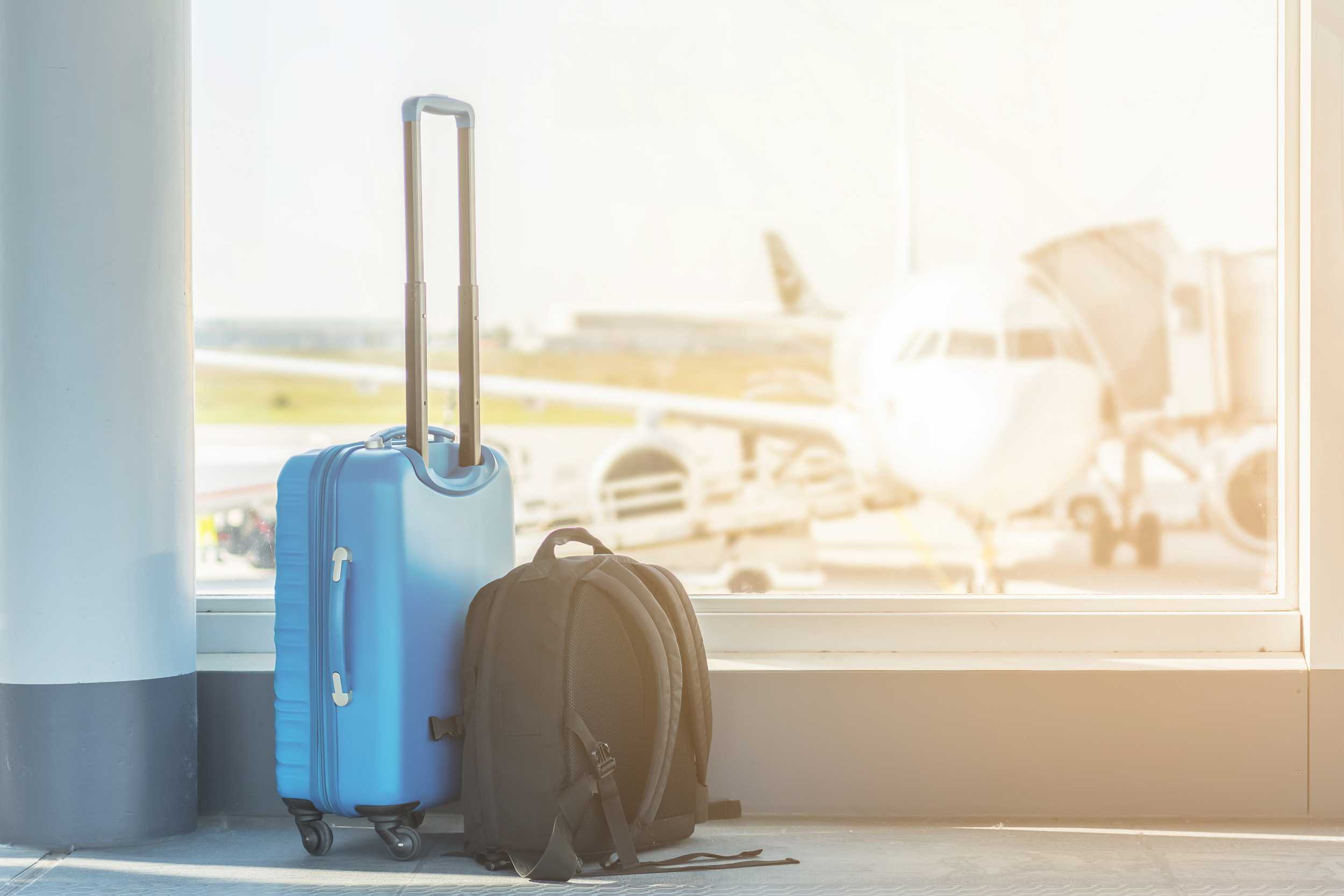
a carry-on luggage and a bag

How Many Bags Can You Carry On? (The 2-Piece Rule)

All Scoot and ScootPlus travelers are allowed up to two pieces of cabin baggage: 1 carry-on baggage + 1 personal item in the cabin. 

Both pieces together must stay within your total cabin weight allowance (usually 10 kg for standard fares). 

If you wish to add on more weight for carry-on baggage, you could upgrade to ScootPlus for a total of 15kg allowance or purchase an add-on weight depending on your need.

Scoot Carry-on Bagggage Size & Weight Limits

Your main cabin bag must fit in the overhead bin and is limited to 54 cm(H) x 38 cm(W) x 23 cm(D), including handles and wheels. 

For Singapore‑origin economy passengers, the free allowance is commonly 10 kg total for cabin baggage, with stricter weighing now more common at the gate, so pack to stay comfortably under the limit.

What's a ‘Personal Item’? (eg. Laptop Bag, Handbag)

Your second piece must be a small personal item that fits under the seat, such as a laptop bag, handbag, compact backpack, or small duty‑free bag. It is limited to 40 cm(H) x 30 cm(W) x 10 cm(D).

Additional charges will apply for weight or dimensions that exceed the policy.

💧 Rules for Liquids in Your Carry-On from Changi Airport

Changi Airport applies the standard 100 ml liquids, aerosols and gels (LAGs) rule at security for all airlines, including Scoot. 

Each container must be 100 ml or less and fit inside one transparent, resealable plastic bag of up to 1 litre, with only one such bag allowed per passenger at departure from Singapore.

Want to know more details about LAGs rules? Check out our guide on Carry-on Baggage Restrictions to pack smart and avoid fees at check-in.

🧳  Scoot Checked Baggage Explained

a stack of luggages

On standard Scoot flights from Singapore, checked baggage is NOT included by default – you add and pay for it as a separate “add-on” by weight. For ScootPlus travellers, 30kg checked baggage allowance is included in the fare.

The allowance you buy is weight-based per sector (not per bag), but each individual suitcase must still stay within standard airline limits (up to 32 kg per piece and reasonable checked-bag dimensions).

How Pre-Booked Baggage Works

You can choose and pay for checked baggage when booking directly with the airline or with a travel agent like Trip.com, or later via “Manage Booking” up to a set cut-off before departure. 

Buying your baggage online in advance is usually much cheaper than adding it at airport check-in, where excess and last‑minute baggage is charged at higher per‑kg rates.

Pre-booked baggage is per flight segment. For example, a Singapore–Kuala Lumpur–Bangkok journey will need baggage added for each leg if you want it through-checked. 

If you expect to shop or are close to your tier’s limit, it is often more cost‑effective to move up to the next higher weight option online instead of risking excess fees at the counter.

Available Weight Tiers (20kg, 25kg, 30kg, etc.)

From Singapore, Scoot typically offers multiple prepaid weight tiers such as 20kg, 25kg, 30kg, and 40kg.

Your purchased allowance is the total combined weight you can check in across one or more bags for that flight, as long as no single bag is over the per‑piece maximum (32kg) and airport/ground-handling rules. 

Do note that the weight limit is 32kg for each individual bag for safety reasons. You may check in up to 15 pieces of baggage that do not exceed total linear dimensions of 158cm (the sum of length, height and width)

The exact tiers and pricing vary by route and fare types, and are shown dynamically when you select baggage during booking or in the app under your trip details. You can refer to this fees chart for more information on add-on fees.

A practical rule is to pre-book the next tier above your expected packed weight to allow a buffer for scale differences and last‑minute additions.

Fare Types with Baggage Allowance Included

scoot fare types

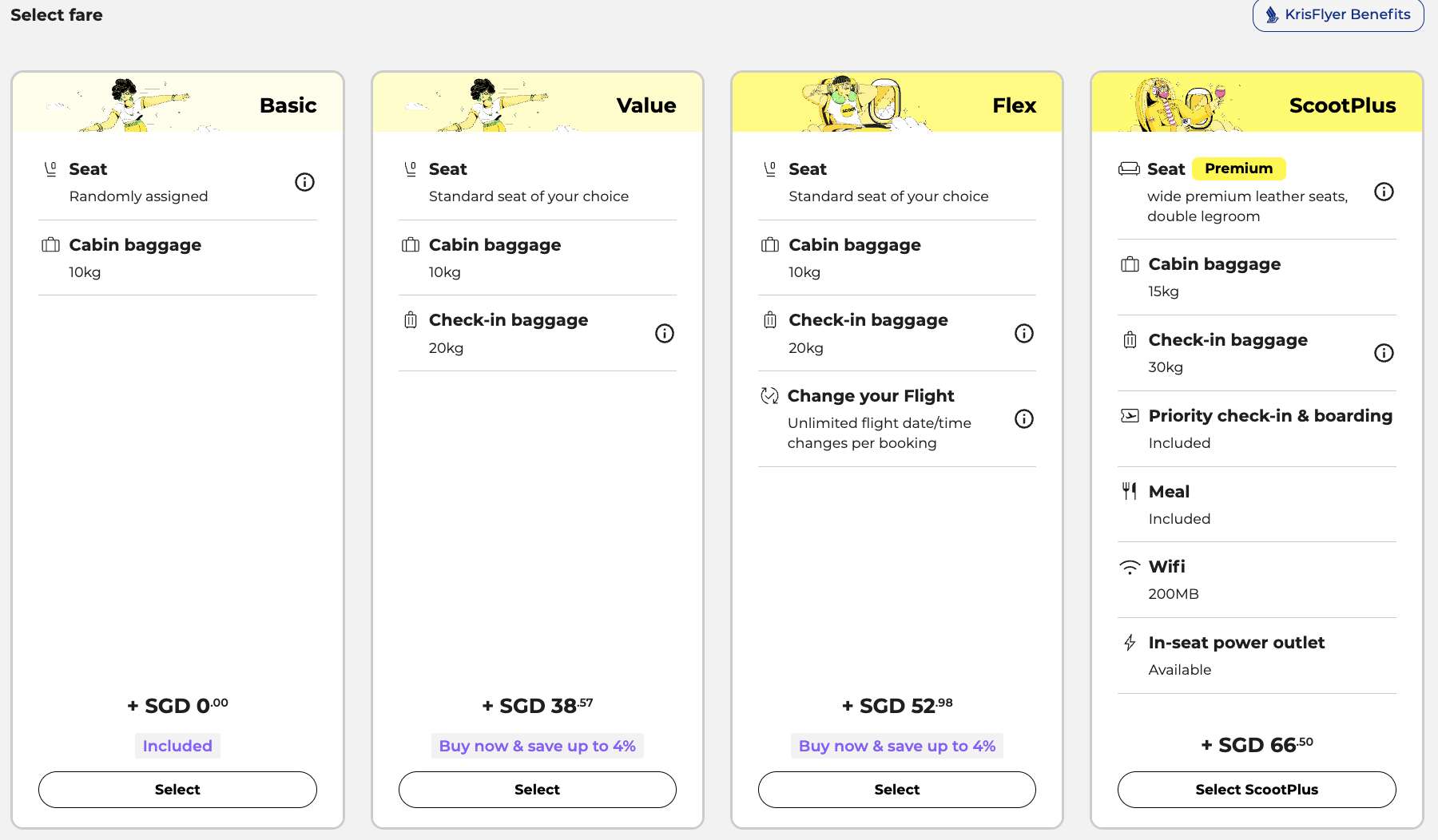
If you are booking with the airline directly, Scoot has different fare types such as Basic, Value, Flex, and ScootPlus. 

Higher-tier fare options like ScootPlus include extras like checked baggage, seat selection, meals, inflight WiFi, and priority boarding in the bundle. 

These fares include checked baggage allowance automatically, so no separate pre-booking of baggage allowance is needed.

  • Value: typically 20kg checked baggage included
  • Flex: typically 20kg checked baggage included
  • ScootPlus: typically 30kg checked baggage included

✈️  How Do I Pre-Book Scoot Baggage on Trip.com?

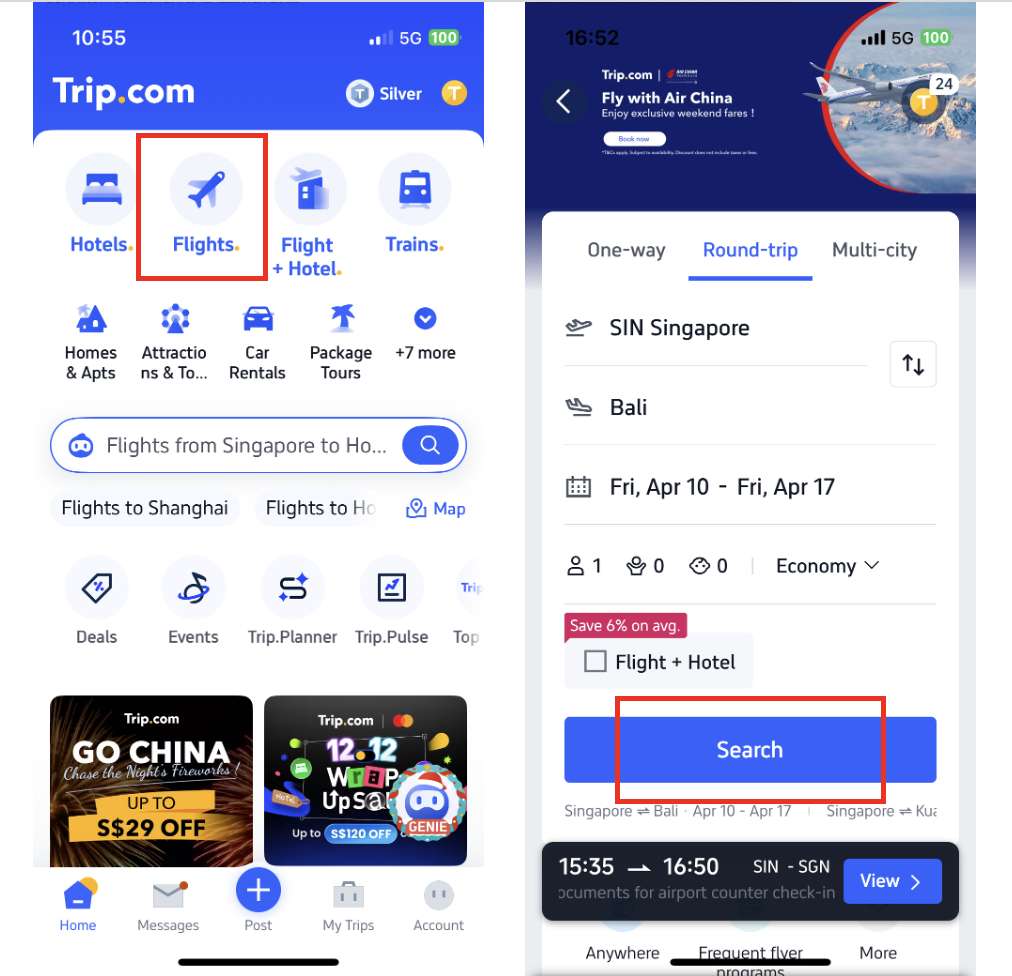
Step 1: At your Trip.com APP homepage, tap [Flight]. Key in your desired travel dates, class, and pax, and tap [Search].

trip.com app main page

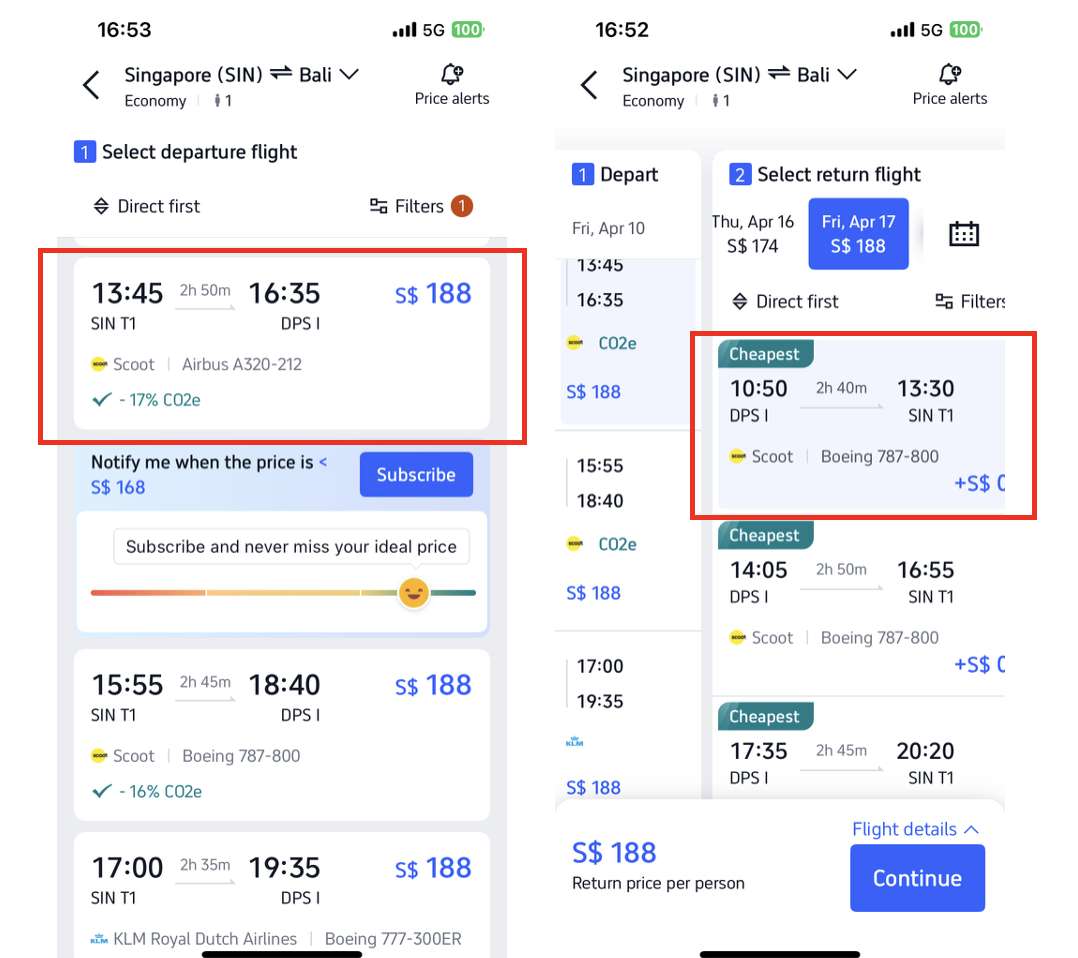
Step 2: Tap to select your preferred departure flight, and then tap to select your preferred return flight.

trip.com app flight search page

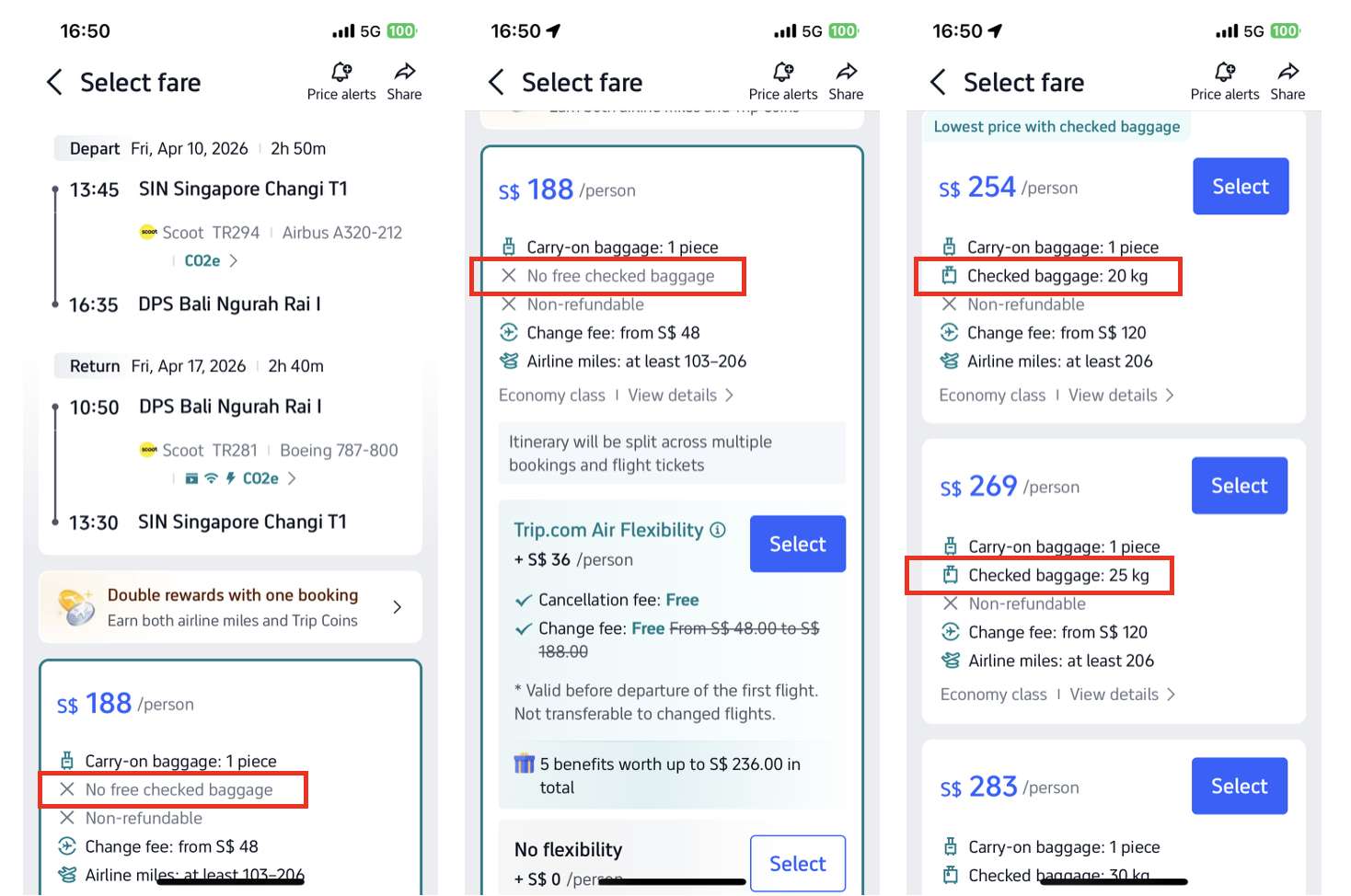
Step 3 EITHER: View fare types with different baggage allowance and select the fare with your preferred baggage allowance.

trip.com app fare types

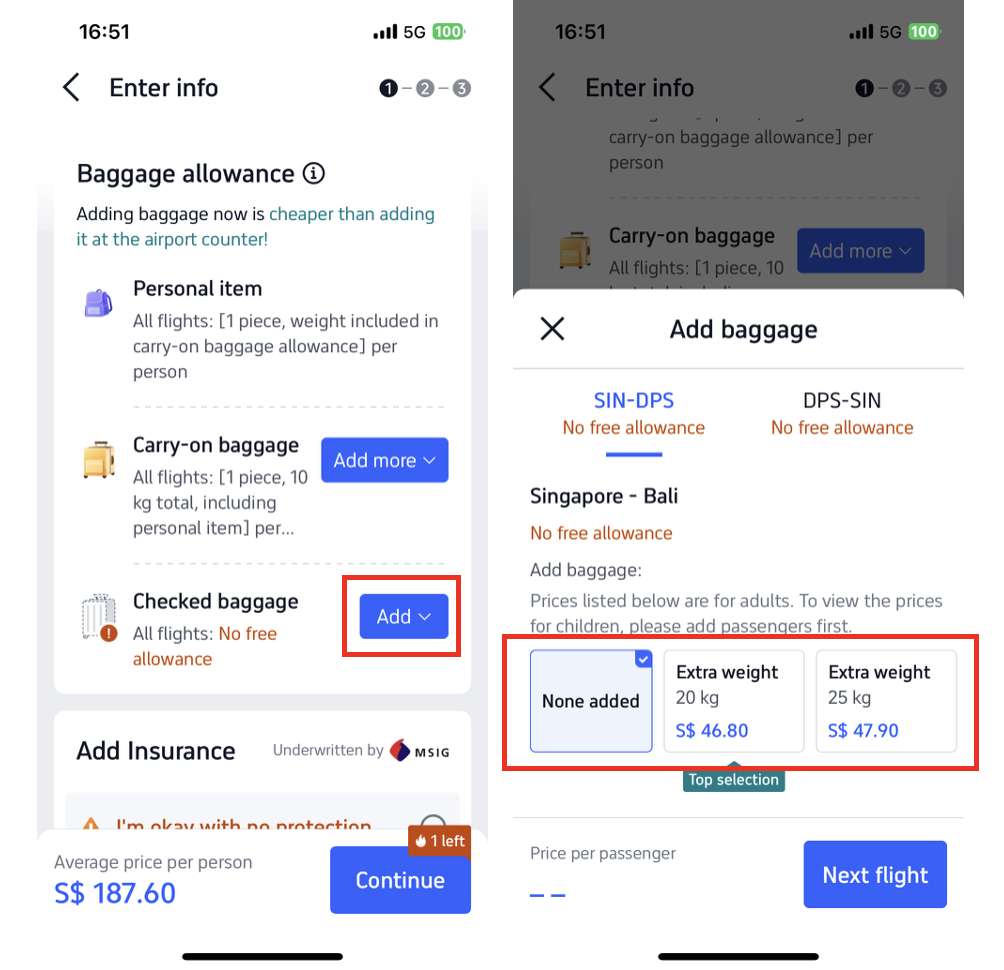
Step 3 OR: If you have booked or are booking the basic fare type without any baggage allowance included, you can purchase an add-on for baggage allowance separately.

trip.com app add on baggage

You may also add checked baggage after booking via ‘Manage My Booking’ under the ‘All Bookings’ page.

🏄  Travelling with Special Items

various sports equipment

🏑️ Sports Equipment

Your sports equipment is treated as part of your pre-purchased baggage allowance, including items like golf clubs, surfboards, canoes, scuba gear, skis, and bikes. 

If the total exceeds your allowance, you’ll be charged the standard extra baggage fees, and the same policy applies on USA routes.

Please note that anything exceeding 32kg is not accepted for checked baggage.

🎻 Musical Instruments

  • Oversized instruments (e.g., cello, double bass) are not allowed as cabin baggage.
  • Purchase an extra seat to bring an oversized instrument into the cabin without checking it. The instrument will be placed on the floor and secured to the seat frame with seat belts.
  • When properly packed, the oversized instrument must not exceed 140 cm × 40 cm × 45 cm. Additionally, anything exceeding 32kg is not accepted for checked baggage.

👶  Baby Prams & Strollers

Allowance, Size & Space

  • Allowed in cabin only if compact, foldable, lightweight, and fits Scoot’s cabin baggage size: L+W+H ≤ 115 cm.
  • Must fit in the overhead compartment or under the seat.
  • When traveling with an infant/child, strollers do not count towards your cabin baggage allowance.

Before and During the Flight 

  • Before boarding, fold and pack securely in a carrier bag/protective cover. 
  • Do not open or use it in the cabin at any time.

Checked In When Required

  • If space is unavailable or the stroller doesn’t meet the requirements, it must be checked in. 
  • When required to check in, the stroller will not count towards your checked baggage when traveling with an infant/child.

🎫  How Do I Find My Booking Number (PNR)?

how to find PNR on scoot app or trip.com app
  • Email: Check booking confirmation email for a 6-character code (e.g., A12BC3).
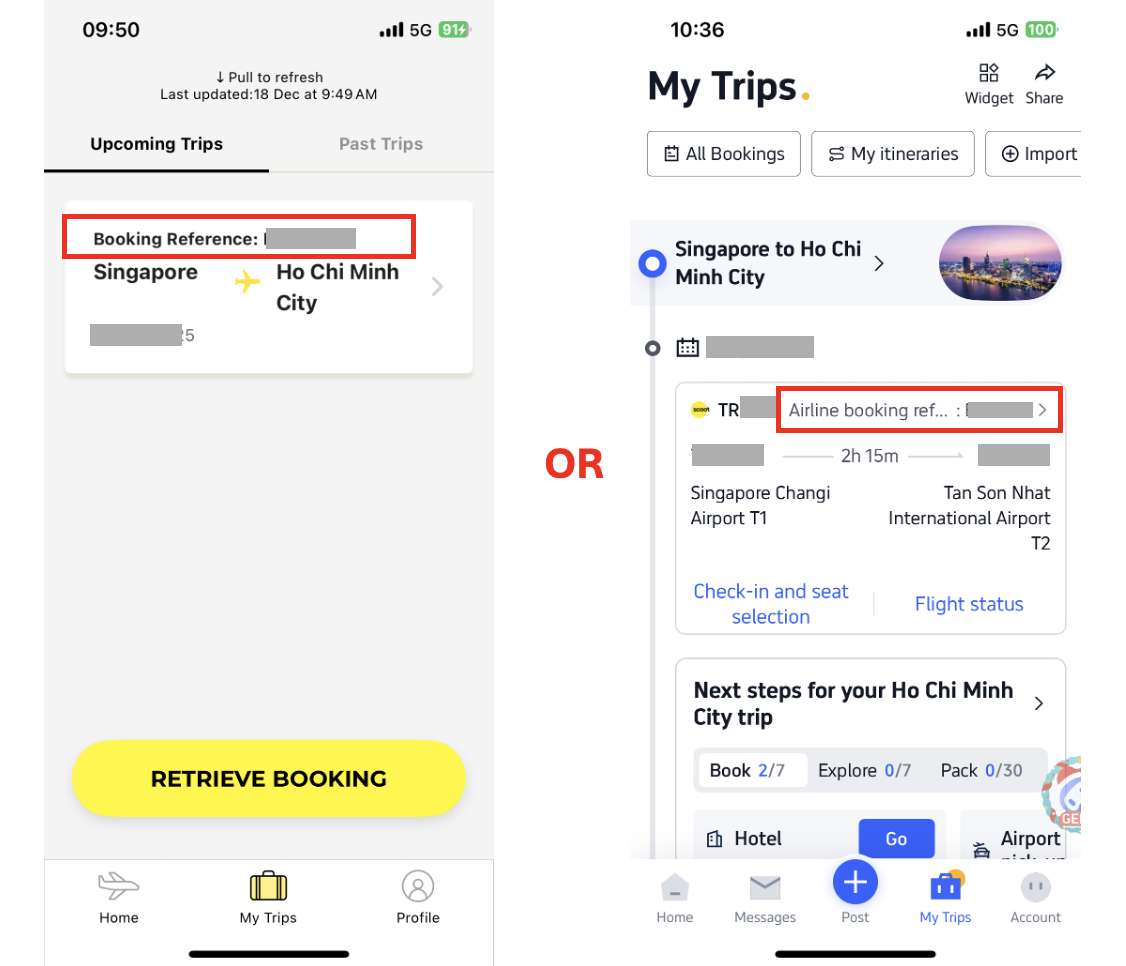
  • Scoot App/Website: On the Scoot App main page, go to [My Trips] to view your booking and the “Booking Reference” number.
  • Trip.com App: If you booked through Trip.com: on your Trip.com App main page, go to [My Trips] at the bottom row. Then, you can see “Airline booking reference number” on top of your booking.

🎁  Pro Tip: Get the Best Scoot Deals on Trip.com

Kick off your Scoot flight booking on Trip.com to enjoy competitive pricing, promotions, and exclusive rewards!

Monthly Campaign Promos

trip.com 8.8 campaign screenshot

Trip.com shines with its Double Date campaigns running monthly from 1.1 all the way to 12.12, where you can get exclusive promo codes, airline promo fares, and bank card discounts (think DBS, UOB perks for locals) for massive savings that are not available if you book with the airline directly.

Double Up Earning Trip Coins + Airline Miles

trip.com campaign email

Moreover, Trip.com bookings let you earn BOTH Trip Coins + airline miles by adding your frequent flyer details.​

Every 100 Trip Coins = 1 USD (~1.3 SGD) and can offset payments at bookings with no minimum spend required.

Earn miles on every trip with Frequent Flyer Programmes—link your account before booking to rack up rewards fast.

Trip Member Rewards

trip.com rewards

More benefits will be unlocked as you progress through your Trip.com membership tiers! For example, Trip.com Platinum, Diamond, or Diamond+ members can access VIP lounges and start the journey relaxed and refreshed.

Stay Ahead - Join Our Exclusive Telegram Group!

Scoot flight promo message in trip talks SG telegram group

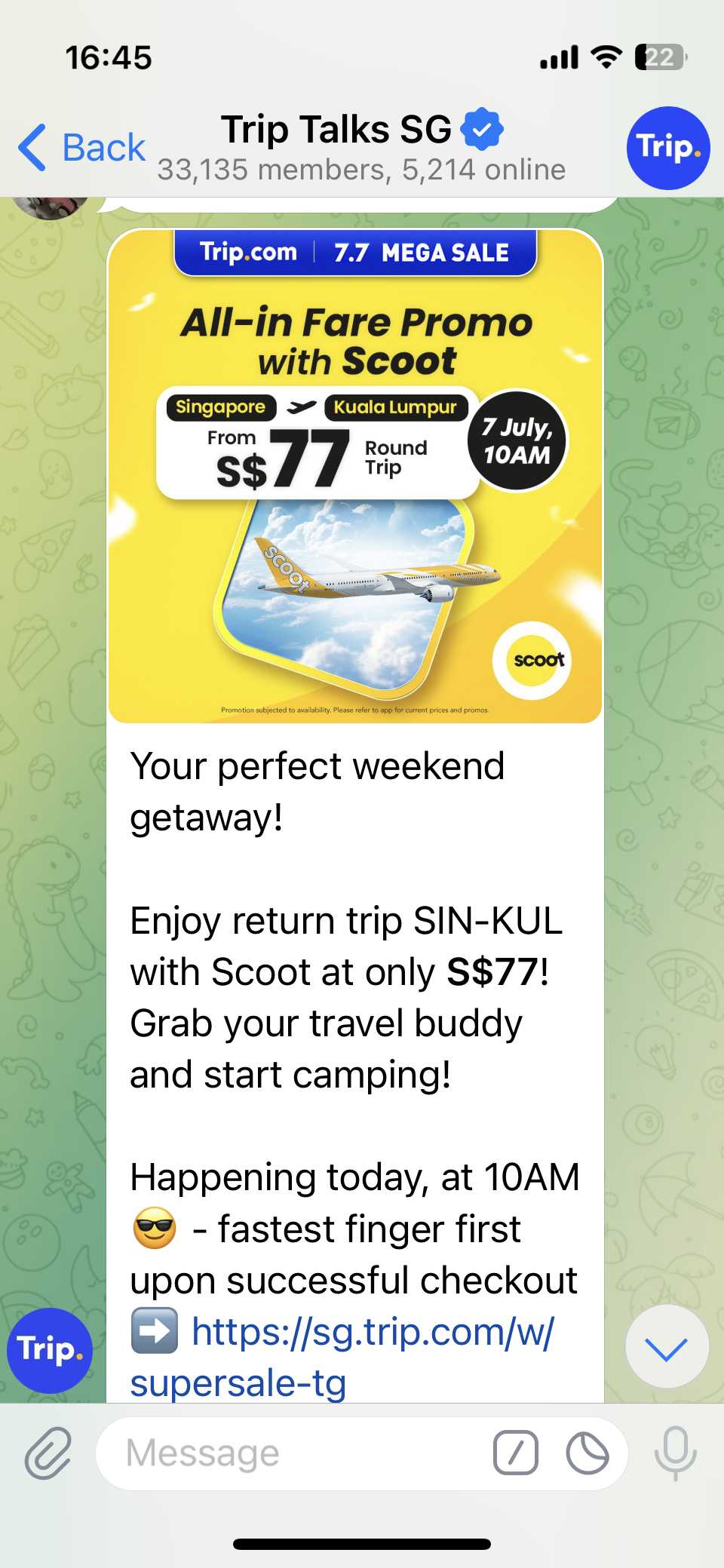
Don’t miss out on the hottest deals and flash sales! Join our Telegram group Trip Talks SG to get instant alerts, exclusive offers, and be first in line for must-grab promo codes. Stay connected, save more!

Download Trip.com App for App-only Discounts!

Download the Trip.com app now and unlock exclusive app-only discounts! Use the QR code to get instant savings on flights and hotels, available for both Android and Apple users.

Ready to fly? Don’t forget to check out our weekly updated deals and promo codes for regional and global destinations—grab the best offers before they’re gone! 

Score bigger savings with How to Use Trip.com Promo Codes and stretch your travel budget further.

FAQ: Scoot Baggage Allowance

  • What’s Scoot’s cabin baggage rule from Singapore?

    One cabin baggage (54x38x23 cm) plus one small personal item (40x30x10 cm) – both add up to a total of 10kg.
  • How do I add checked baggage for my Scoot flight?

    Pre-book weight tiers (20–40 kg) during booking or Manage Booking; cheapest online, priciest at airport.
  • Which fare types include checked baggage?

    Value, Flex, and ScootPlus fare types include 20kg-30kg checked allowance, together with seat selection and sometimes meals.
  • What if I booked Scoot on Trip.com – can I still use Scoot App?

    Absolutely! Under [My Trips] on Scoot App, tap ‘Retrieve Booking’ by entering your PNR and details for online check-in and add-ons after securing the deal on Trip.com.
Disclaimer: This article has been provided by an individual contributor or third party platform. If there is any discrepancy regarding the copyright, please contact us directly and we will delete the content immediately.
Tea Lover

Tea Lover

Travel writer

Tea Lover is a travel writer who’s happiest with a cup of tea in hand, a boarding pass in the other, and an eye on the weather forecast. From sunny skies to snow days, Tea Lover’s articles are brewed with curiosity and wanderlust.

51 articles
FlightsWeather
>>
Scoot Baggage Allowance
aaaa