Best China Food Delivery Apps for Foreigners (2026 Guide)

Ever felt hungry after a long day in China but too tired to head out or face a menu you can’t read? Food delivery apps can be a lifesaver. The two most popular apps are Meituan and Ele.me (Taobao Shangou), which allow you to order everything from local dishes to international food and have it delivered directly to your hotel or accommodation.
Top Food Delivery Apps in China
Here’s a practical look at four China food delivery apps you can use:
App | Main Features | Best For |
Meituan Waimai | Largest delivery app with local restaurants and chains | Everyday meals, street food, and quick delivery |
Taobao Shangou (Ele.me) | Wide selection, often has discounts, owned by Alibaba | Price deals and trying different cuisines |
JD (Jingdong) | JD’s app for cooked meals and supermarket delivery | Combining food delivery with groceries |
Note: It is highly recommended to have local China phone numbers. So the delivery riders can easily communicate with you!
China Food Delivery App: Meituan

What Is Meituan?
Meituan App is one of China’s biggest lifestyle apps, and it’s best known for food delivery through Meituan Waimai. While “Meituan” is the main app offering everything from restaurant deals to hotel bookings, movie tickets, and even ride-hailing, “Meituan Waimai” specifically focuses on food delivery.
Locals and travellers use Meituan Waimai daily to order meals, drinks, and snacks from nearby restaurants at affordable prices. You can find everything on it, with clear prices, photos and reviews.
How to Download and Set Up Meituan?
1. Download the App
On iPhone: You may need to switch your App Store region to China. Search for “美团”/"美团外卖" or “Meituan”/"Meituan Waimai" and install.
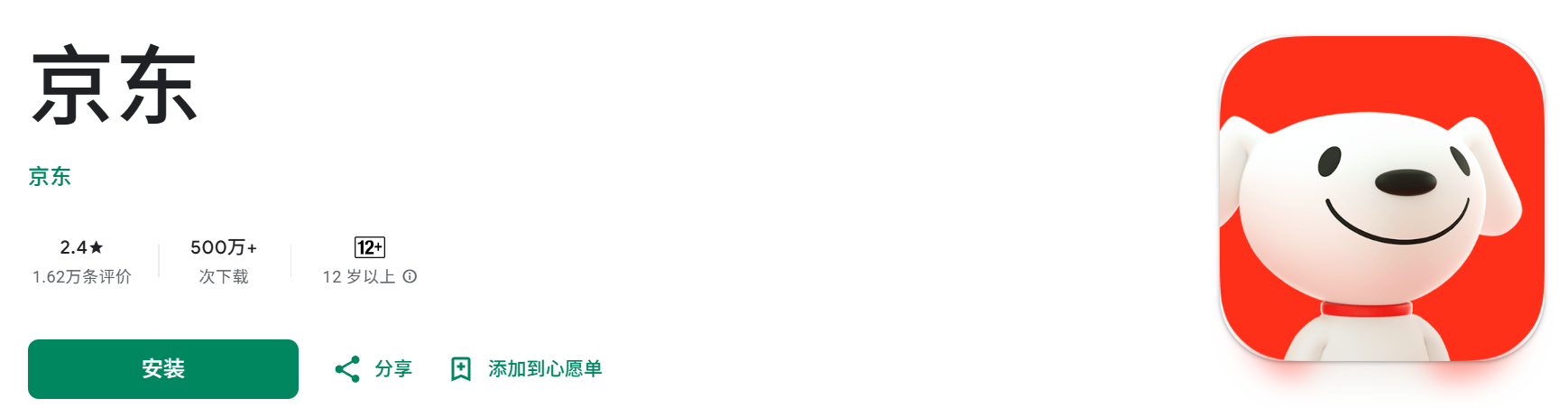
On Android: You can find Meituan on Google Play in some regions, or download from trusted Chinese sources, or via Meituan’s official website.
Tip: Even with Chinese characters, many icons and images are clear. If you don't understand Chinese, translation apps can be helpful.
2. Register and Log In
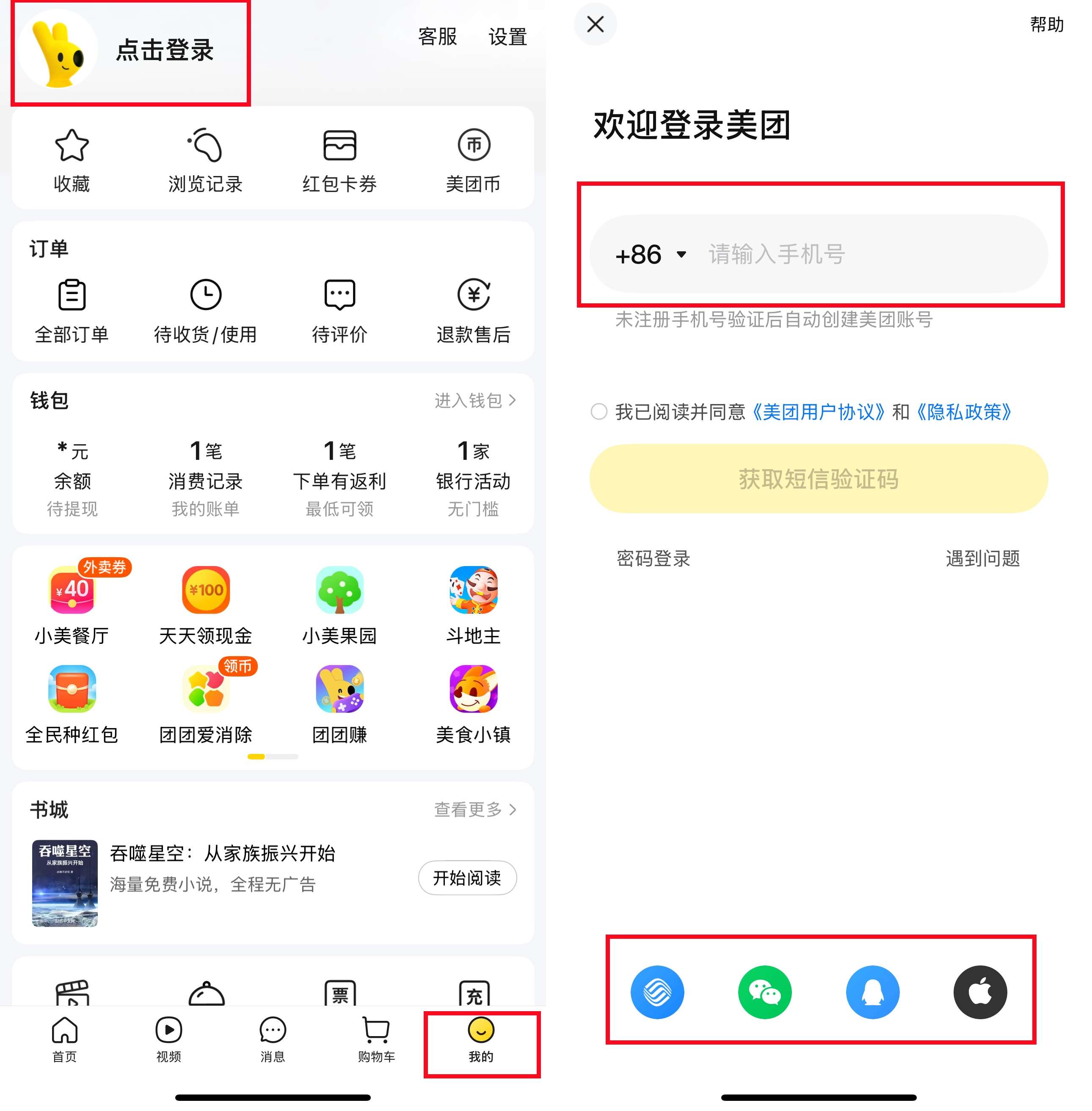
Sign up using your international phone number, and verify via an SMS code. You can also log in via WeChat or Alipay if you already use those platforms.
3. Set Your Location & Address
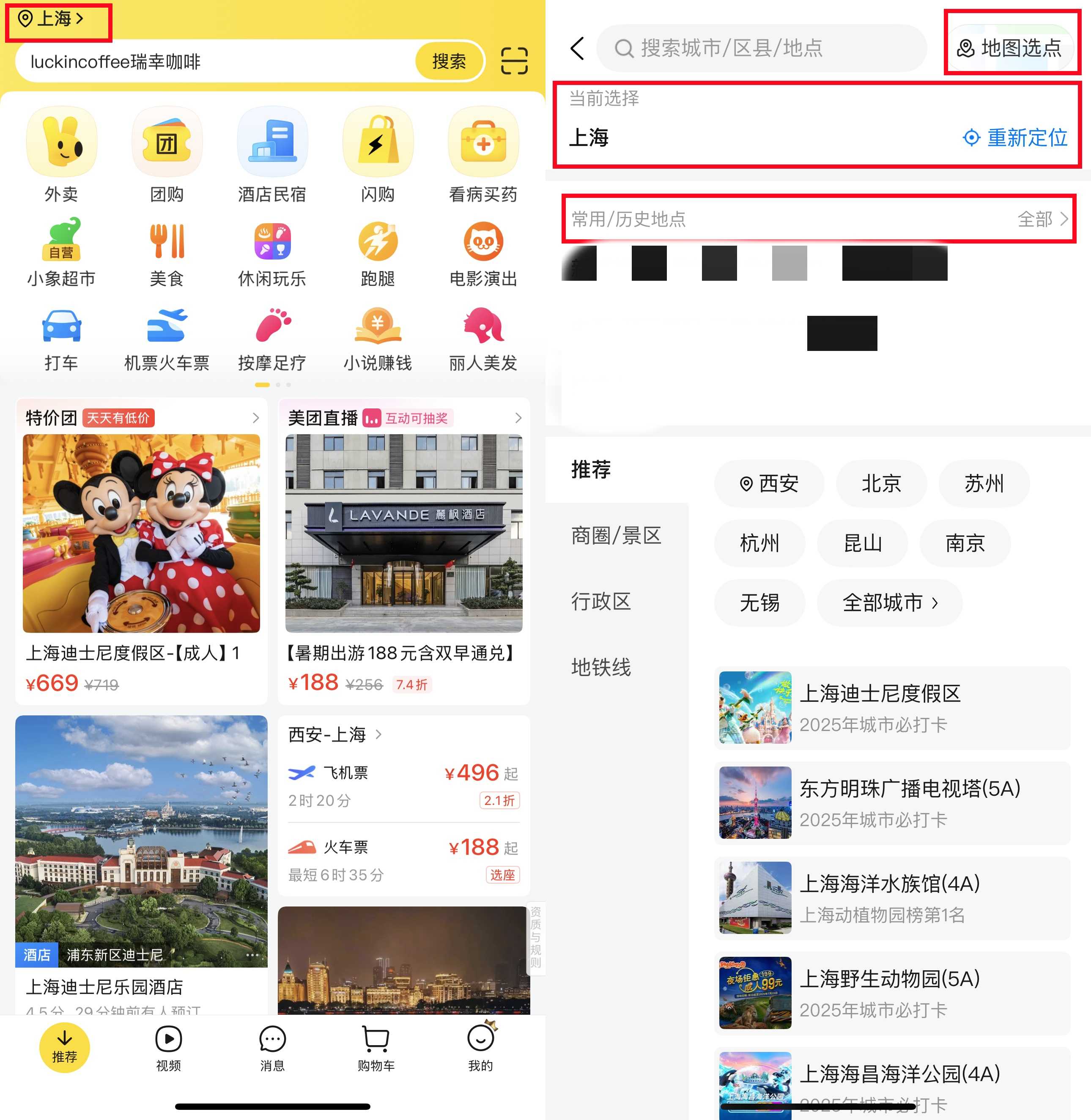
Allow Meituan to use your location, or manually search for your address.
4. Link Payment Methods
Meituan uses WeChat Pay or Alipay for payments. Make sure these apps are set up and linked to your credit or debit cards beforehand so checkout is smooth.
Book Flights to China Now


How to Order Food on Meituan?
1. Find Food Delivery Service
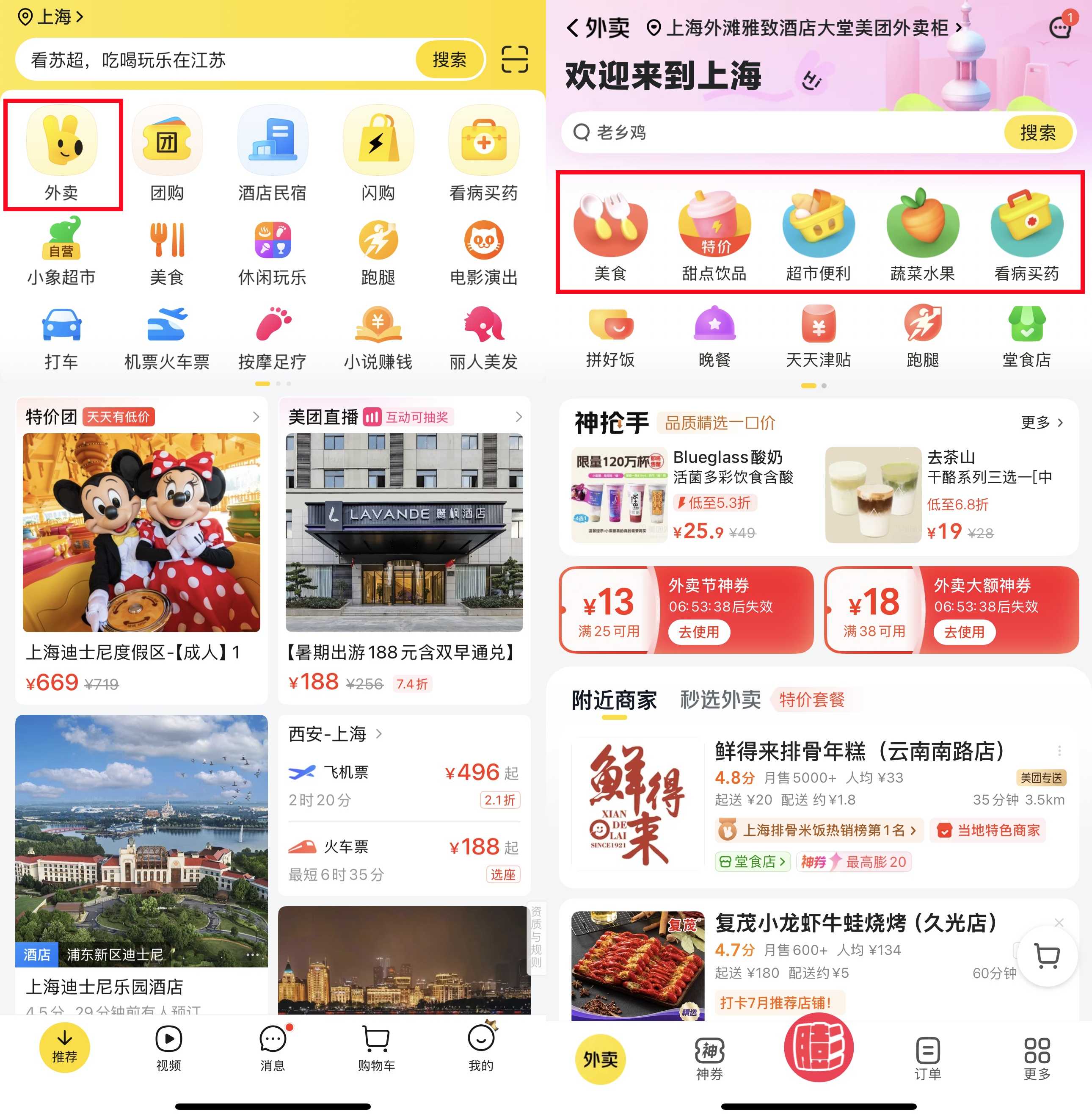
Tap on the food delivery icon “外卖” (usually the first one you see).
2. Browse or Search
You can scroll to see restaurants nearby or type in what you feel like eating.
Tip: Look for places with higher ratings (yellow stars) and delivery times under 45 minutes.
3. Check Delivery Fees and Minimum Spend
Some places have a small delivery fee (¥3–¥6). Many require a minimum order, but it’s usually easy to hit with a drink and a main.
4. Place Your Order
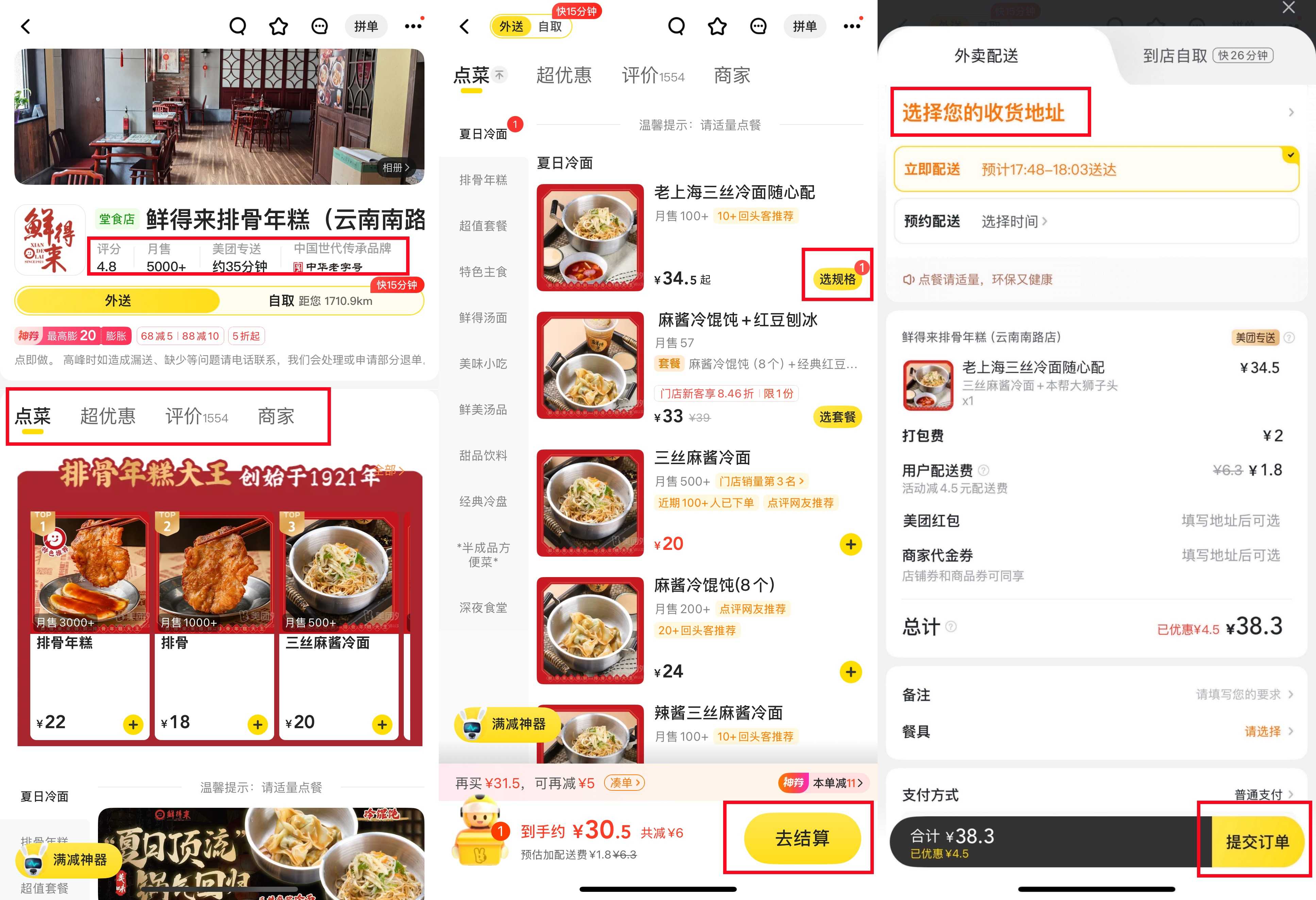
Tap “选规格” on the dishes you want. Check your cart before confirming. Then click "去结算" and make payment. If you have coupons or vouchers, they will be applied automatically or can be selected before payment. You can also leave notes for the restaurant or the Meituan delivery rider. Click "提交订单" to place your order.
5. Pay
Payment is fast using WeChat Pay or Alipay. You’ll get a confirmation once it’s successful.
6. Track Your Order
You can see your driver’s progress on the map, similar to GrabFood. Many drivers will call you upon arrival. If you don’t speak Chinese, you can ask hotel staff to help, or message the driver with “我在大堂” (I am in the lobby).
7. Leave a Review
After you get your food, you can leave a simple star rating and a comment. This helps other users and keeps your Meituan account active for future discounts.
China Food Delivery App: Taobao Shangou (Ele.me)
What Is Taobao Shangou?
Taobao (淘宝) is China’s biggest online shopping platform, owned by Alibaba, similar to Amazon or Shopee but with a wider range of products and sellers. While most people use Taobao for buying clothes, gadgets, and daily essentials, it also offers Taobao Shangou (淘宝闪购) for food delivery in certain cities, whichi is also previously known as Ele.me (饿了么).
How to Download and Set Up Taobao Shangou?
1. Download the App
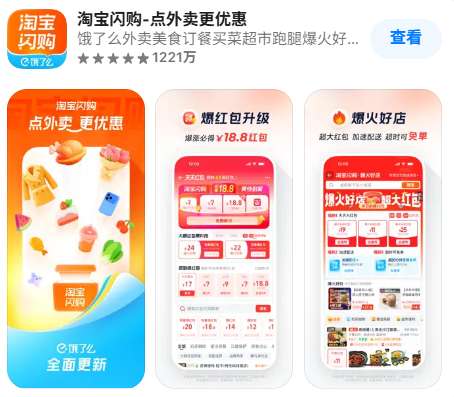
iPhone users: Download from App Store by searching for “淘宝闪购” or “Taobao Shangou” and install it.
Android users: Look for Taobao Shangou in the Google Play Store or download it from app stores.
You can also download Taobao only and Taobao Shangou is built in it.
2. Register or Log In
Use your international phone number to sign up and verify via SMS. If you already have a Taobao/Tmall or Alibaba account, you can use that to log in faster.

3. Set Up Payment Options
Taobao supports Alipay for payments. Make sure your Alipay account is set up and linked to your credit/debit card before ordering.
4. Enable Location
Grant location permission in the app.
How to Order Food on Taobao?
1. Set Your Delivery Address
Enter your address and save it. This ensures your order gets delivered to the right location.
2. Browse or Search for Food
You’ll see food options powered by Ele.me. Browse by categories like Chinese dishes, snacks, or drinks. Use the search bar to find specific items.
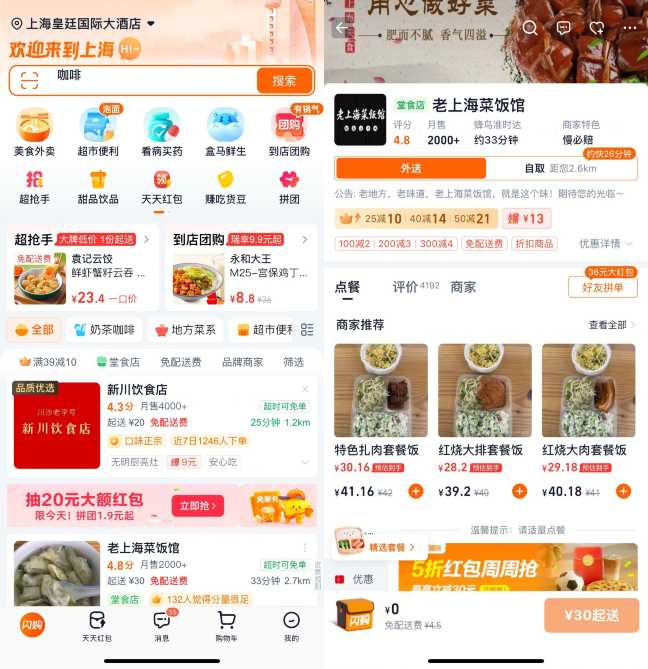
3. Check for Deals and Promotions
Look for labels like “满减” (spend X, save Y) or “红包” (red envelope) to find discounts and free delivery offers.
4. Add Items to Your Cart
Tap on a restaurant, select the dishes you want, and customize if possible (e.g. spice level, add-ons).
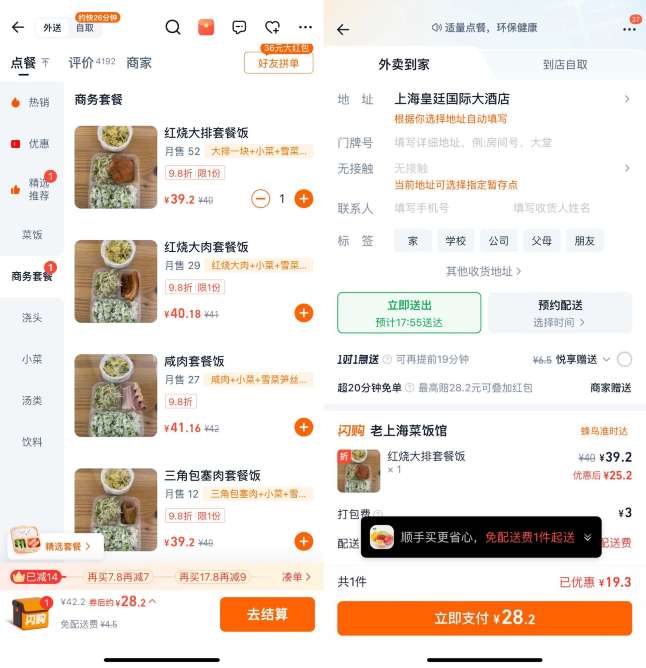
5. View Cart and Apply Discounts
Open your cart to review items. Select any available coupons or vouchers and check offer details before ordering.
6. Checkout and Pay
Tap 去结算 (Checkout), confirm your order, and pay. You'll receive an estimated delivery time.
8. Track Your Delivery
Watch your courier’s progress through the app in real time.
9. Enjoy Your Food & Leave a Rating
When your food arrives, enjoy your meal! After eating, leave a star rating or comment.
China Food Delivery App: Jingdong

What Is Jingdong?
Jingdong (JD.com) is one of China’s biggest e-commerce platforms, similar to Amazon. It's known for fast delivery of electronics, clothes, and daily goods.
Besides its shopping, JD recently launched its food delivery feature, called JD Miaosong (京东秒送). It lets you order cooked meals, groceries, snacks, drinks, and daily essentials to your door within 30–60 minutes in many cities.
Unlike Meituan and Ele.me, which mainly focus on restaurant food, JD combines supermarket delivery with hot meals from nearby restaurants.
How to Download and Set Up Jingdong?
1. Download the App
iPhone users: Switch your App Store region to China, then search for “京东” or “Jingdong” and install.
Android users: Locate it on Google Play or download from app stores.
Note: The app is primarily in Chinese, but features clear icons and images. If needed, use your phone’s translation tool or overlay translator app to help identify key sections.
2. Register or Log In
Sign up with your international phone number and verify via SMS, though some travellers find overseas numbers are blocked or don't receive the code. You can also register with an email or log in using a JD.com account if you already have one.
3. Enter Delivery Address
Allow the app to access your location or manually enter the address. Paste the Chinese version of your location to avoid mistakes.

4. Link Payment
JD Daojia supports JD Pay, WeChat Pay, and Alipay. Make sure your chosen payment app is set up in advance and linked to your card or topped up for seamless checkout.
Buy China eSIM Now
 1936122 booked


How to Order Food on Jingdong?
1. Choose Jingdong Miaosong
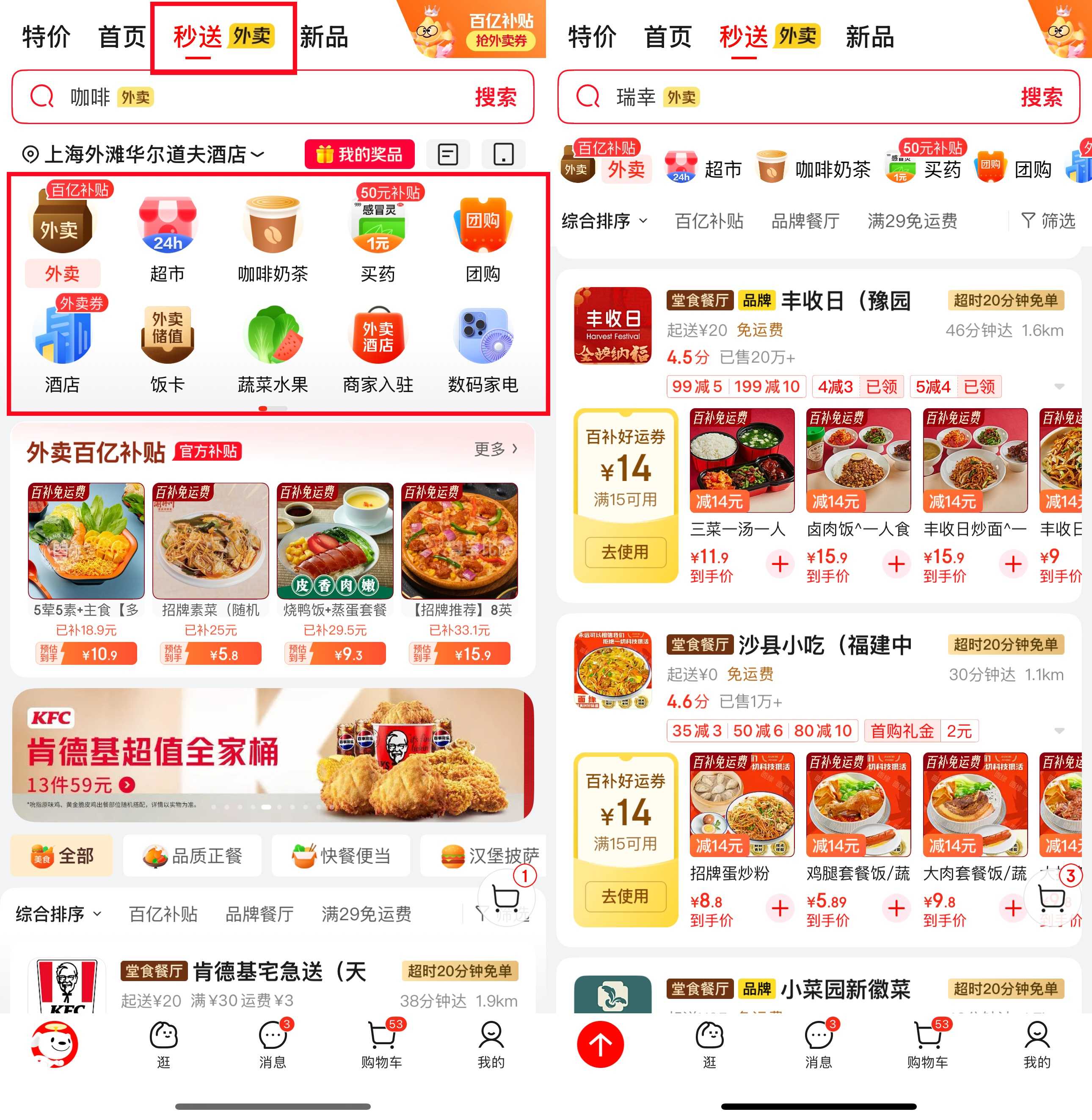
Open JD and tap "秒送" at the top.
2. Browse Categories
You’ll see options like “外卖” (food delivery), “超市” (supermarket goods), “咖啡奶茶” (coffee & milk tea) “蔬菜水果” (vegetable & fruit), and more. Tap the category you need.
3. Search or Scroll Through Listings
Use the search bar to find favourites.
4. Select Items
Tap into a listing, browse images, then tap “+” (Add to cart) for your chosen dishes or snacks.
5. Check Cart & Apply Offers
Open your cart to review items. JD often includes deals like “满¥30减¥10” (¥10 off ¥30 spend) or free delivery options. Apply any that fit.
6. Place Your Order
Tap 领券结算 (Checkout with coupon), choose your payment method, and confirm your order. You’ll see an estimated delivery time.

7. Track the Delivery
Track your delivery person’s location and receive notifications. You can also call or message via the app if needed.
8. Enjoy Your Order & Review
Once your order arrives, unpack and enjoy! Don’t forget to leave a rating or comment. JD rewards reviews with coupons or extra points used in future orders.
Other Food Delivery Apps You Can Try in China
Apart from Meituan, Taobao Shangou, and JD Daojia, there are a few other apps you might see in China:
Dingdong Maicai (叮咚买菜): Focuses on fresh groceries and some ready-to-cook meals, useful if you’re staying longer and want to try local ingredients.
Hema (盒马): Alibaba’s grocery and hot meal delivery service, offers cooked meals, sushi, and fresh fruits within 30-60 minutes in many big cities.
Yonghui Superstores (永辉超市): Yonghui is a popular supermarket chain in China. Besides in-store shopping, it offers online delivery for fruits, snacks, and ready meals through its app. It’s a handy option if you want fresh food delivered.
Xiaoxiang Supermarket (小象超市): Formerly known as Meituan Maicai (美团买菜), Xiaoxiang Supermarket is Meituan’s grocery delivery service offering fresh produce, meat, seafood, snacks, drinks, and daily essentials. It is a convenient option for travelers staying longer in China who want to buy groceries or simple ingredients, with fast delivery available in many major cities.
Enjoy Local Food Easily in China
Ordering food in China doesn’t have to be stressful, even if you don’t speak Chinese. With food delivery apps, you can try local dishes, snacks, and drinks from your hotel with just a few taps.
It’s fast, affordable, and a great way to explore local flavour. Next time you’re in China, don’t miss the chance to order in and eat like a local.
FAQs About China Food Delivery Apps
-
Are the apps available in English?
-
How long does delivery take?
-
Do I need to tip the delivery rider?
-
How to order food delivery in China without a local number?
-
How to pay for food delivery in China?
Trending Researches
-
Popular Content
-
Top Flight Links
-
Popular Hotels
-
Popular Things to Do
-
Featured guides
-
Trip.com links
- Trip.com Customer Service
- Buy Now Pay Later
- Trip.com VIP Lounge
- Singapore Airlines Baggage Allowance
- Trip.com Contact
- How to Use Trip com Promo Codes
- Trip.com Cancellation Policy
- scoot-baggage-allowance
- Best Credit Cards
- luggage size cabin
- How to Book a Student Flight Ticket
- Best Day to Book Flights
- Flight Classes Explained
- Trip.com Flight Refund
- Singapore Airlines Change Flight
- JT924 Flight Status
- MU7705 Flight Status
- SQ869 Flight Status
- CA490 Flight Status
- ZG053 Flight Status
- MU2434 Flight Status
- CA1651 Flight Status
- Cheap flights from Singapore to Kuala Lumpur
- Plane tickets from Singapore to Fukuoka
- Cheap tickets from Singapore to Bangkok
- Plane tickets from Singapore to Shanghai
- Cheap tickets from Singapore to Manila
- Plane tickets from Singapore to Hanoi
- Plane tickets from Singapore to Seoul
- Plane tickets from Singapore to Bengaluru
- Hotels near Johor Bahru Senai International Airport
- Hotels near Hefeinan Railway Station
- Hotels near Hongcun Aju Theater
- Hotels near Zixiao Palace
- Hotels near Beijing Road
- Kuala Lumpur Hotels
- Chengdu Hotels
- Kunming Hotels
- Hong Kong Hotels
- Phu Quoc Island Hotels
- Hotel Les Matins de Paris
- Ramada by Wyndham Seoul Dongdaemun
- Mercure Guangzhou Beijing Road Pedestrian Street Hotel
- Atour Hotel (Chengdu Taikoo Li)
- Taohuawu Lijiang Snow Mountain Secret Realm Luxury Resort Hotel
- Singapore 4G eSIM | Supports Google Maps / ChatGPT | Daily/Total Data Plans | 24-Hour Billing | 1–30 Days | QR Code
- Malaysia 5G eSIM | Supports mainstream apps including TikTok, Google Maps & ChatGPT | Day Pass/Total Package | 24H Billing | 1-30 days | QR code
- Vietnam Airport VIP Fast Track Service
- VIP Fast Track service for immigration clearance at Tan Son Nhat Airport in HCM
- Huanglongjiuzhai Railway Station - Jiuzhaigou | Departure/Return | Rideshare/Private Charter | Bus/Nanny/5-9 Seater Business | Shuttle Bus | Vehicle Type Optional | Any Combination | T
- Mainland China 5G eSIM | ChatGPT Available | Day Pass/Total Data | 24-Hour Billing | 1-365 Days | QR Code
- Mainland China 5G eSIM | Supports Google Maps / ChatGPT | Daily/Total Data Plans | 24-Hour Billing | 1–365 Days | QR Code
- Mainland China/Hong Kong/Macau 5G eSIM | Dual Network | Day Pass/Total Data Package | 24-Hour Billing | QR Code
- Munich SIM Card
- Finland Connectivity Solutions
- Las Vegas Tours with Hotel Pickup
- Gansu SIM Card
- Vung Tau Activities
- Bohol Island Travel Services
- Hakone Photoshoot
- China Power Bank Limit
- Trip.com Customer Service
- train to kl from singapore
- Shanghai Metro
- China Entry Requirements
- train from singapore to jb
- Renew Autopass Singapore
- China Train Map
- Thailand Plug
- universal studios singapore tickets
- Vietnam Arrival Card
- Batam Arrival Card
- 泰国插头
- Singapore Malaysia Cross Border Taxi
- China Plug
- Big Transport from Tokyo to Fukuoka
- Frankfurt Airport to City
- Osaka Station to Kyoto Station
- Trip.com Promo Code
- Trip.com Flight Deals
- Trip.com Credit Card Promotions
- How to Book Cheap Hotels
- How to Book Cheap Flights
- Trip.com Member Rewards
- Trip Weekly Hotel Sales
- Online Hotel Booking
- Online Flight Booking
- Trip.com Travel Guide
- Book China Train Tickets
- Trip.com Seat Selection
- Singapore Public Holidays 2027
- Trip.com 优惠码
- Trip.com Travel Guides