How to Use Dianping App: Food & Service App in China

If you’re planning a trip to China, one app you definitely don’t want to miss is Dianping App. It’s like Yelp but much bigger in China. You can find good places to eat, cafes, spas, entertainment and all kinds of local services you can imagine. Dianping will help you explore China with real reviews and ratings from locals.
What is Dianping App?

Dianping started in 2003 as a website for restaurant reviews. Over the years, it grew into a big platform covering lots of lifestyle services like food delivery, hotel bookings, beauty salons, and entertainment. Dianping app lets users check ratings, read reviews, see photos, and even book or order directly. Users can also post their reviews on the App. There is a community for a more real experience.
It’s super popular in China. People use it to check ratings and read honest reviews before they decide where to go. Because it’s so trusted by locals, Dianping is a great tool for travellers too. You can explore China like a local and avoid tourist traps.
Top Features of Dianping
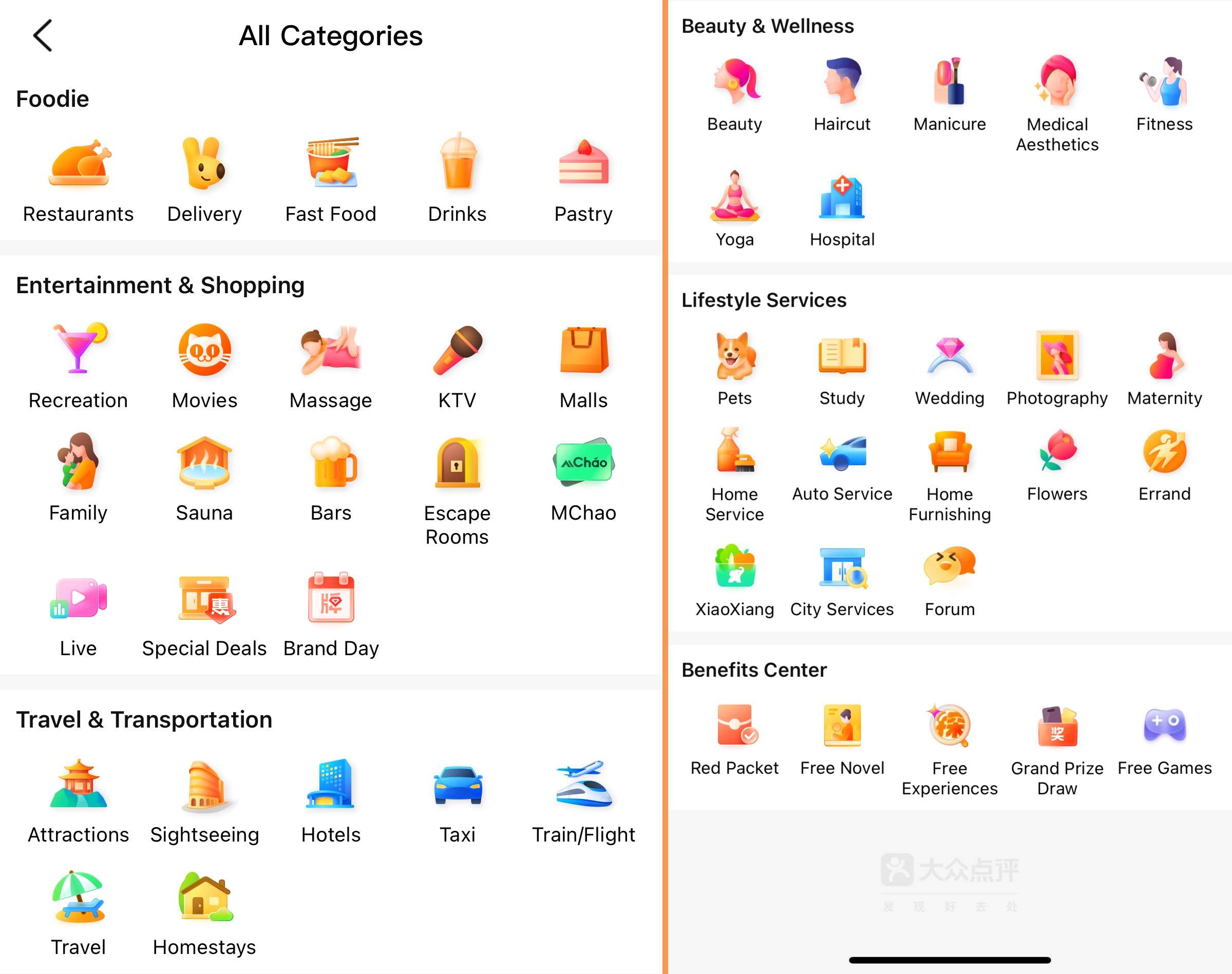
Restaurant reviews and ratings: You can easily find where to eat by checking honest reviews and star ratings from locals. You can check photos and menus before you visit, so you know what to expect.
Reservations and delivery: Many restaurants let you book a table directly through Dianping app. It's super handy. Or you can directly book food delivery on it.
Lifestyle services: Need a haircut, massage, movie, or tickets to a show? Dianping has you covered with local service listings and reviews.
Location-based search: Dianping app shows places near you, so you can discover spots without much planning.
Hotel & flight booking: Dianping also helps you book hotels and flights. You can also check local deals and user reviews.
Ride-hailing: Need a quick ride? You can book taxis or private cars right from the app.
Book Flights to China Now


How to Use Dianping App as a Foreigner?
1. Download and Install the App
Search for “Dianping” in your app store and install it. The app is mostly in Chinese. But don’t worry if it looks tricky at first. It can switch to English for travellers.

2. Create an Account & Switch Language
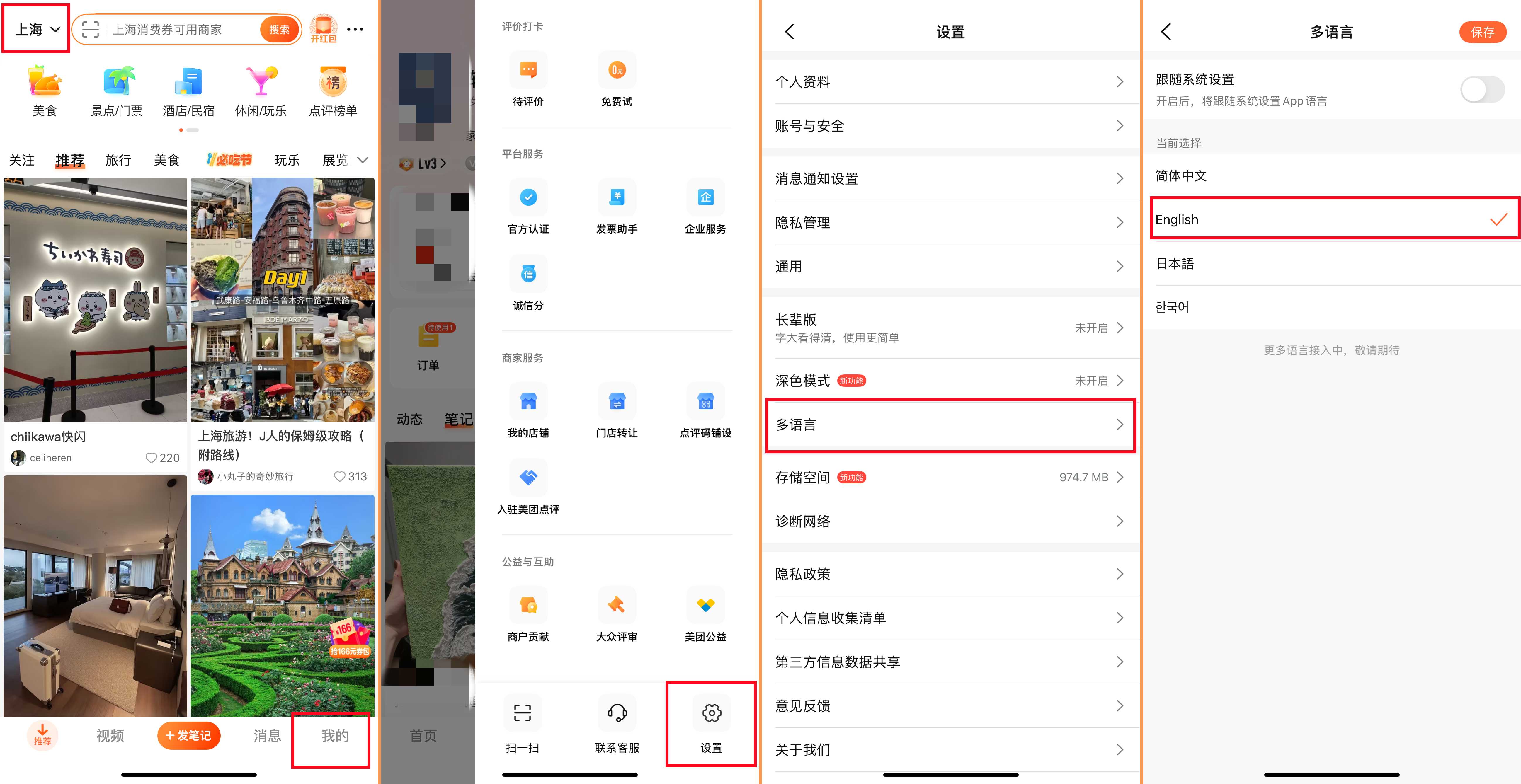
To book or order, you may need to sign up. You’ll need a phone number to register. Using a local Chinese SIM card makes this easier. If you need to switch language, just tap "我的"-“设置”-“多语言”-“English”.
3. Use Location Services
Allow Dianping to use your location. This way, it can show places near you, making it easy to explore on the go. Or you can also switch the city manually at the top left corner.
4. Open the App and Explore
Open Dianping and browse around. You’ll see categories like food, hotels, and services. Try tapping on them to see what’s inside.
5. Use the Search Bar
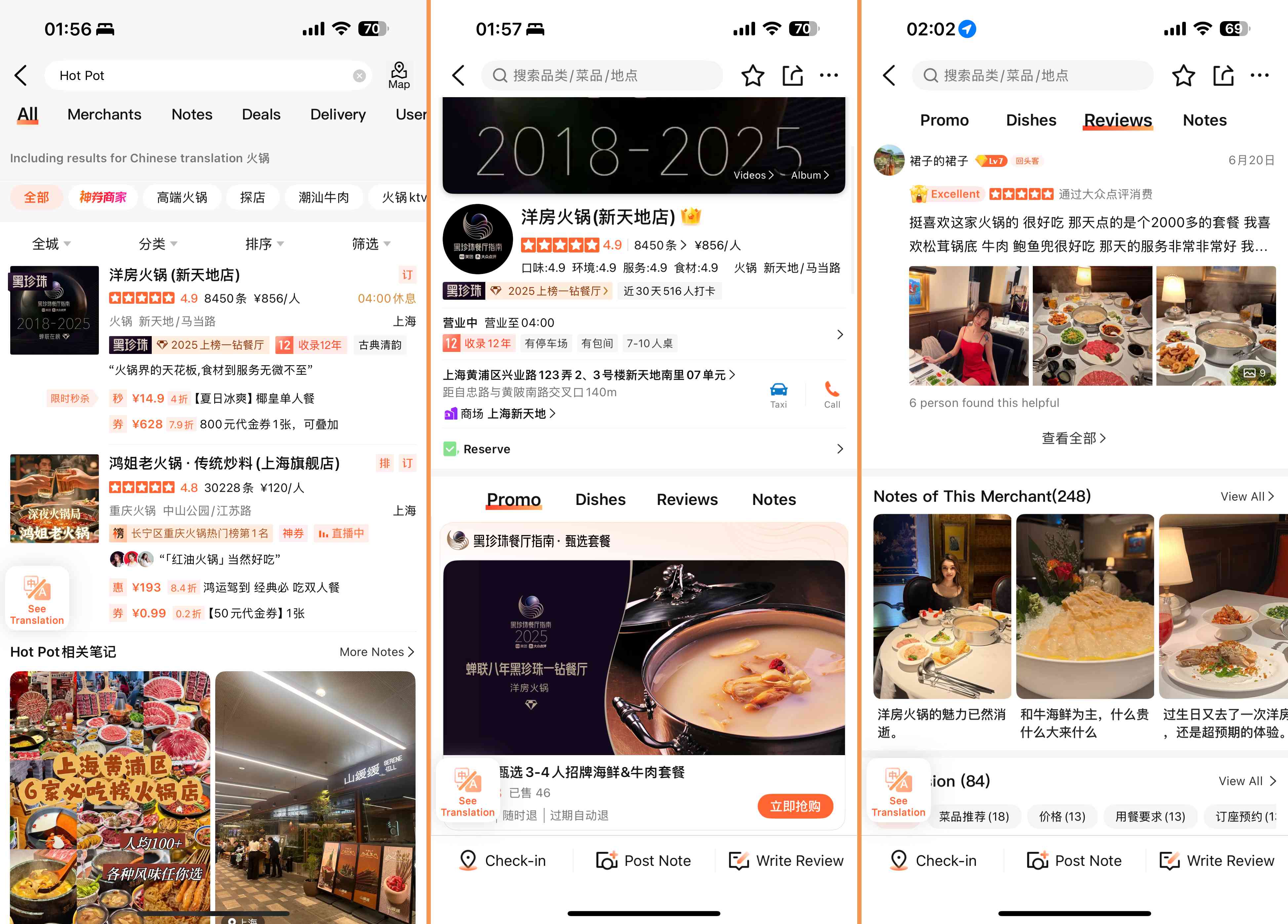
Type what you want in the search bar. For example, “restaurants,” “massage,” or “taxi.” You can also type names of places or food types.
6. Check Reviews and Ratings
Look at the stars and read reviews by locals. Even if you don’t understand everything, photos and ratings give you a good idea.
7. Book or Order
Once you find a place you like, you can book a table, order food, book a hotel, or call a taxi right from the app.
8. Payment
Most payments use WeChat Pay or Alipay, which need a Chinese bank account. Sometimes international cards work, but check first.
9. Keep Your Confirmation Info
After booking anything on Dianping, make sure to save your confirmation details. Take a screenshot, save the QR code, or note down the booking number. This will help avoid confusion when you arrive or if you need to show proof.
Buy China eSIM Now
 2018184 booked


Choosing Restaurants and Using Group Deals on Dianping
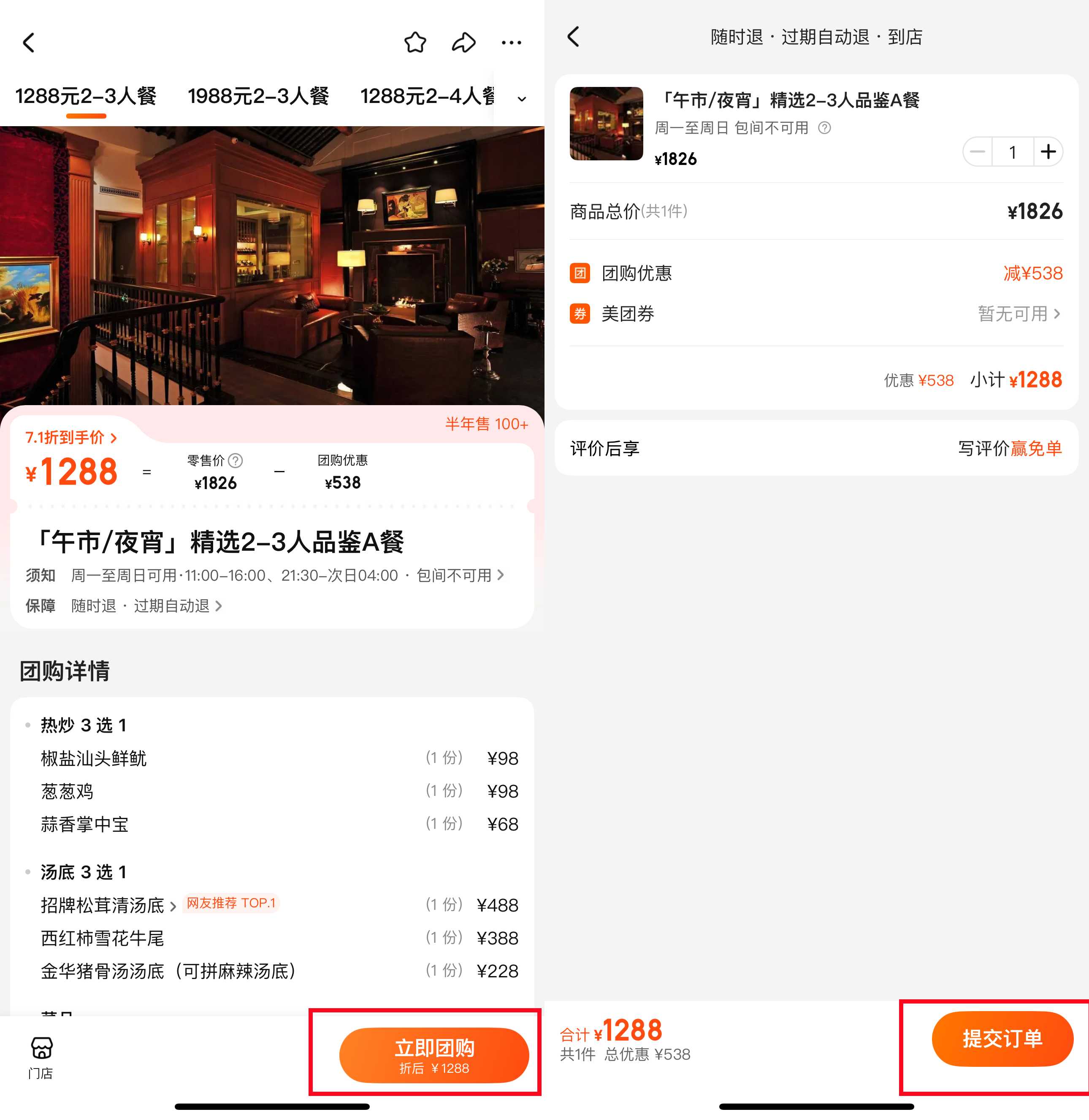
One of the best things about Dianping is how easy it is to find great places to eat. You can search by food type, location, or even specific dishes. The detailed reviews and photos from locals help you pick the perfect spot, whether it’s a small street food stall or a fancy restaurant.
Dianping also offers group deals called 团购 (tuán gòu) — these are discounts or special offers you can buy in advance. It’s like a Groupon for China. Using these deals can save you money on meals, beauty treatments, or entertainment. Just look for the “团购” section when browsing, and follow the simple steps to buy and use your coupon.
Dianping vs Meituan

Dianping and Meituan are two top apps in China that often work closely together. In fact, Meituan owns Dianping, so their services overlap a lot. But each app still has its own focus and strengths.
Feature | Dianping | Meituan |
Main Focus | Food & lifestyle reviews | Food delivery & local services |
Restaurant Reviews | Detailed reviews and ratings | Reviews available, less detailed |
Food Delivery | Available | Very strong and fast |
Hotel Booking | Yes | Yes |
Ride-Hailing | Yes | Yes |
Flight Booking | Yes | No |
Best For | Exploring local restaurants, services | Fast food delivery, daily needs |
Book Hotels in China Now






















Smart Tips for Using Dianping on Your Trip
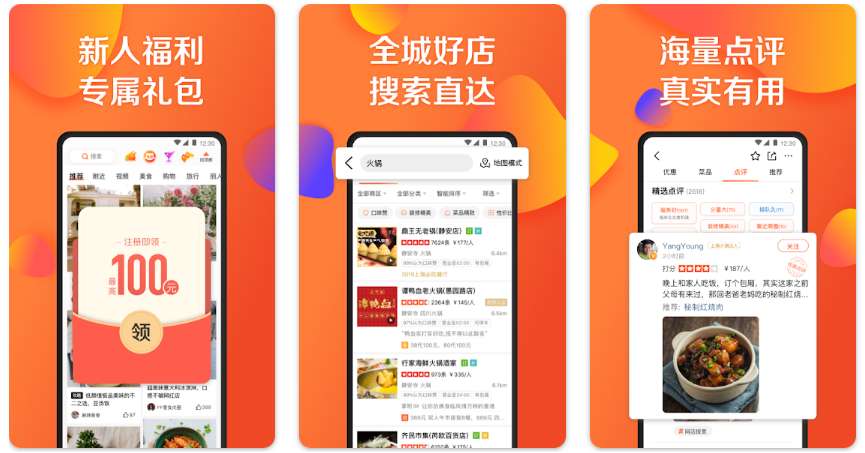
Use filters: When searching for restaurants or services, use filters like price range, rating, or distance to quickly find what suits you best.
Check recent reviews: Look at the newest reviews to see if a place is still good. Things can change fast!
Try group deals: Save money by using Dianping’s group deals, especially for meals and beauty services.
Plan ahead: Book popular restaurants or services in advance. Some services may need an appointment.
Dianping is more than just an app. It’s your local guide in China. With a bit of patience and these tips, you’ll unlock great food, services, and deals that many tourists miss. Give it a try, and you might find your favourite spots faster than you expect. Happy exploring!
More Essential Apps to Use in China
FAQs About Dianping App for Travellers
-
Is Dianping free to use?
-
How reliable are the reviews on Dianping?
-
Does Dianping support English language?
-
Can I cancel bookings through Dianping?
Trending Researches
-
Popular Content
-
Top Flight Links
-
Popular Hotels
-
Popular Things to Do
-
Featured guides
-
Trip.com links
- Trip.com Customer Service
- Trip.com VIP Lounge
- Buy Now Pay Later
- Trip.com Contact
- Trip.com Cancellation Policy
- How to Use Trip com Promo Codes
- Best Credit Cards
- Singapore Airlines Baggage Allowance
- scoot-baggage-allowance
- luggage size cabin
- How to Book a Student Flight Ticket
- Singapore Airlines Change Flight
- Best Day to Book Flights
- Trip.com Flight Refund
- Flight Classes Explained
- CA490 Flight Status
- SQ869 Flight Status
- MU7705 Flight Status
- ZG053 Flight Status
- MU2434 Flight Status
- QG523 Flight Status
- CA1651 Flight Status
- Plane tickets from Singapore to Kuala Lumpur
- Plane tickets from Singapore to Fukuoka
- Cheap flights from Singapore to Shanghai
- Plane tickets from Singapore to Bangkok
- Cheap flights from Singapore to Seoul
- Cheap flights from Singapore to Manila
- Cheap flights from Singapore to Tokyo
- Plane tickets from Singapore to Chengdu
- Hotels near Hefeinan Railway Station
- Hotels near Johor Bahru Senai International Airport
- Hotels near Hongcun Aju Theater
- Hotels near Zixiao Palace
- Hotels near Beijing Road
- Chengdu Hotels
- Tokyo Hotels
- Kuala Lumpur Hotels
- Kunming Hotels
- Phu Quoc Island Hotels
- Hotel Les Matins de Paris
- Ramada by Wyndham Seoul Dongdaemun
- Mercure Guangzhou Beijing Road Pedestrian Street Hotel
- Airport International Hotel (Xuzhou Guanyin Airport)
- Atour Hotel (Chengdu Taikoo Li)
- Malaysia 5G eSIM | Supports mainstream apps including TikTok, Google Maps & ChatGPT | Day Pass/Total Package | 24H Billing | 1-30 days | QR code
- Singapore 4G eSIM | Supports Google Maps / ChatGPT | Daily/Total Data Plans | 24-Hour Billing | 1–30 Days | QR Code
- Vietnam Airport VIP Fast Track Service
- VIP Fast Track service for immigration clearance at Tan Son Nhat Airport in HCM
- Foreign Tourist Day Tour: Panda Valley / Dujiangyan / Mt Qingcheng / Blue Tear / Chengdu
- Huanglongjiuzhai Railway Station - Jiuzhaigou | Departure/Return | Rideshare/Private Charter | Bus/Nanny/5-9 Seater Business | Shuttle Bus | Vehicle Type Optional | Any Combination | T
- Guilin Yangshuo Impression Liu Sanjie Landscape Performance + Complimentary Exclusive Coffee Drink - Pick Up at Designated Restaurant
- Mainland China 5G eSIM | Dual Network • All AI & TikTok | 1–365 Days | QR Code
- Yamanakako Day Tours
- Naples SIM Card
- Phu Quoc Island Connectivity Solutions
- Guam Connectivity Solutions
- Onna Activities
- Los Angeles Travel Services
- Ha Long City Cultural Experience
- China Power Bank Limit
- Trip.com Customer Service
- train to kl from singapore
- Shanghai Metro
- China Train Map
- China Entry Requirements
- Hong Kong Public Holidays 2027
- train from singapore to jb
- China Plug
- Thailand Plug
- universal studios singapore tickets
- Renew Autopass Singapore
- Taiwan Plug
- Vietnam Arrival Card
- Singapore Malaysia Cross Border Taxi
- Frankfurt Airport to City
- Osaka Station to Kyoto Station
- Bangkok to Pattaya
- Trip.com Promo Code
- Trip.com Flight Deals
- Trip.com Credit Card Promotions
- How to Book Cheap Hotels
- How to Book Cheap Flights
- Trip.com Member Rewards
- Trip Weekly Hotel Sales
- Online Hotel Booking
- Online Flight Booking
- Trip.com Travel Guide
- Book China Train Tickets
- Trip.com Seat Selection
- Singapore Public Holidays 2027
- Trip.com 优惠码
- Trip.com Travel Guides
- Trip.com 10.10 Mega Sale