🔥Get 3% Off Your First Train Ticket Booking!
As a special treat, Trip.com is offering a 3% discount on your first train ticket booking. Simply claim your coupon and enjoy a seamless travel experience.

By Trip.com
September 2, 2026
As a special treat, Trip.com is offering a 3% discount on your first train ticket booking. Simply claim your coupon and enjoy a seamless travel experience.
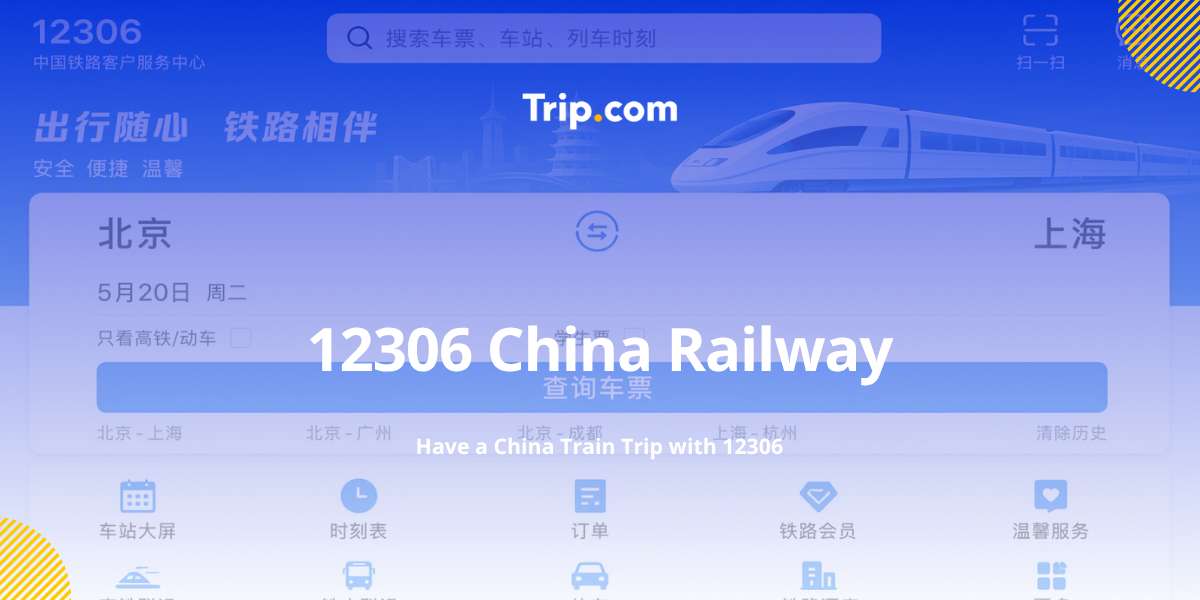
12306 China Railway is the official website for train ticket booking, which is named after the phone number of China Railway customer service. It serves as the most widely used method for both domestic and foreign travellers to book tickets for trains operating within China.
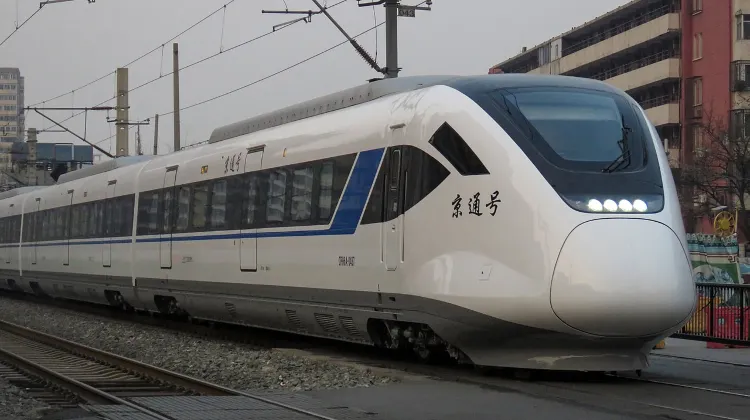
12306 offers access to a wide range of train services, including high speed trains, regular trains, and sleeper trains. You can check train schedules, seat availability, ticket fares and boarding information on it.
Source: Wikipedia
When it comes to booking train tickets in China, travellers often use either Trip.com or 12306. What are the differences? Find the table below comparing Trip.com and 12306.
Feature | Trip.com | 12306 |
Language | Multi-language support | Chinese and English support |
Customer Service | 24/7 support via phone, email, live chat | Limited customer service in specific periods |
Integration | All-in-one platform with trains, flights, hotels, attractions and more | Train ticket bookings only |
Promotions | Regular promo code and discount | Barely no promotions |
Mobile App | Mobile app for convenient booking on-the-go | Official app available |
Target Users | International and domestic users | Domestic users |
Both are reliable options for booking China train tickets. 12306 is the official railway platform and is a good choice if you’re comfortable with its booking process and have a supported payment method. Trip.com can be more convenient for international travellers, especially if you prefer an easier English-language experience and more flexible payment options.
The China railway system is one of the most extensive and advanced in the world, with a vast network covering both high-speed and normal trains.
The two primary types of high speed trains in China are the CRH (China Railway High-speed) trains and the D (D-series) trains. Here’s a brief comparison of the two.
Train Type | Speed | Features |
CRH (高铁) | 200-350 km/h | 1. The fastest high-speed train2. Modern amenities, punctuality |
D Trains (动车) | Up to 250 km/h | 1. Electric Multiple Unit (EMU) trains2. Suitable for frequent stops, regional connectivity |
In addition to high-speed trains, China's normal trains also cover a vast distance, including urban and rural areas.
Train Type | Speed | Features |
Z Trains (直达特快) | 120-160 km/h | 1. Direct express trains2. Fewer stops, faster travel |
T Trains (特快) | 100-140 km/h | 1. Express trains2. For medium to long-distance routes3. Medium speed |
K Trains (快速) | 80-120 km/h | 1. Fast trains2. Suitable for regional travel |
Except for Z, T, and K, there are also several other types of general fast trains such as
All the different trains have different seat classes, including second class, first class, business class, sleeper class, etc. You can select your seats based on your preference and budget.
😊After learning the general information about China railway system, let’s explore how 12306 operates for booking train tickets.
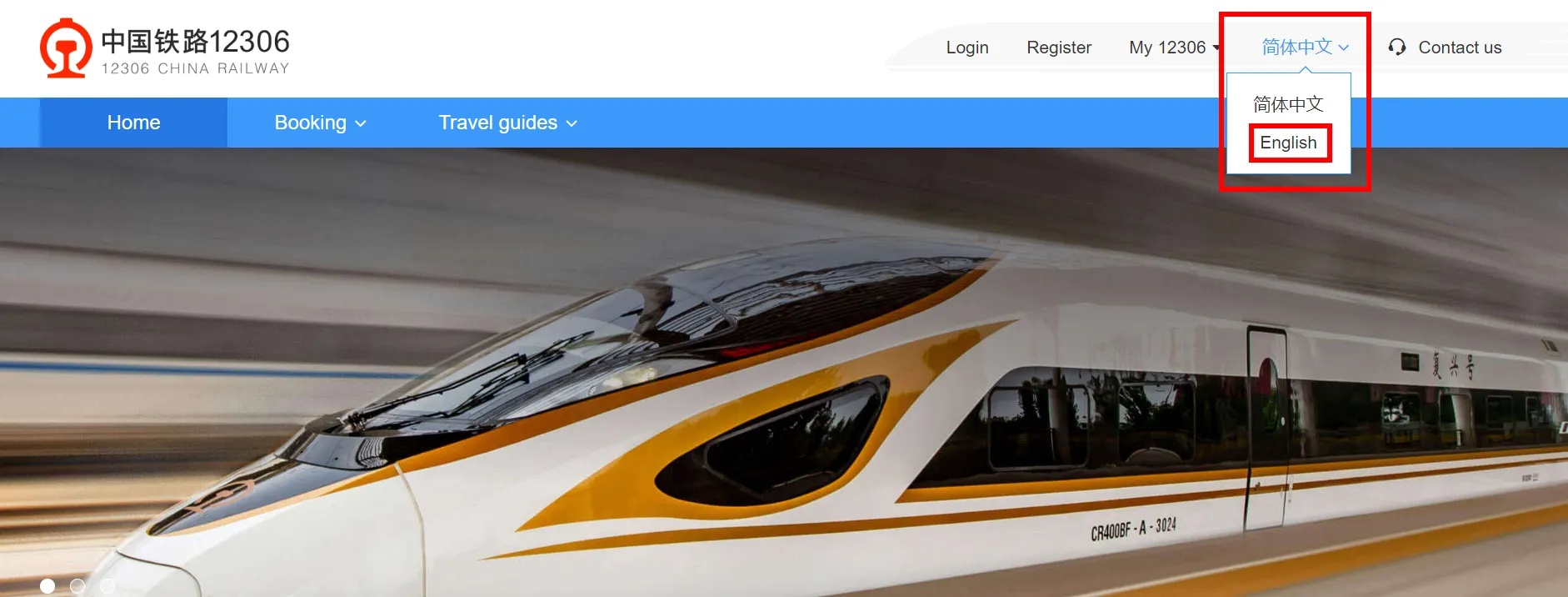
Step 1: Visit the 12306 website and switch the language to English. You can click on the right upper corner to switch the language.
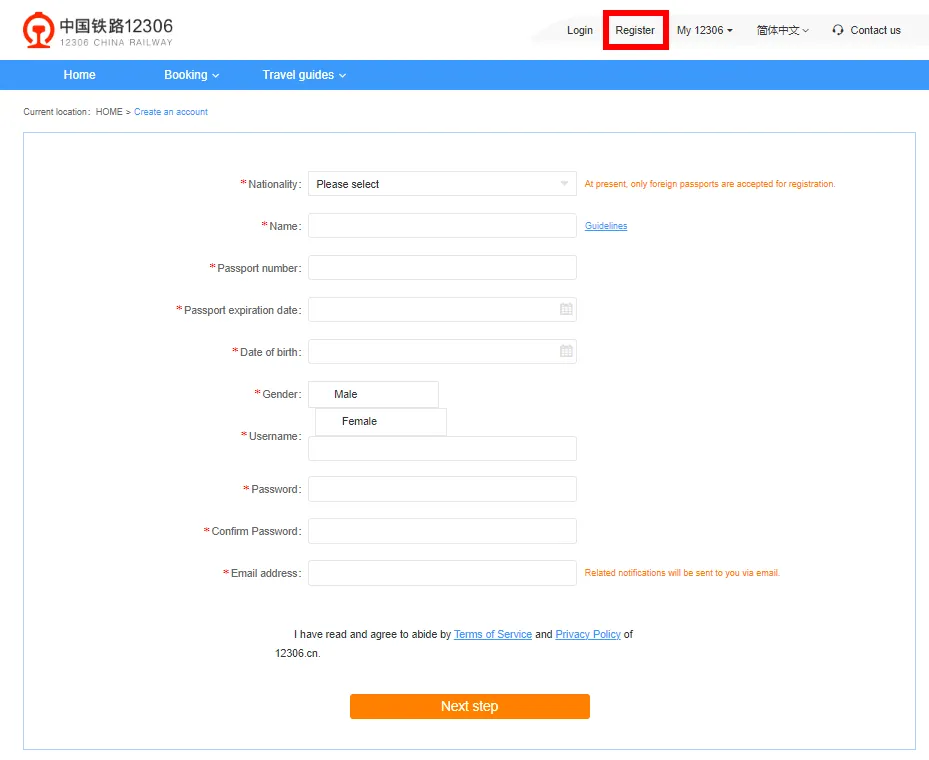
Step 2: Click on “Register” and fill out the required information, including your nationality and passport details.
Step 3: Verify your email address to activate your account.
Step 1: Download the 12306 App. You can go to Google Play or the Apple App Store, search for “12306” and download the App.
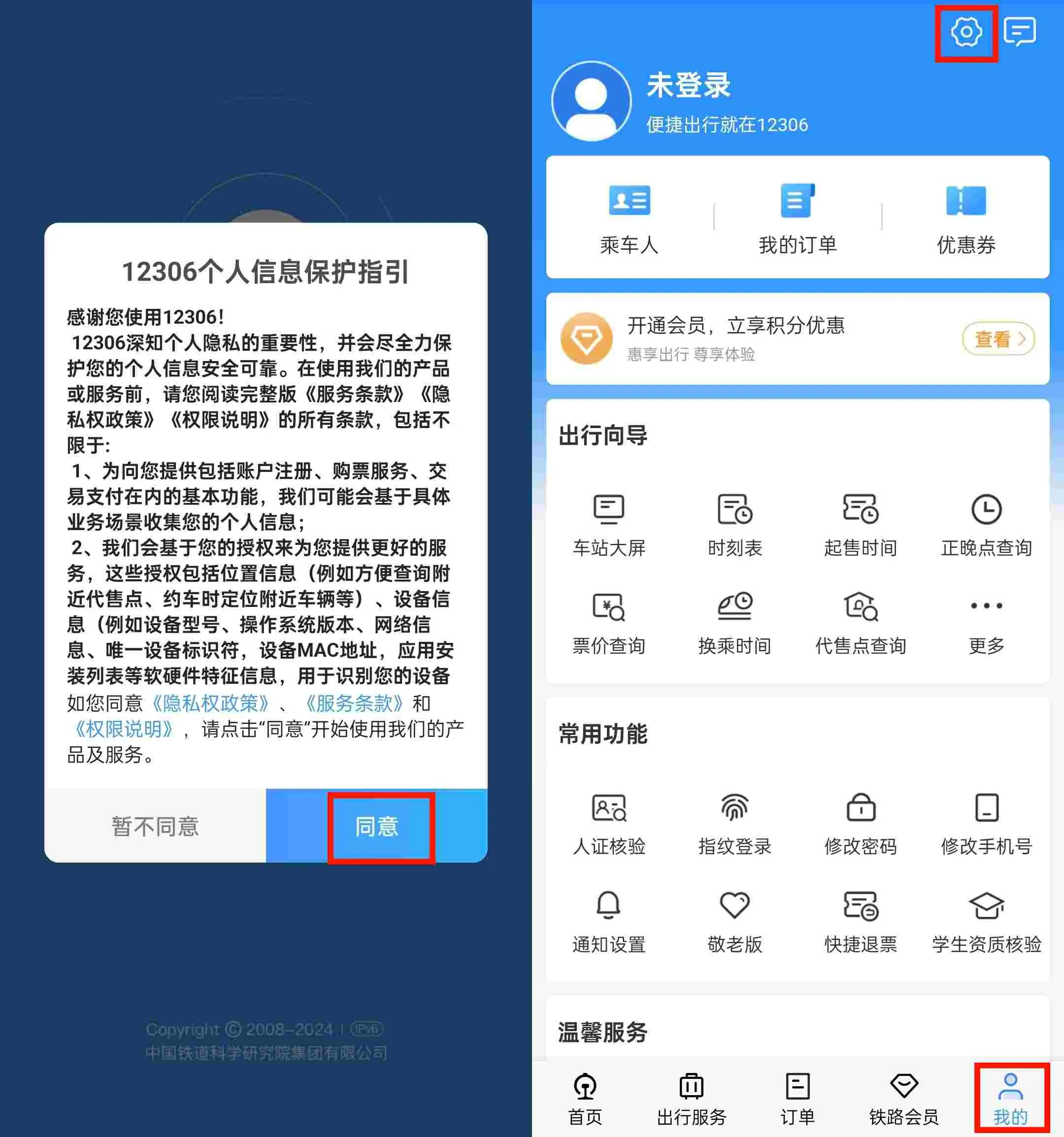
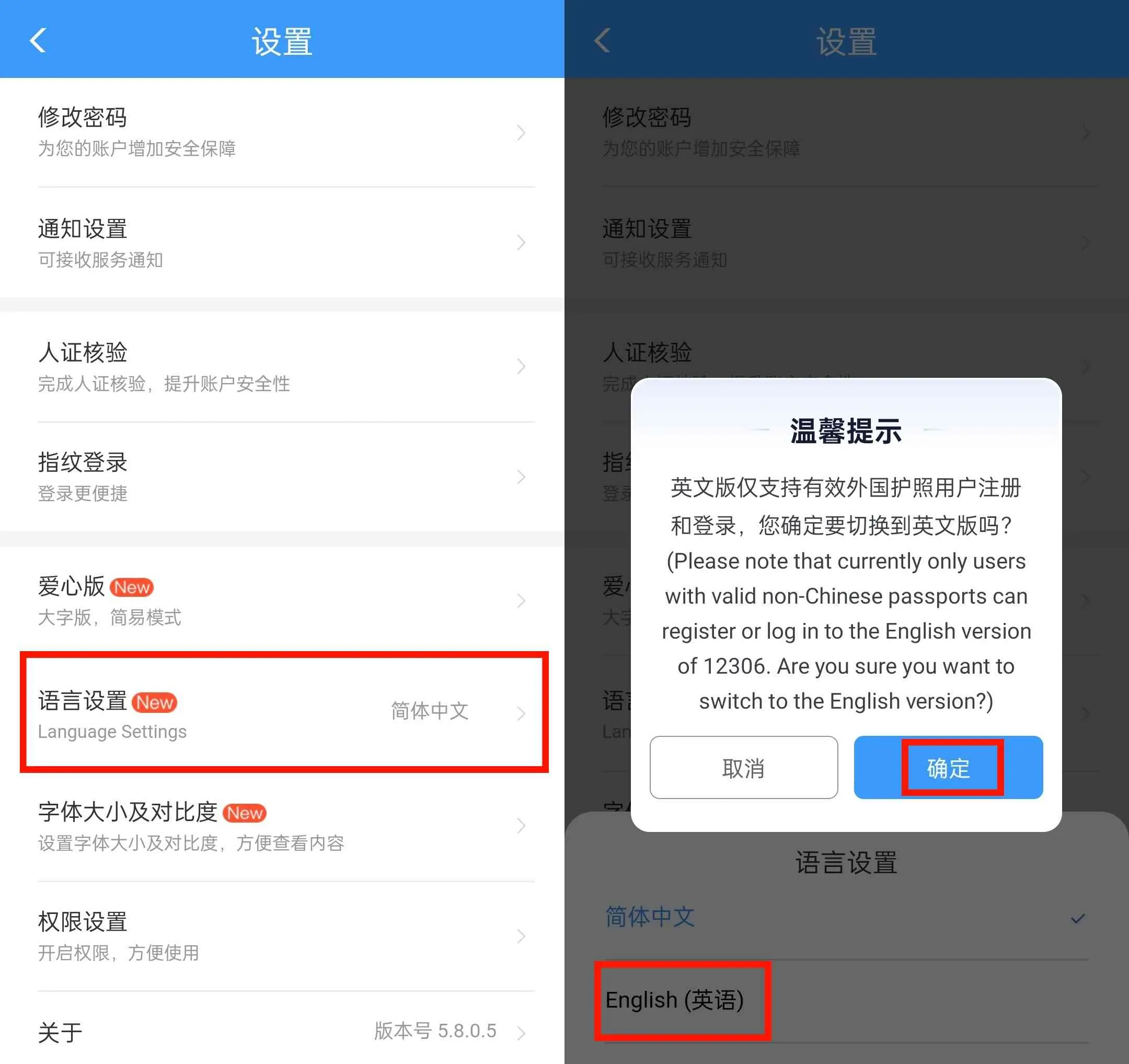
Step 2: If the App opens in Chinese, you’ll first need to agree with the terms and conditions by clicking “同意”. Then you can change the language to English. Click “我的”-“设置”-“语言设置”-“English”-“确定”.
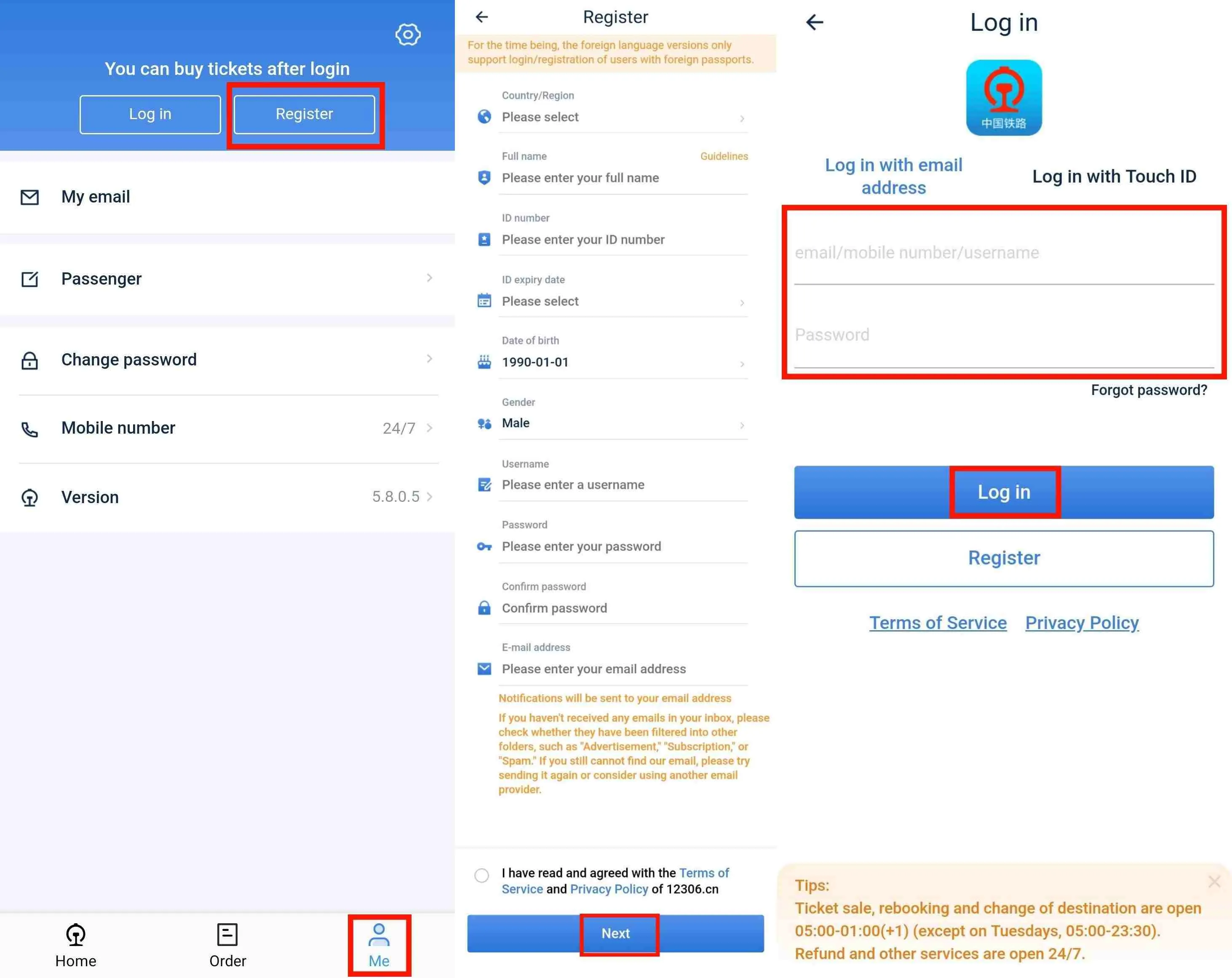
Step 3: On the main screen, tap “Me”-“Register” to begin the account creation process. Then enter your personal information including name, gender, ID number (passport number), phone number, password and Email address.
Step 5: Once all fields are filled out and verified. You may receive a confirmation email. Open your email and follow the instructions to verify your email address.
Step 6: Return to the 12306 App login screen. Enter your email/phone number and password. Tap “Log In” to access your new account.
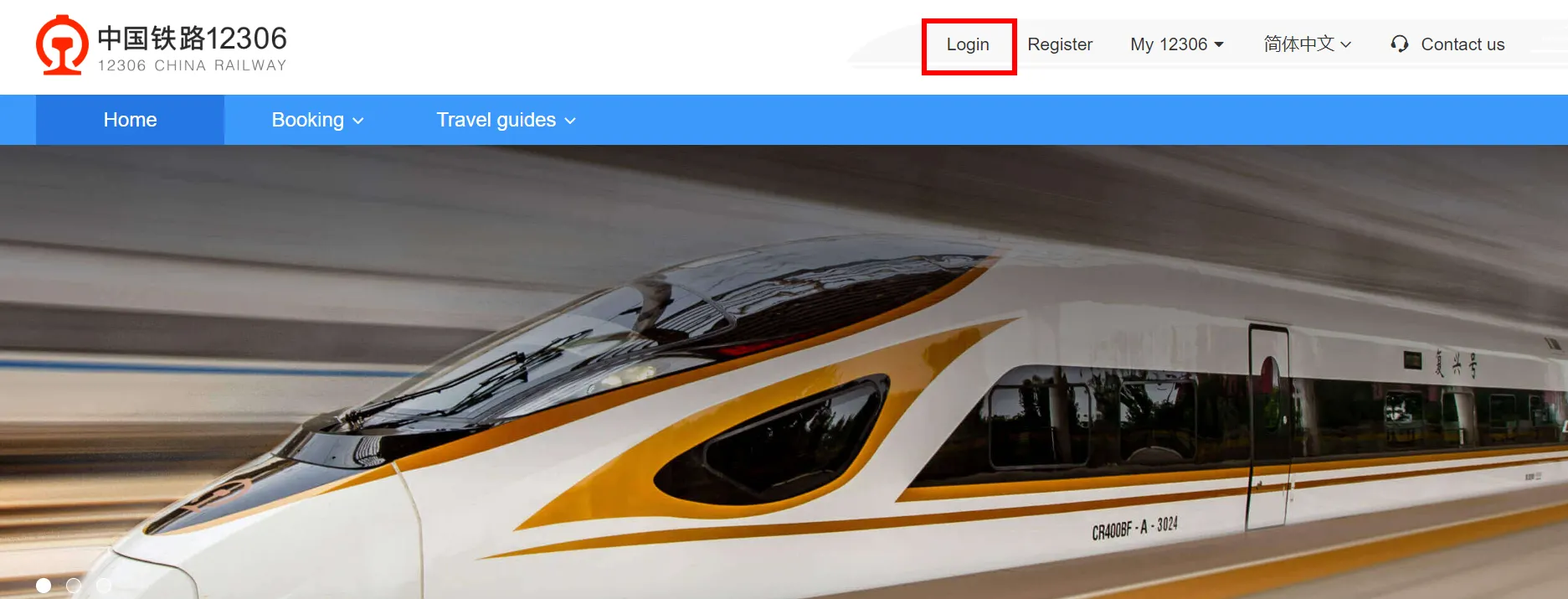
Step 1: Visit the 12306 website and log in to your account. Click on the “Login” button located at the top right corner. Complete the process by entering the necessary information.
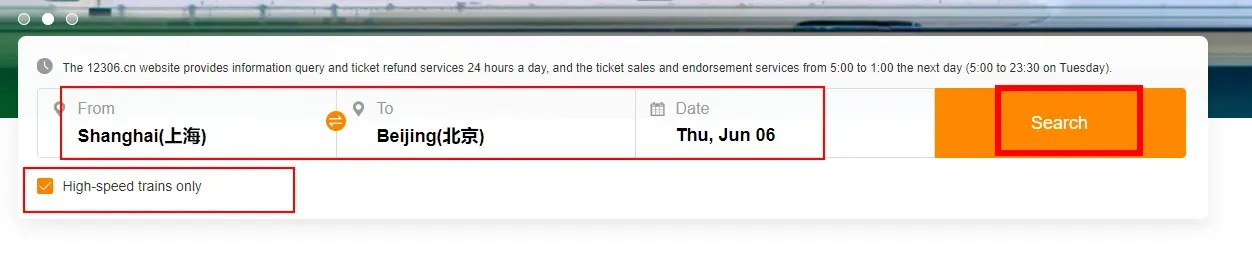
Step 2: Enter your departure city, destination city, and travel date in the search fields. Click the “Search” button to view available trains.
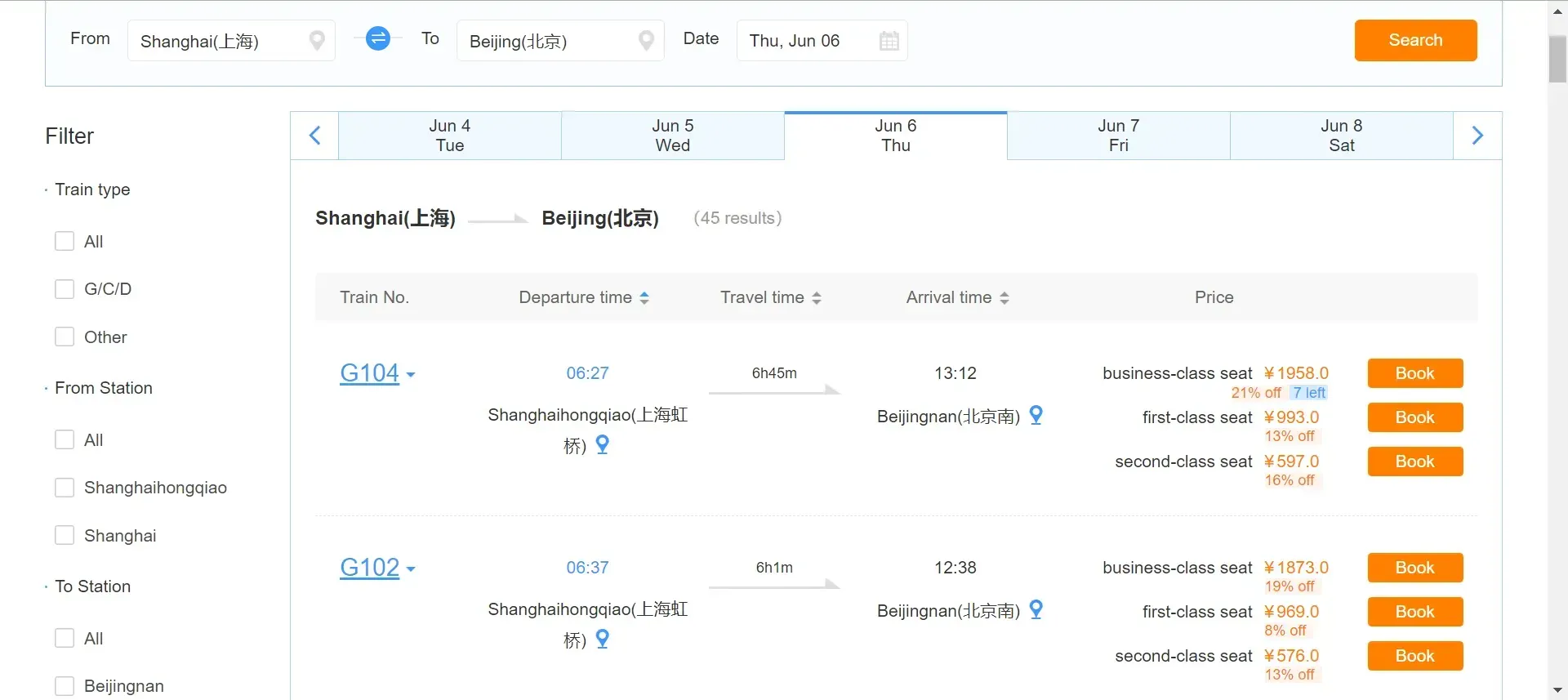
Step 3: Browse the list of available trains. Each entry displays the train number, departure and arrival times, seatt classes, and ticket availability. Click on the “Book” next to your chosen train.
Step 4: Fill in the passenger details. Then verify and confirm the booking. Click “Submit” to proceed to payment.
Step 5: Select your preferred seat class (e.g., second class, first class, business class). Choose your seat preference (e.g., window, aisle).
Step 6: Make payment and receive booking confirmation. You can check your ticket status under the “Order”.
Step 1: Open the 12306 App and log in to your account.
Step 2: Search for trains by entering your departure city, destination city, and travel date. Tap the “Search” button to view available trains.
Step 3: Scroll through the list of available trains and tap on your chosen train. View the train details and available seats. Then click "Book".
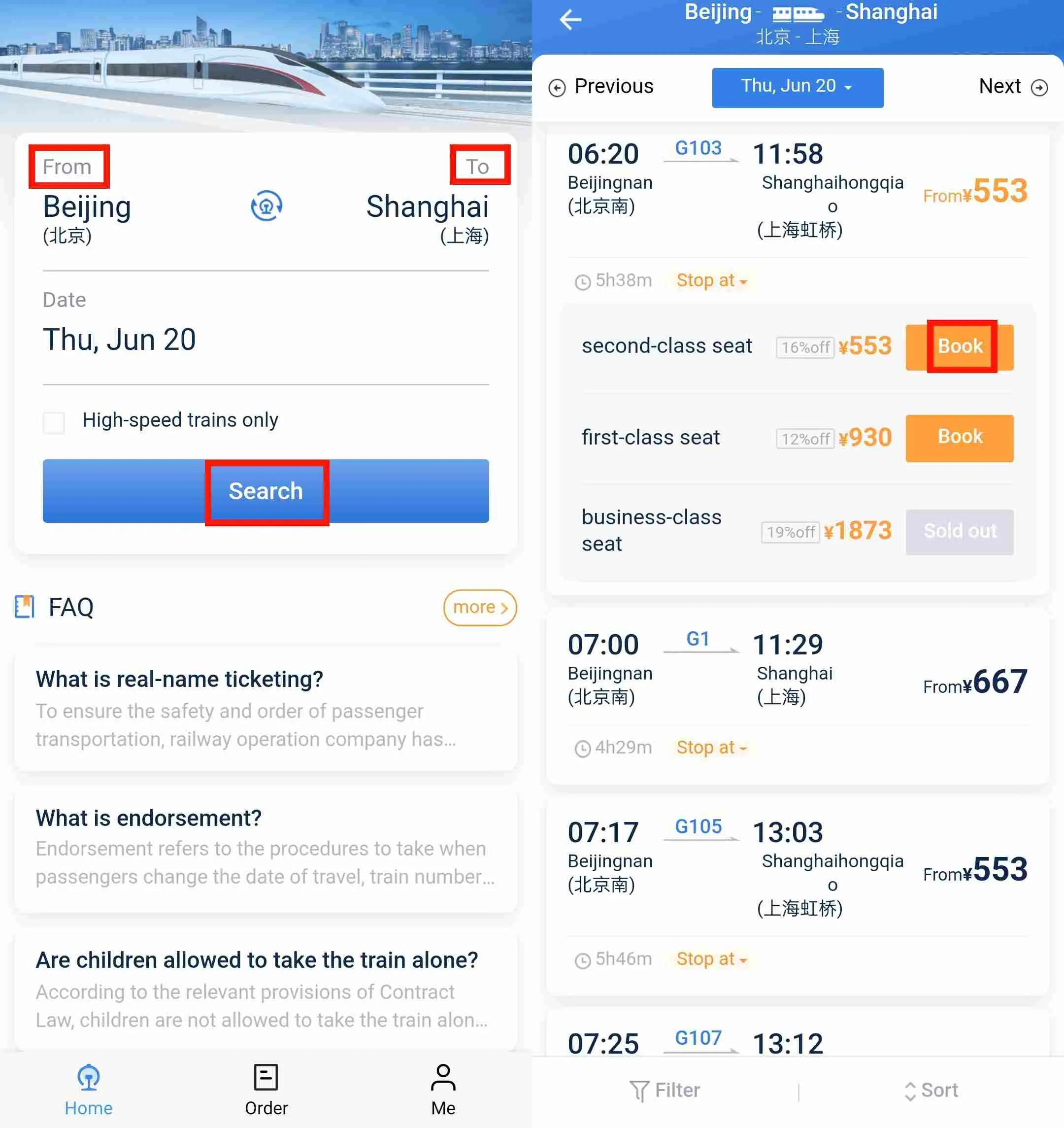
Step 4: Tap “Add New Passenger” and fill in the passenger details. Review your booking details to ensure all information is correct.
Step 5: Choose your seat and class (e.g., second class, first class, business class). Choose your seat preference (e.g., window, aisle).
Step 6: Complete the payment process as instructed. Once the payment is successful, you will receive a booking confirmation with your ticket details. You can check your ticket status under the “Order”.
Here is the summary of the ticket refund policy for 12306:
Refund Timing(before departure) | Refund Fee | Special Conditions |
More than 8 days | No refund fee | - |
48 hours to 8 days | 5% of ticket price | - |
24 to 48 hours | 10% of ticket price | - |
Less than 24 hours | 20% of ticket price | - |
After endorsement/change of destination | Based on new ticket price difference | 5% refund fee if the new ticket is refunded at least 8 days before departure; otherwise, standard fees apply based on refund timing. |
Spring Festival peak season | 20% of ticket price | Uniformly charged regardless of refund timing. |
Trip.com offers an alternative to booking directly through 12306, with several advantages that can enhance your booking experience.
Step 1: Visit Trip.com. You can click here for train bookings.
Step 2: Enter your travel details such as departure, arrival stations, and travel date. Click “Search” for the trains available.
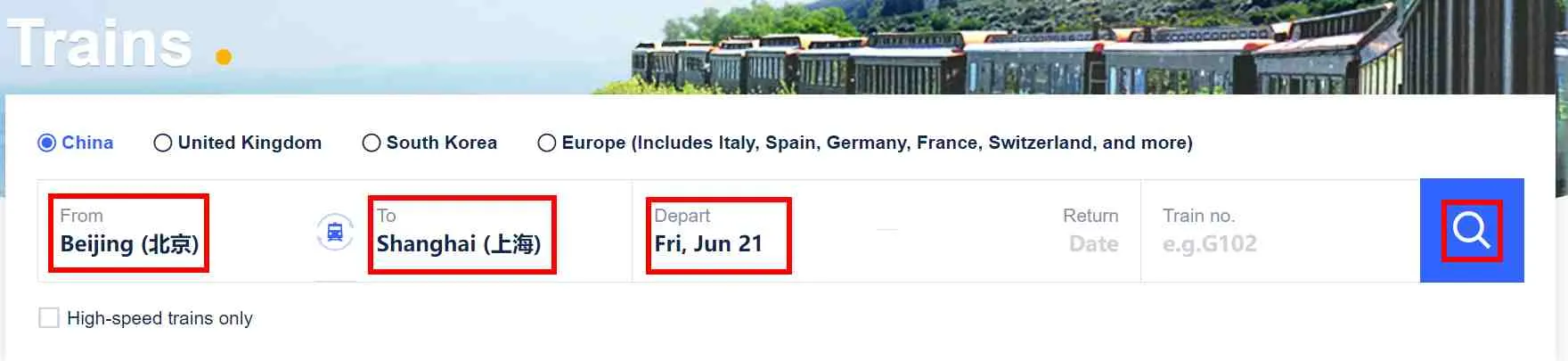
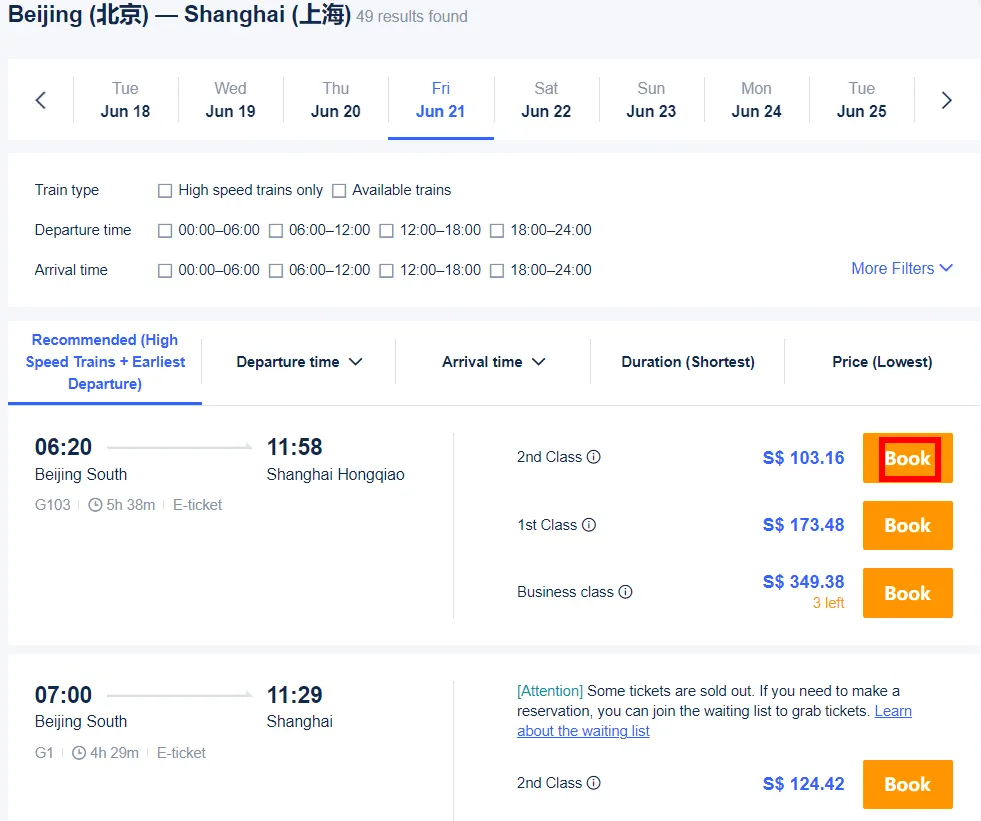
Step 3: Review the list of available trains, including departure times, durations, seat classes and ticket prices. Select the train that best fits your schedule. Click “ Book” to continue the process.
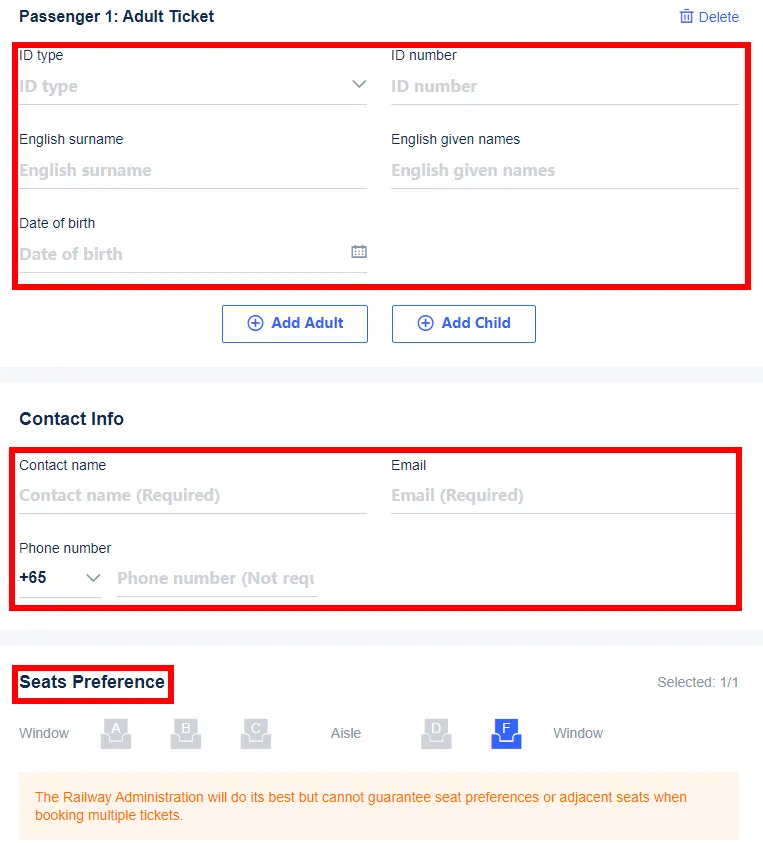
Step 4: Enter passenger details such as full name, passport number, and contact details. If seat selection is available, pick your preferred seats.
Step 5: Make payment and receive confirmation.
Step 1: Download Trip.com App from the Apple App Store or Google Play.
Step 2: Launch the app, and select “Trains”.
Step 3: Enter your departure and arrival cities, and select your travel date from the calendar. Click “Search” to view available trains.
Step 4: Browse the list of available trains, and tap on the train according to the schedule and seat class. Click “Book”.
Step 5: Enter the required information for each passenger, such as full name, passport number, and contact details. You can select your seats here if available.
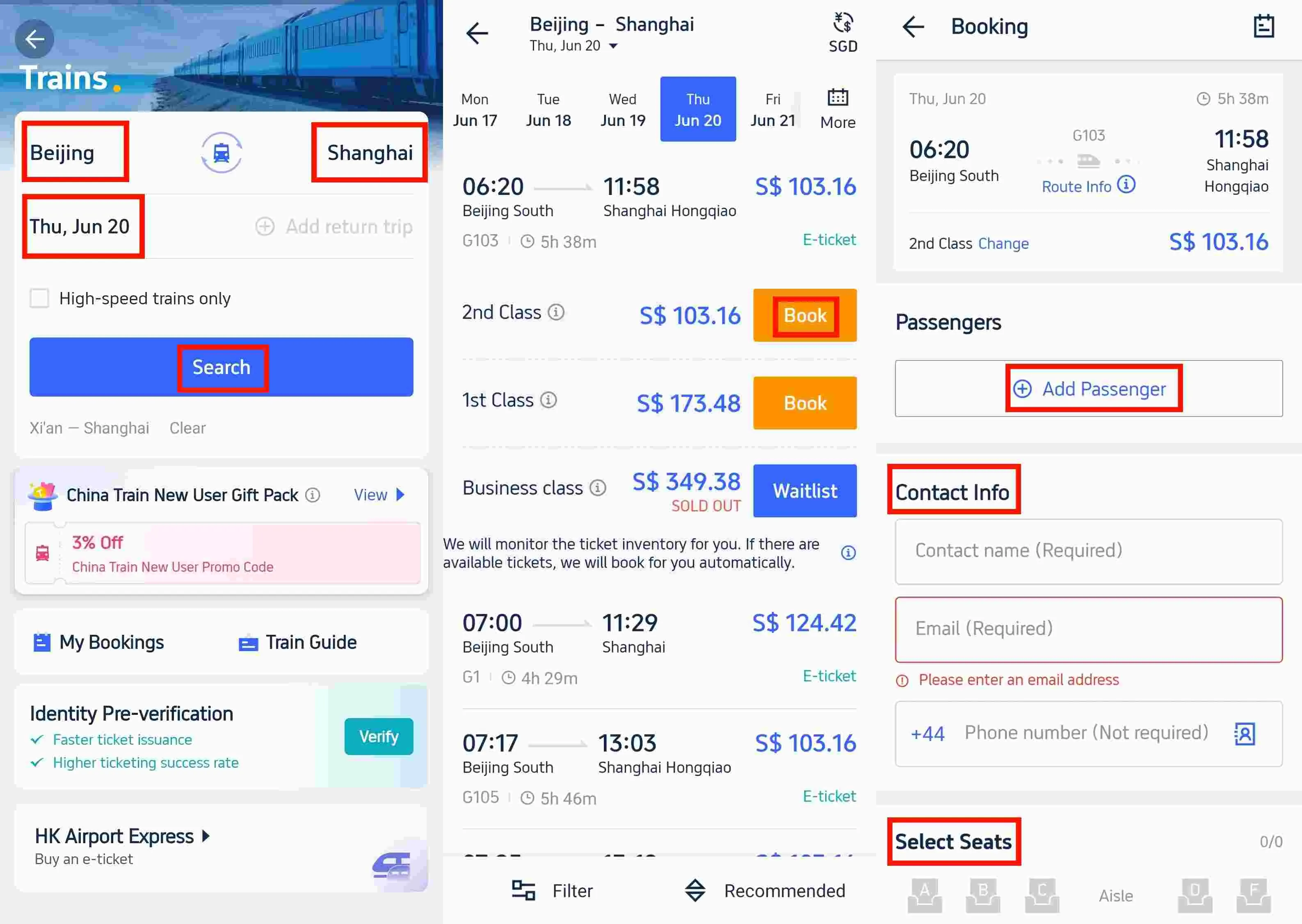
Step 6: Make payment and receive confirmation.
In China, when purchasing train tickets, the following identification cards are typically accepted:
If you booked a train ticket but your plans have changed, you can submit a request to change or cancel your ticket. To ensure your request can be processed, please be sure to submit it before your train's departure time within the time period from 08:00 to 20:00 (GMT+8).
If you booked a train ticket with Trip.com and it hasn’t been issued, you can cancel your train ticket on Trip.com. To do so, sign in to Trip.com, go to your account, and then select My Bookings > Trains. Cancel the train ticket booking by selecting the Cancel Booking button.
If you've already picked up your paper train ticket (for reimbursement purposes), you'll need to go to a station ticket window to change the ticket or get a refund.
Trip.com follows the cancellation policies of China Railway. Please note that tickets for trains departing within 25 minutes cannot be cancelled online.

Take G trains as an example, here are some popular routes of China speed train.
Route | Duration | Frequency (Daily) | Price (Second Class) |
4.5-6 hrs | 40+ | From S$98.08 | |
45-60 mins | 270+ | From S$10.82 | |
30-50 mins | 500+ | From S$13.90 | |
4.5-6 hrs | 20+ | From S$95.56 | |
1.5-2 hrs | 150+ | From S$24.06 |
Didn't find your route? Click to book your train tickets now and enjoy a seamless train trip in China!
 2036594 booked








![Beijing Mutianyu Great Wall 1-Day Tour [VIP Private Charter ◆ Door-to-Door Pickup/Includes Admission Ticket & No Shopping]](https://ak-d.tripcdn.com/images//0580u12000mzn0c4q2CAB_C_568_320.jpg)

![Beihai Park in Beijing Trip Moments [8 chain stores in Beijing · Hanfu + makeup and styling/multiple packages optional]](https://ak-d.tripcdn.com/images//0586012000rf58x2mFB8B_C_568_320.jpg)
![Mutianyu Great Wal Tour[Small Group of 9 | Private Tour Optional | Multiple Packages]](https://ak-d.tripcdn.com/images/0355l12000qpsc3klD145_C_568_320.jpg)