
How to Use Baidu Maps in English: Guide for Tourists in China (2025)

Author's Profile Picture
Baidu Maps

If you’re used to relying on Google Maps, get ready for a surprise. Google Maps doesn’t work well in China. That’s where Baidu Maps comes in. It’s a popular navigation app in China. Baidu Maps App will help you find your way there. In this guide, I’ll show you how to download, set up, and use Baidu Maps so you can travel around China confidently!

Can You Use Baidu Maps in English?

Baidu Maps doesn’t offer a full English version yet. It can make using it a bit tricky for non-Chinese speakers. However, with a little help from translation, you can still navigate the app and find your way. With some practice, Baidu Maps will become a powerful tool for getting around China.

💡 Pro Tip: Ready to book your trip? Don't forget to check out the latest deals on flights to China and hotels in China.

How to Download and Set up Baidu Maps?

Baidu Maps App

Download Baidu Maps App

1. For iPhone users, go to the Apple App Store. For Android users, go to Google Play Store.

2. Search for “Baidu Maps” or “百度地图”.

3. Download the app.

Note: The app is free. No VPN is needed to download it in Singapore.


Set up Baidu Maps

You can register with your phone number. Or you can also skip login and use the app as a guest. For most travelers, skipping login is fine. But if you skip it, you may not be able to use ride-hailing, since ​a Chinese number is required.

Register Baidu Maps

How to Change Baidu Maps to English?

Currently, Baidu Maps doesn’t have a full English version. The main interface is in Chinese. Because it's a local app and most of the users are Chinese. But using translation apps or recognizing key icons in the app can also help you get around. Here are some tips to use Baidu Maps in English:

Try Google Translate’s Camera

Open Google Translate, select the Camera mode, and point it at the Baidu Maps screen. It will instantly translate buttons like 搜索 (Search) and 路线 (Route). But you need a VPN to access Google Translate in China.

Remember The Useful Terms

  • 开始导航 = Start Navigation
  • 收藏夹 = Favorites
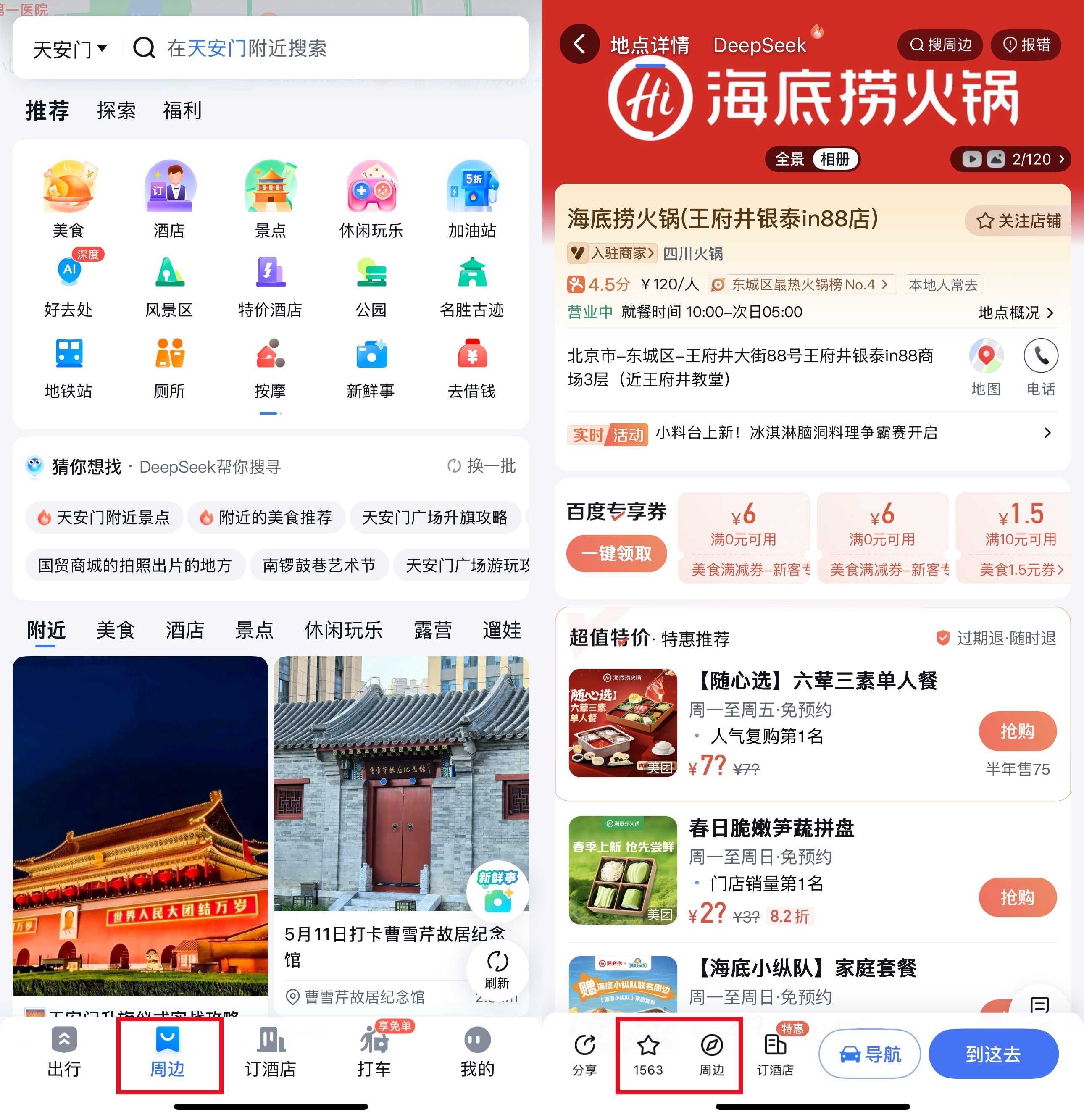
  • 周边 = Nearby (places like ATMs, hotels, and more)

Search in Pinyin

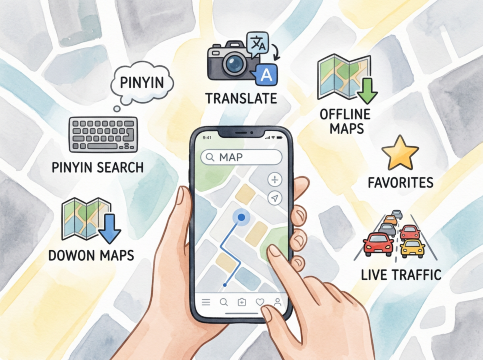
Instead of typing Chinese characters, enter the place name in Pinyin. For example, type “Tiananmen” instead of 天安门. This method works well for most famous attractions.

😀Pro Tip: To stay connected throughout your visit, consider getting a China eSIM. Just activate and go!

Buy Cheap China eSIM

See All Attractions
384349 booked
4.7/511555 reviews
Mainland China | 5G/4G eSIM | Day Pass/Total Package | Support Tiktok & ChatGPT | 24H Billing | 1-365 days | QR code
SIM card
TRY 17.67
213850 booked
4.6/55493 reviews
Mainland China/Hong Kong/Macao/Taiwan | 5G eSIM | Day Pass/Total Package | 24H | 1-30 days | QR code
SIM card
TRY 18.18
447210 booked
4.7/520217 reviews
Mainland China 5G eSIM | Day Pass/Total Data Package | ChatGPT Available | 24-Hour Billing | 1-30 Days | QR Code
SIM card
TRY 17.67

🔥Go China Promotion

Book your China trip with Go China and enjoy amazing savings! Get up to 50% OFF flight coupon drops, 5% off hotels, 6% off China attractions & tours, 5% off high-speed rail, and 10% off airport transfers. Plus, there are more surprises waiting for you. Don’t miss out—start planning your adventure today!

Go China Promotion

📅Promotion period: Evergreen 2025 (GMT+8)

How to Use Baidu Maps App in China?

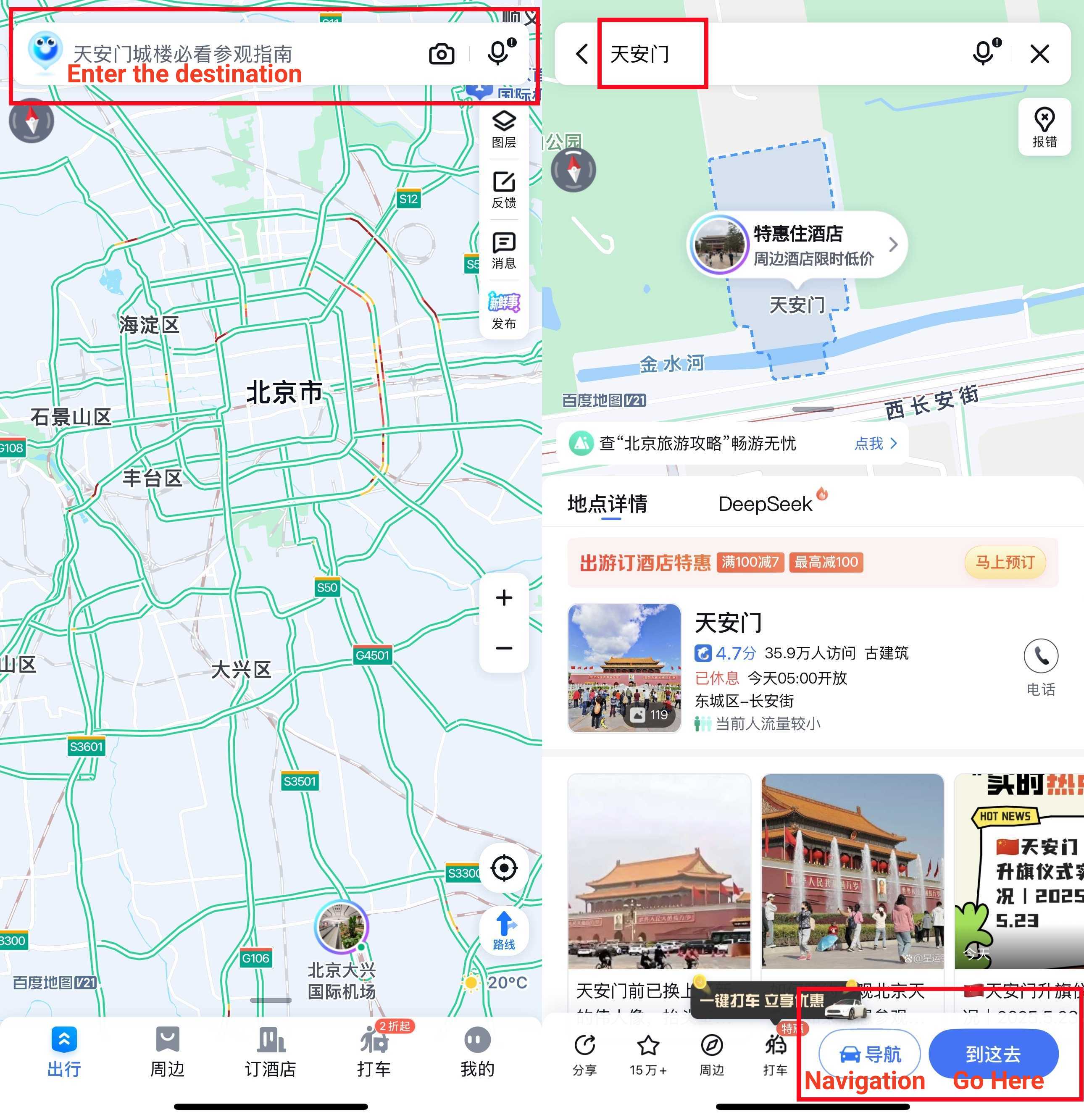
1. Find the Search Bar

Launch Baidu Maps. At the top of the screen, you’ll see a search bar. Tap it to enter your destination.

2. Enter Your Destination

You can type the place name in Chinese characters or Pinyin. Baidu Maps will show suggestions as you type. Then click “到这去” (Go here) to find the route and transport.

Use Baidu Maps App in China: Search for Destination

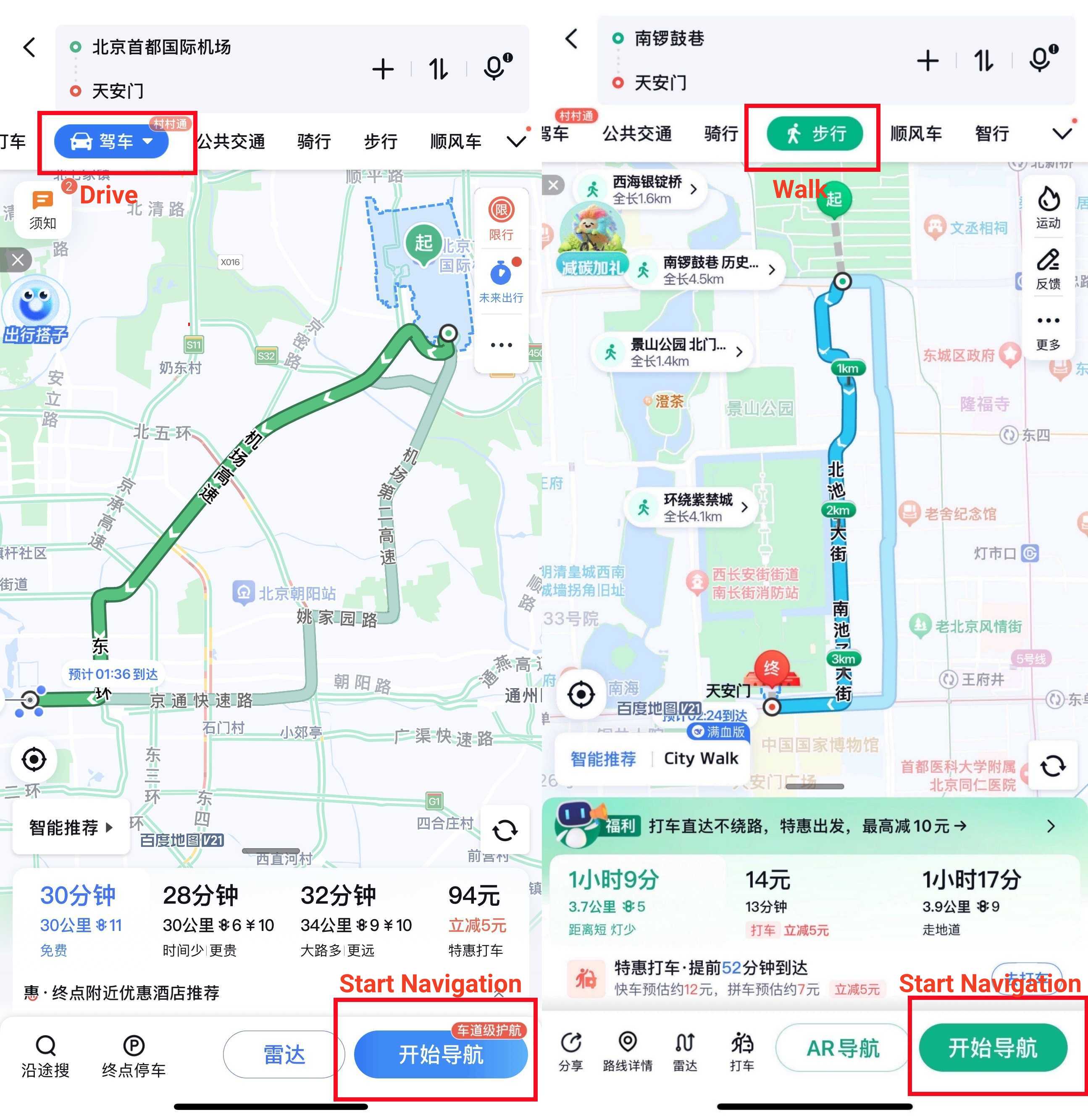
3. Choose Your Route and Transport

After selecting your destination, Baidu Maps will display different routes:

  • Driving (驾车)
  • Public Transit (公共交通)
  • Cycling (骑行)
  • Walking (步行)

4. Start Navigation

Once you pick a route, tap the blue button labeled “开始导航” (Start navigation) at the bottom. If you choose public transport, tap the route you choose. The app will guide you step-by-step while you are getting around.

Use Baidu Maps App in China: Navigation

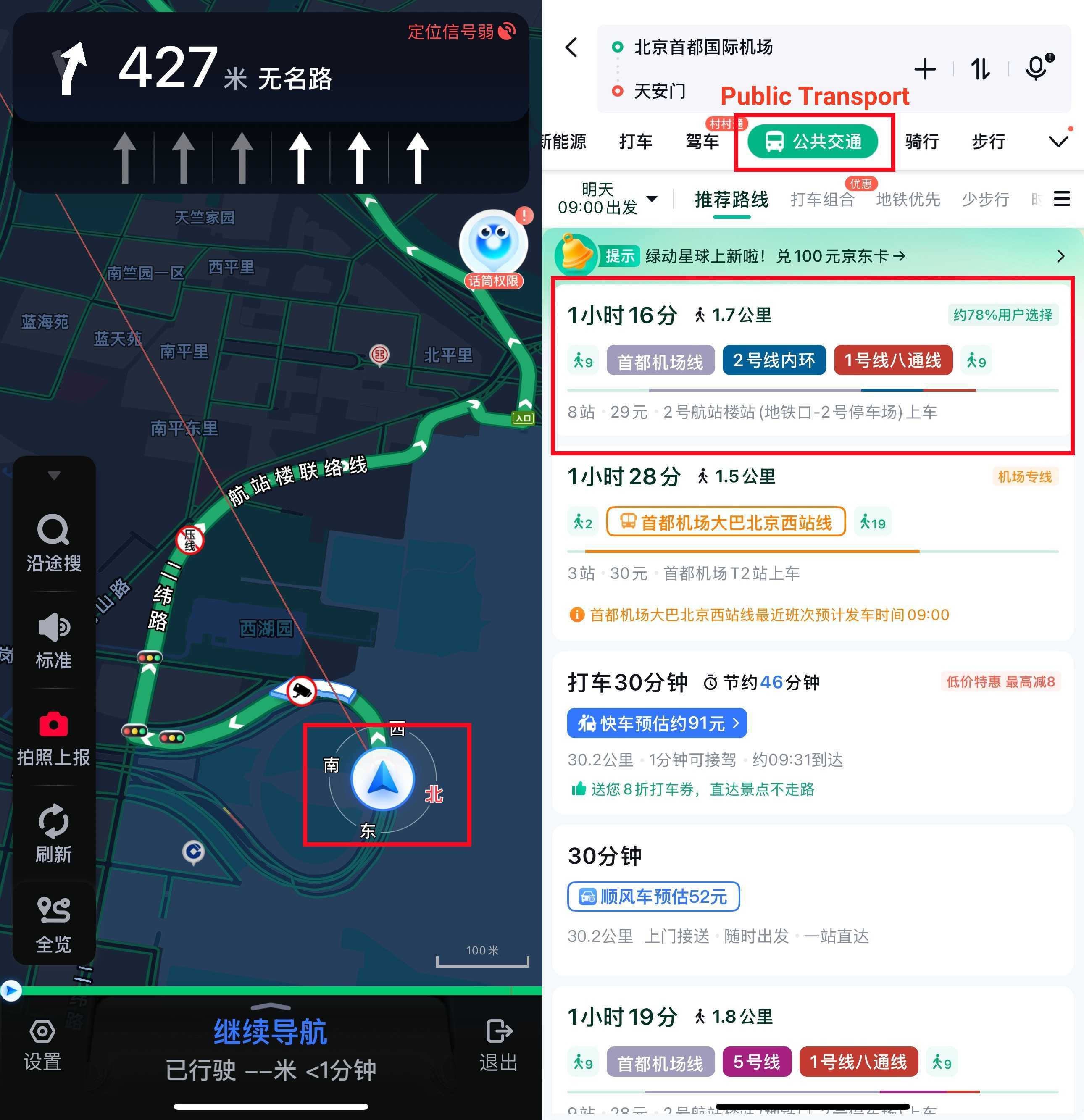
5. Follow Real-Time Directions

Baidu Maps provides real-time guidance.

  • You can check your current location with a blue dot.
  • The arrows indicate upcoming turns or actions.
  • Voice prompts announce when to turn, exit, or stop.

6. Check Traffic and Travel Time

At the top, the app displays estimated travel time and traffic conditions. It's marked by different colors:

  • Green = smooth traffic
  • Yellow = moderate traffic
  • Red = heavy traffic or jams

7. Use Public Transit

If you choose public transit:

  • Baidu Maps lists available buses, metro lines, stops, and transfer points.
  • It shows the estimated travel time and fare.
  • You can view walking routes between stations.
Use Baidu Maps App in China: Public Transport

8. Explore "Nearby"

Tap the “周边” (Nearby) icon to find useful places close to you, like restaurants, ATMs, gas stations, or hotels.

9. Save Favorites

To save a place, tap a star icon⭐, which is “收藏夹” (Favorites).

Use Baidu Maps App in China: Nearby and Favorite

10. Offline Maps

Baidu Maps supports offline maps. You can download offline maps for specific cities before your trip, so you can use Baidu Maps without internet.

Alternatives to Baidu Maps in China

Alternatives to Baidu Maps in China

While Baidu Maps is the most popular navigation app in China, it’s not the only option. You might also find other map apps more convenient or easier to use. If you want better English support, there are other apps to choose. 

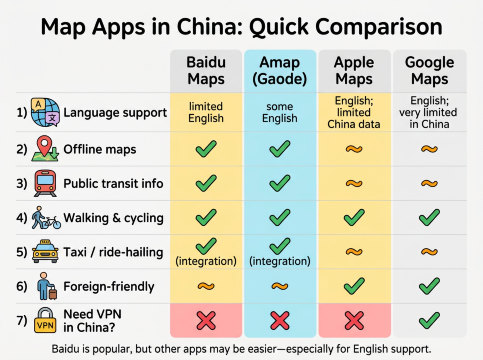
Below is a quick comparison of some popular alternatives you can consider during your trip in China.

Feature

Baidu Maps

Amap (Gaode Map)

Apple Maps

Google Maps

Language Support

Mainly Chinese, limited English

Mainly Chinese, some English

English, limited China data

English, very limited in China

Offline Maps

Available

Available

Limited

Limited

Public Transit Info

Comprehensive

Comprehensive

Limited

Limited

Walking & Cycling

Yes

Yes

Yes

Yes

Taxi / Ride-hailing

Supports integration

Supports integration

Limited

Limited

Friendly for Foreigners

Moderate (language barrier)

Moderate (some English)

High (English UI)

High (English UI)

Need VPN in China?

No

No

No

Yes

Tip: Except for these map apps in China, you may also need taxi apps in China for ride-hailing. Check our guide for easier navigation.

Tips for Foreigners Using Baidu Maps App in China

Baidu Maps: Navigation for Getting Around
  • Use Pinyin for Searching

If you don’t know Chinese characters, type place names in Pinyin.

  • Leverage Translation Tools

Use apps like Google Translate’s camera mode to instantly translate buttons and menus on Baidu Maps.

  • Download Offline Maps in Advance

Before your trip, download offline maps of the cities you’ll visit. This saves data and helps when your connection is weak.

  • Save Favorite Locations

Bookmark important places like your hotel or meeting spots in the “收藏夹” (Favorites) for quick access.

  • Check Traffic Conditions Early

Traffic in big cities can get heavy. Use Baidu Maps to check traffic before you travel and plan your route accordingly.


Ready to explore China without getting lost? Download Baidu Maps before your trip! Baidu Maps will be your best travel buddy in China. Don’t forget to save your must-visit spots and offline maps so you can travel easily. Give it a try and see how much easier getting around China can be!

💡 Tip: Want more tools for your trip? Check out our guides on the best China map app and must-have apps for China travel. Super handy for first-time visitors!

More Essential Apps to Use in China

Essential China Travel Apps

FAQs About Baidu Maps App

  • How to change language in Baidu Map App?

    Baidu Maps doesn’t have a full English interface yet. But you can use Pinyin to search and translation apps like Google Translate to help understand menus and buttons.
  • Do I need a VPN to use Baidu Maps in China?

    No, Baidu Maps works without a VPN inside China. It’s designed for local use, so you can access it easily.
  • Does Baidu Maps support offline navigation?

    Yes, you can download offline maps of cities to use Baidu Maps without internet connection.
  • Can I get public transit directions on Baidu Maps?

    Absolutely! Baidu Maps offers detailed bus and subway routes, including transfers and estimated travel times.
  • Is Baidu Maps accurate for taxi or ride-hailing?

    Yes, it integrates well with popular ride-hailing services like Didi for easy booking and navigation.
Disclaimer: This article has been provided by an individual contributor or third party platform. If there is any discrepancy regarding the copyright, please contact us directly and we will delete the content immediately.
>>
Baidu Maps