


Booking a flight, hotel, or train ticket is exciting, but plans don’t always go as expected. Whether it’s a sudden change in schedule, an emergency, or just a change of mind, knowing the Trip.com cancellation policy can save you money, time, and stress. This guide covers everything you need to know in 2025 about Trip.com cancellation refund, cancellation fees, and how to make changes to your booking, so you can travel with peace of mind.
Trip.com Flight Cancellation Policy

Free Cancellation Window:
Some flights on Trip.com may include a 24-hour free cancellation flight option, which allows you to cancel your booking without penalty if done within 24 hours of purchase. However, this benefit depends on the airline’s policy and the type of ticket you book, so always review the fare rules carefully before confirming your reservation.
Refundable vs. Non-Refundable Tickets:
Refundable fares on Trip.com usually allow cancellations with little to no penalty, giving you flexibility if your plans change. In contrast, non-refundable tickets often come with strict conditions that you may have to pay a cancellation fee, or in some cases, you won’t receive any refund at all. Always check on how to get full refund on flight cancellation and the fare rules before booking to avoid costly surprises
Airline Rules Apply:
Since Trip.com follows the refund and cancellation policies of each airline, your eligibility for a refund will depend on the rules of the airline you’re flying with. This means the same booking platform may have different outcomes depending on the carrier and fare type
Change Options:
Instead of canceling your ticket outright, some airlines allow you to change your travel date or flight time. However, these modifications may come with additional fees or fare differences depending on the airline’s policy
How to Get Trip.com Flight Cancellation
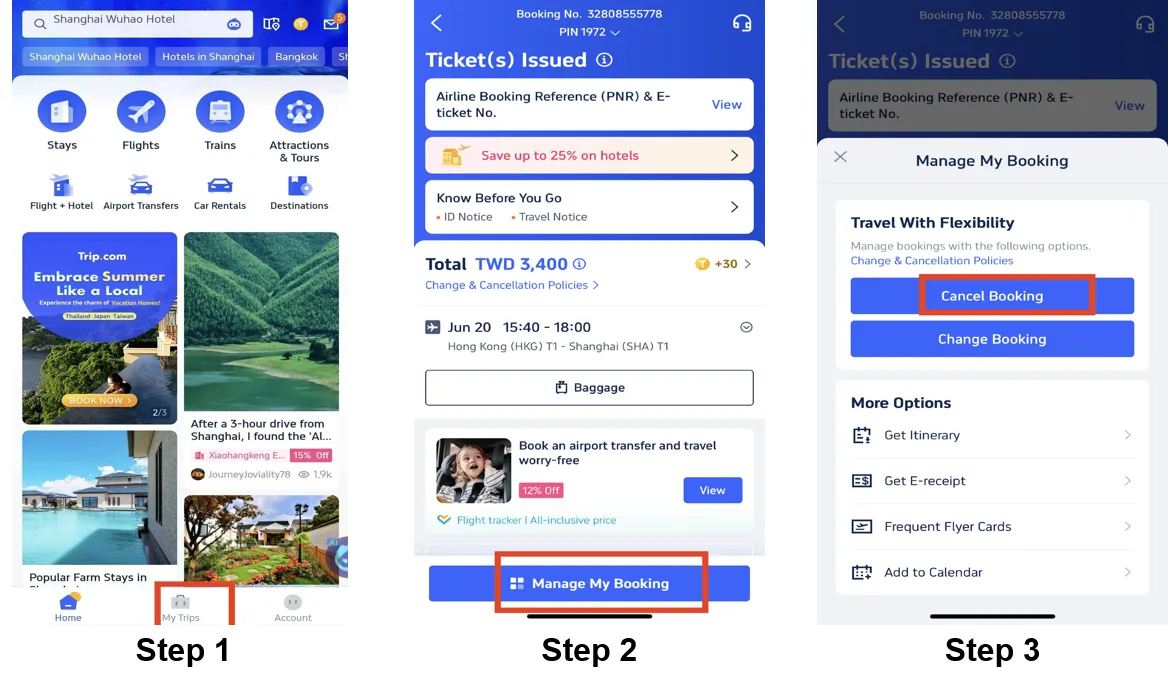
Step 1: Enter the Trip.com App to Cancel Your Flight Booking
- Log in to your Trip.com account on your mobile device.
Step 2: Find the Flight Booking
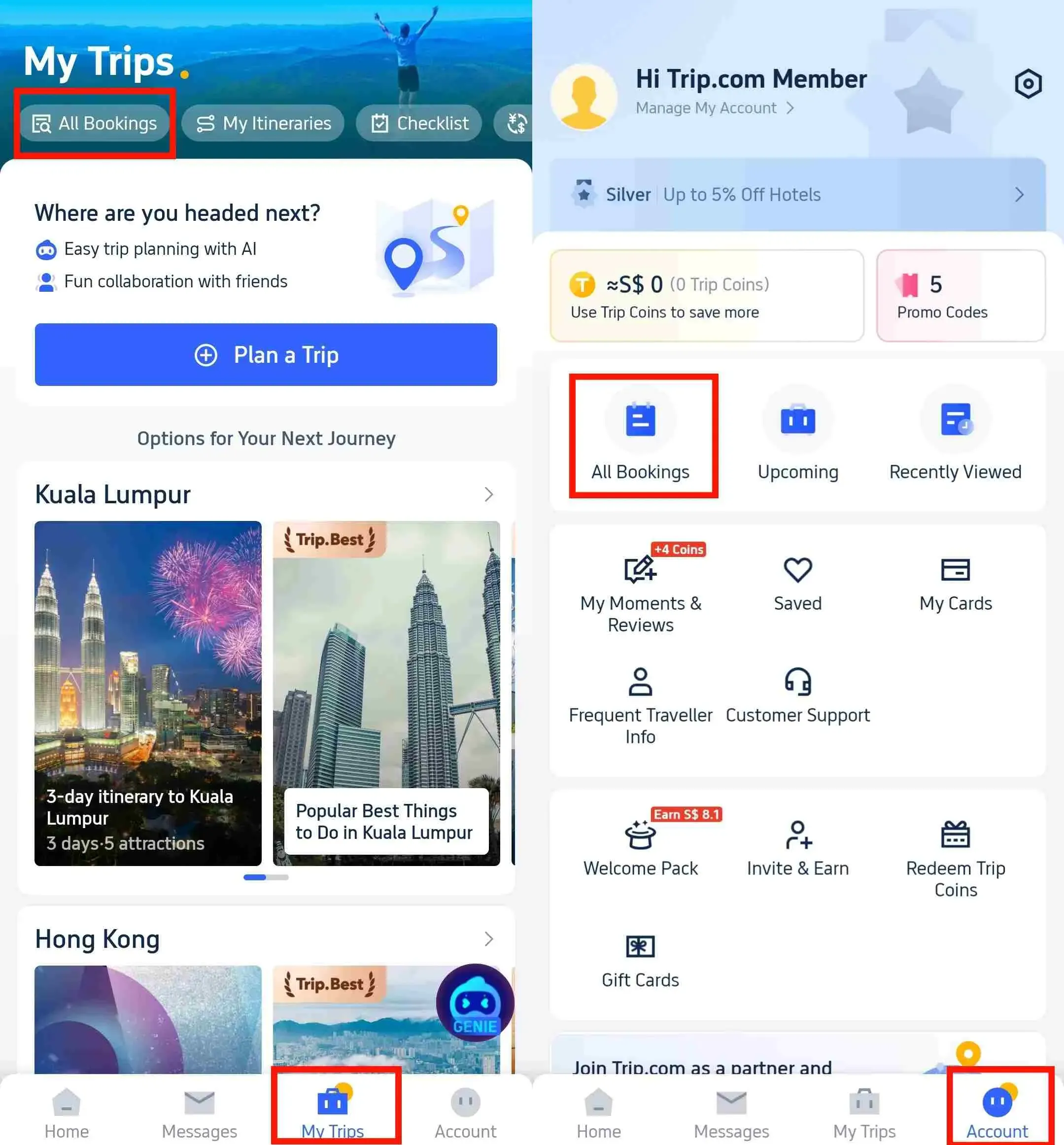
- Go to "My Trips->All Bookings" or go to “Account->All Bookings” on the Trip.com app once logged in.

Step 3: Request the Trip.com Flight Cancellation
- Click on "Manage My Booking" and tap the button "Cancel Booking" to cancel the flight booking.

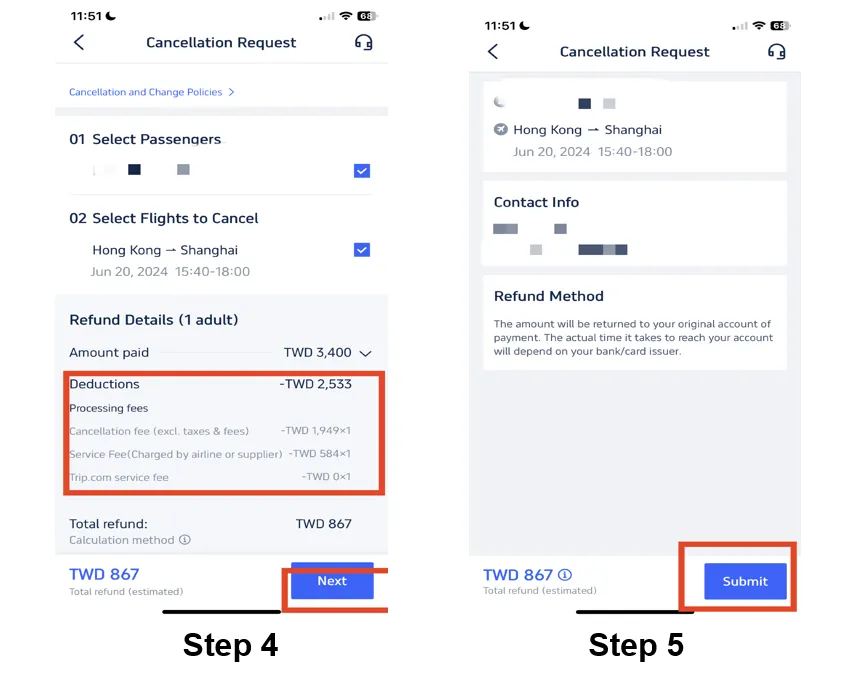
Step 4: Confirm the Trip.com Flight Cancellation
- Check out the refund detail and confirm the Processing fees that making by cancelling flights, then click on the button "Next" to enter the detail page.
Step 5: Submit the Trip.com Flight Cancellation
- Check your refund detail and refund info and tap "Submit" to complete the procedure.

Trip.com Hotel Cancellation Policy

Free Cancellation Hotels:
Many hotels booked through Trip.com provide free cancellation hotel if you cancel before a specific deadline, usually 24–48 hours before check-in. This gives travelers flexibility to adjust plans without extra costs
Non-Refundable Rooms:
Cheaper hotel rates on Trip.com often come with stricter rules. These non-refundable bookings usually cannot be changed or canceled once confirmed, meaning you’ll lose the full amount if your plans change. Always double-check the cancellation policy before choosing the lowest price.
No-Show Policy:
If you fail to show up without canceling in advance, most hotels will treat it as a no-show and charge you for the full stay. This means you won’t be able to claim a refund, even if you didn’t use the booking.
How to Get Trip.com Hotel Cancellation
Step 1: Enter the Trip.com App to Cancel the Hotel Booking
- Log in to your Trip.com account on your mobile device.
Step 2: Find the Hotel Booking
- Go to "My Trips->All Bookings" or go to “Account->All Bookings” on the Trip.com app to find your hotel booking.

Step 3: Request the Trip.com hotel refund
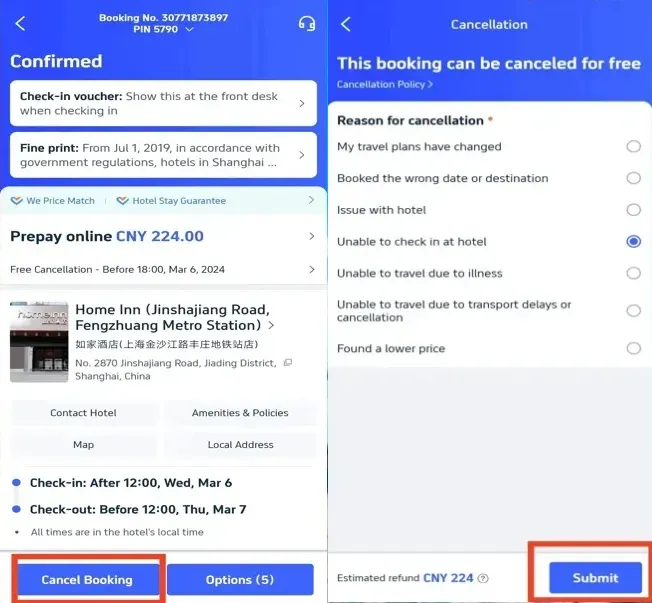
- Tap "Cancel Booking" to cancel the hotel reservation. Some hotels may have non-refundable policies, while others may offer full or partial refunds if you cancel by a certain date.
Step 4: Provide a reason for cancellation
- Give the reason why you need to cancel the hotel booking and click on the button "Submit" to confirm your cancellation.

Step 5: Confirm the Trip.com hotel refund
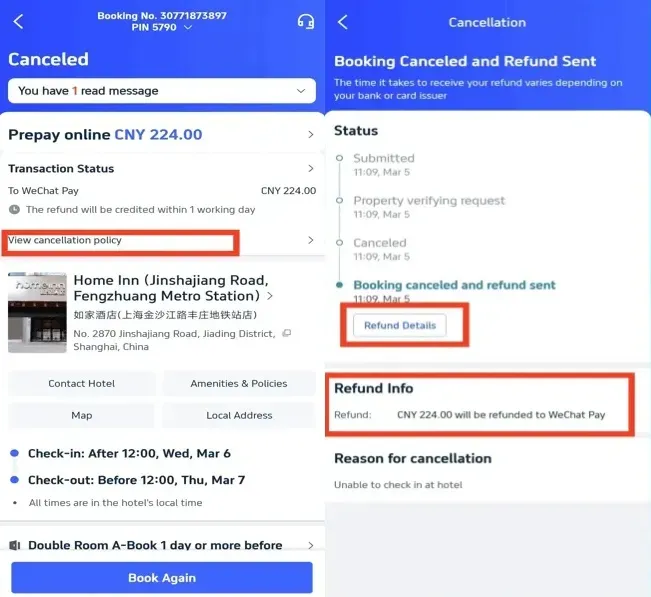
- Once you've submitted your request, click "View cancellation policy" to check the detail of your refund.
Step 6: Check your Trip.com hotel refund status
- Check your refund detail and refund info to complete the procedure.

Trip.com Train Ticket Cancellation Policy

International Train Tickets:
Refunds and changes for train tickets depend on the specific railway provider’s policy. Some may allow free cancellations or modifications within a certain time, while others charge a fee or don’t permit changes at all. Always review the terms carefully before booking to avoid unexpected costs.
Processing Time:
Refunds for train cancellations are usually processed within a short time frame, but depending on your payment method, it may take a few days before the amount appears in your account.
How to Get Trip.com Train Cancellation
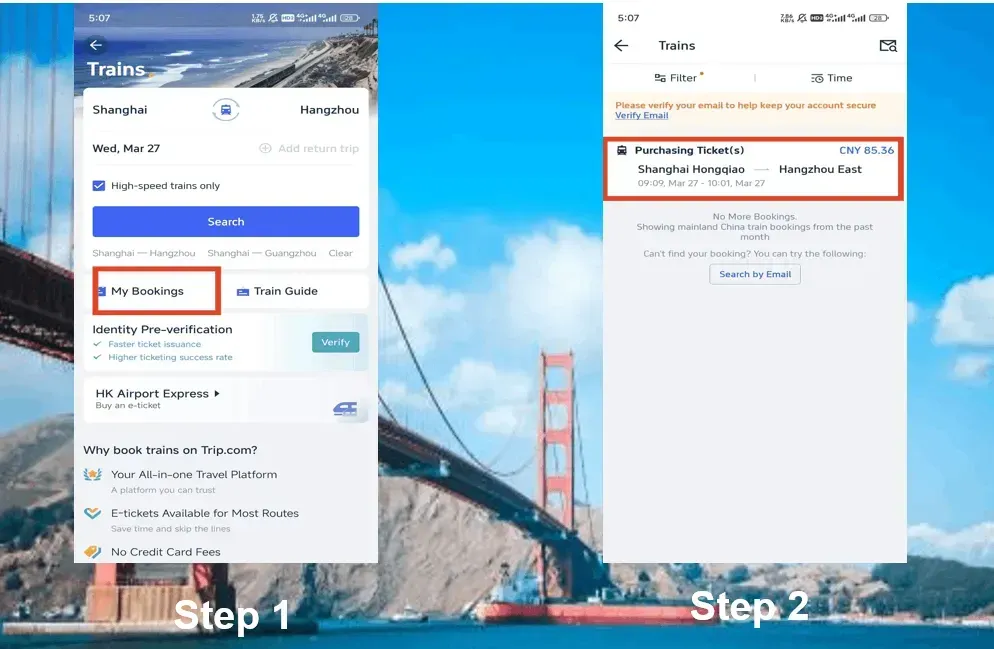
Step 1: Enter the Trip.com App to Cancel the Train Booking
- Logging in Trip.com account, click on "Train" section, then go to "My Bookings" to cancel the train booking.
Step 2: Choose the Train You Need to Cancel
- Select the China High Speed train booking you need to cancel and click on it, which will go to the booking page.

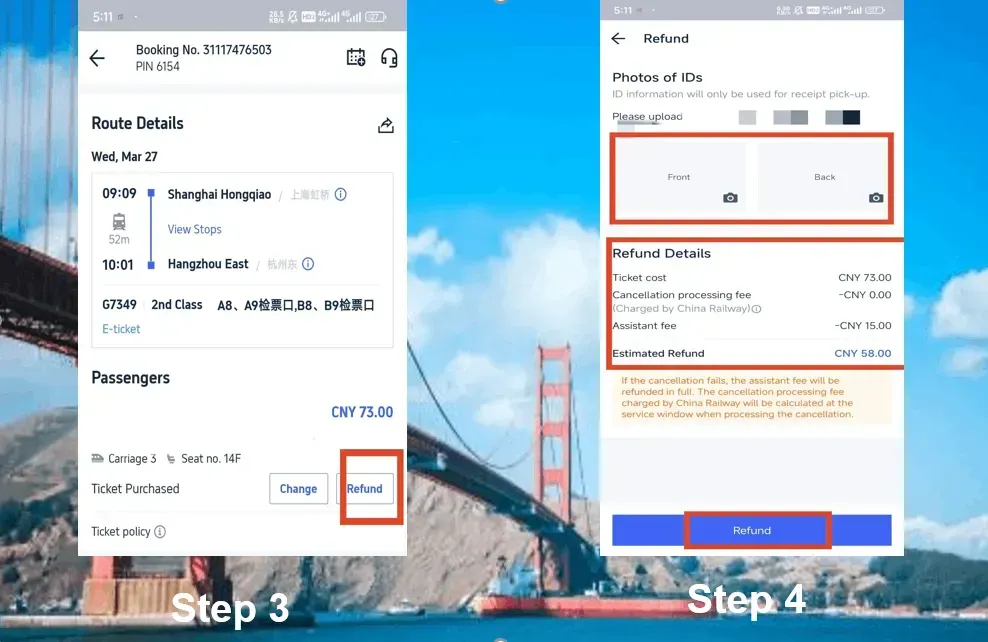
Step 3: Request Trip.com Train Cancellation
- Click on the button "Refund" to cancel the China bullet train booking. Remember it will deduct certain assistance fee for train refund.
Step 4: Complete Trip.com Train Cancellation
- Provide the front and back of your ID information and check the refund detail. Then click on the button of "Refund" to complete the procedure.

Tips to Avoid High Cancellation Fees

Check before you book:
When booking, always look for hotels with a clear ‘Free Cancellation’ tag and flights that offer flexible fares. This gives you peace of mind if your plans change, helping you avoid unnecessary fees.
Act quickly:
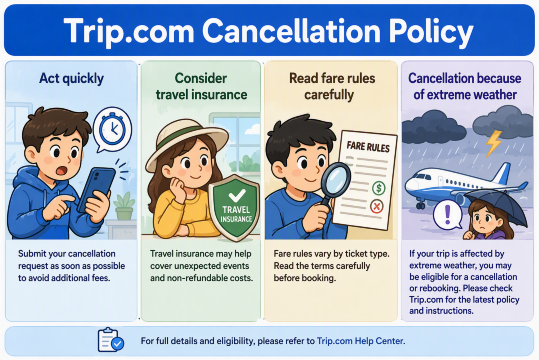
The earlier you cancel, the lower the penalty. Many airlines, hotels, and train providers charge higher fees as the travel date approaches, so acting quickly can save you money.
Consider travel insurance:
Covers unexpected cancellations due to emergencies, such as sudden illness, family emergencies, or unforeseen travel restrictions. Having this protection ensures you won’t lose the full cost of your booking.
Read fare rules carefully:
Especially for budget airlines and discounted hotels, where lower prices often come with stricter rules and little to no refund if you cancel.
Conclusion

Trip.com offers flexible options for cancellations and refunds, but the exact rules depend on airlines, hotels, and train providers. To avoid costly surprises, always check the cancellation terms before booking. If flexibility is important, choose refundable fares or free cancellation hotels, and consider travel insurance for extra peace of mind.
With this guide, you’ll be ready to handle changes with confidence and make the most of your Trip.com bookings.
Trip.com Cancellation Policy: Your Guide to Fees, Refunds & Changes
Are all Trip.com tickets refundable?
No. Refund eligibility depends on the airline, hotel, or train provider. Non-refundable tickets usually cannot be canceled.Can I change my flight instead of canceling?
Yes, many airlines allow date or time changes (fees may apply) instead of full cancellation.Should I buy travel insurance for cancellations?
Yes, travel insurance covers unexpected cancellations due to emergencies, giving you more protection than standard booking terms.