🔥Save More with Up to 5% OFF
Use our promo code to enjoy up to 5% OFF (up to S$3) on your attraction tickets, tours and eSIMs! Only for new users!


Arriving in China can be a shock for many Singaporeans, WhatsApp doesn’t work, Google Maps is blocked, and roaming charges are painfully high. That’s where the best eSIM for China comes in. It’s convenient, flexible, and great value for money, exactly what travellers need.
If you plan to use apps like Meituan (美团) for food delivery, need local private hire drivers to contact you easily, or want to register for certain Chinese services that require SMS verification, you'll want a physical local SIM card from the airport or a China Mobile (中国移动)/China Unicom (中国联通) store.
However, if you're comfortable sticking to tourist-friendly apps like Didi (滴滴出行) and using data-only connectivity for navigation and communication through WeChat, an eSIM is your perfect solution for seamless, affordable internet access.
Use our promo code to enjoy up to 5% OFF (up to S$3) on your attraction tickets, tours and eSIMs! Only for new users!
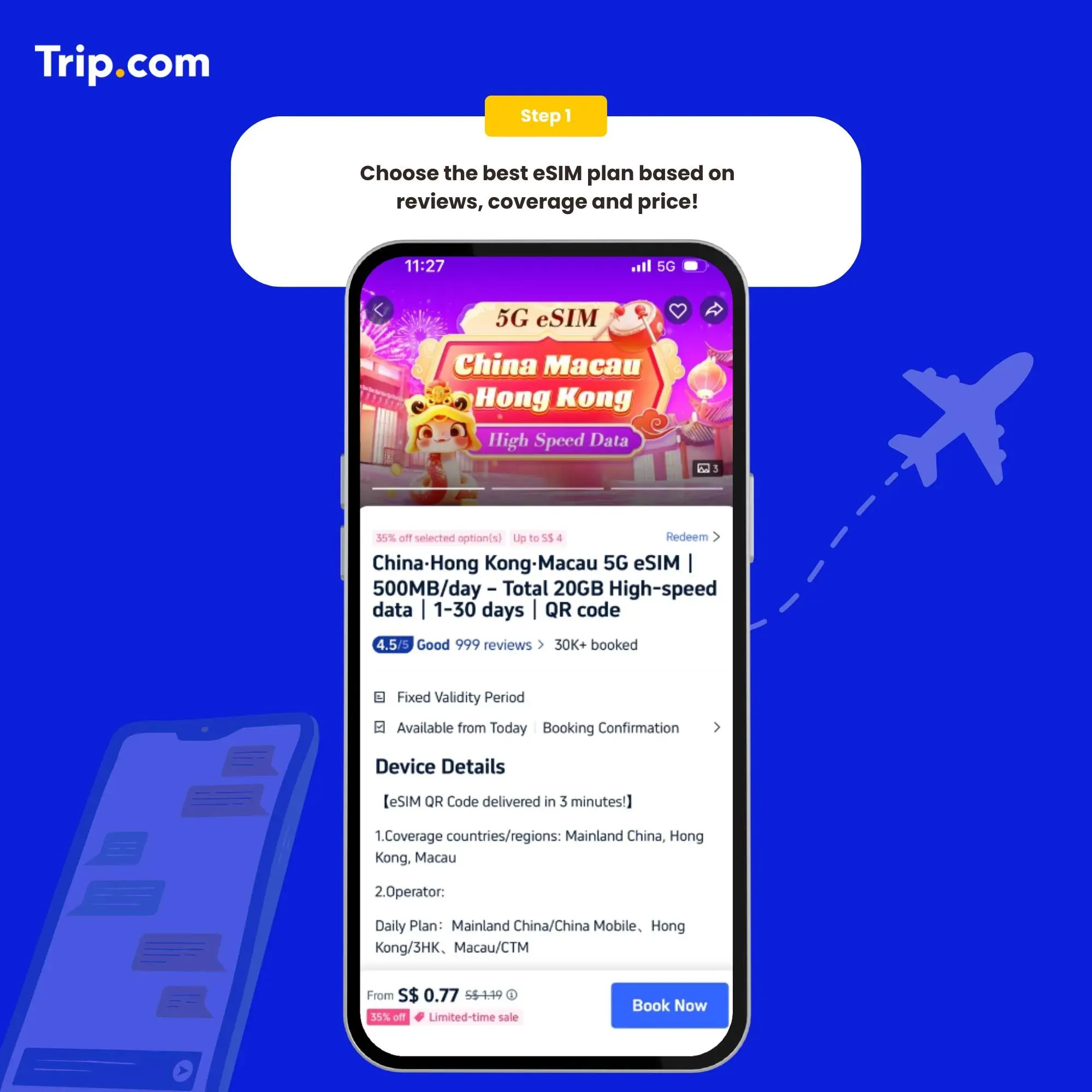
Stay connected in China without the hassle of a physical SIM or a separate VPN. Our recommended China eSIMs provide instant, high-speed 5G/4G access to Google, Instagram, and your favourite apps the moment you land. Discover the best data plans for your trip and get connected in minutes.

Provider | Plan Name / Option | Data / Validity | Price (SGD) | Avg Cost / Day | Avg Cost / GB* |
Singtel | ReadyRoam Asia | 4 GB / 30 days | S$18 | S$0.60/day | S$4.50/GB |
Singtel | hi! DataRoam (prepaid) | 1 GB / 30 days | S$10 | S$0.33/day | S$10.00/GB |
StarHub | DataTravel APAC | 1 GB / 3 days | S$6 | S$2.00/day | S$6.00/GB |
StarHub | DataTravel APAC | 2 GB / 30 days | S$16 | S$0.53/day | S$8.00/GB |
StarHub | DataTravel APAC | 3 GB / 30 days | S$20 | S$0.67/day | S$6.67/GB |
StarHub | DataTravel Global | 2 GB (+6GB bonus)/30d | S$40 | S$1.33/day | S$5.00/GB |
StarHub | DataTravel Global | 3 GB (+9GB bonus)/30d | S$50 | S$1.67/day | S$4.17/GB |
StarHub | Unlimited Daily | ~2 GB/day (FUP) | S$30/day | S$30.00/day | ~S$15.00/GB |
M1 | China Data Passport | Use local plan/30d | S$35 | S$1.17/day | Depends |
M1 | Asia Data Passport | Use local plan/30d | S$65 | S$2.17/day | Depends |
M1 | Daily Passport | 3 GB / 1 day | S$2.95–7.95 | S$2.95–7.95/day | S$0.98–2.65/GB |
M1 | Unlimited Daily | Unlimited / 1 day | S$15–25 | S$15–25/day | N/A |
VIVIFI Go | Regional China Pack | 4 GB / 14 days | S$17 | S$1.21/day | S$4.25/GB |
CMLink | China/HK Pack | 1 GB / 30 days | S$4 | S$0.13/day | S$4.00/GB |
CMLink | China/HK Pack | 4 GB / 30 days | S$16 | S$0.53/day | S$4.00/GB |
CMLink | China/HK Pack | 6 GB / 30 days | S$24 | S$0.80/day | S$4.00/GB |
MyRepublic | Asia II & US | 1 GB / 7 days | S$8.90 | S$1.27/day | S$8.90/GB |
Circles.Life | SuperRoam Global | 2 GB / 30 days | S$12 | S$0.40/day | S$6.00/GB |
gigaRoam APAC | APAC eSIM | 1 GB / 5 days | S$5 | S$1.00/day | S$5.00/GB |

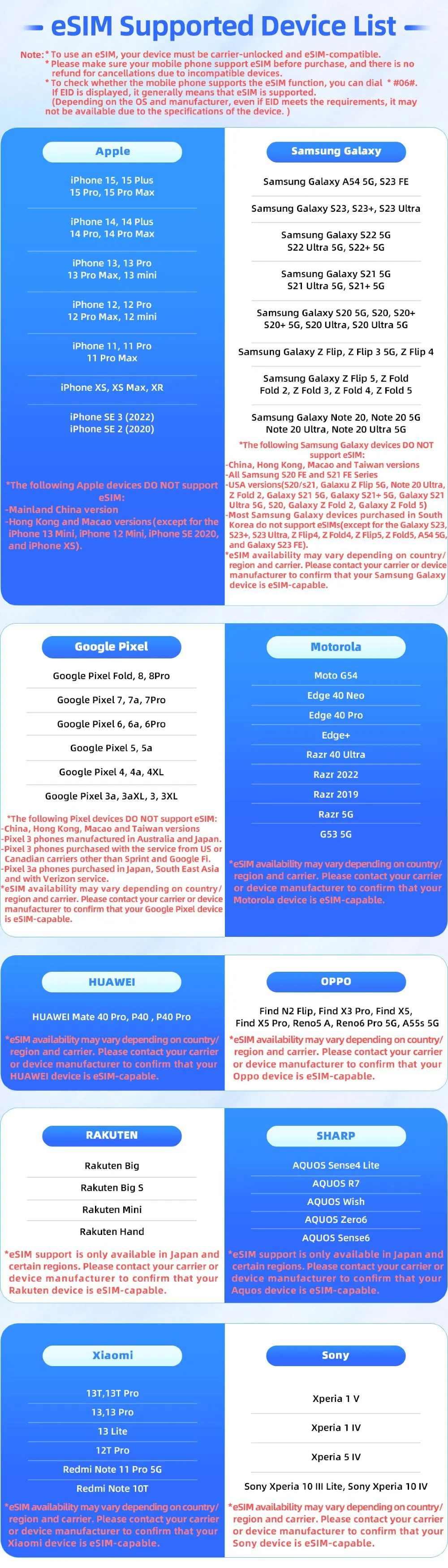
Mobile phones vary from country to country. Please make sure your mobile phone supports eSIM before purchasing. This ensures a seamless experience when activating and managing your eSIM, allowing you to enjoy the benefits without any compatibility issues.
Check the compatible models below. 👇
You’ll receive the eSIM activation email and a QR code with installation instructions. You must have a network to install eSIM. Please ensure that there is available WiFi or mobile data before installation.
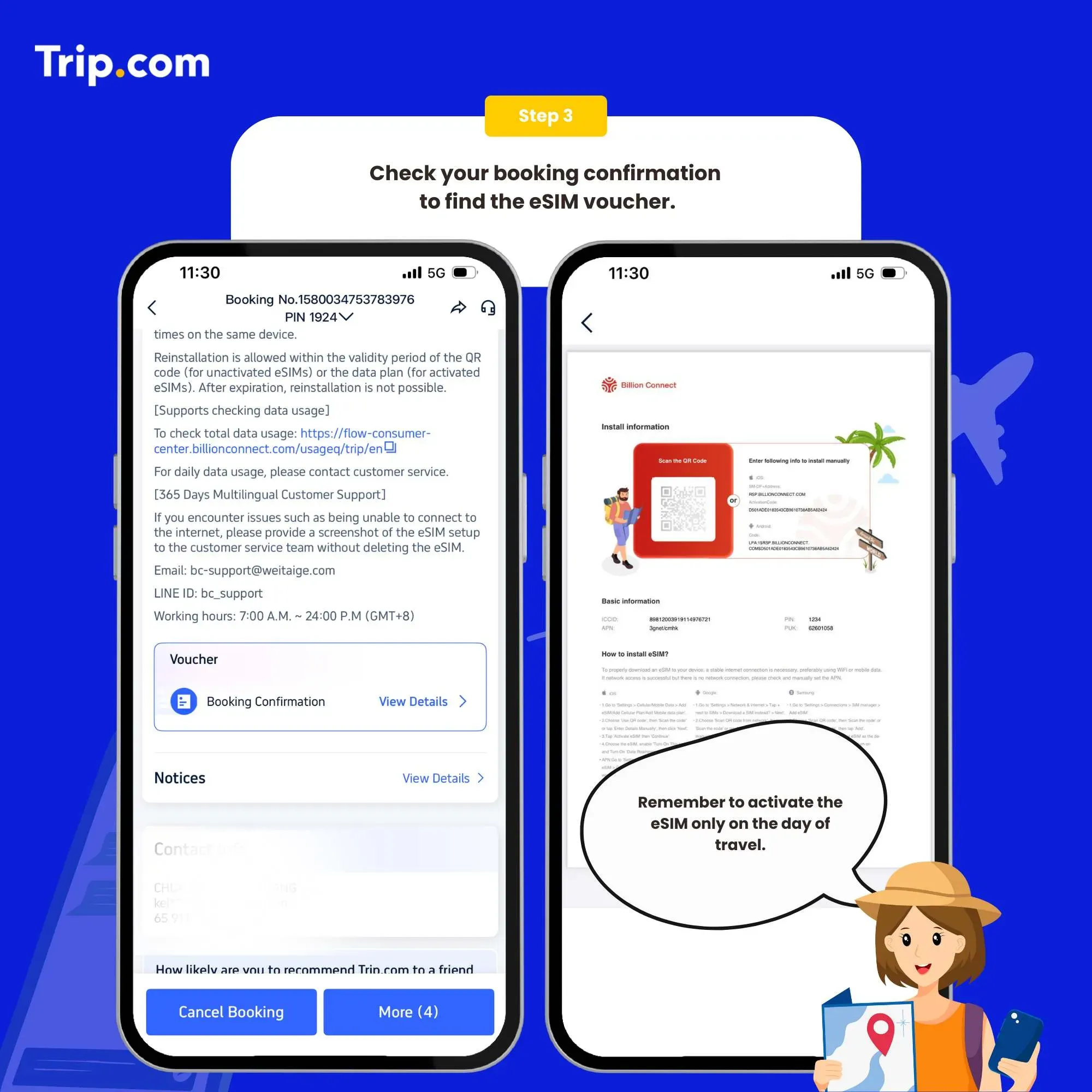
Set as the instructions: System - Settings - Cellular (iOS) / SIM Card Management (Andriod) - add a Cellular Plan (iOS) / SIM Card (Android) - agree to download Cellular Plan (iOS) or SIM Card (Android), and then scan the QR code for activation (or enter SM-DP +Address and Activation Code manually).
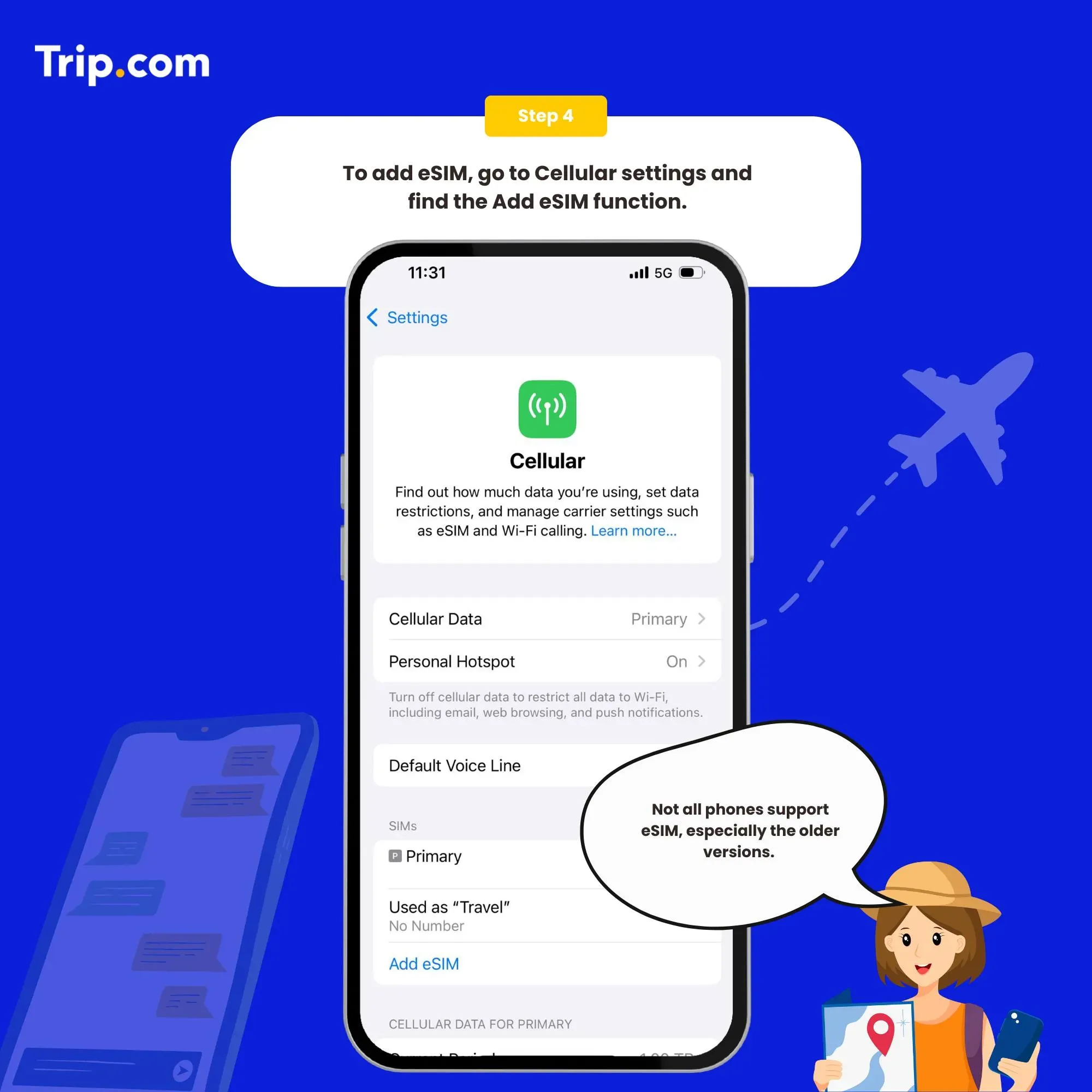
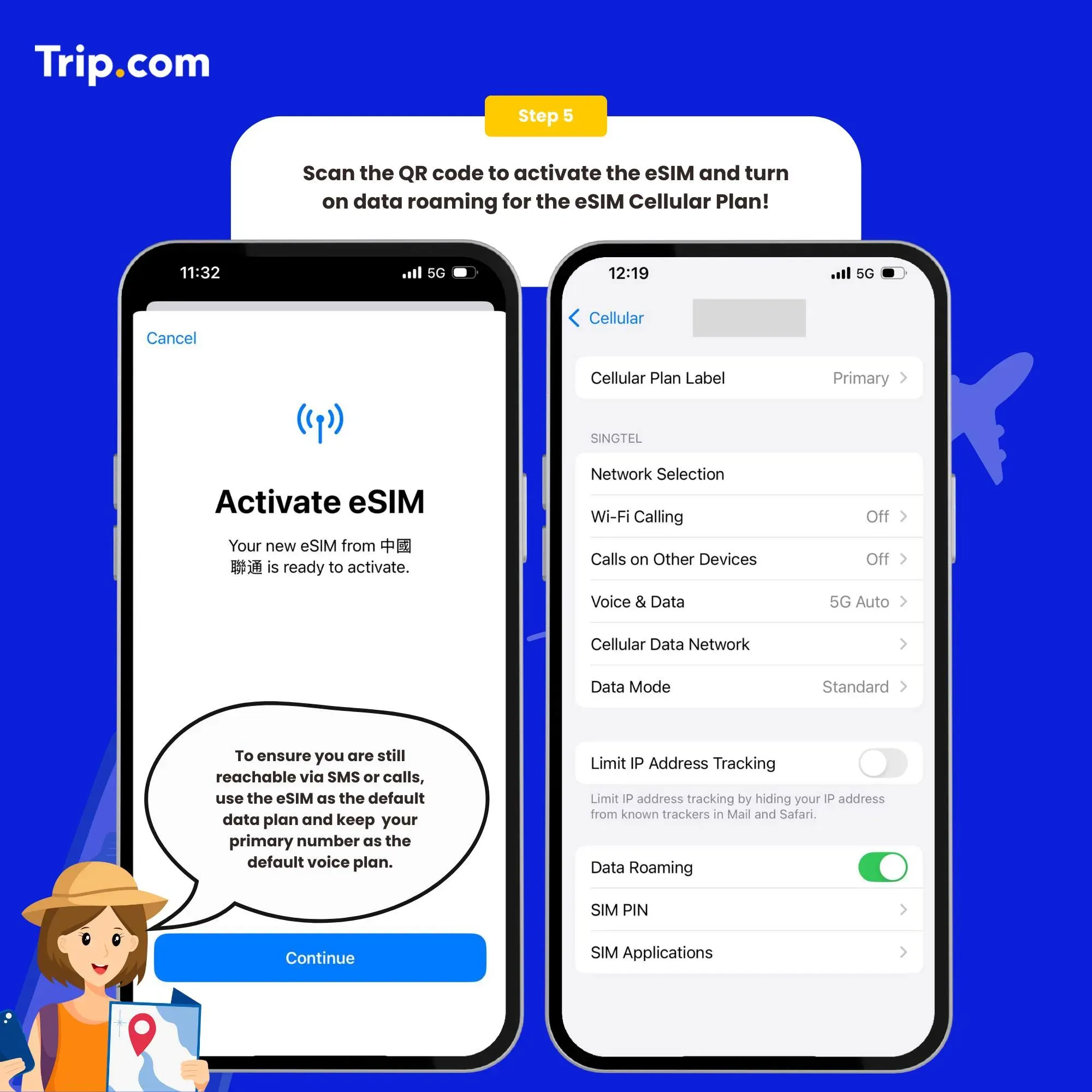
Open the open Cellular (iOS) or SIM Card Management (Android), and click to turn off the Cellular Plan (iOS) or SIM Card (Android) (the steps of enabling and disabling are the same).
You can now connect to the Internet and enjoy the convenience of eSIM as per your selected plan.
Buy China eSIM Now
Most travellers overestimate their data needs. Here's a realistic breakdown for a typical China trip:
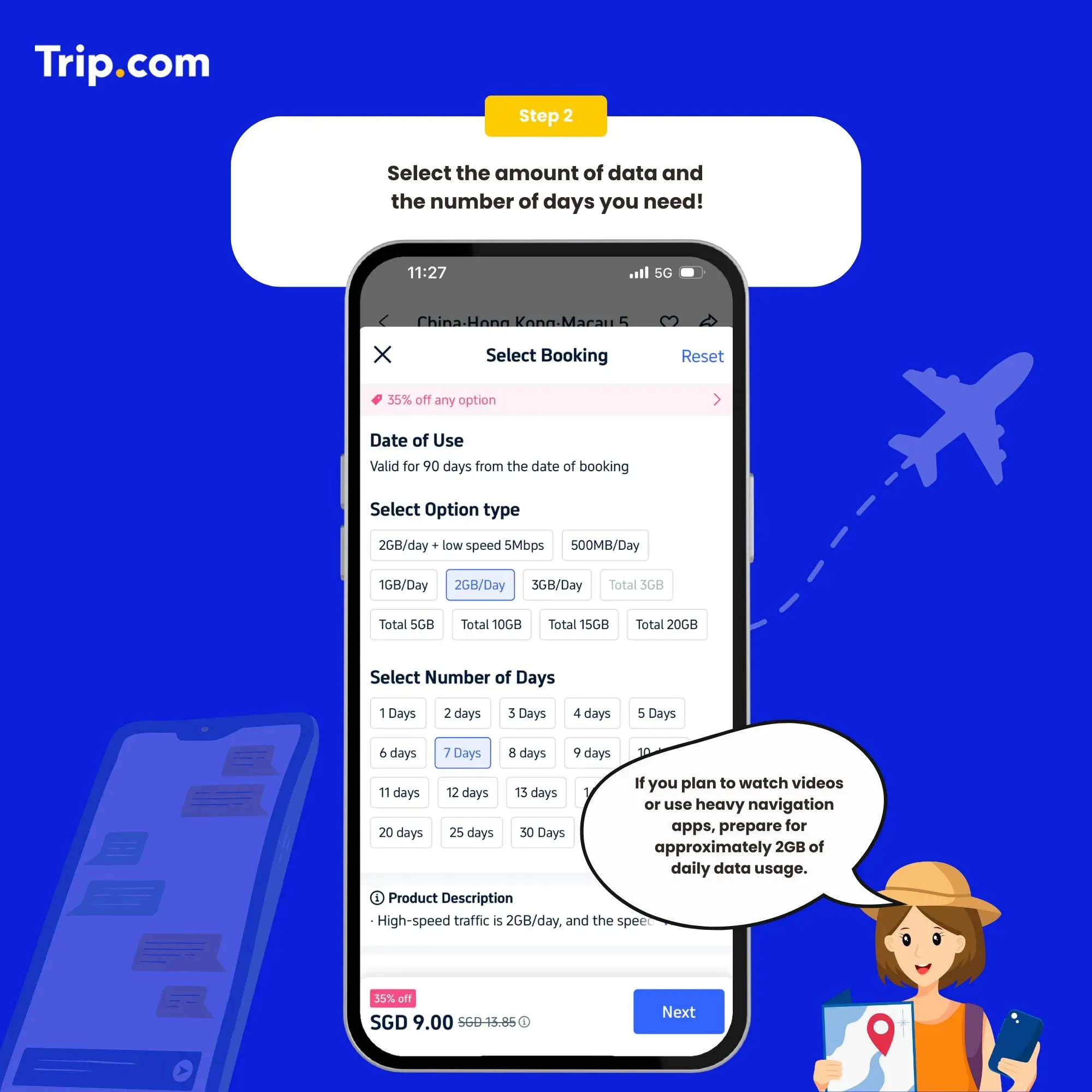
👍Pro Tip: The safest choice is to get a 2GB/day or 3GB/day plan. Also, avoid timing your plan to end exactly on the day you fly home. Extend it one extra day to stay connected at the airport before departure.
Discover the world with Trip.com! Book cheap flights to destinations worldwide and enjoy S$5 off flight bookings over S$150 or S$20 off over S$450 (before tax). Start your journey today!
Most tourist eSIMs from Trip.com already work for accessing international services when you're on mobile data. However, hotel WiFi in China usually requires a VPN if you want to use Google, WhatsApp, or Instagram. Our recommendation: Get a reliable eSIM first (like Trip.com's plans), then add a VPN app if you need consistent access to blocked services.
You can find the comparison below to gain a comprehensive understanding of eSIM, SIM and WIFI to make informed decisions about which option best suits your needs!
Feature | eSIM | SIM | WIFI |
Physical Presence | No physical card required, embedded in device | Physical card required | No physical card required, requires access point and equipment |
Operator Switching | Easily switch between operators without changing physical SIM | Switching requires physically replacing SIM card | Relies on available Wi-Fi networks and different operators |
Security | Robust security features, such as encryption and remote management capabilities | Relatively secure, but susceptible to physical theft or loss | Security varies depending on the network and encryption protocols used |
Availability | Increasing availability, supported by many modern devices | Widely available for GSM and LTE networks | Widely available in urban areas, may be limited in rural or remote areas |
Having the right apps for China travel can make all the difference. With restrictions on apps like Google Maps and WhatsApp, local apps become essential for navigation, communication, and services. Additionally, China payment methods, like Alipay and WeChat Pay, might feel unfamiliar to Singaporean travelers.
Category | Recommended Apps |
Payment apps | Alipay, WeChat Pay |
Transport apps | Didi, Baidu Maps, China Railway 12306 |
Map/navigation apps | Baidu Maps, Gaode Maps |
Translation apps | Baidu Translate |
Food delivery/discovery | Meituan, Ele.me, Dianping |
Attraction booking | Trip.com |
Train booking | Trip.com |
Communication apps | WeChat, QQ |
Other useful local apps | Taobao, JD.com |
Discover the world with Trip.com! Book the perfect hotel anywhere in the world and get an unbeatable 10% discount if you're a first-time user! Download our app now and start planning your next trip with ease.
Trip.com is a one-stop travel service provider with a huge selection of hotels, flights, and attractions across the globe.
Here on Trip.com, you can have multiple plans for your needs, including data package, validity period, quantity and more. What you can choose is flexible and customisable!
Users’ voice is our voice. Check what people who used Trip.com's China eSIM say.
"Esim was great! Easy to configure and good reception everywhere I went in China!"
"Purchased esim or internet service from Trip.com. got very excellent service."
"It was available immediately if you roamed on, very convenient."
"Very easy to use! Use again!"
Trip.com always prioritises your satisfaction and responds to any queries or concerns promptly. Whether you have questions about activation, plan options, or troubleshooting, count on us for reliable support that puts your needs first.
 2081786 booked