Best China Taxi Apps & How to Use Ride-Hailing Apps for Foreigners


Ever tried hailing a taxi in China and ended up waving your hand for ages, not sure if the driver will stop or understand where you want to go? It can be stressful, especially if you don’t speak Chinese.
That’s why using taxi apps in China is a game-changer. They let you book a ride in just a few taps, show your route clearly, and pay easily without worrying about cash or explaining your destination.
I’ll walk you through the best taxi apps to use in China, how to set them up, and how to book a ride like a pro. So you can get around easily and enjoy your trip more.
Top China Taxi Apps to Use

China’s taxi apps can be confusing at first, but choosing the right one can save you time and money. Here’s a simple comparison of the main apps you should know about before your trip:
App | Main Features | Best For | Notes |
DiDi | Private cars, taxis, shared rides, upfront fare estimates | Most cities, reliable everyday use | Most popular and user-friendly |
Gaode (AutoNavi) | Map & navigation + taxi booking | Combining navigation with booking | Great if you use Gaode maps |
Meituan | Ride-hailing, promos, food delivery combo | Alternative rides, promo seekers | Useful in big cities, less coverage outside |
China Taxi App: DiDi

What Is DiDi?
DiDi Chuxing is the most popular ride-hailing app in China. It's kind of like China’s Uber. It lets you book taxis, private cars, and shared rides in almost every city. DiDi shows you the estimated fare before you book, so there are no surprises. It supports multiple payment methods, which makes paying easier.
Whether you need a quick ride from the airport, a taxi for sightseeing, or a private car for comfort, DiDi is the go-to app. It’s reliable, user-friendly, and often offers helpful features like driver ratings and route tracking to keep your trip smooth.
How to Download and Set Up DiDi in China?
1. Download the App
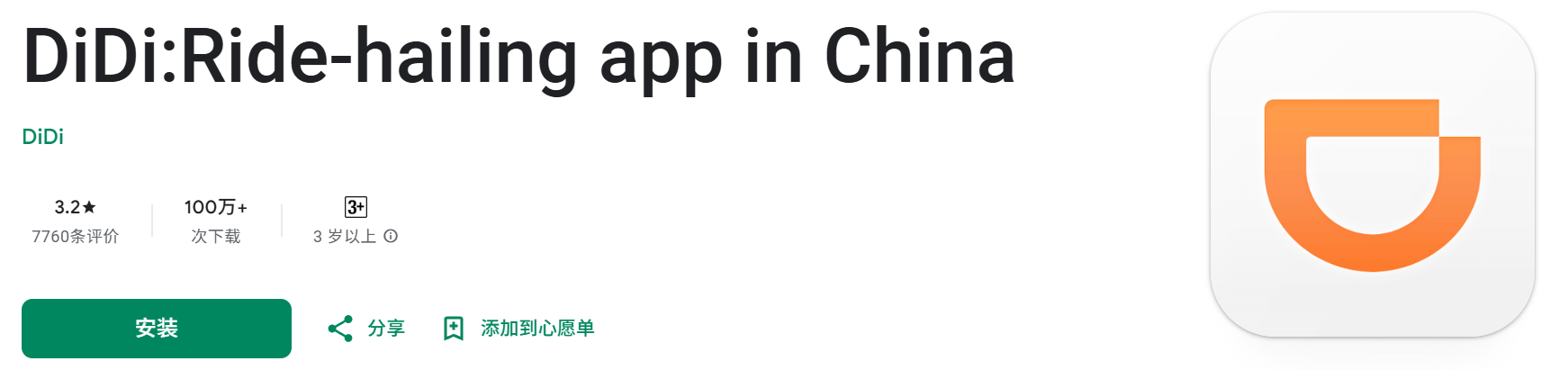
On iPhone: If your App Store isn’t set to China, you might need to switch regions to find DiDi. Search for “DiDi” or “滴滴出行” and download it.
On Android: You can download DiDi from the Google Play Store, or directly from DiDi’s official website or trusted Chinese app stores.
2. Language Settings
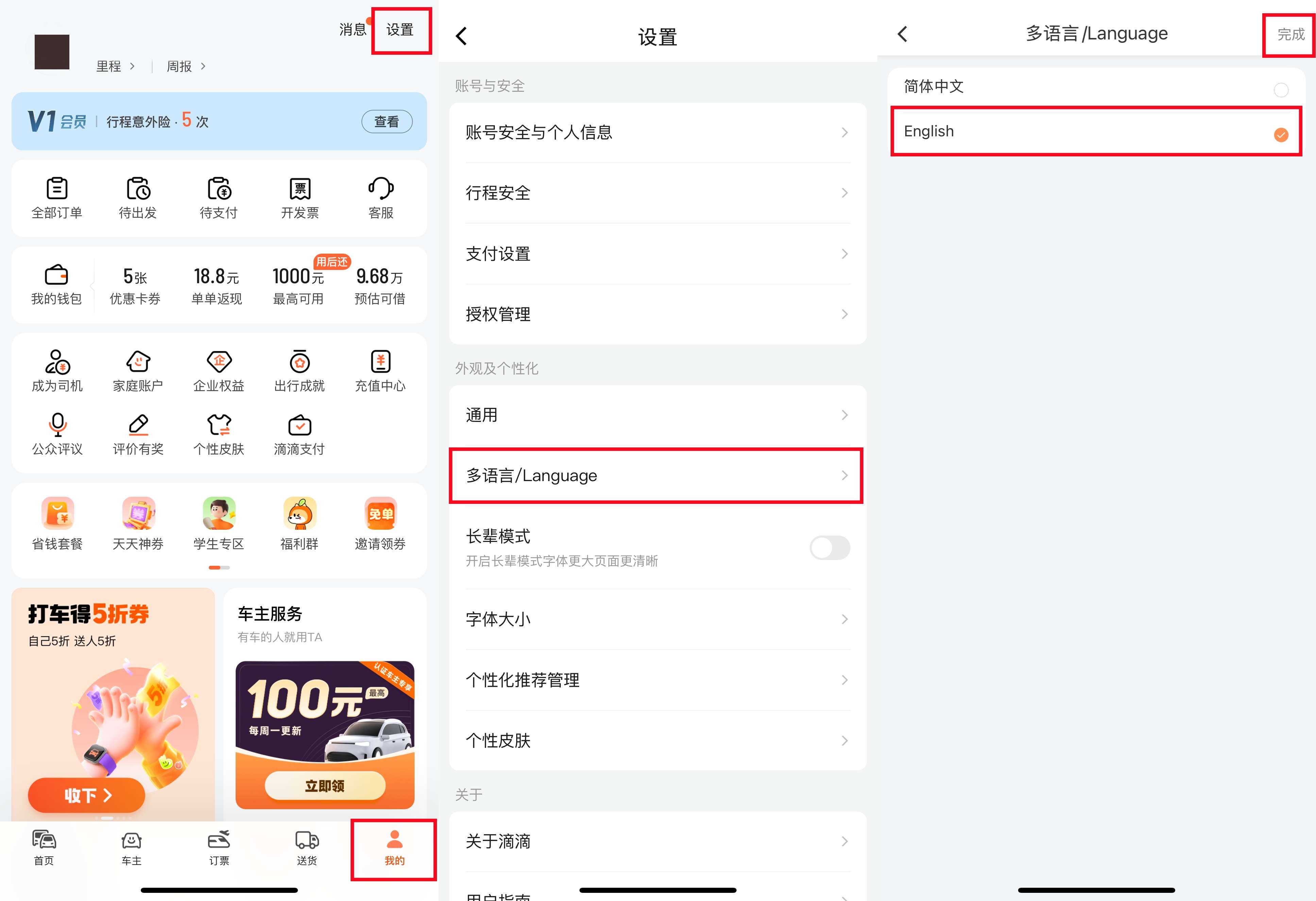
DiDi offers an English interface, so you can switch the app language easily in the settings. Go to "我的"-“设置”-“多语言/Language”. Choose English and click "完成".
3. Create an Account
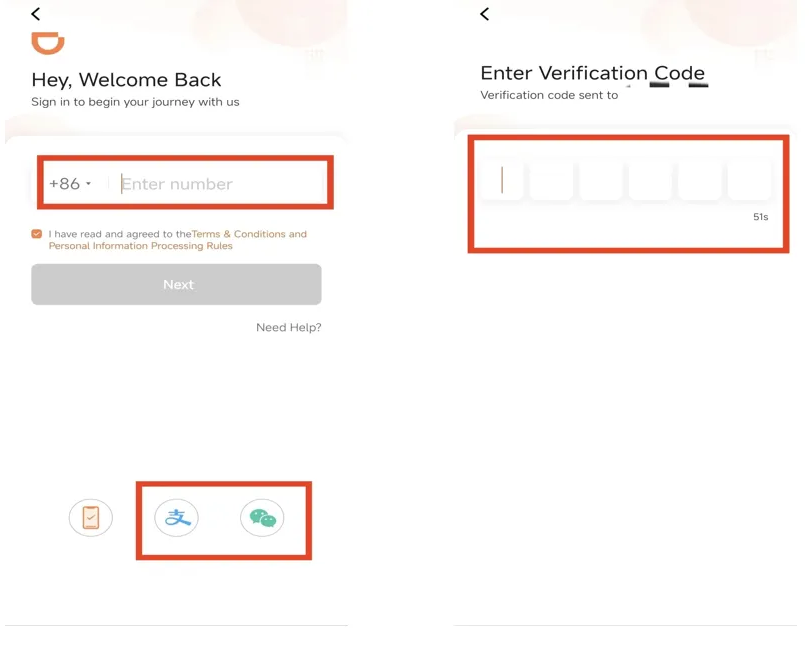
You’ll need to sign up with your phone number. Many travellers use their international number and receive an SMS verification code. Or you can log in using WeChat or Apple ID if available.
4. Add Payment Method
DiDi accepts WeChat Pay, Alipay, and sometimes international credit cards. Linking WeChat Pay, Alipay, Credit/Debit Card, PayPal, Apple Pay and Google Pay
Make sure your wallet in those apps has some balance or is linked to your card.
Book Flights to China Now


How to Book a Ride on DiDi?
1. Launch DiDi App
Launch the app and make sure your location is turned on.
2. Set Your Pickup Location
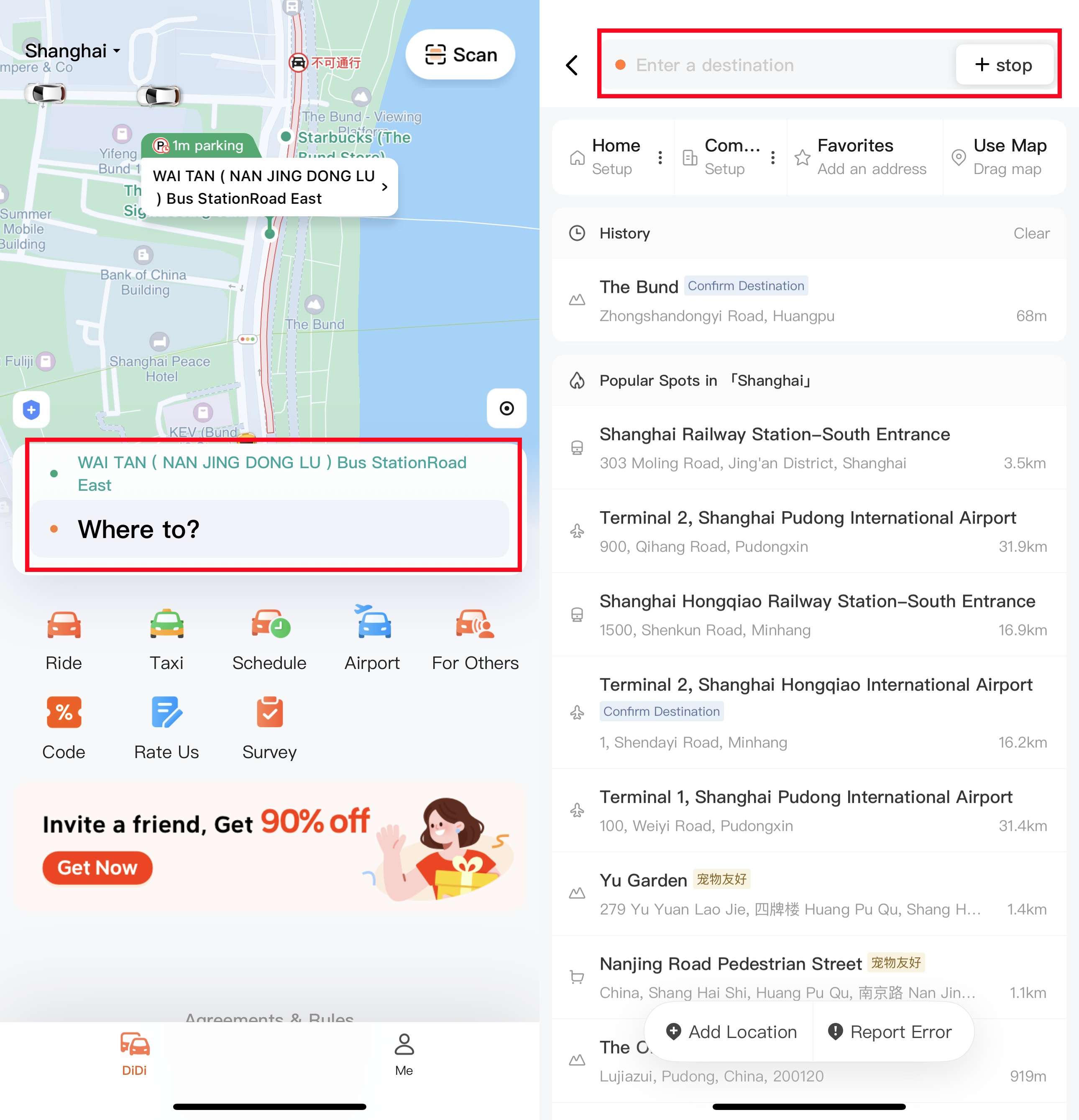
DiDi will usually detect your current spot automatically. If not, type in your hotel or wherever you want to be picked up.
3. Enter Your Destination
Type the address or name of the place you want to go. If you don’t speak Chinese, copy-pasting the address in Chinese works best.
4. Choose Your Ride Type
You can pick from taxis, private cars, economy rides, luxury rides or even shared rides. DiDi will show the estimated fare and wait time for each option.
5. Track Your Driver
You can watch your driver’s route on the map and get updates on their arrival. When the driver arrives, verify their identity by checking the information provided in the app.
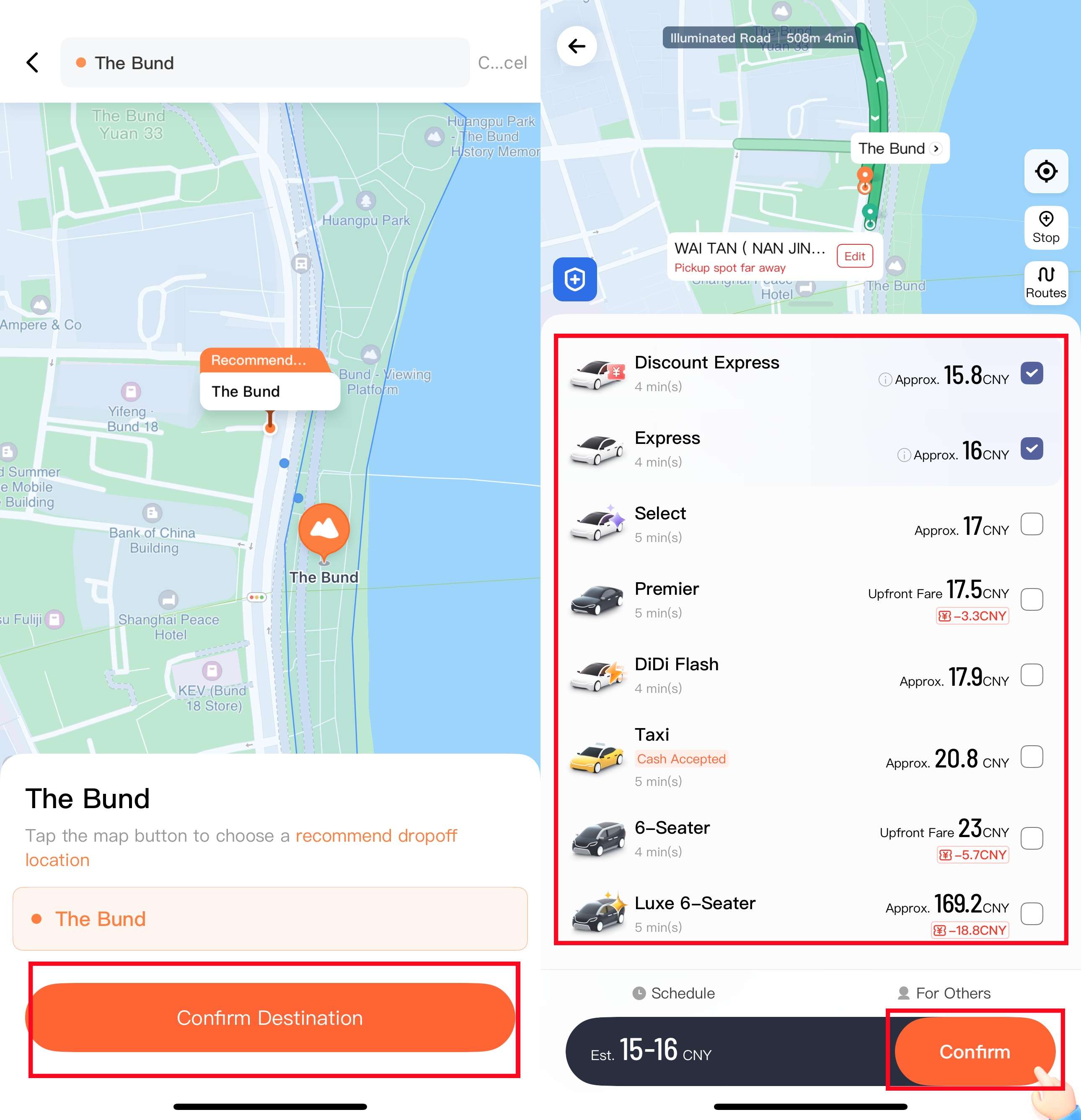
6. Confirm and Pay
After you reach the destination, payment is usually automatic.
China Taxi App: Gaode

What Is Gaode (AutoNavi)?
Gaode, also known as AutoNavi. It's the leading map and navigation app in China. It gives you accurate directions and lets you book taxis directly through the app.
It’s widely used by locals for daily travel and works well in most Chinese cities. If you’re already using Gaode for navigation, its taxi booking feature can help avoid confusion when telling drivers where to go.
Unlike standalone ride apps, Gaode integrates maps and rides seamlessly, making it a useful choice for travellers who want navigation and booking combined.
How to Download and Set Up Gaode (AutoNavi) in China?
1. Download the App
For iPhone users: Switch your App Store region to China if needed, then search for “高德地图” or “Gaode” or "AMAP".
For Android users: Download from the Google Play Store or Chinese app stores, or directly from Gaode’s official website.

2. Register or Log In
Gaode is mainly in Chinese, but the interface is quite visual and intuitive. You can use your phone’s built-in translator to help if you’re not confident with Chinese.
You can use Gaode without registering for basic map functions. But to book taxis, you’ll need to create an account with your phone number, which can be an international number. Verify via SMS code.
4. Set Up Payment
Gaode connects to popular payment methods like WeChat Pay and Alipay. Link your preferred payment method to pay for rides easily.
Book Hotels in China Now
 NO.1
NO.1





















How to Book a Ride on Gaode (AutoNavi)?
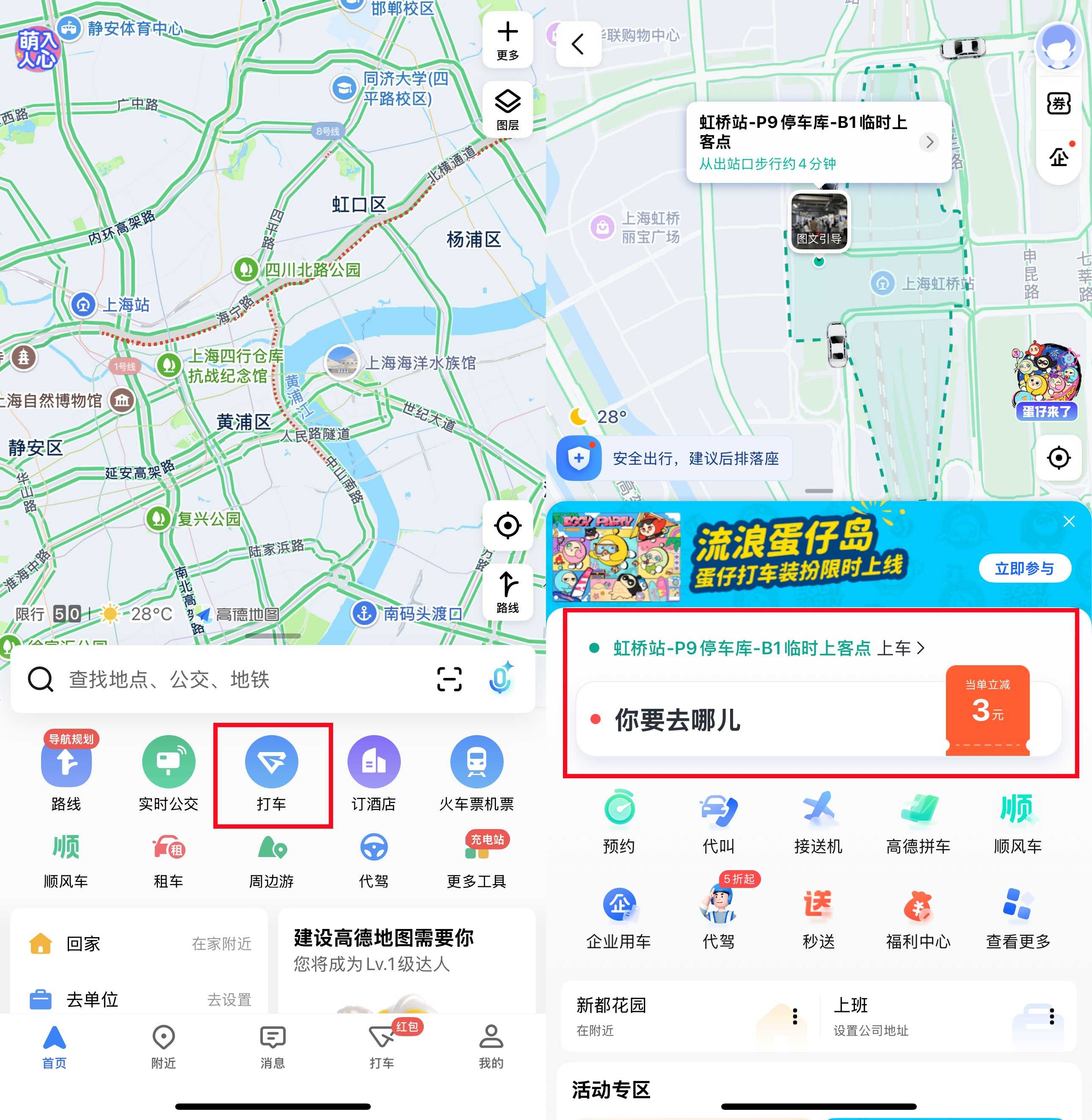
1. Launch the App and Select the Ride Hailing
Launch the app and make sure location services are on. Tap the ride-hailing icon.
2. Choose Your Route
Gaode will usually detect your current location automatically. You can also enter your pickup spot manually. Type in the address or name of where you want to go.
3. Choose Your Car Type
Choose the type of ride you want, such as a standard taxi or private car. The app will show you estimated fare and wait time.
4. Track Your Driver
Watch your driver’s location on the map and get notified when they arrive. You can check their license plate number to make sure you get on the right one.
When the driver arrives, verify their identity by checking the information provided in the app.
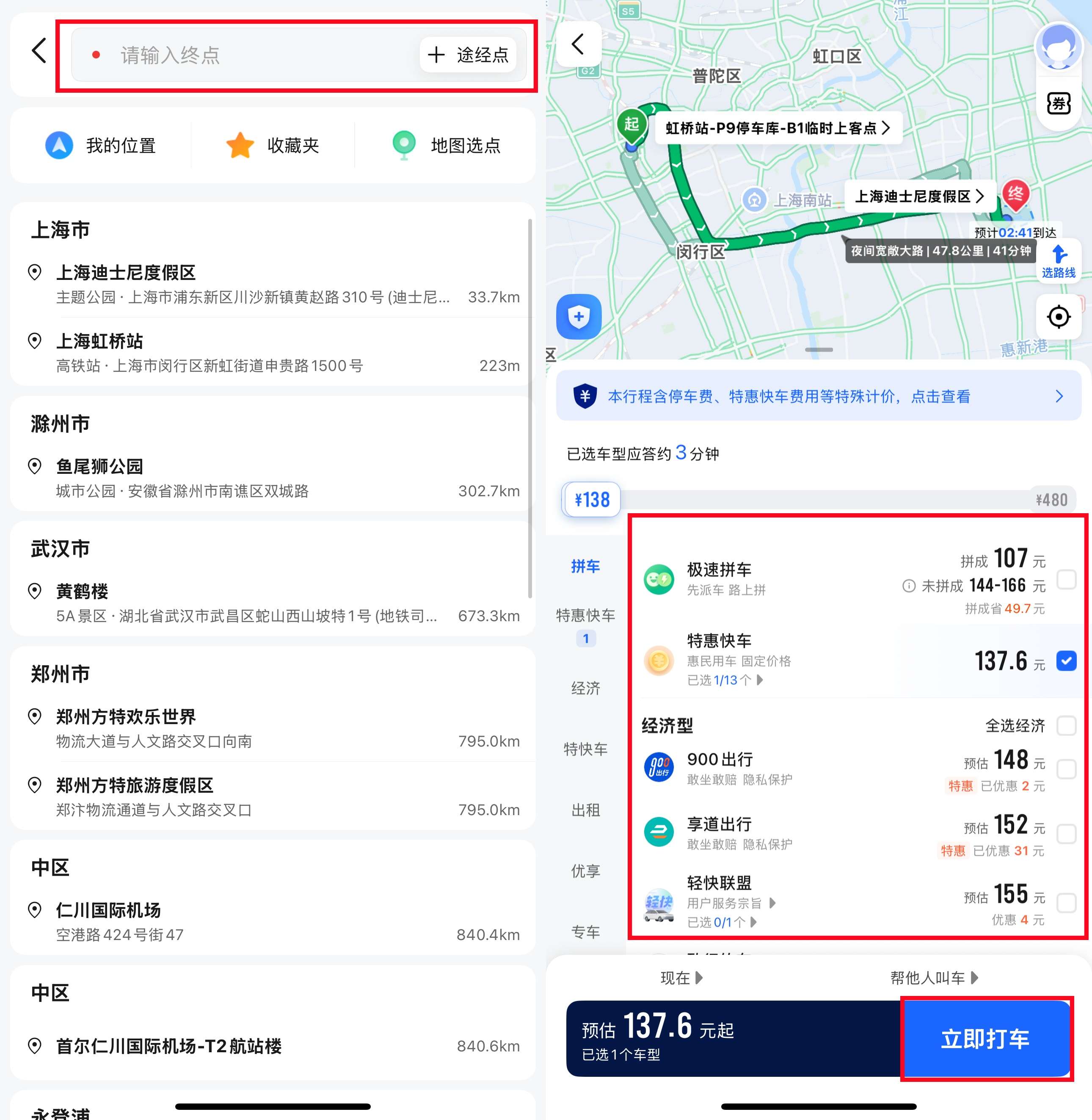
5. Pay
Review the details and tap to pay. Payment is usually handled automatically linked to your account.
China Taxi App: Meituan

What Is Meituan?
Meituan is a popular all-in-one app in China that started with food delivery but now offers a range of services. While it’s best known for ordering meals and great dining deals, Meituan’s ride-hailing is growing in many cities.
If you’re already using Meituan for food or local deals, it’s easy to switch over to book a taxi or private car without downloading another app. It’s especially useful when DiDi has long wait times or when you want to try different offers.
How to Download and Set Up Meituan in China?
1. Find the App
On iPhone: Change your App Store region to China (if needed), then search “美团” or “Meituan.”
On Android: Use the multi‑region Play Store or download from a Chinese app store (e.g. Huawei, Xiaomi). You may also use APK sites. Just be sure it’s a reputable source.

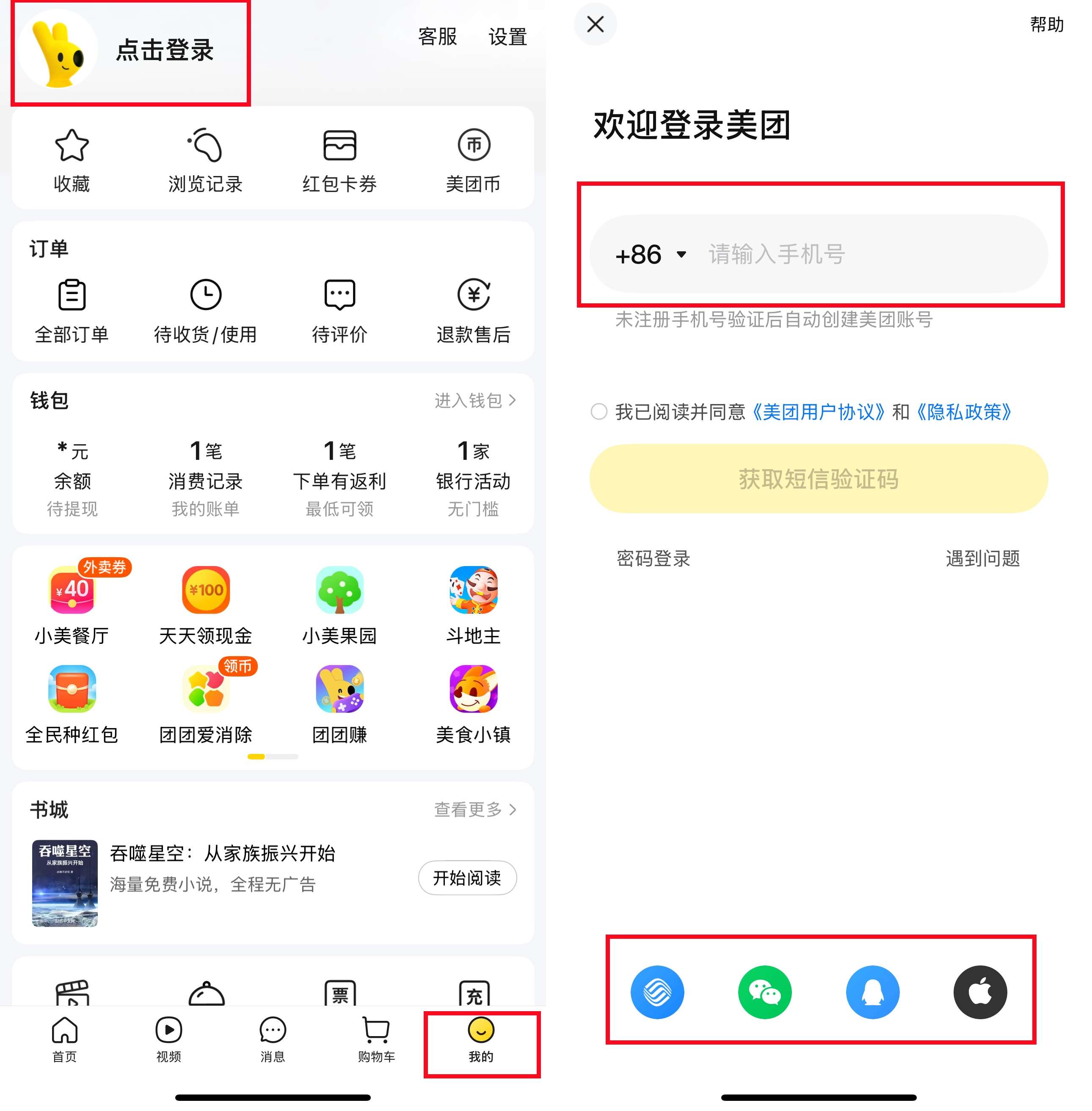
2. Create an Account
You’ll need a phone number to register. Many users sign up with their overseas number and receive a verification SMS. If you already have one for data or SIM, you can use that too.
3. Link a Payment Method
Meituan works with WeChat Pay or Alipay. Both of the payment methods support foreign credit cards or China-issued cards. You’ll need to top up your wallet or link your card in those apps first. Once linked, payments in Meituan are seamless.
Buy China eSIM Now



How to Book a Ride on Meituan?
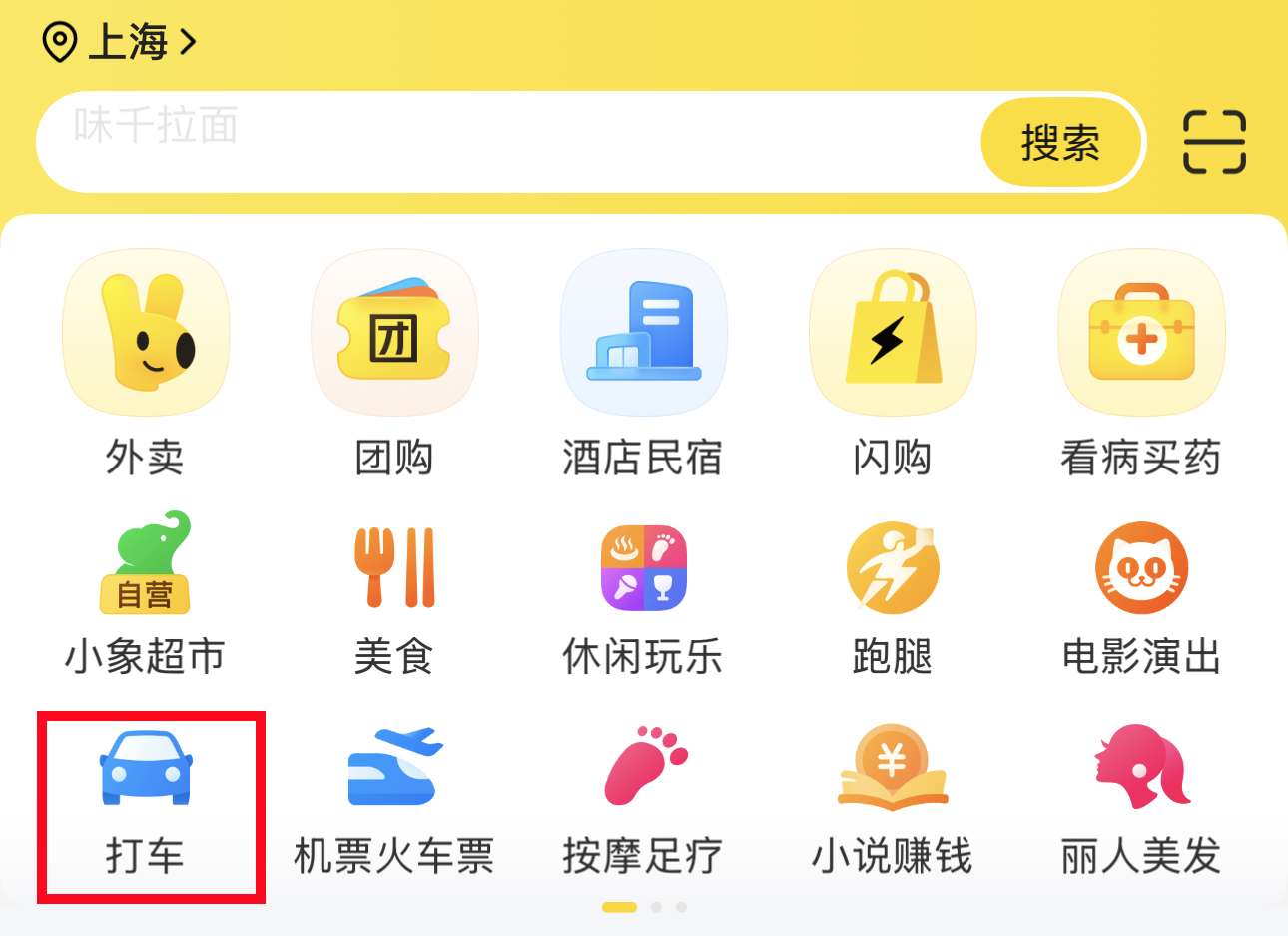
1. Find the Ride-Hailing Section
Find the ride-hailing section (a car icon).
Note: Meituan ride-hailing is not available in all cities, but works well in many major cities.
2. Set Your Pick-Up Location and Destination
The app will auto-locate you, or you can pin your location on the map. Type in your destination in Chinese or copy-paste the address from Google Maps.
3. Choose Your Car Type
Options include standard, comfort, or larger cars if you have luggage. You’ll see the estimated cost and how long it will take for a driver to arrive. Tap to confirm.
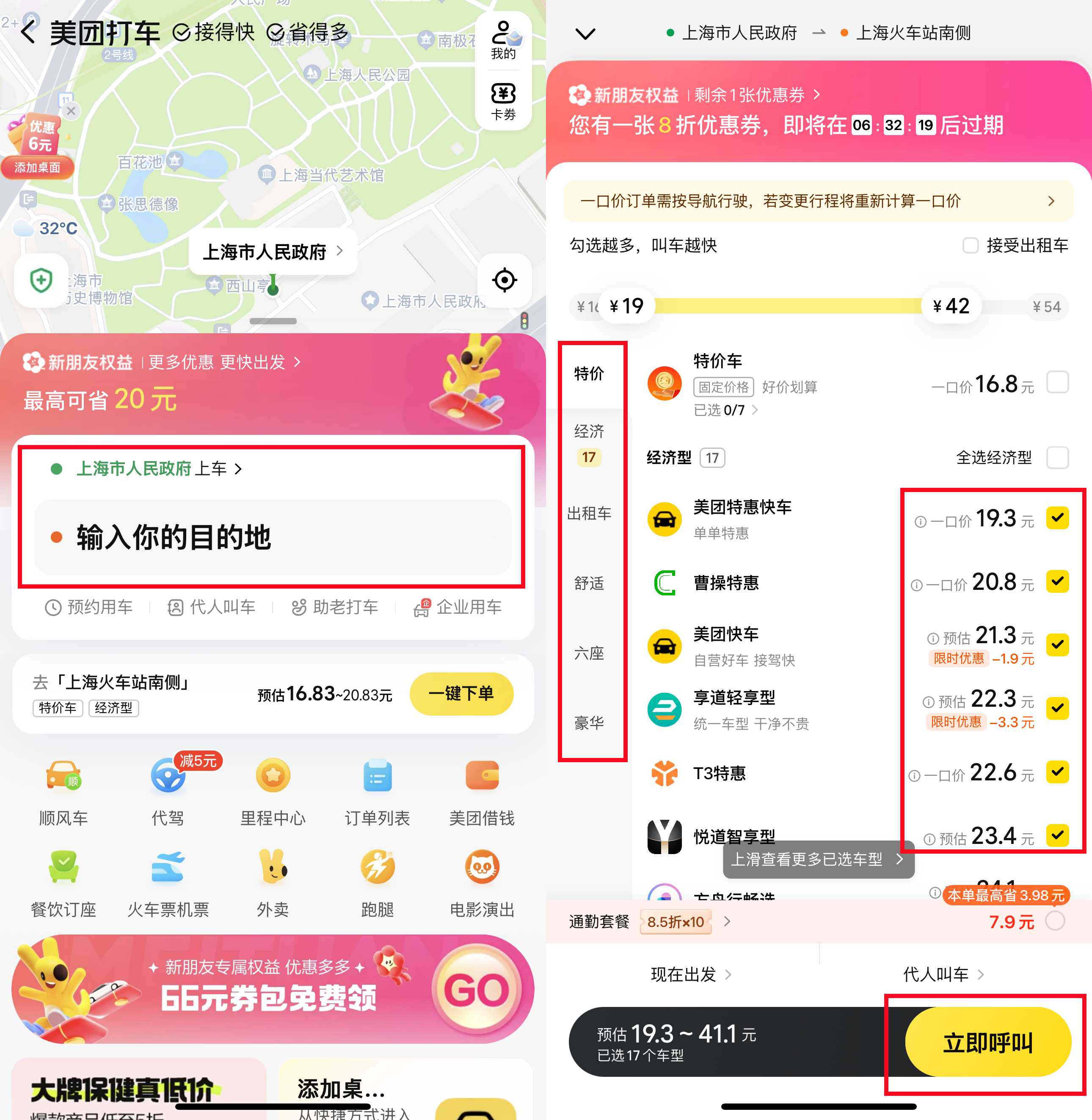
4. Track Your Driver
Watch your driver’s location on the map. If they call and you don’t speak Chinese, you can send a message like “我在这里” (I am here) and send a photo to the driver.
5. Confirm and Pay
Payment is usually automatically deducted after the ride.
Other China Taxi Apps You Can Use

Besides DiDi, Gaode, and Meituan, there are a few other taxi apps worth knowing about in China. Caocao focus on electric, eco-friendly cars, while Shouqi offers premium taxi and private car services for those looking for a more comfortable ride.
These apps aren’t as widely used as DiDi but can be great alternatives depending on your city and needs.
Trying out different apps can sometimes help you find better prices or faster pickups, so it’s good to have a few options ready on your phone while you travel.
Regular China Taxis vs. China Ride-Hailing Apps

Feature | Regular China Taxis | China Ride-Hailing Apps |
Booking Method | Hail on the street or find taxi stands | Book via app anytime, anywhere |
Language Barrier | High, need basic Chinese or gestures | Low, app handles address and route, less talking |
Payment | Mostly WeChat Pay or Alipay | Cashless via many payment mathods |
Fare | Metered but can be unclear or negotiable | Estimated fare shown before booking |
Availability | Depends on location and time | Often more available, especially in big cities |
Safety & Tracking | No ride tracking; harder to share trip info | GPS tracking, driver ratings, and trip sharing |
Convenience | Less convenient if unfamiliar with area | More convenient, especially for foreigners |
Extra Features | None | Options for car types, shared rides, promotions |
Tips for Using Taxi Apps Smoothly in China

Source: Freepik
- Save Key Addresses in Chinese
Before your trip, get the Chinese names and addresses of your hotel, attractions, or restaurants. Copy-paste them into the app to avoid confusion.
- Use WeChat or Alipay for Payment
Most taxi apps rely on these. Make sure you set them up with your card before travelling.
- Keep Your Phone Charged and Connected
A local SIM card or China eSIM with data helps you book rides anytime without hassle.
- Be Ready to Communicate Simply
If the driver calls, they might speak little or no English. Have a simple phrase ready like:
- 我在这里 (Wǒ zài zhèlǐ) — I am here.
- 我在门口 (Wǒ zài ménkǒu) — I am at the entrance.
- 请等一下 (Qǐng děng yīxià) — Please wait a moment.
- 我要去这里 (Wǒ yào qù zhèlǐ) — I need to go there.
- 请在这里停车 (Qǐng zài zhèlǐ tíng chē) — Please stop here.
You can also show these phrases on your phone or ask hotel staff to help.
- Check the Car and Driver Details
Look at the driver’s rating and car info before confirming your ride for extra peace of mind.
- Book in Advance When Possible
During busy times or bad weather, book early to avoid long waits.
More Essential Apps to Use in China
FAQs About China Taxi Apps
-
Are taxi apps cheaper than regular taxis?
-
Can I cancel a ride?
Trending Researches
-
Popular Content
-
Top Flight Links
-
Popular Hotels
-
Popular Things to Do
-
Featured guides
-
Trip.com links
- Trip.com Customer Service
- Trip.com VIP Lounge
- Buy Now Pay Later
- Trip.com Contact
- Best Credit Cards
- Trip.com Cancellation Policy
- How to Use Trip com Promo Codes
- Singapore Airlines Baggage Allowance
- scoot-baggage-allowance
- How to Book a Student Flight Ticket
- Singapore Airlines Change Flight
- luggage size cabin
- Best Day to Book Flights
- Trip.com Flight Refund
- Flight Classes Explained
- CA490 Flight Status
- MU2434 Flight Status
- CZ8302 Flight Status
- MU7705 Flight Status
- ZG053 Flight Status
- QG523 Flight Status
- VN654 Flight Status
- Cheap flights from Singapore to Kuala Lumpur
- Plane tickets from Singapore to Shanghai
- Cheap flights from Singapore to Fukuoka
- Cheap flights from Singapore to Bangkok
- Plane tickets from Singapore to Seoul
- Cheap tickets from Singapore to Manila
- Cheap tickets from Singapore to Tokyo
- Cheap flights from Singapore to Bengaluru
- Hotels near Hefeinan Railway Station
- Hotels near Hongcun Aju Theater
- Hotels near Zixiao Palace
- Hotels near Johor Bahru Senai International Airport
- Hotels near Beijing Road
- Chengdu Hotels
- Tokyo Hotels
- Kuala Lumpur Hotels
- Kunming Hotels
- Hong Kong Hotels
- Hotel Les Matins de Paris
- Airport International Hotel (Xuzhou Guanyin Airport)
- Ramada by Wyndham Seoul Dongdaemun
- Mercure Guangzhou Beijing Road Pedestrian Street Hotel
- Atour Hotel (Chengdu Taikoo Li)
- Malaysia 5G eSIM | Supports mainstream apps including TikTok, Google Maps & ChatGPT | Day Pass/Total Package | 24H Billing | 1-30 days | QR code
- Singapore 4G eSIM | Supports Google Maps / ChatGPT | Daily/Total Data Plans | 24-Hour Billing | 1–30 Days | QR Code
- Vietnam Airport VIP Fast Track Service
- VIP Fast Track service for immigration clearance at Tan Son Nhat Airport in HCM
- Foreign Tourist Day Tour: Panda Valley / Dujiangyan / Mt Qingcheng / Blue Tear / Chengdu
- Guilin Yangshuo Impression Liu Sanjie Landscape Performance + Complimentary Exclusive Coffee Drink - Pick Up at Designated Restaurant
- Mainland China 5G eSIM | Day Pass/Total Data Package | ChatGPT Available | 24-Hour Billing | 1-365 Days | QR Code
- Mainland China 5G eSIM | Supports Google Maps / ChatGPT | Daily/Total Data Plans | 24-Hour Billing | 1–365 Days | QR Code
- Amsterdam City Pass
- Hong Kong Day Tours
- Sri Lanka SIM Card
- Thailand Tours with Hotel Pickup
- Hoa Lu District Activities
- Kyoto Pocket Wifi Router
- Wellness & Spa in Jiuzhaigou
- China Power Bank Limit
- Trip.com Customer Service
- train to kl from singapore
- 中国地图
- Shanghai Metro
- Hong Kong Public Holidays 2027
- China Train Map
- China Entry Requirements
- China Plug
- train from singapore to jb
- Taiwan Plug
- Thailand Plug
- universal studios singapore tickets
- Singapore Public Holiday 2027
- Best Translation App for China
- Frankfurt Airport to City
- Osaka Station to Kyoto Station
- Bangkok to Pattaya
- Trip.com Promo Code
- Trip.com Flight Deals
- Trip.com Credit Card Promotions
- How to Book Cheap Hotels
- How to Book Cheap Flights
- Trip.com Member Rewards
- Trip Weekly Hotel Sales
- Online Hotel Booking
- Online Flight Booking
- Trip.com Travel Guide
- Book China Train Tickets
- Trip.com Seat Selection
- Singapore Public Holidays 2027
- Trip.com 优惠码
- Trip.com Travel Guides
- Trip.com 10.10 Mega Sale