🔥Get 3% Off Your First Train Ticket Booking!
As a special treat, Trip.com is offering a 3% discount on your first train ticket booking. Simply claim your coupon and enjoy a seamless travel experience.


Traveling by train is one of the best ways to see China. The trains are fast, comfortable, and connect almost every city.
But if you’ve never booked train tickets in China before, it can feel confusing. That’s where China train apps come in handy.
They help you find trains, book tickets, and check schedules easily. In this article, I’ll introduce the best train apps for travellers, so you can enjoy a smooth journey across China.

Two of the most popular train apps are the official 12306 app and the international-friendly Trip.com app.
Here’s a quick comparison to help you decide which one suits you best:
Feature | 12306 | Trip.com App |
Target Users | Mainly Chinese domestic travellers | International travellers |
Language Support | Chinese + Limited English | Multiple languages |
Payment Methods | Chinese bank cards, Alipay, WeChat, international credit cards | International credit cards, PayPal, etc. |
User Interface | Functional but complex | User-friendly and simple |
Customer Support | Limited English support is available | Multilingual support, 24/7 |
Extra Services | Basic ticket booking and train info | Also offers flights, hotels, attractions and more |
As a special treat, Trip.com is offering a 3% discount on your first train ticket booking. Simply claim your coupon and enjoy a seamless travel experience.

12306 is the official train ticket app in China. It lets you check train times, book tickets, and see live updates.
This app is used by millions in China every day and has the most complete ticket options.
👍Best for:
Feature | Description |
|---|---|
Check Real-Time Train Schedules | View up-to-date departure and arrival times for trains across China. |
Book Tickets Directly with China Railway | Purchase train tickets directly through the official railway system. |
Select a Seat | Choose your preferred seat type and location during booking. |
Get E-Tickets Linked to Your Passport | Travel paperlessly with tickets connected to your passport information. |
View Platform and Delay Updates | Receive notifications about platform changes and train delays. |
Cancel or Change Tickets In-App | Modify or cancel bookings conveniently through the app. |
Search for “12306” in your app store and install it.
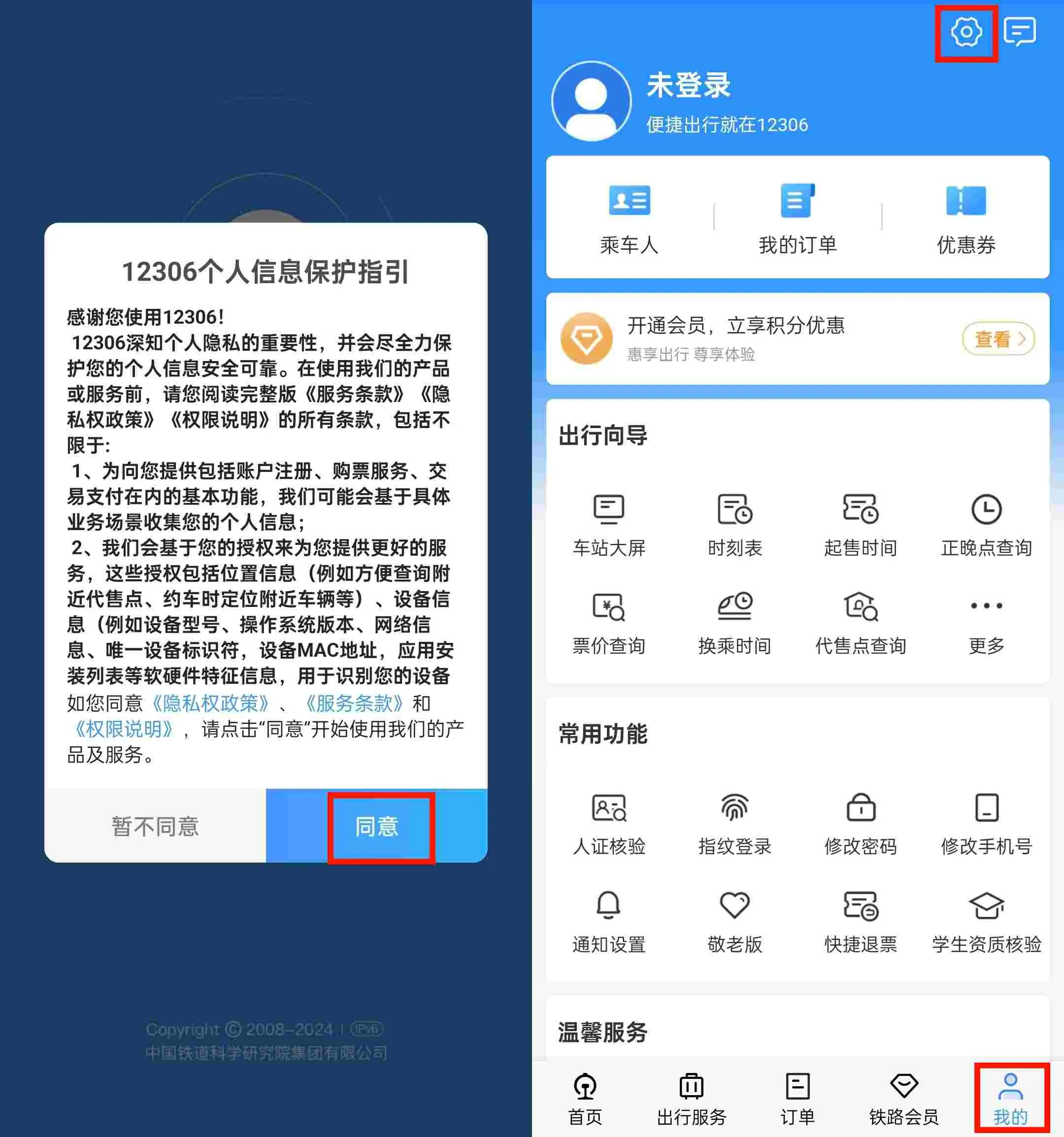
If the App opens in Chinese, you’ll first need to agree with the terms and conditions by clicking “同意”.
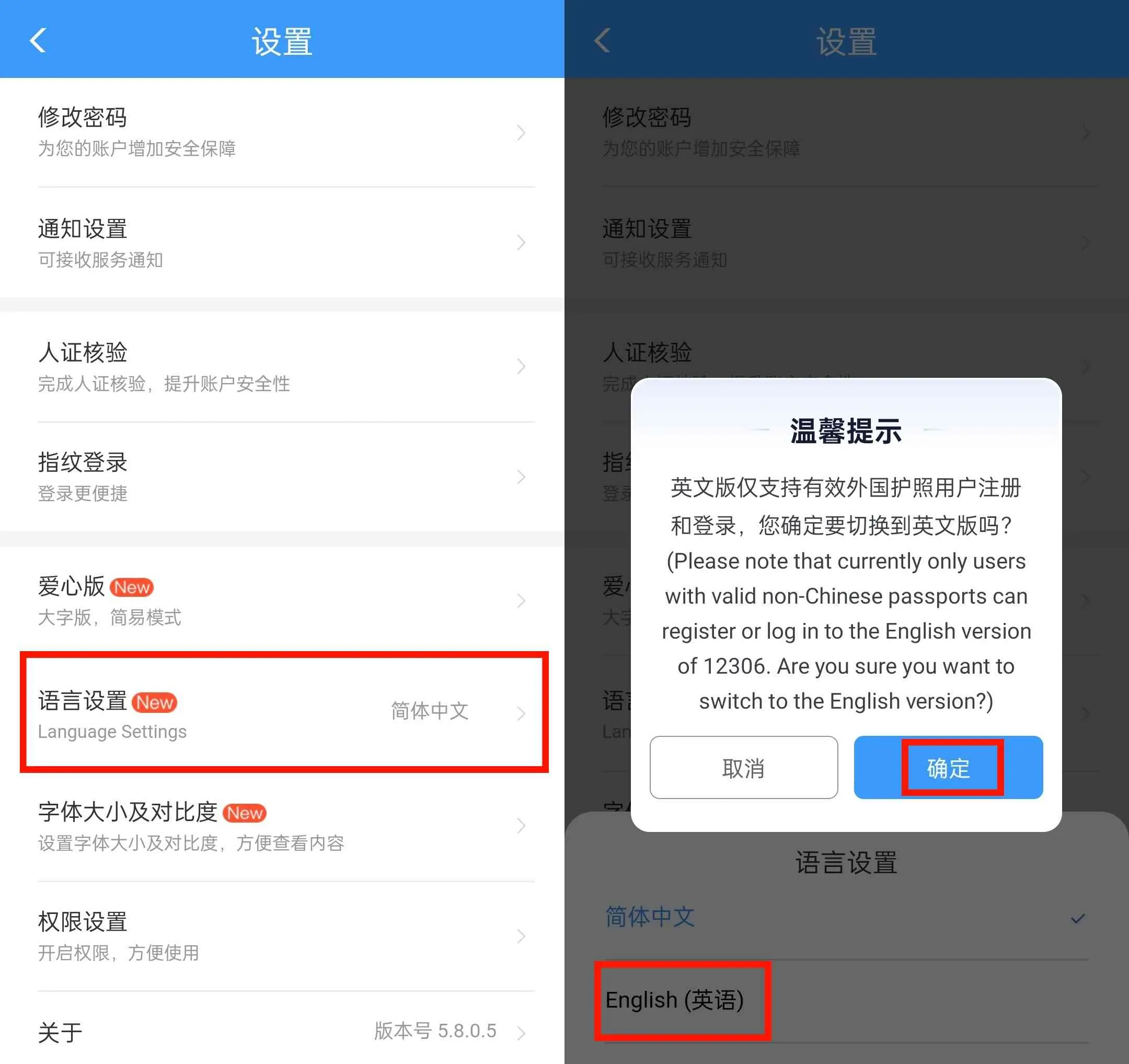
Then you can change the language to English. Click “我的”-“设置”-“语言设置”-“English”-“确定”.
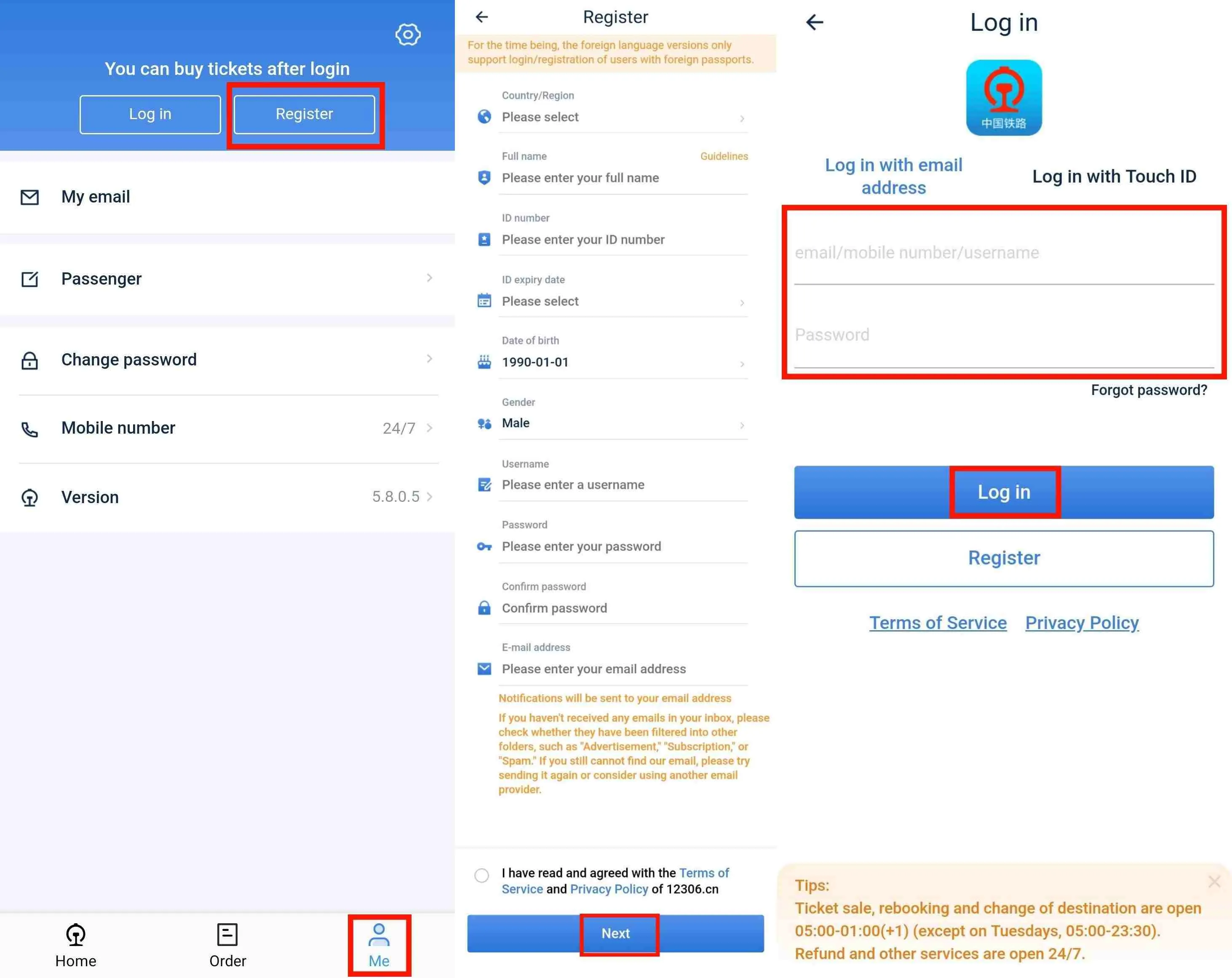
On the main screen, tap “Me”-“Register” to begin the account creation process. Then enter your personal information, including name, gender, ID number (passport number), phone number, password and Email address.
You’ll receive a verification code. Enter it to complete registration.
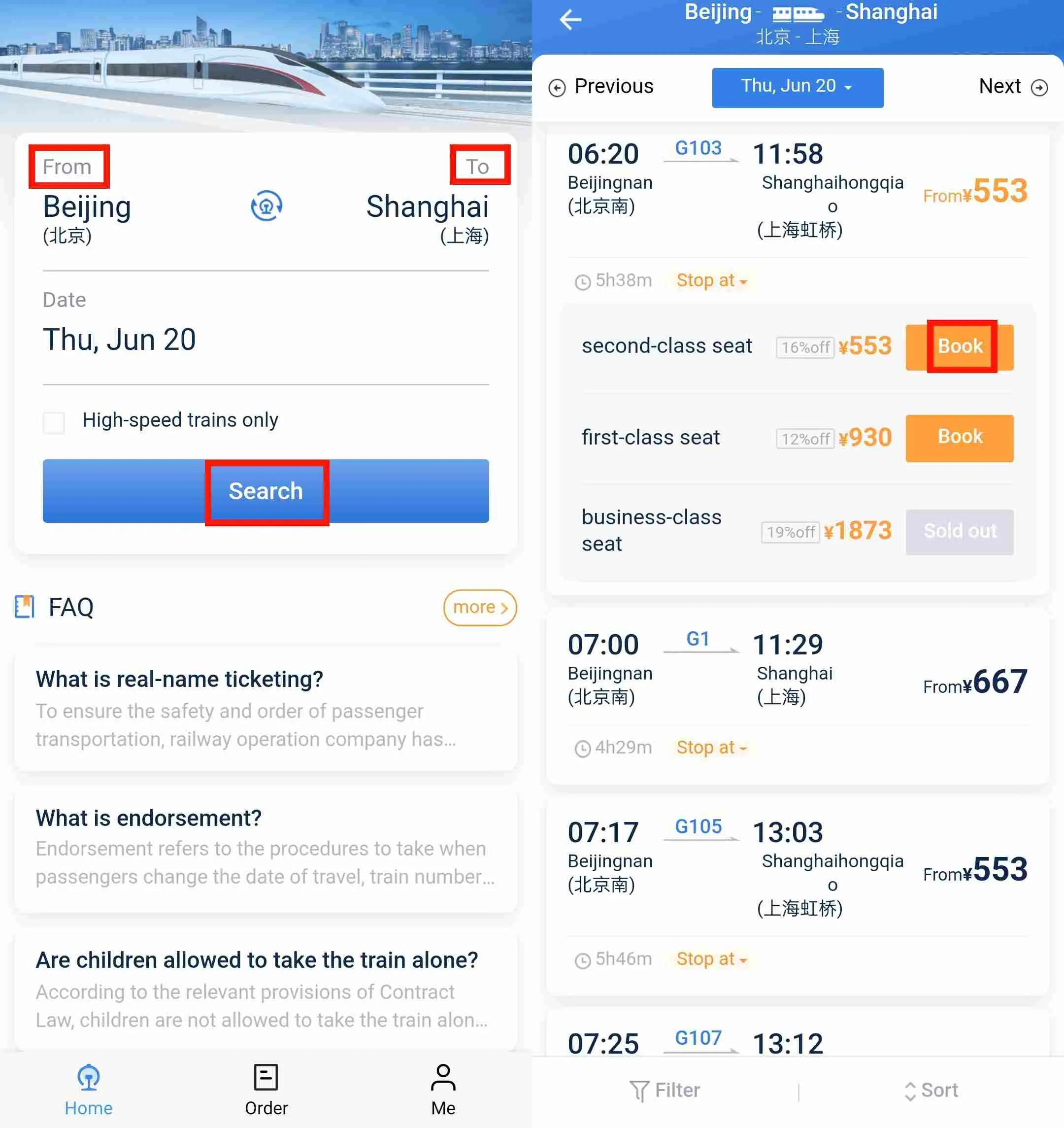
Enter your departure city and destination. Select your travel date. Tap “查询” (Search) to see available trains.
Browse the list. Select train number, departure/arrival time, and seat types (e.g., 二等座 = second class, 商务座 = business class). Tap your preferred option. Then click "Book".
Choose from your saved passengers (linked via passport). Add a new passenger if needed, entering passport details.
Confirm order details. Pay using a Chinese bank card, Alipay, WeChat payment or international credit cards (Visa, Mastercard) .
After payment, you will receive an e-ticket with your ticket details. No need to print—just show your passport and QR code at the train station.
Go to “我的订单” (My Orders) to view or cancel. You can also change your ticket within the allowed time frames.
That’s all! Booking through 12306 can feel challenging at first, but once you know the steps, it becomes quite smooth.
Pros | Cons |
|---|---|
✅ Official app with full ticket availability | ❌ Complex registration for foreigners |
Book Flights to China

Trip.com is a popular app for booking China train tickets, especially for foreign travellers. It offers an English interface, clear steps, and easy payment with international cards or PayPal.
You can check train times, book tickets, and get e-tickets. This makes train travel in China much easier for tourists.
👍Best for:
Feature | Description |
|---|---|
Easy-to-Use English Interface | Navigate and book train tickets easily with a user-friendly English interface. |
International Payment Options | Pay using international credit cards and PayPal. |
Seat Selection | Choose your preferred seat, including window or aisle options. |
E-Ticket Code | Use your passport and QR code to go directly to the station gate at most stations; pickup codes are also available. |
24/7 Multilingual Customer Support | Access customer service in English and other languages anytime. |
Book Multiple Journeys | Reserve round trips or multiple train journeys in a single order. |
Ticket Availability Alerts | Get notified when tickets become available or your booking is confirmed. |
Download the Trip.com app from the App Store or Google Play.
Register or log in with your email.
Open the app and tap the “Train” icon at the bottom menu.
Fill in your departure city, destination, and travel date. Tap “Search” to see available trains.
Filter by time, train type, or seat class. Tap the train you want to book for more details.
Enter the required information for each passenger, such as full name, passport number, and contact details. You can select your seats here if available.
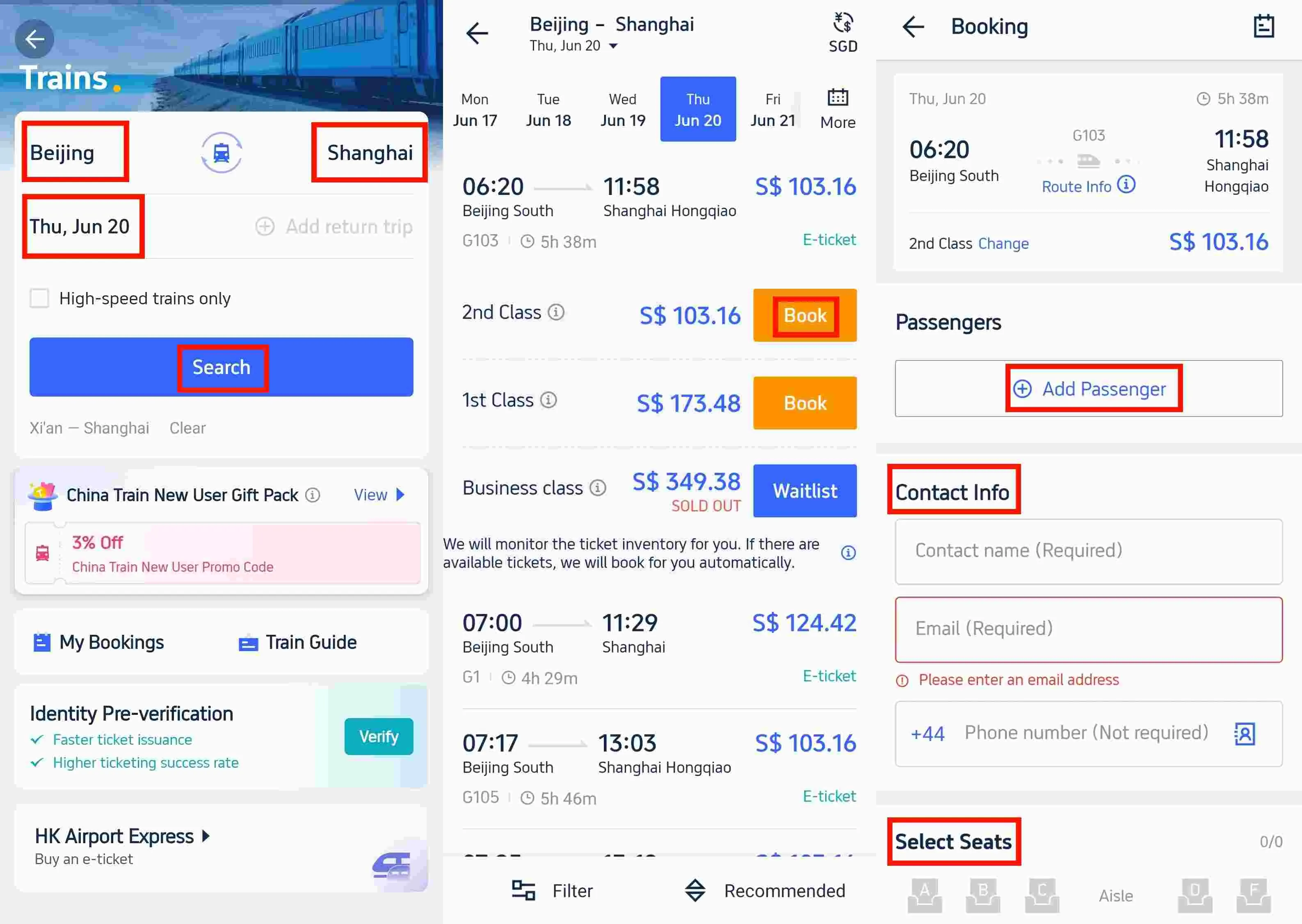
Review your order and price. Choose your payment method (international credit card, PayPal, Alipay, WeChat Pay).
Once the payment is complete, you will receive a booking confirmation. You can access your e-ticket through the Trip.com App under the "My Bookings" section.
Booking with Trip.com is easy and perfect for foreign travellers thanks to the English interface and international payment. If you need help, just ask!
Pros | Cons |
|---|---|
✅ Easy English interface and user-friendly design | ❌ Ticket availability may sometimes lag behind the official railway website |

Source: Wikipedia
Know Your Travel Dates: Train tickets usually open 15 days before departure. Be ready to book right when they open.
Check Train Types and Seats: Understand train classes (high-speed, normal) and seat types (business, first, second class).
Keep Your E-Ticket Info Handy: Save your ticket QR code or pickup code for easy boarding.
Track Train Status: Check for delays or platform changes before heading to the station.
Buy China eSIM Now

Source: Unsplash
Travelling by train in China can be easy and fun when you use the right app. For foreign travellers, Trip.com offers a simple English interface, international payments, and great support. If you speak Chinese and want full access, 12306 is the official choice.
Whichever app you pick, plan ahead and book early to get the best tickets. Safe travels and enjoy your train journey across China!


 2018184 booked

