Trip.com Flight Refund Policy & Cancellation Steps

By Trip.com
June 24, 2026
Changing travel plans can be stressful, but getting a flight refund from Trip.com doesn’t have to be.
If you’ve booked a flight and need to cancel, understanding the Trip.com flight refund policy will help you avoid unnecessary delays and extra costs.
This guide walks you through how to request a refund on Trip.com, explains the flight cancellation rules, and outlines how long it typically takes to receive your money back.
Fly from Singapore


Understanding Trip.com Flight Refund Policy

Trip.com acts as a travel agent, so your refund depends on both the airline and your ticket type.
Key points of the Trip.com flight refund policy include:
Key Factor | What It Means for Your Trip.com Flight Refund |
|---|---|
Refundable vs Non-Refundable Tickets | Refund eligibility depends on the fare rules. Refundable tickets allow full or partial refunds, while non-refundable tickets may only qualify for partial refunds, taxes only, or airline vouchers. |
Airline Rules Apply | Trip.com processes the refund on behalf of the airline. The airline’s refund policy determines the final refund amount, applicable fees, and processing timeline. |
Flight Status Matters | If the airline cancels your flight, you are usually entitled to a full refund. For voluntary cancellations, cancellation fees or fare restrictions may apply. |
How to Request a Trip.com Flight Refund
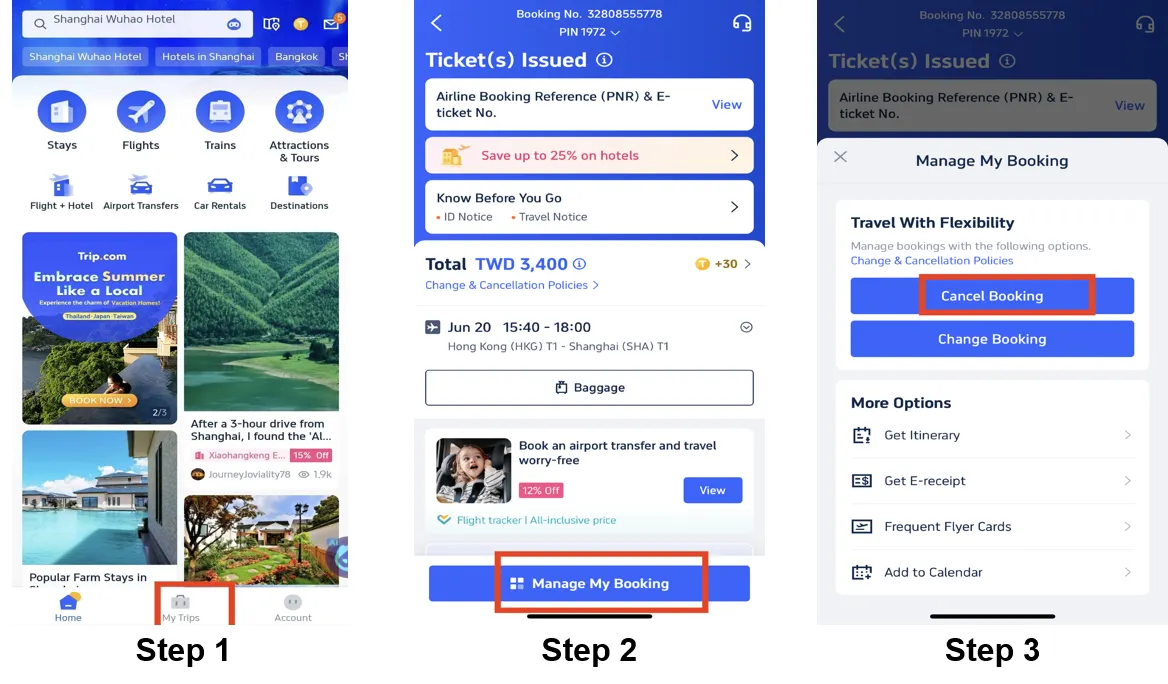
Step 1: Log into your Trip.com account
- Visit the Trip.com website or open the Trip.com app, and log in to your account.
- Click on "My Trips" section
Step 2: Access your bookings
- Click on "Manage My Bookings" to find the flight booking you need to cancel.
Step 3: Choose a flight cancellation
- Click on "Cancel Booking" to cancel the flight booking.
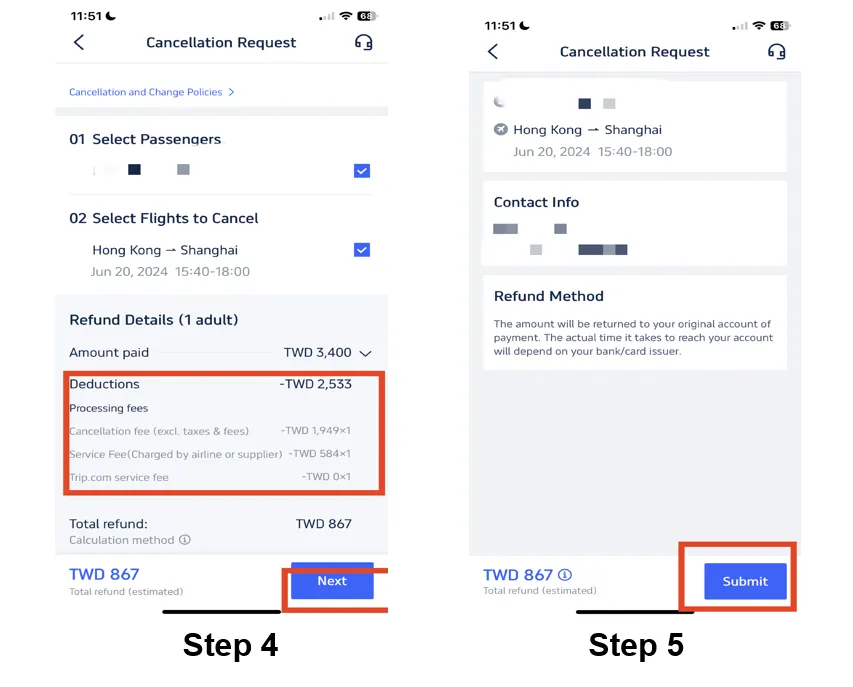
Step 4: Check the flight refund policy
- Click on the specific flight booking to view the details.
- Check the flight booking’s refund policy.
- Review the refund policy and verify the processing fees.
- Once you've done that, simply click on "Next" to the next page.
Step 5: Request a flight cancellation
- If your flight is eligible for a refund, check your refund details and tap "Submit" to complete the procedure.
- Follow the prompts to provide any necessary information or reasons for your flight cancellation.
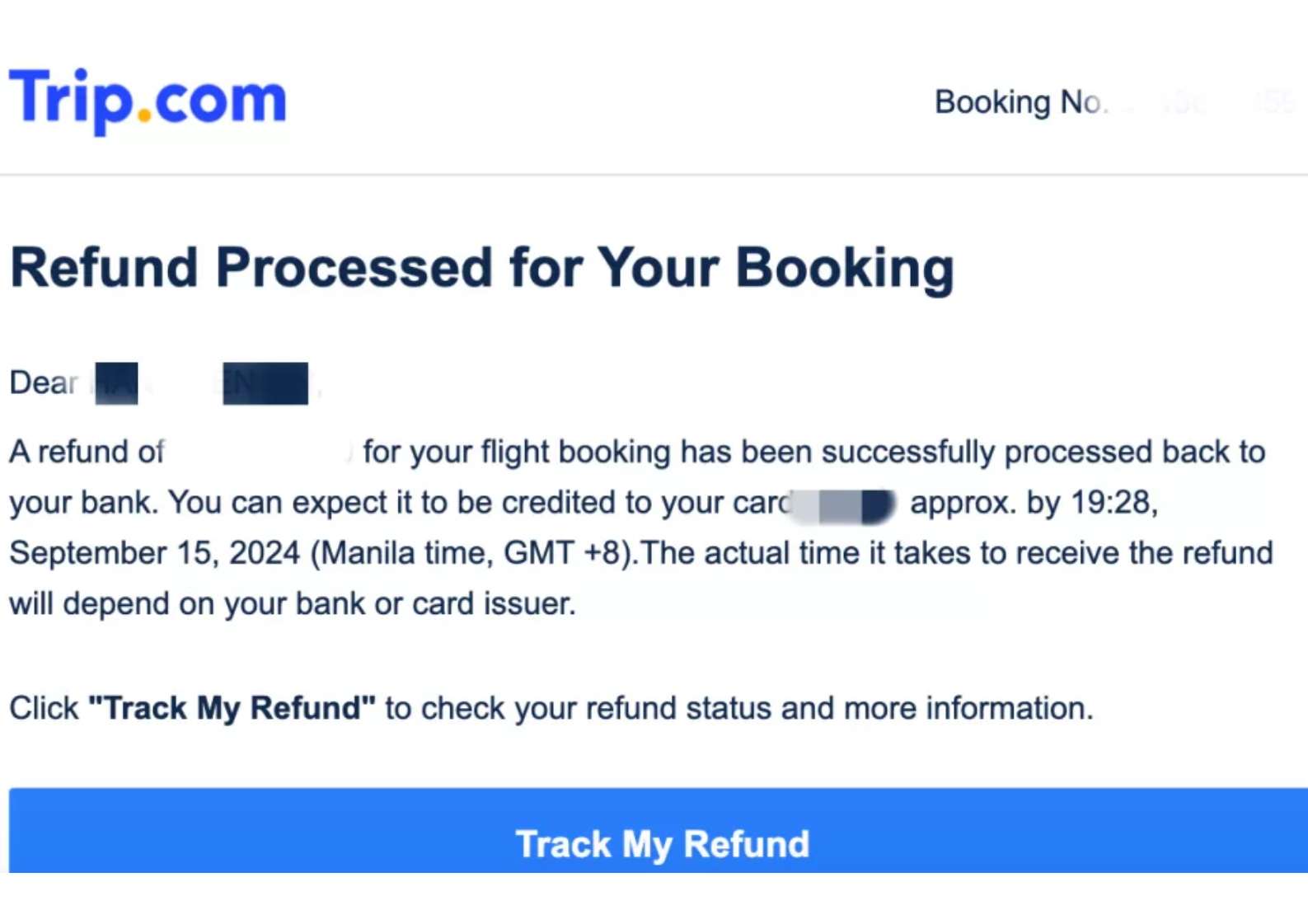
Step 6: Confirm your cancellation and refund
- Once you have submitted your flight cancellation request, you should log in to your Trip.com account to check the Trip.com refund status.
- The refund will be credited to your account within a couple of days.
Trip.com Refund Processing Time

How long Trip.com refund takes?
It depends on your payment method and airline :
Payment Method | Estimated Trip.com Refund Time |
|---|---|
Credit / Debit Card | 5–20 business days |
PayPal / E-wallets | 3–7 business days |
Bank Transfer | Up to 30 days |
Trip.com Contact for Refund

If you’re based in Singapore, Trip.com customer service Singapore is available 24 hours a day.
The support team can assist with:
| Support Category | Details |
|---|---|
Flight or Hotel Booking Issues | Assistance with booking errors, missing confirmations, or reservation problems |
Itinerary Changes | Modify flight times, hotel dates, or travel schedules |
Refunds or Cancellations | Help with refund requests and cancellation policies |
Payment and Billing Queries | Issues with payments, invoices, or duplicate charges |
🌐 Hours | 24/7 (English and Mandarin support available) |
What To Know About Trip.com Cancellation Ticket?
Trip.com Cancellation Protection

Trip.com sometimes offers optional add-ons or insurance-style products at the time of booking that give you extra cancellation flexibility beyond the basic fare rules.
These are often marketed as “Cancellation Guarantee,” “Trip Air Flexibility,” or similar protections.
With such protection:
- You may be able to cancel your flight and receive a full refund even on non-refundable tickets, as long as you cancel within a specific time window before departure. This isn’t part of standard airline policy but rather an optional service purchased through Trip.com.
- The exact terms (such as cancellation window and refund guarantee) depend on the specific product you select at checkout.
- Keep in mind: Trip.com still must recover funds from the airline first, so the protection usually covers cancellation fees and guarantees you get the refund back once the airline processes it.
Trip.com 24-Hour Cancellation Policy

Trip.com does not have a universal 24-hour risk-free cancellation policy that applies to every flight booking in all markets.
However:
- On many flights booked through Trip.com, you can cancel within 24 hours of booking for free and receive a full refund, provided the fare rules allow it and the flight departure is sufficiently far in the future.
- This 24-hour cancellation window depends on the airline’s policy and how Trip.com has set up the booking, it’s not automatically guaranteed for every flight. Some users need to confirm eligibility by contacting Trip.com support.
Trip.com Cancellation Fees
Most airlines charge a cancellation fee, and Trip.com may also apply service charges.
The exact amount depends on:
Possible Deduction | What It Means for Your Trip.com Refund |
|---|---|
Airline Cancellation Fees | Airlines may charge a cancellation fee, which is deducted from your refund amount. The fee varies by airline, route, and fare type. |
Non-Refundable Ticket Rules | Non-refundable tickets usually do not allow a full refund. In some cases, only airport taxes or a partial amount may be refunded. |
Service Charges (Rarely Applied by Trip.com) | Trip.com generally does charge service fees for refunds that may vary in fees apply depending on the booking conditions. |
Tips to Speed Up Your Refund
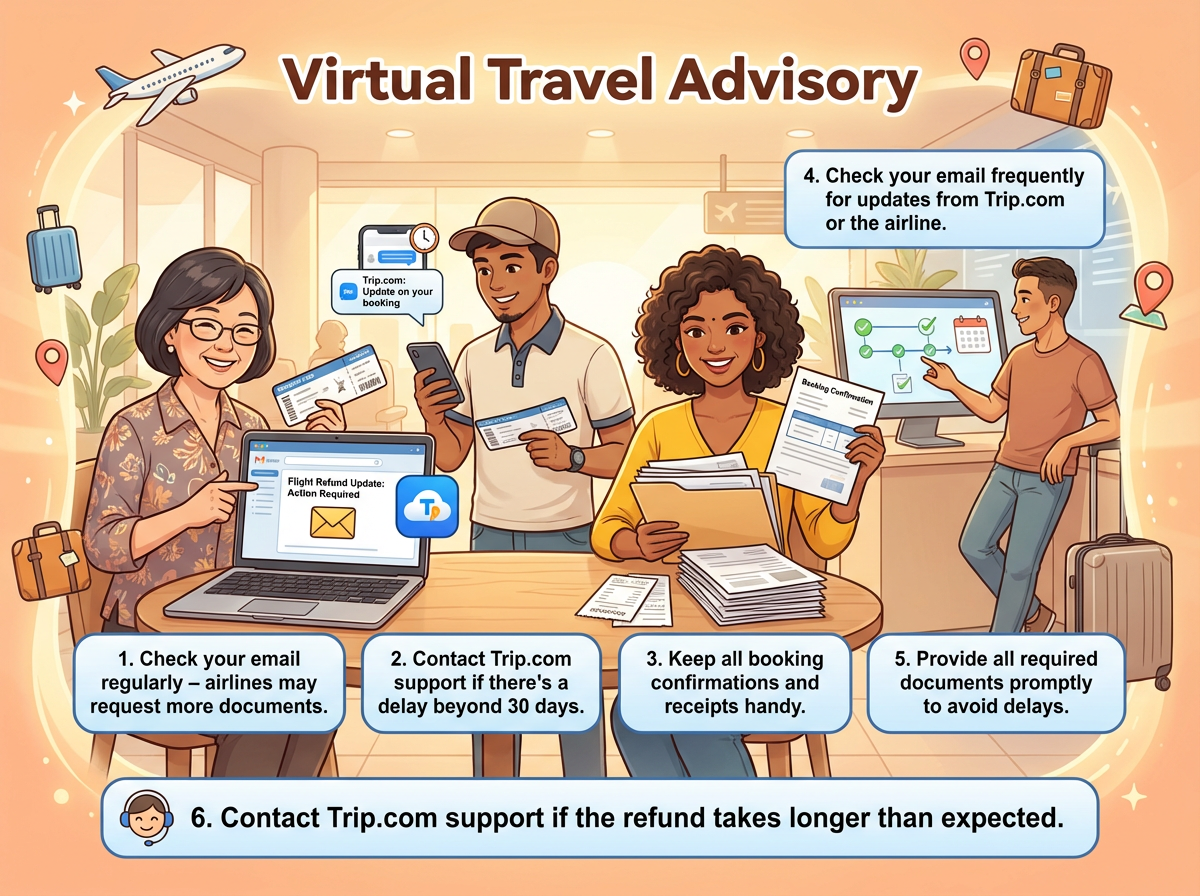
- Check your email regularly – Airlines or Trip.com may contact you to request additional documents or provide important updates regarding your booking or refund.
- Contact Trip.com support if there is a delay – If your refund or request has not been processed within the expected timeframe, especially after 30 days, reach out to Trip.com customer support for assistance.
- Keep all booking confirmations and receipts handy – Save copies of your booking confirmations, payment receipts, refund requests, and any correspondence with the airline or Trip.com.
- Monitor updates frequently – Check your email and Trip.com account regularly for status changes, refund notifications, or requests for further information.
- Submit required documents promptly – If the airline or Trip.com requests supporting documents, provide them as soon as possible to avoid additional processing delays.
- Follow up when necessary – If your refund or booking issue takes longer than expected, contact Trip.com support for updates and clarification on the status of your request.
🔥Double your Rewards
How to earn miles AND trip coins?
If you don't know it yet, you're missing out! Earn your airline miles while booking your flights with Trip.com! Plus, earn Trip Coins with each flight booking - coins earned can be used to offset your future purchases for flights, hotels, attractions and more!

📅Promotion period: Evergreen.
Final Thoughts

Navigating a Trip.com flight cancellation refund policy or voluntary cancellation doesn’t have to be stressful.
By understanding the Trip.com flight refund policy and following the proper steps to Trip.com refund flight ticket, travelers can recover their funds efficiently.
Always check your ticket type and airline rules before booking to minimize surprises.
FAQ: Trip.com Flight Refund
-
Does Trip.com charge a cancellation fee?
-
Can I cancel a non-refundable Trip.com ticket?
-
Are promotional or discounted Trip.com tickets refundable?
-
How do I contact Trip.com customer service about my refund?
-
How do I know if my Trip.com ticket is refundable?
-
Can I get a refund for a non-refundable ticket?
Trending Researches
-
Popular Content
-
Top Flight Links
-
Popular Hotels
-
Popular Things to Do
-
Featured guides
-
Trip.com links
- Trip.com Customer Service
- Trip.com VIP Lounge
- Buy Now Pay Later
- Trip.com Contact
- Trip.com Cancellation Policy
- Best Credit Cards
- How to Use Trip com Promo Codes
- Singapore Airlines Baggage Allowance
- scoot-baggage-allowance
- How to Book a Student Flight Ticket
- luggage size cabin
- Singapore Airlines Change Flight
- Best Day to Book Flights
- Trip.com Flight Refund
- Flight Classes Explained
- CA490 Flight Status
- MU2434 Flight Status
- SQ869 Flight Status
- MU7705 Flight Status
- ZG053 Flight Status
- QG523 Flight Status
- CA1651 Flight Status
- Cheap tickets from Singapore to Shanghai
- Plane tickets from Singapore to Kuala Lumpur
- Cheap tickets from Singapore to Fukuoka
- Cheap tickets from Singapore to Bangkok
- Plane tickets from Singapore to Seoul
- Plane tickets from Singapore to Manila
- Plane tickets from Singapore to Tokyo
- Cheap tickets from Singapore to Bengaluru
- Hotels near Hefeinan Railway Station
- Hotels near Hongcun Aju Theater
- Hotels near Johor Bahru Senai International Airport
- Hotels near Zixiao Palace
- Hotels near Beijing Road
- Chengdu Hotels
- Tokyo Hotels
- Kuala Lumpur Hotels
- Kunming Hotels
- Phu Quoc Island Hotels
- Hotel Les Matins de Paris
- Ramada by Wyndham Seoul Dongdaemun
- Mercure Guangzhou Beijing Road Pedestrian Street Hotel
- Airport International Hotel (Xuzhou Guanyin Airport)
- Atour Hotel (Chengdu Taikoo Li)
- Malaysia 5G eSIM | Supports mainstream apps including TikTok, Google Maps & ChatGPT | Day Pass/Total Package | 24H Billing | 1-30 days | QR code
- Singapore 4G eSIM | Supports Google Maps / ChatGPT | Daily/Total Data Plans | 24-Hour Billing | 1–30 Days | QR Code
- Vietnam Airport VIP Fast Track Service
- VIP Fast Track service for immigration clearance at Tan Son Nhat Airport in HCM
- Foreign Tourist Day Tour: Panda Valley / Dujiangyan / Mt Qingcheng / Blue Tear / Chengdu
- Huanglongjiuzhai Railway Station - Jiuzhaigou | Departure/Return | Rideshare/Private Charter | Bus/Nanny/5-9 Seater Business | Shuttle Bus | Vehicle Type Optional | Any Combination | T
- Guilin Yangshuo Impression Liu Sanjie Landscape Performance + Complimentary Exclusive Coffee Drink - Pick Up at Designated Restaurant
- Mainland China 5G eSIM | Day Pass/Total Data Package | ChatGPT Available | 24-Hour Billing | 1-365 Days | QR Code
- Kumamoto City Group Tours
- Yogyakarta Connectivity Solutions
- Istanbul Airport Services
- Fujisawa Day Tours
- Madrid Sports & Adventure
- Putrajaya Activities
- Nagoya Restaurant Discounts
- China Power Bank Limit
- Trip.com Customer Service
- train to kl from singapore
- 中国地图
- Shanghai Metro
- Hong Kong Public Holidays 2027
- China Train Map
- China Entry Requirements
- China Plug
- train from singapore to jb
- Taiwan Plug
- Thailand Plug
- universal studios singapore tickets
- Singapore Public Holiday 2027
- Best Translation App for China
- Frankfurt Airport to City
- Osaka Station to Kyoto Station
- Bangkok to Pattaya
- Trip.com Promo Code
- Trip.com Flight Deals
- Trip.com Credit Card Promotions
- How to Book Cheap Hotels
- How to Book Cheap Flights
- Trip.com Member Rewards
- Trip Weekly Hotel Sales
- Online Hotel Booking
- Online Flight Booking
- Trip.com Travel Guide
- Book China Train Tickets
- Trip.com Seat Selection
- Singapore Public Holidays 2027
- Trip.com 优惠码
- Trip.com Travel Guides
- Trip.com 10.10 Mega Sale