
Trip.com Customer Service – Hotline, Email & Chat Support

Author's Profile Picture
Trip.com Customer Service

When you’re planning your trip through Trip.com, things usually go smoothly but if you ever need help with a booking, refund, or payment, Trip.com Customer Service is always available to assist.

With 24/7 multilingual support via phone, email, and live chat, getting travel help has never been easier.

📞 Trip.com Customer Service Number

Live Chat 24/7

For urgent travel issues like flight changes, hotel cancellations, or refund requests, you can call the Trip.com customer service number available in your region.

Region / LanguageTrip.com Customer Service NumberAvailability

Singapore

+65 3138 2039

24/7

Malaysia

+60 3 2053 1899

24/7

Hong Kong

+852 3008 3295

24/7

United States

+1 833 896 0077

24/7

United States

+1 833 896 0077

24/7

United Kingdom

+44 808 164 7270

24/7

Australia

+61 2 8310 8661

24/7

💡 Tip: Always use the customer service hotline of the country where you made your booking for faster assistance.

🇸🇬 Trip.com Customer Service Singapore

Customer Support

If you’re based in Singapore, Trip.com customer service Singapore is available 24 hours a day. The support team can assist with:

Support CategoryDetails

Flight or Hotel Booking Issues

Assistance with booking errors, missing confirmations, or reservation problems

Itinerary Changes

Modify flight times, hotel dates, or travel schedules

Refunds or Cancellations

Help with refund requests and cancellation policies

Payment and Billing Queries

Issues with payments, invoices, or duplicate charges

📞 Hotline

+65 3138 2039

🌐 Hours

24/7 (English and Mandarin support available)

💡Additional info: Singapore travelers can also contact support directly through the Trip.com app or live chat for faster resolution.

🧾 What Trip.com Customer Service Can Help With

CategoryExamples

Flights

Flight cancellations, date changes, refund requests

Hotels

Wrong date bookings, no-show issues, refund policies

Payments

Double charges, failed transactions, invoice requests

App / Website

Login issues, missing points, booking errors

Car / Train

Booking modifications, refund follow-up

Payments

Double charges, failed transactions, invoice requests

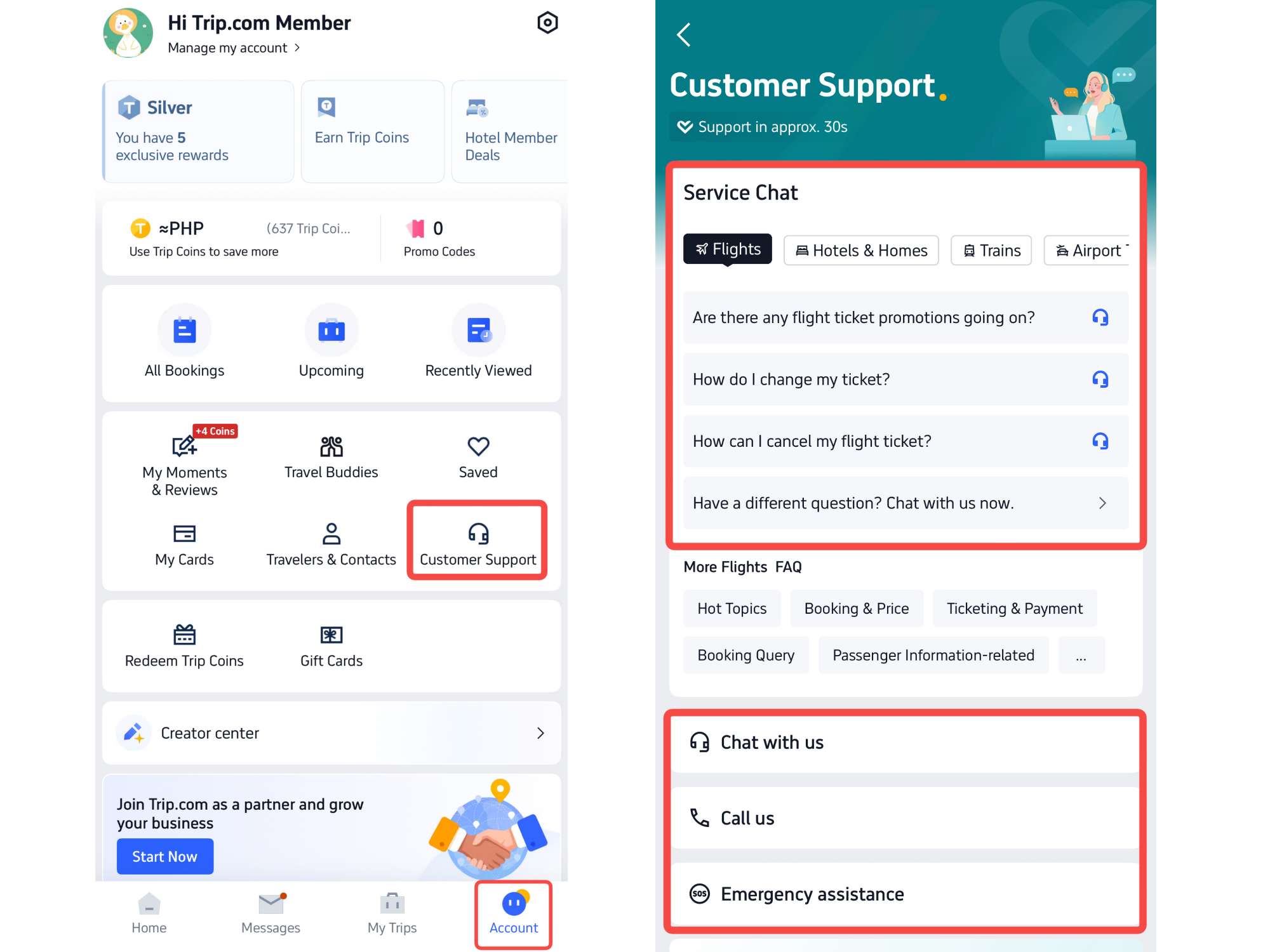
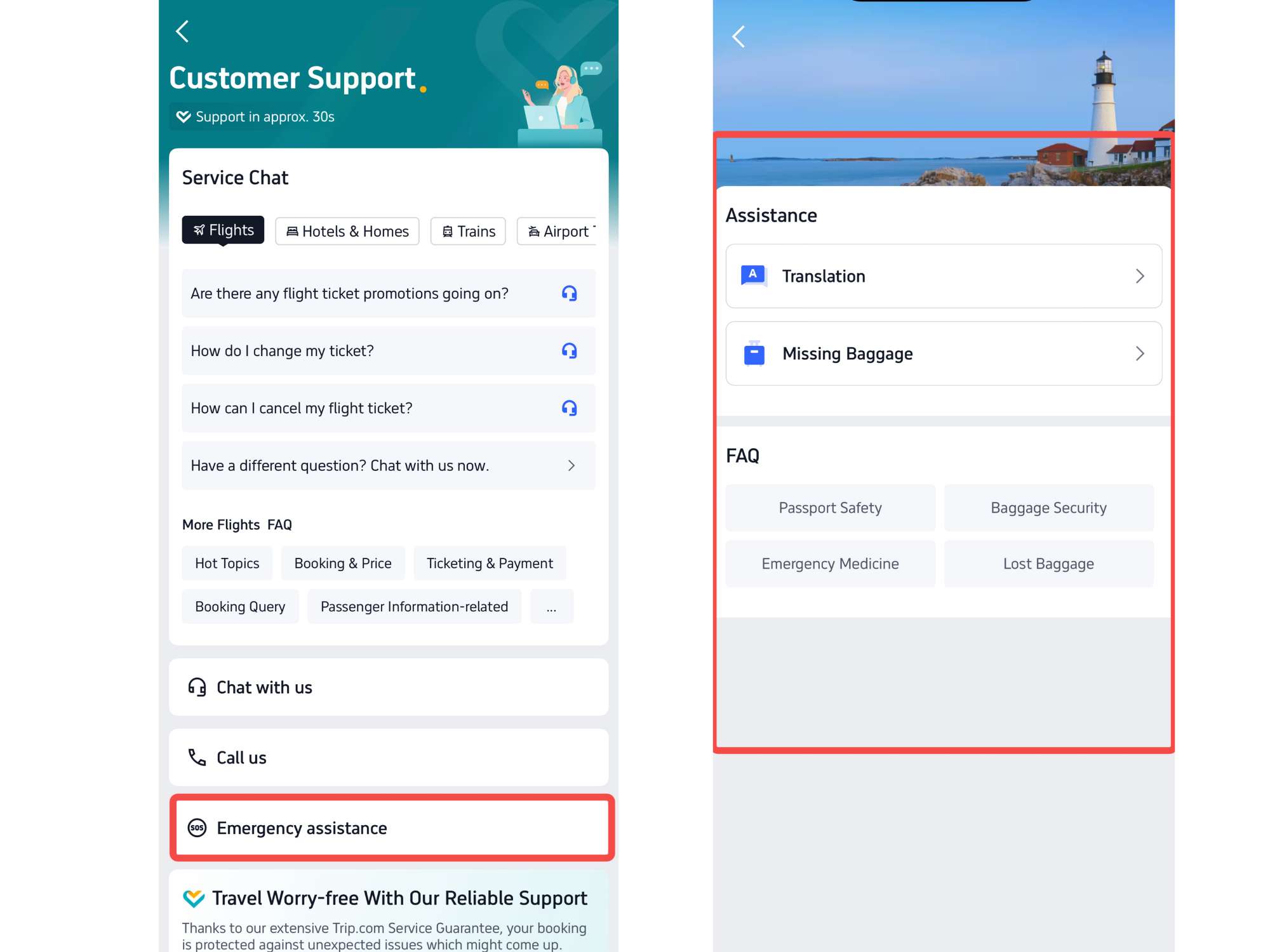
How to Find Trip.com Customer Service on Trip.com App

Step 1: Enter the Trip.com App to Find Trip.com Customer Support

  • Log in to your Trip.com account using your mobile phone and go to the “Account” section.
  • Tap Customer Support to view all available options.
  • Trip.com offers several ways to get help, including Chat Service, Call Service, and Emergency Assistance
Step 1: Enter the Trip.com App to Find Trip.com Customer Support

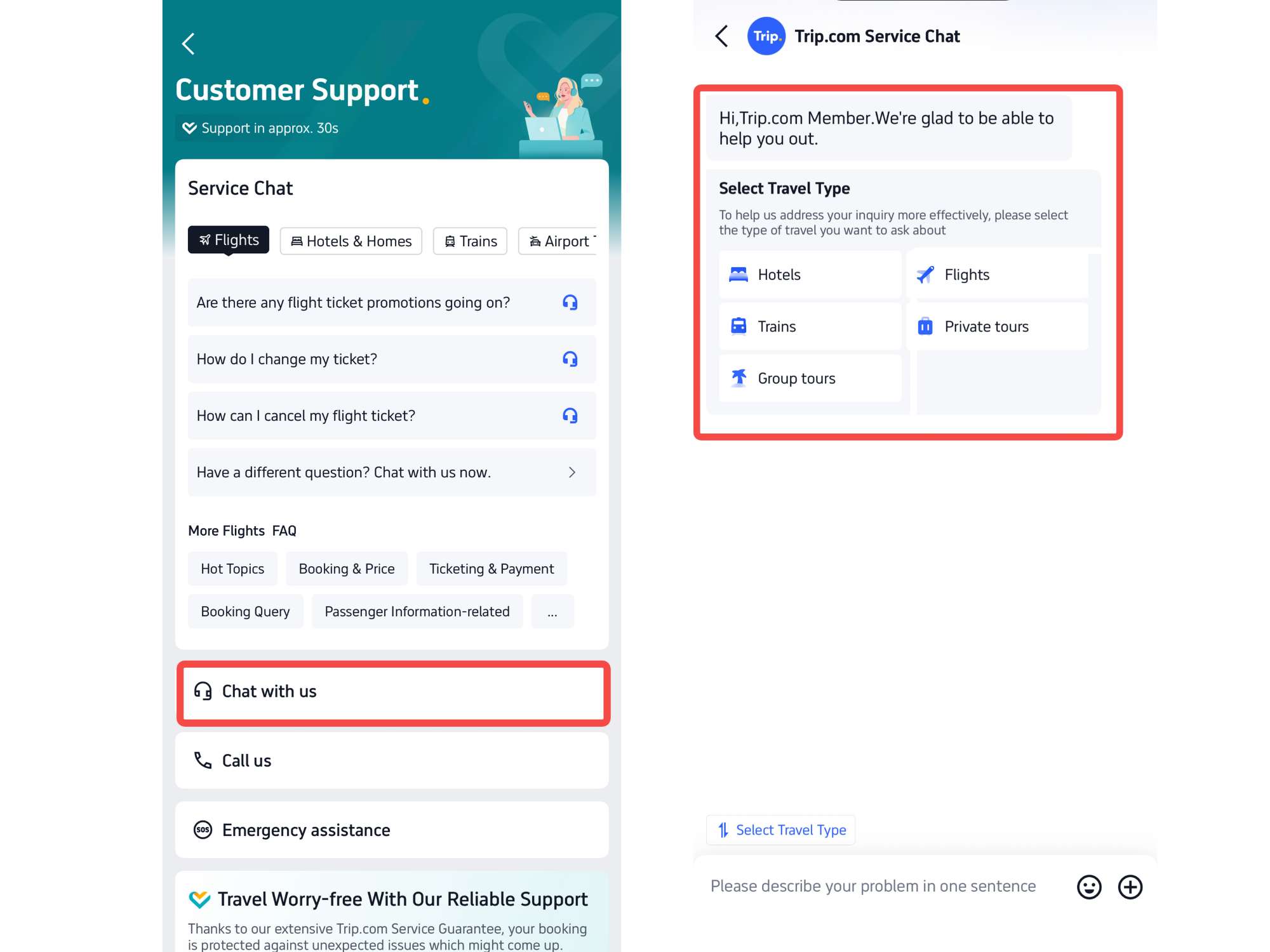
Step 2: Choose Chat Trip.com Customer Service

  • Click on to "Chat With Us" to enter the detail page.
  • Customers can get chat service for different aspects, including flights, hotels, transportation, and travel guide.
Step 2: Choose Chat Trip.com Customer Service

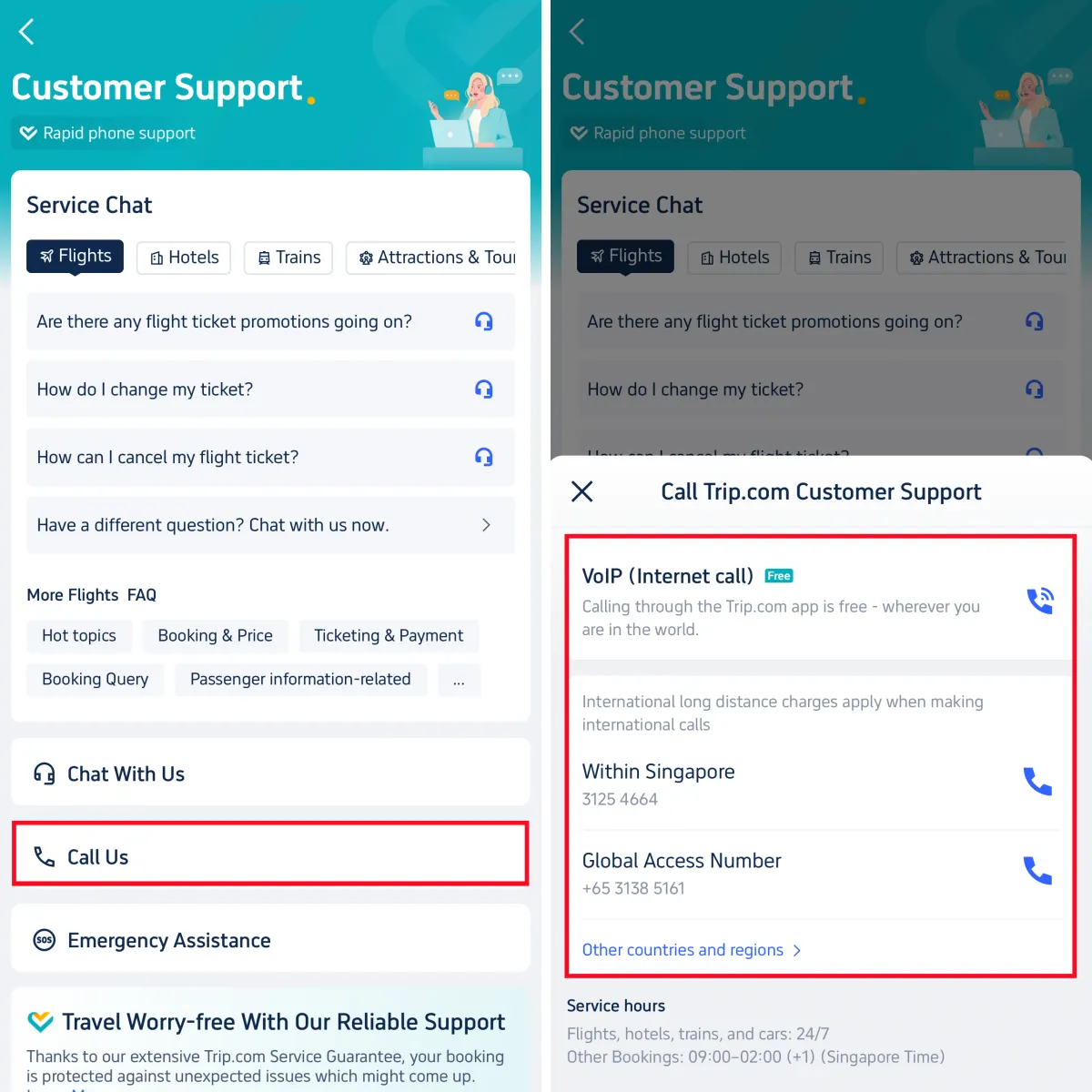
Step 3: Choose Call Trip.com Customer Service

  • Go to "Call Us" section to enter call service page.
  • Customers can choose Internet call or Global call according to their personal need.
Choose Call Trip.com Customer Support

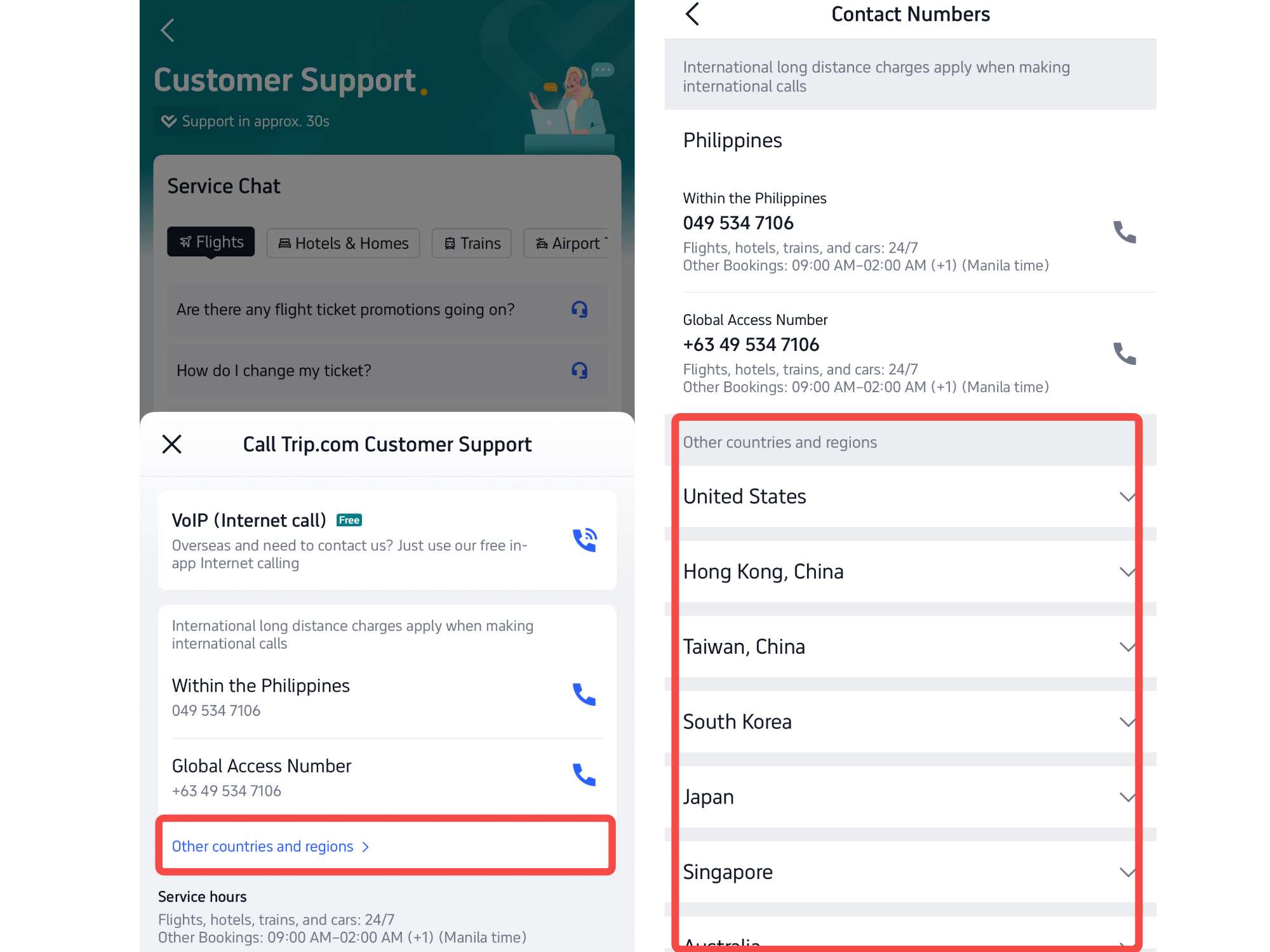
Step 4: Find Call Trip.com Customer Service of Other Countries and Regions

  • If customers need to find call customer service from other countries and regions
  • Click on the button "Other countries and regions" to veiw the detail, where you can find contact numbers from lots of countries and regions.
  • For more detail ,check the table!
Step 4: Find Call Trip.com Customer Service of Other Countries and Regions

Step 5: Choose Emergency Assistance Trip.com Customer Service

  • Go to "Emergency Assistance" section to acquire more customer support, including Translation help, Missing Baggage, Emergency Medicine, Passport Safety etc.
Step 5: Choose Emergency Assistance Trip.com Customer Service

How to Find Trip.com Customer Service on Trip.com Website

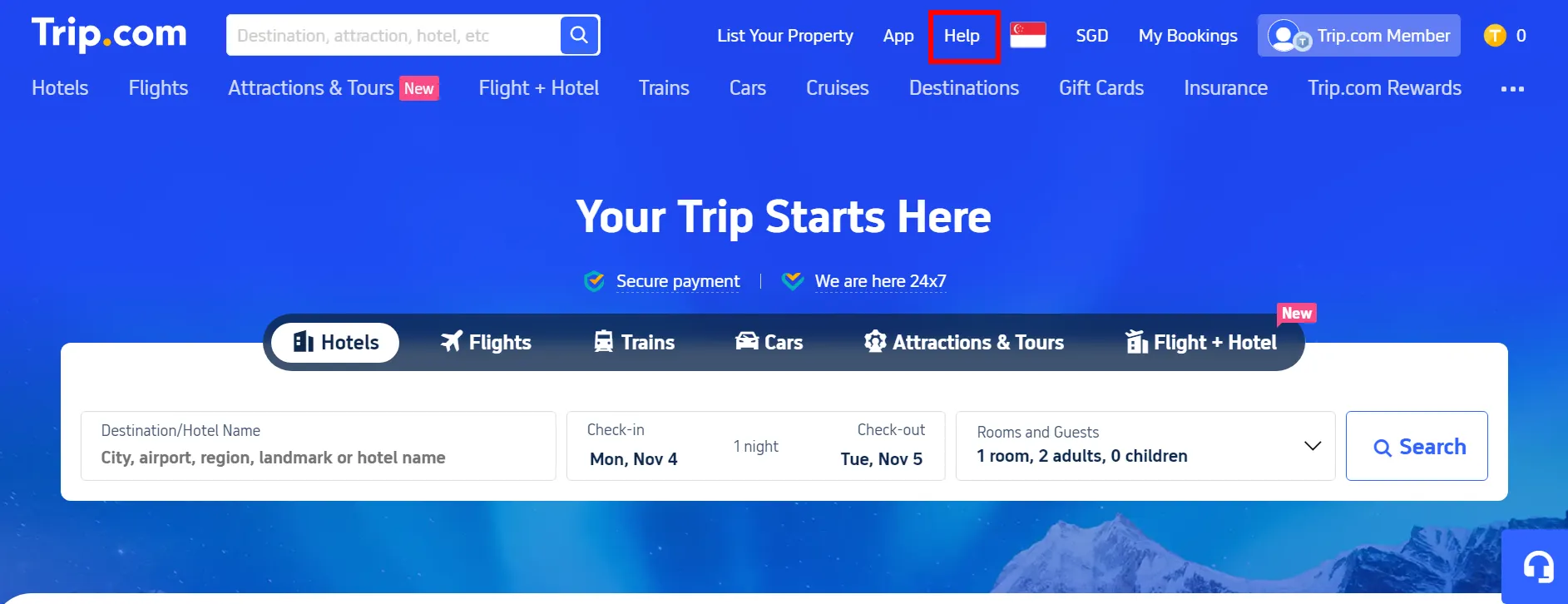
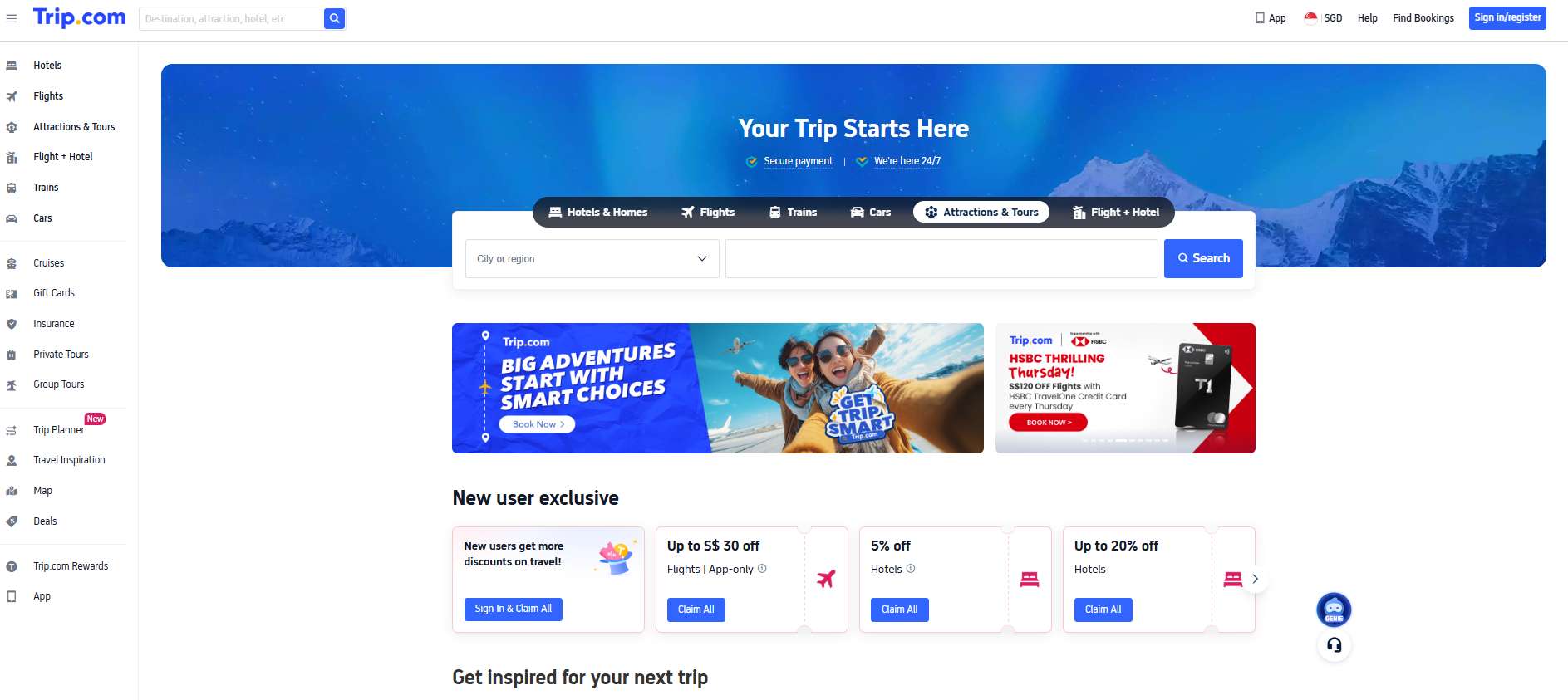
Step 1: Tap "Help" at the Top of the Trip.com website

  • Visit the Trip.com website and click on "Help" at the top right to the detail page.

Step 1: Tap "Help" at the Top of the Trip.com website
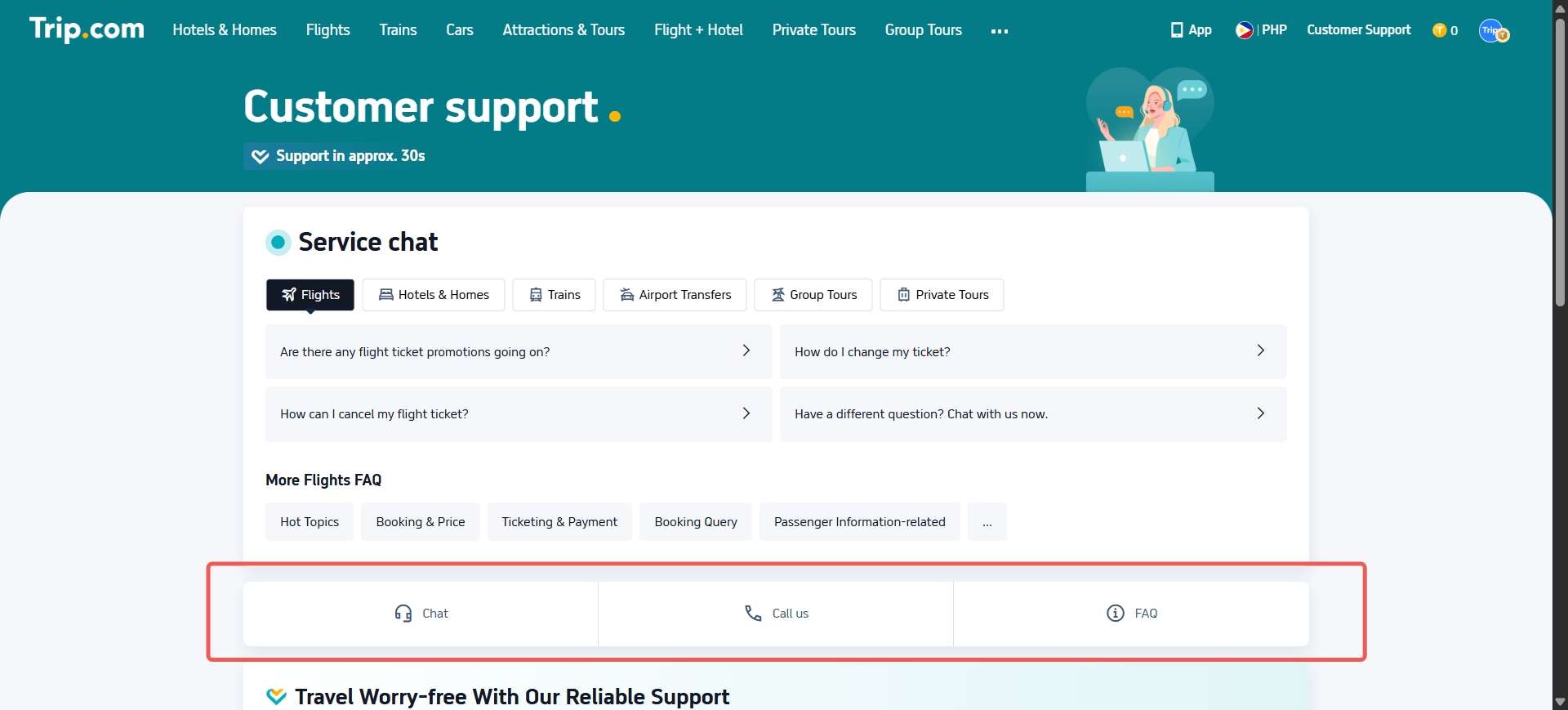
Step 1: Tap "Customer Support" at the Top of the Trip.com website
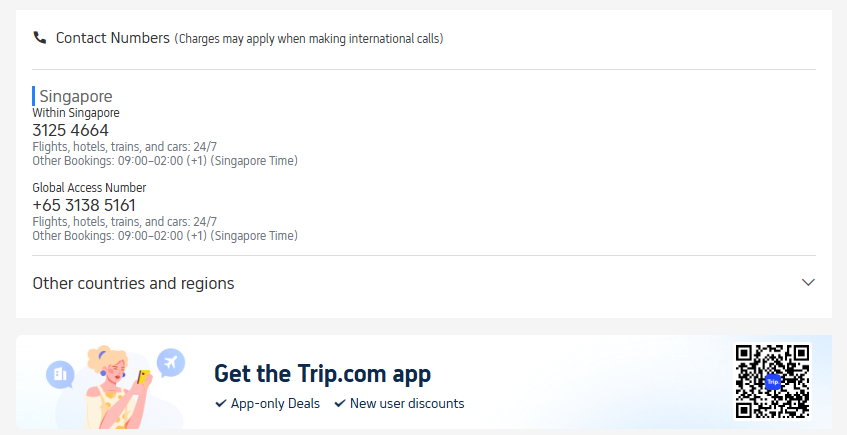
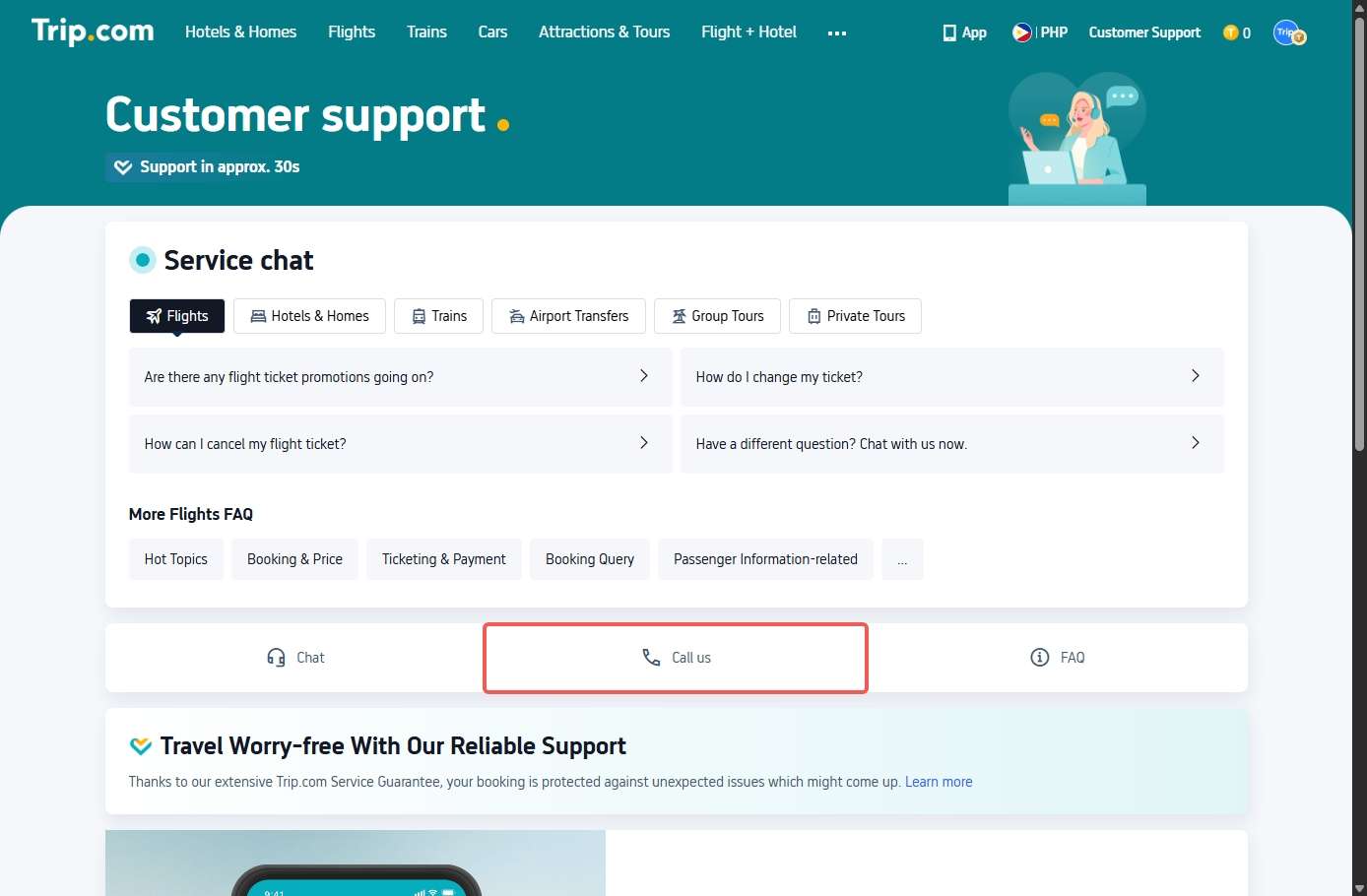
Step 2: Select "Call Us" on Customer Support Page

  • Click “Call Us” to open the detailed page about the call service.
    Number Hotline Trip.com SG

Step 3: Select "Chat" on Customer Support Page

  • Click “Chat” to open the detailed page about the chat service.
  • Trip.com chat service is for non-urgent issues and connects you to a human agent 24/7.
Step 2: Select "Chat" on Customer Support Page

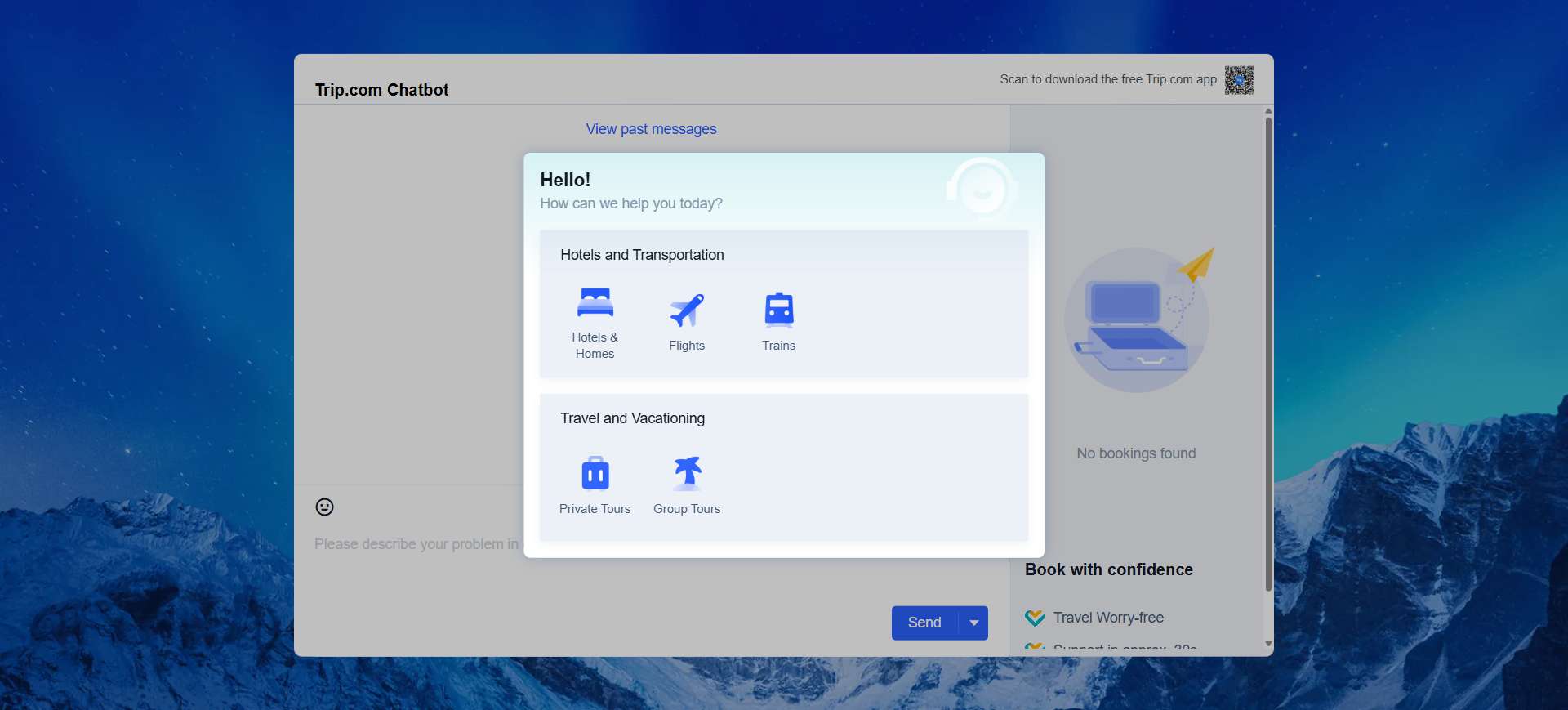
Trip.com Customer Service - Live Chat with Human

The Trip.com customer service chat is the quickest way to get help, no waiting on hold or email delays.

Trip.com Customer Service - Live Chat with Human

How to use Trip.com live chat:

  • Open the Trip.com App or go to the website.
  • Log in and select “My Bookings.”
  • Choose the booking you need help with.
  • Tap “Contact Customer Service.”
  • Select “Live Chat.”
FeatureDetails

✅ Response Time

Usually within minutes

✅ Languages

English, Chinese, Korean, Japanese, and more

✅ Best For

Simple requests like refund status or booking confirmation

📧 Trip.com Customer Service Email

For non-urgent issues or when you need to attach receipts or screenshots, you can contact support via email.

Trip.com Customer Service Email: customer_service@trip.com

📝 When emailing Trip.com, include:

  • Your booking reference number
  • Full name (as per booking)
  • Detailed description of the issue
  • Any attachments or proof of payment

Response Time:

Usually within 12–24 hours depending on request type.

💡 Tips for Contacting Trip.com Support

Tips Contact Trip.com Customer Service

🧳 Final Thoughts

Trip.com website

Read more:

FAQ: Trip.com Customer Service

  • How do I contact Trip.com customer service?

    You can contact Trip.com customer service via phone, live chat, or email. The fastest way is through Trip.com customer service chat in the app or website, available 24/7.
  • What is the Trip.com customer service number?

    The Trip.com customer service number varies by country. For example, in Singapore, you can call +65 3138 2039, which operates 24 hours a day.
  • Does Trip.com have live chat support?

    es! The Trip.com customer service chat is available 24/7. You can access it through the Trip.com App or website by going to “My Bookings” → “Contact Customer Service” → “Live Chat.”
  • How long does Trip.com take to reply to emails?

    Typically, Trip.com customer service email responses arrive within 12–24 hours, depending on the type of request. For urgent issues, use live chat or the hotline instead.
  • Is Trip.com customer service available in Singapore?

    Yes. Trip.com customer service Singapore is available 24/7 in both English and Mandarin. You can reach them at +65 3138 2039 or through the Trip.com live chat.
Disclaimer: This article has been provided by an individual contributor or third party platform. If there is any discrepancy regarding the copyright, please contact us directly and we will delete the content immediately.
>