WeChat QR Code Guide: How to Log In, Pay, and Add Friends

Author's Profile Picture
WeChat QR Code

WeChat QR codes are an essential feature for travel and daily life in China, used for everything from logging in and adding friends to making payments and joining groups. In this guide, we'll break down the different types of WeChat QR codes and show you step-by-step how to use them.

What Is WeChat QR Code?

WeChat QR codes come in various formats depending on the specific task.

QR Code Types

Key Features

Contact QR Code

Add friends, follow official accounts, and connect with business representatives

Group QR code

Joining WeChat groups (class, work, interests, etc.)

Payment QR code

Scan to pay at merchants, receive money transfers, and split bills (settle up)

Login/Verification QR Code

WeChat login on new devices, account registration support, and identity verification

🎁 Search for the flights to China early to snag the best deals and keep an eye out for promotions.
Shanghai
Beijing
Guangzhou
Chengdu
Chongqing
See all flights

How to Find the WeChat QR Code Scanner?

How to find the WeChat QR code scanner

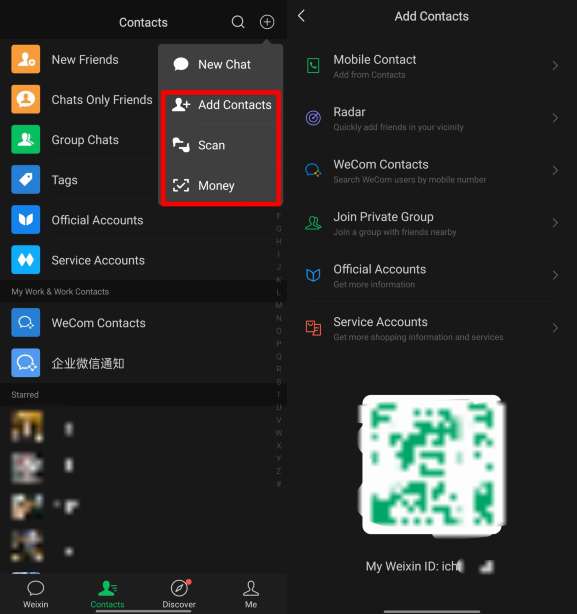
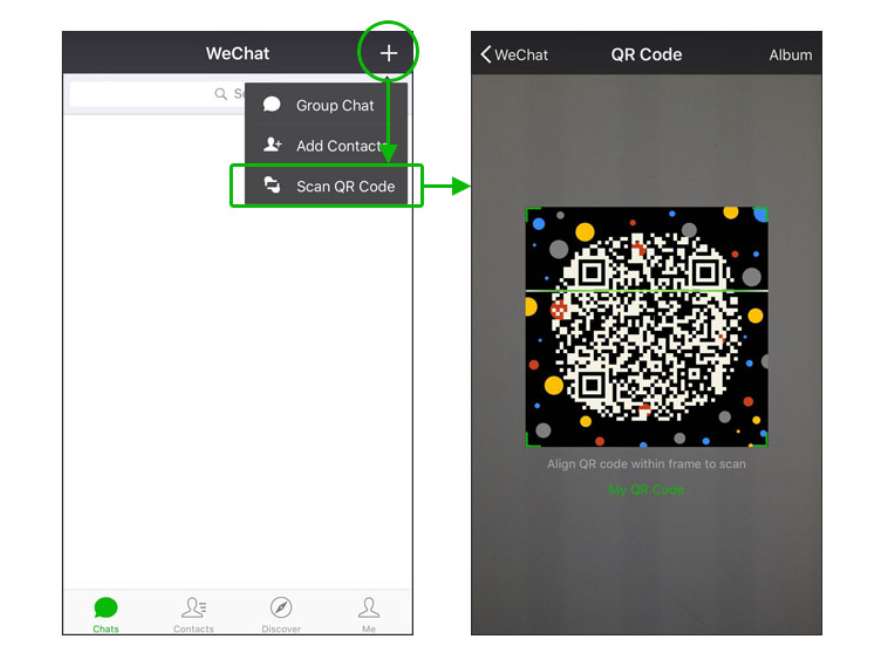
You can easily access the QR code scanner right from the WeChat home screen:

  1. Open the WeChat app (please use the official version from the App Store/Google Play).
  2. Tap the + icon in the top right corner of the chat screen.
  3. Select 'Scan' from the dropdown menu. The camera scanner will launch immediately.
  4. For faster access, you can long-press the WeChat icon on your home screen (iOS/Android) to launch the scanner directly.

How to Scan WeChat QR Codes?

Once the WeChat QR code scanner is open, the process is the same for all code types.

  1. Align the code: Hold your phone steady and align the QR code within the square frame on your screen.
  2. Please wait until you hear a beep or feel a vibration: The WeChat QR code will be recognized automatically.
  3. Follow the prompts:
  • For contacts: Tap 'Add to Contacts' and send a greeting.
  • For groups: Scan the group QR code → 'Join Group' tab (Groups that are full require an invitation from the admin).
  • For payment: Enter the amount, confirm the recipient's name, and then enter your 6-digit payment password.
  • To log in: Tap 'Confirm login' on your phone to approve the PC/web session.

👉How to scan using a screenshot?
If you received a QR code via chat or have a screenshot: Open the scanner → Tap "Album" (bottom right) → Select an image. The WeChat QR code will be automatically recognized from your photo.

👀Pro Tip: To stay connected throughout your visit, consider getting a China eSIM. Just activate and go!

🔥Save More with Up to 5% OFF

Use our promo code to enjoy up to 5% OFF (up to S$3) on your attraction tickets, tours and eSIMs! Only for new users!

How to Add Friends via WeChat QR Code?

This is the most common social use case for QR codes in China. There are two ways to do this:
How to Add Friends via WeChat QR Code 1

Source: WeChat Official Account

Method 1. Scan the Other Person's QR code

  1. Open the scanner.
  2. Point your camera at the other person's WeChat QR code.
  3. Tap 'Add to Contacts' and edit the greeting message as needed.
  4. Please wait until the other person accepts your request.
How to Add Friends via QR Code 2

Source: WeChat Official Account

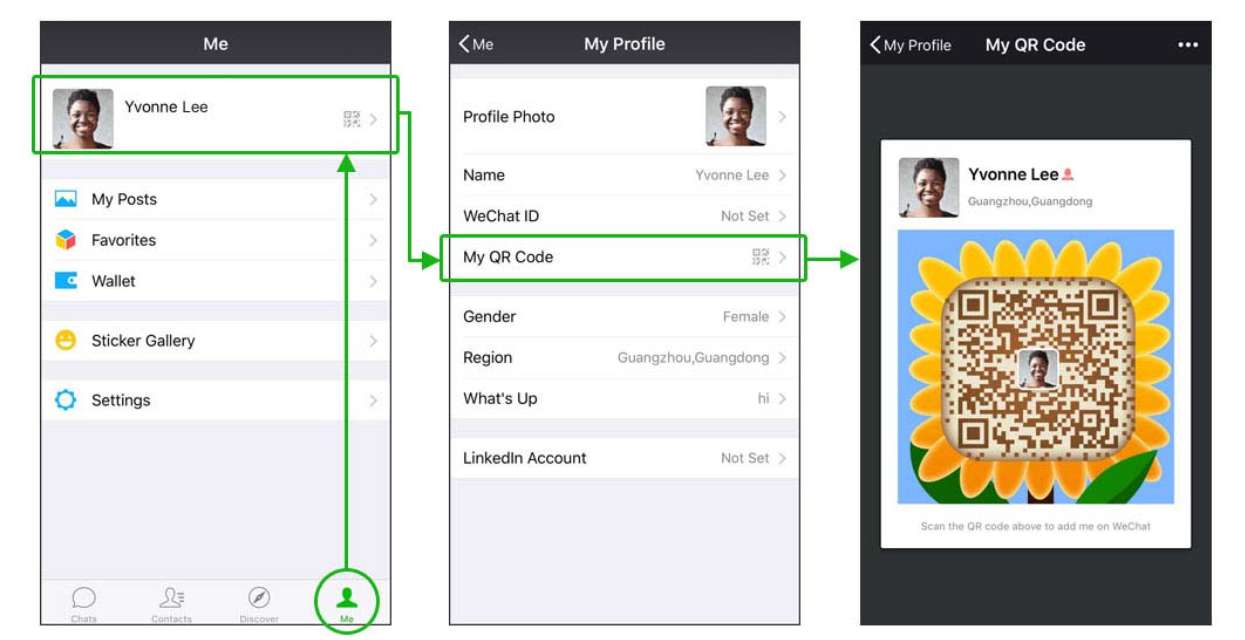
Method 2. Show Your QR code for the Other Person to Scan

  1. Head over to the 'Me' tab in the bottom right corner.
  2. Tap your profile photo/name at the top.
  3. Tap 'My QR Code'.
  4. Have a friend scan it, or tap the '...' menu to save it to your album and share it online.

How to Pay with a WeChat QR Code (WeChat Pay)?

How to pay with a WeChat QR code

For foreigners staying in China, making payments is the most essential part of daily life.
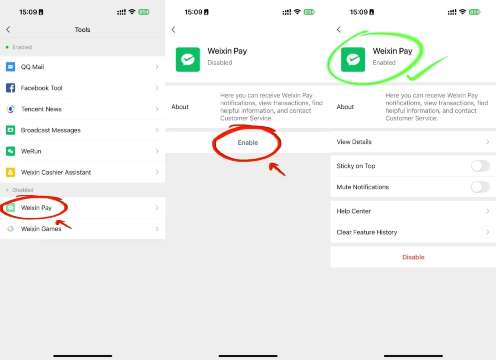
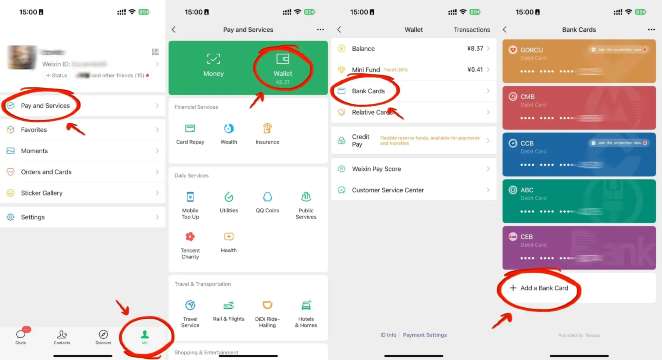
1. How to Activate and Use WeChat Pay?

Activate WeChat Pay
How to use WeChat Pay

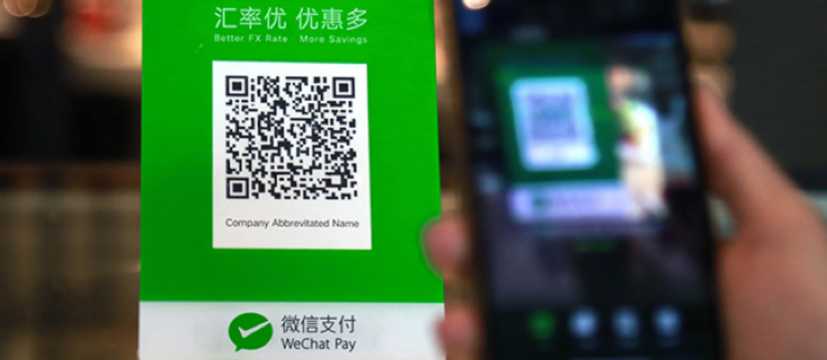
2. Paying at Merchants (Scan QR code)

  1. Open the scanner.
  2. Scan the merchant's QR code (usually printed and attached to the counter).
  3. Please enter the amount.
  4. Please enter your 6-digit WeChat Pay password.
  5. Tap 'Pay'.
Paying at WeChat QR code merchants

3. Receiving WeChat Pay (Other person scans)

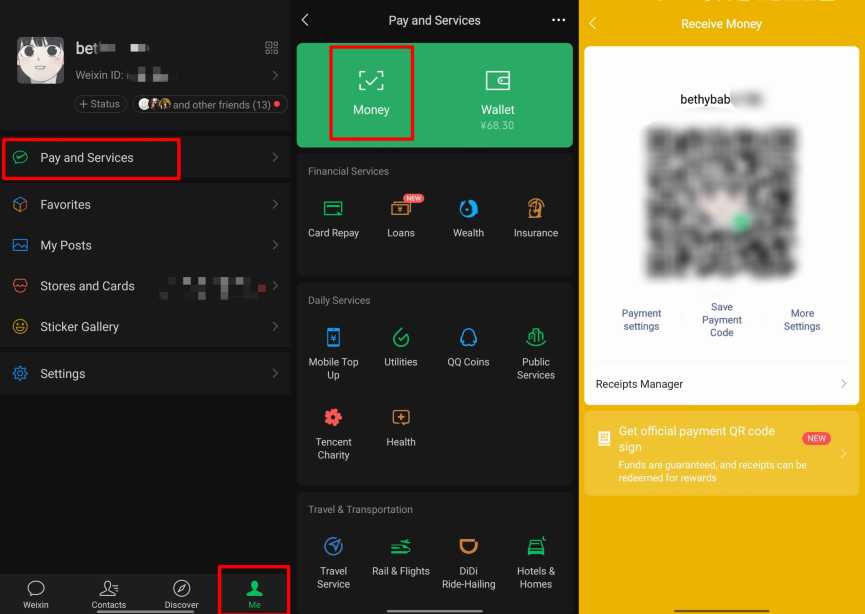
  1. Go to 'Me' → 'Wallet' (or 'Services').
  2. Tap 'Money' or 'Receive Money'.
  3. Show your QR code to the person making the payment.
  4. The other person scans it and enters the amount to send to you.
💡 WeChat Guide for Foreigners: To use WeChat Pay, you generally need to link a Chinese bank card or complete real-name authentication with your passport. Some international credit cards are also supported, but features may be limited depending on your region.
💡 Pro Tip: If you’re travelling onwards to other cities in China, consider using China high-speed rail. It's fast, comfortable, and efficient!

🔥Get 3% Off Your First Train Ticket Booking!

As a special treat, Trip.com is offering a 3% discount on your first train ticket booking. Simply claim your coupon and enjoy a seamless travel experience.
How to Log in with a WeChat QR code (PC/Desktop/Web)?

  1. Visit web.wechat.com or open the desktop WeChat app (Windows/Mac).
  2. A large QR code will appear on the screen.
  3. Open WeChat on your phone and use the scanner to scan the code on your computer.
  4. Tap 'Log in' or 'Confirm' on your phone. Your chats will sync with your desktop.

How to Sign up for and Log in to WeChat Without a QR code?

How to sign up for and log in to WeChat without a QR code

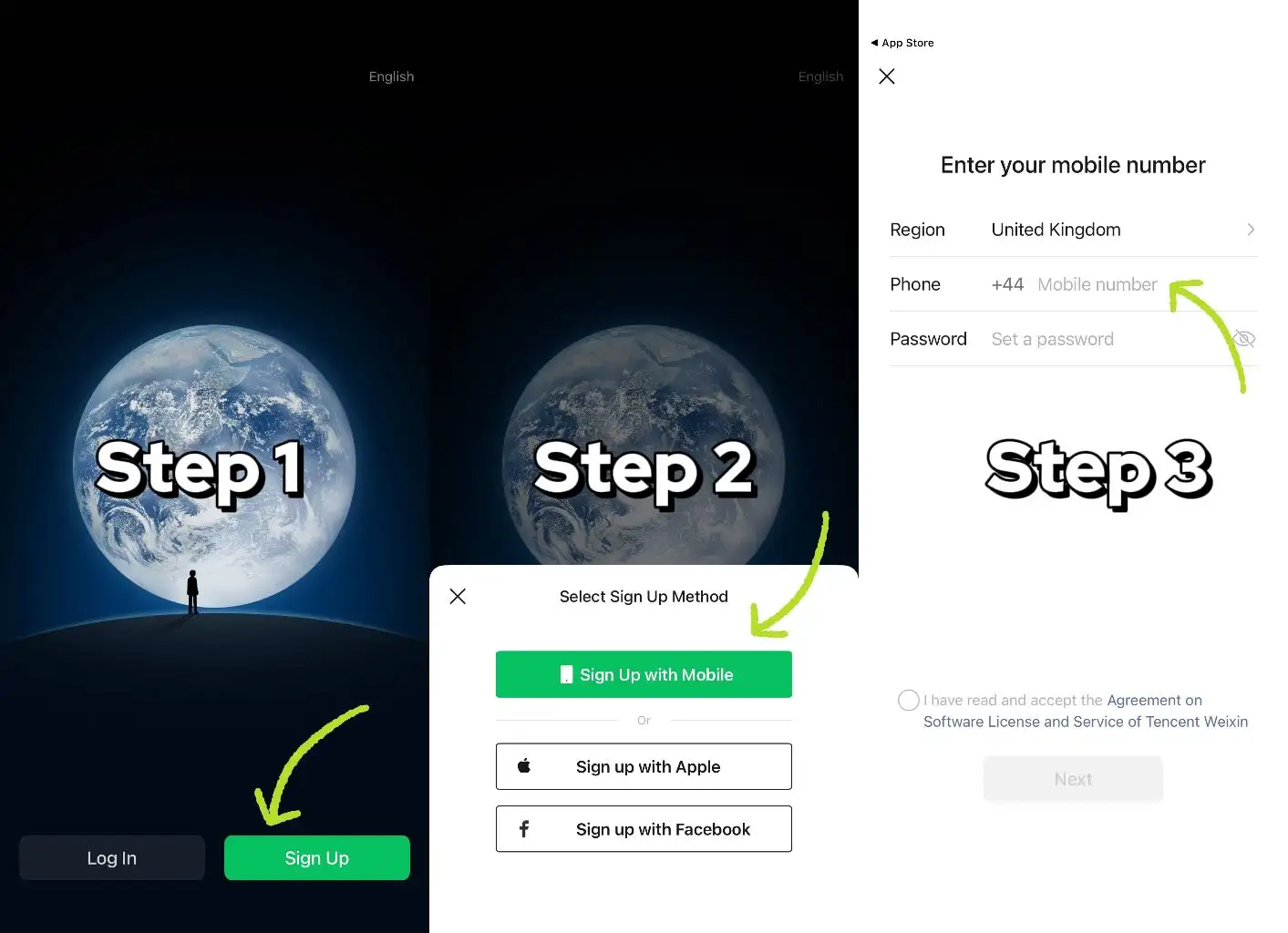
How to Sign up for WeChat Without a QR Code?

  1. Download the official WeChat app (do not use a VPN when signing up).
  2. Option 1: Tap 'Sign up with mobile' → Select country code → Enter mobile number → Set password → SMS verification.
  3. Option 2: Tap 'Sign up with Facebook' → Grant permissions → Enter phone number → SMS verification.
  4. If a WeChat QR code assistance request pops up: use 'Verify Payment Card' or 'Activate WeChat Pay' to skip it.

Logging in Without a WeChat QR Code?

  • Mobile: Enter your linked mobile number + account password, or use an SMS verification code.
  • PC/Desktop (version 3.9.5+): Select 'Log in with phone number' → Enter your phone number and password → Verify via SMS.

How to Sign up for WeChat Without a Friend's QR Code?

How to sign up for WeChat without a friend's QR code

This is the most frequently asked question by new international users. WeChat often asks existing users to scan a WeChat QR code to verify a new account. If you don't have any friends nearby, try the alternatives below.

Method 1: Authenticate with a Bank Card

  1. On the assistance request screen, tap 'Verify with Payment Card'.
  2. Please enter your bank card details (Chinese cards or supported international cards).
  3. Complete all the necessary verifications to finish your registration.

Method 2: Verify with WeChat Pay

  1. Tap 'Verify and Activate WeChat Pay'.
  2. Follow the on-screen instructions to enter your information and set up your payment password.
  3. Complete your sign-up.

Method 3: Standard Mobile Phone Sign-up (No Initial QR Code Required)

  1. Download WeChat from the official App Store/Google Play (do not use third-party APKs).
  2. Open the app → Tap 'Sign up' → Tap 'Sign up with phone number'
  3. Select your country code, enter your mobile number, and set your password.
  4. Complete SMS/phone verification.
💡 Note: The WeChat QR code verification step typically appears after this initial setup, rather than during installation.

Important Notes When Signing up

  • Please do not use a VPN when signing up. This may trigger a security block.
  • Always use the official version of WeChat.
  • If you get stuck, please contact WeChat customer support with your phone number and a screenshot of the error. You can usually expect a response within 3 business days.
👉Pro Tip: For a convenient stay, look for China hotels in advance to secure the best rates.

🔥Exclusive Hotels Deal: Up to 10% OFF for New Users

Discover the world with Trip.com! Book the perfect hotel anywhere in the world and get an unbeatable 10% discount if you're a first-time user! Download our app now and start planning your next trip with ease.

Just click this link and download the Trip.com App, after successfully registering as a member, use it when you place an order!
Beijing
Shanghai
Guangzhou
Chongqing
Chengdu
See All Hotels

Support for QR Code Verification When Signing up for WeChat (If Needed)?

If WeChat QR code verification is required, please use the following method:

① Bank card verification (enter card information)

② Activate WeChat Pay (set payment password).
If the problem persists, please submit your phone number and a screenshot of the error to WeChat customer support (you'll get a response within 3 days).

WeChat QR Code Tips for Singaporean Users

  • Please do not use a VPN while signing up - this may trigger a security block.
  • Always use the official version of WeChat (third-party APKs are prohibited).
  • If you get stuck, please contact WeChat customer support with your phone number and a screenshot of the error. You can usually expect a response within 3 business days.
  • Do not post QR codes on public websites - there is a security risk.

WeChat QR codes are the key to mobile life in China, connecting everything from payments and transportation to logging in. They're a must-have feature for travellers, too—with just a simple scan, you can unlock a world of convenience during your trip.

FAQs About WeChat QR Code

Disclaimer: This article has been provided by an individual contributor or third party platform. If there is any discrepancy regarding the copyright, please contact us directly and we will delete the content immediately.
Alex

Alex

Asia Explorer

View profile

Hi, I’m Alex! I started travelling as a way to take a break from my busy work life, but over the years, it became my passion. From weekend getaways around Asia to longer journeys exploring different cities, I love researching hidden gems, trying local food, and creating practical travel plans. Through my travel guides, I hope to share tips and useful recommendations to help fellow travellers plan meaningful adventures.

75 articles
Asia Travel Travel Planning Hidden Gems
> >
WeChat QR Code