🔥Get 3% Off Your First Train Ticket Booking!
As a special treat, Trip.com is offering a 3% discount on your first train ticket booking. Simply claim your coupon and enjoy a seamless travel experience.


Need to cancel a train ticket booked on Trip.com? You can usually submit a cancellation request directly through the Trip.com website or app without contacting the train station.
However, whether you receive a full refund, a partial refund or no refund depends on the railway operator's rules, the ticket type and how close you are to the departure time.
In this guide, we'll walk you through how to cancel your Trip.com train ticket, check your refund eligibility and understand what happens after you submit a cancellation request.
You can cancel many train bookings, but the refund amount will depend on several factors:
For Chinese train tickets in particular, cancellation fees generally increase as the departure time gets closer. Cancelling earlier may help you avoid higher fees.
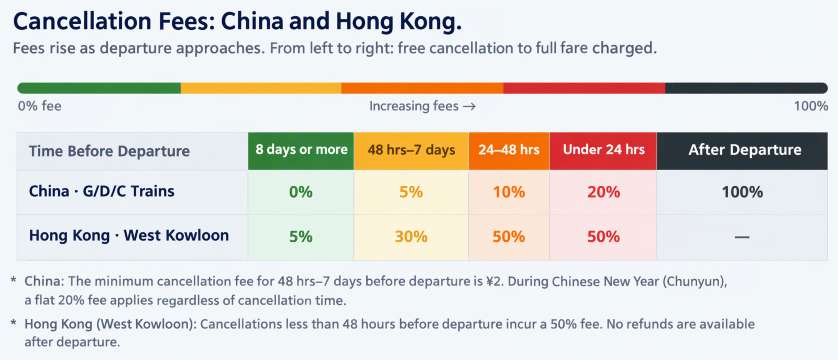
For China's G, D and C-category high-speed trains, cancellation fees depend on how close to the departure time you submit your request.
The cancellation fee is based on the original ticket price. For example, if your train ticket costs approximately S$103, cancelling it 12 hours before departure with a 20% fee would result in a deduction of around S$20.60.
You would receive approximately S$82.40 as a refund.
| Cancel before departure time | Fees | Estimated cashback |
|---|---|---|
8 days or more | 0% | Full amount |
48 hours–7 days | 5% with a minimum of ¥2 | Approximately 95% |
24–48 hours | 10% | About 90% |
Less than 24 hours | 20% | Approximately 80% |
After the train has departed | Non-refundable | ¥0 |
As a special treat, Trip.com is offering a 3% discount on your first train ticket booking. Simply claim your coupon and enjoy a seamless travel experience.
During the Chunyun period, also known as China's Spring Festival travel rush, different cancellation rules may apply.
A 20% cancellation fee may be charged even if you cancel your ticket well ahead of departure.
If you're travelling during Chinese New Year, remember to review the ticket's cancellation policy carefully before making a booking or submitting a refund request.

High-speed train services departing from or arriving at Hong Kong West Kowloon Station follow different cancellation policies from those applicable to trains operating within mainland China.
If you need to make changes to your booking, submit your request at least 90 minutes before the scheduled departure.
Please note that tickets that have already been changed may have additional restrictions on refunds.
| Cancel before departure time | Fees |
|---|---|
8 days or more | 5% |
48 hours–7 days | 30% |
Less than 48 hours | 50% |
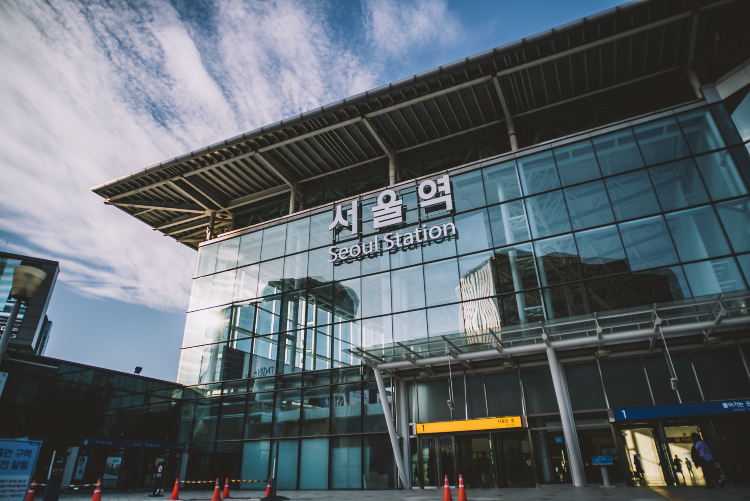
For Korea's KTX trains, the conditions are as follows:
| Cancel before departure time | Fees |
|---|---|
1 day or more | Free |
Travel day, but with at least 1 hour to spare | 400 won |
Less than 1 hour left | 10% or 400 KRW, whichever is higher |
After the train departs | Non-refundable |

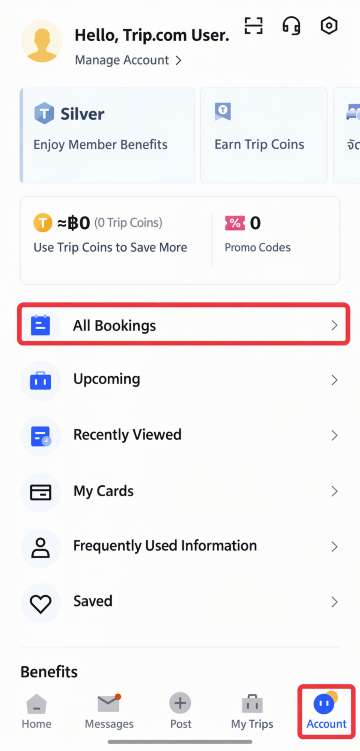
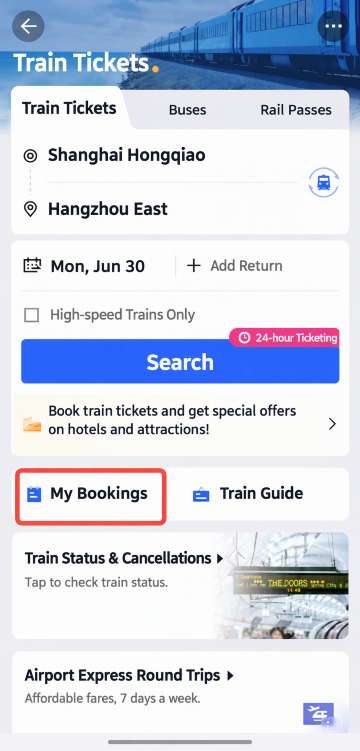
The system will display details such as
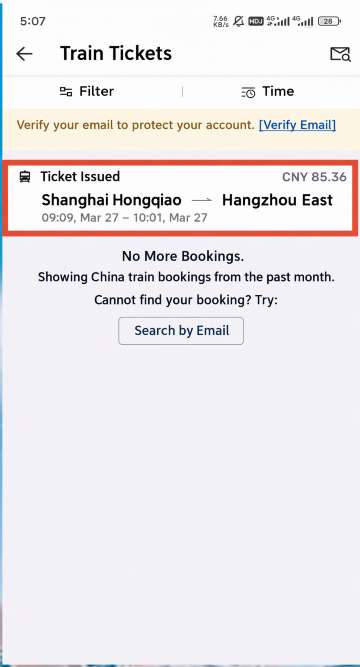
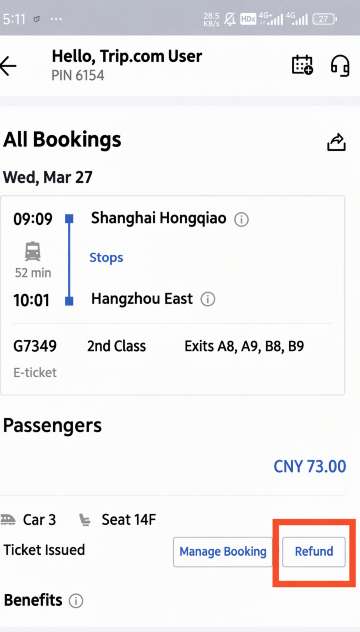
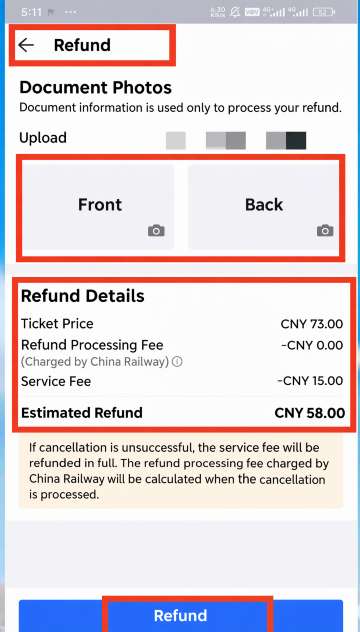
Sure! The steps are similar to those in the app.
However, some features or benefits may only be available on the app.
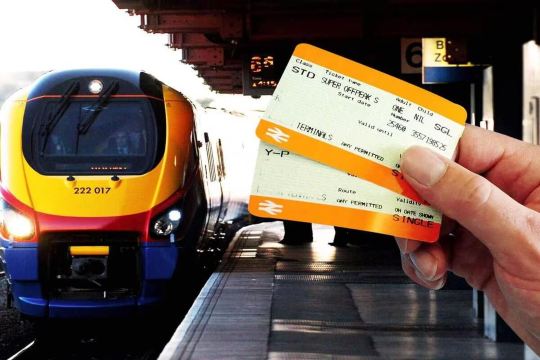
If you have already picked up your physical train ticket at the station, the refund process may be different from cancelling an e-ticket.
You will generally need to submit a refund request through Trip.com first, then visit the station counter with your paper ticket and original passport to complete the necessary procedures.
If your travel plans are not yet confirmed, it is best to avoid collecting your paper ticket too early. Keeping it as an e-ticket may make it easier to manage cancellations or booking changes online.
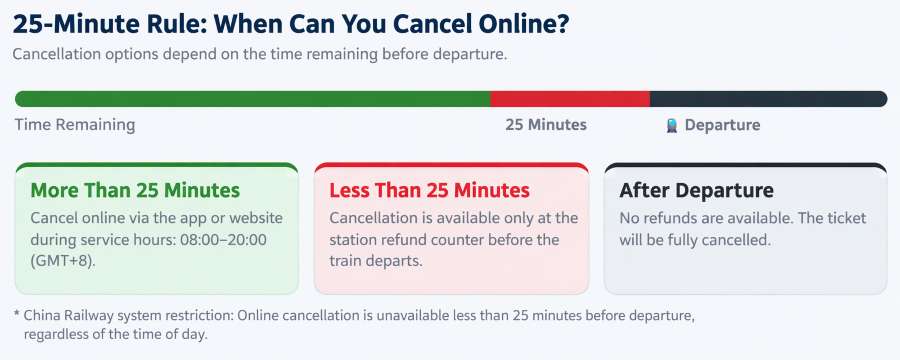
Online cancellations for China train tickets are only available during the designated service hours, usually from 8:00 AM to 8:00 PM (China Standard Time, GMT+8).
Please also note that online cancellation is not permitted within 25 minutes of the scheduled departure time.
If your departure time is very close, we recommend heading straight to the ticket refund counter at the station with your passport and booking details.
| Situation | How to get there |
|---|---|
More than 25 minutes remaining and within online hours | Do it via the app or website |
More than 25 minutes remaining, but outside of online hours | Contact the station counter |
Less than 25 minutes left | Contact the station counter |
The train has already departed. | Non-refundable |

Yes, changes may be allowed depending on the ticket conditions and railway operator's rules.
You may be able to modify certain booking details, including:
However, each ticket is generally allowed only one change, and online modifications must be made within the permitted time period.
Any applicable fees will depend on when you request the change and the new travel date.
Example conditions:
| A time of change | New travels | Fees |
|---|---|---|
At least 48 hours before departure | Within the ticket sales period | Free |
Less than 48 hours | Within the same day | Free |
24–48 hours | The next day or sometime after | 5% |
Less than 24 hours | The next day or sometime after | 15% |
Travel date before 22:00 | Within the same day | Free |
Travel date before 22:00 | The next day or sometime after | 40% |
After 22:00 on the travel date | — | Cannot be changed |
Once a train ticket has been modified, it may become non-refundable, depending on the railway operator's rules. This may apply even if you only change:
Before confirming any changes, take a moment to consider your travel plans. If you think you may need to cancel the entire journey, cancelling your original ticket and purchasing a new one could be a better option in certain situations.
Remember to review the ticket's terms and conditions carefully before making your decision.
Once the cancellation is confirmed, the refund will be credited back to your original payment method.
The estimated timeframes are as follows:
| Payment methods | Estimated duration |
|---|---|
Credit/Debit Card | 7–30 business days |
Refund at the station | 7–20 business days |
List of ticket changes | 7–10 business days |
The processing time begins once the system confirms your cancellation.
For refunds via credit or debit card, the funds may take longer to appear than stated, depending on your issuing bank.
You can track the status under "My Bookings" in the Trip.com app.
If your refund has not arrived after the expected processing period, try the following steps:
In some cases, the refund may have already been credited to your account without a push notification or app alert, so it is worth checking your payment records first.
If the railway operator cancels your train service, you are generally entitled to a full refund without cancellation charges.
For electronic tickets, you can usually submit the refund request directly through Trip.com. If you have already collected a physical ticket, you may need to visit the train station with your original passport to complete the refund process.
Once the cancellation is confirmed, your booking status in the Trip.com app should be updated to "Cancelled". The refund details should also indicate that no cancellation fees have been deducted.
If your journey is affected by a force majeure event, such as a typhoon, earthquake, flood or heavy snowfall, first check whether the railway operator has officially cancelled the service.
If the train is cancelled, you may qualify for a full refund without fees, subject to the operator's refund policy.
However, if the train continues to operate as scheduled and you choose not to travel, the usual cancellation rules and fees will apply.
Therefore, before cancelling your ticket during an emergency, check the railway operator's latest announcements to see whether any special refund arrangements have been introduced.
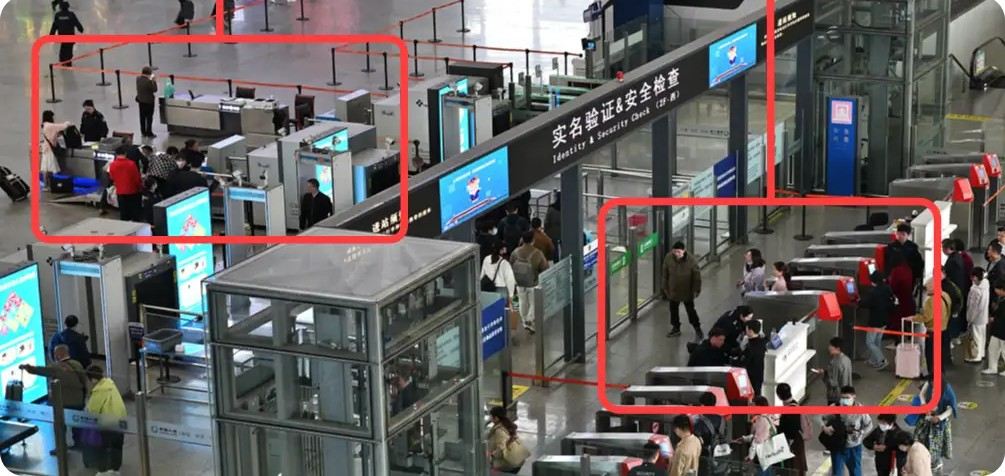
Train tickets are linked to each passenger's personal information, so the name and passport number on your ticket must match the details provided during booking.
This means you cannot transfer your ticket to another person. When cancelling online, you may be asked to enter your passport details or upload a photo for identity verification.
If you need to handle the cancellation at the train station, remember to bring your original passport for verification.
In general, cancelling a Trip.com train ticket is simple as long as it meets the railway operator's refund requirements. One key point to remember is that cancelling earlier usually means paying a lower fee.
For China train tickets, cancellations made at least 8 days before departure may qualify for a full refund, while requests submitted less than 24 hours before departure may incur fees of up to 20%. Always review the applicable charges before confirming your cancellation.
Before submitting a request, make sure you check the following:
If the railway operator cancels your train due to force majeure, avoid submitting a cancellation request yourself immediately.
Check the latest service announcements and booking status on Trip.com first, as operator-initiated cancellations may come with different refund arrangements from passenger-requested cancellations.
 NO.1