
Trip.com eSIM Review: Plans, Prices, Pros and Cons

eSIMs have become a popular choice for travellers who want to stay connected overseas without having to remove or replace their physical SIM cards.
However, you may still have questions about how well they work, whether the internet speed is reliable and how easy they are to set up.
In this Trip.com eSIM review, we'll look at the installation process, connection performance, advantages, disadvantages and overall value to help you decide whether it's a suitable option for your next trip.
What is Trip.com eSIM?

eSIMs are now a convenient way for travellers to access the internet overseas without having to queue at airport shops to buy a local SIM card or switch SIM cards while travelling.
Trip.com eSIM is one option worth considering, allowing users to purchase and set up a data plan online before departure.
With packages available for various destinations and different data needs, it offers a simple way to stay connected while travelling.
How is it different from a standard SIM card?
An eSIM is a digital SIM card that is built into your smartphone at the factory. It functions just like a standard SIM card, but you no longer need to physically insert or remove a card.
Users simply purchase an internet package from a provider, then scan a QR code or install it via a file they receive. The system will then add the network profile to your device, and it's ready to use immediately.
When traveling abroad, your eSIM will automatically connect to a partner network in your destination country, allowing you to use the internet as soon as you connect, no need to wait in line for a SIM card at the airport, worry about losing your original SIM, or fumble with a SIM ejector tool.
The differences between an eSIM and a standard SIM card include:
eSIM | Standard SIM card |
No physical SIM card required | You'll need to swap your SIM card |
Available for purchase and installation online | You'll need to pick up a SIM card or buy one at the shop. |
Get up and running in just a few minutes | You'll need to insert the SIM card and set it up yourself |
You can store multiple profiles on a single device. | Limited by the number of SIM slots |
Use your main number alongside international data on many models. | You might need to remove your primary SIM card. |
eSIMs are a convenient choice for international travellers, whether you're going on a short holiday, travelling for business or visiting several countries in one trip.
You can arrange your mobile data before departure, saving time and avoiding the need to look for a local SIM card after arrival.
Why choose an eSIM from Trip.com?
Trip.com is a well-known travel platform where users can book flights, hotels and attraction tickets.
Besides these services, it also provides eSIM plans for destinations around the world, giving travellers another way to arrange their travel essentials through one app.
One of the main features of Trip.com's eSIM service is its range of data packages. Travellers can choose from daily plans, fixed data allowances and multi-country packages, depending on their destination and internet needs.
This makes it suitable for both those visiting one country and those travelling across several destinations.
Compared with purchasing a physical SIM card at the airport, Trip.com's eSIM offers several conveniences:
- Buy and install before departure: Set up your eSIM in advance instead of spending time looking for a SIM card after landing.
- Stay connected after arrival: Activate your plan according to the instructions and connect to a supported local network at your destination.
- Compare different plans: Browse available packages, data allowances and prices before choosing one that suits your trip.
- Keep your physical SIM card: There's no need to remove your regular SIM, so you can avoid the risk of misplacing it.
- Read customer reviews: Check feedback from other travellers to get a better idea of their experience before making a purchase.
Trip.com's eSIM is also relatively straightforward to set up. First-time users can follow the installation instructions provided after purchasing a plan, making the process easier to understand.
Whether you're trying an eSIM for the first time or travel overseas regularly, it can be a convenient way to arrange your mobile data before reaching your destination.
What are the Trip.com eSIM packages like?
Trip.com provides various eSIM packages for travellers with different trip durations and data needs.
You can choose between single-country and multi-country plans covering destinations across the globe, including Asia, Europe, the Americas and Oceania.
Whether you're visiting one destination or exploring several countries, there's a range of options to consider.
eSIM Trip.com for Asia: Hong Kong, Japan, Korea, and more
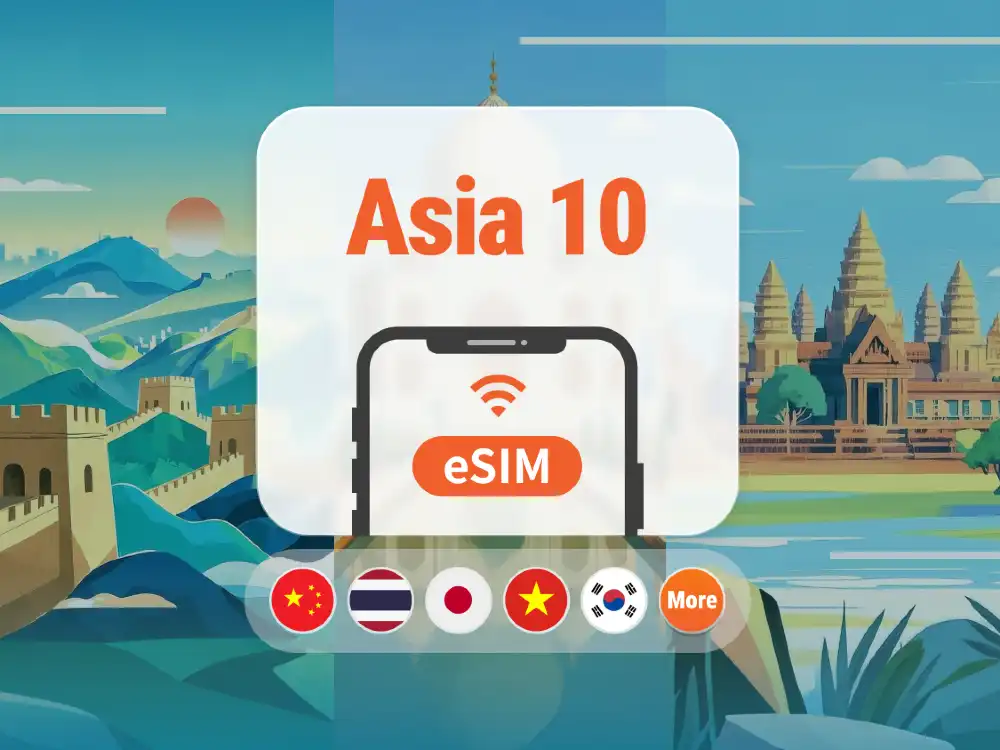
Asia has one of the largest selections of eSIM packages on Trip.com, with plenty of options for travellers visiting the region.
Both single-country and multi-country plans are available, covering popular destinations such as Japan, South Korea, Hong Kong, China, Singapore, Taiwan, Vietnam, Malaysia, Thailand and many more.
For each country, there are usually several package options available, such as
Package Type | Perfect for everyday use |
1-3 days | Short trips or layovers |
5-7 days | Holiday Getaways |
10-15 days | Full trip experience |
30 days | Long-term stays or working abroad |
In terms of connection speed, many plans support 4G LTE and 5G networks, where available and when used with a compatible device.
They connect through local network providers in each destination, allowing you to use everyday apps such as Google Maps, LINE, Facebook, Instagram, TikTok and YouTube while travelling.
Keep in mind that prices and data allowances differ depending on the destination and package. Trip.com may also offer promotional rates from time to time, so check the latest plan details before making a purchase.
eSIM Trip.com for Europe and America: How suitable is it for long-haul trips?

For travellers heading further afield, Trip.com also has eSIM packages for destinations across Europe, North America and parts of South America.
Depending on your itinerary, you can select a plan for one country or opt for a regional eSIM that provides coverage across several countries under a single package. Some popular destinations include:
Europe
- France
- Italy
- Switzerland
- Germany
- Spain
- Netherlands
- Austria
- Belgium
- Portugal
- United Kingdom
America
- United States
- Canada
- Mexico
One of the popular options is the Europe Regional eSIM, which allows you to use the internet in multiple countries under a single package.
It is perfect for those traveling along popular routes, such as
- France → Switzerland → Italy
- Germany → Austria → Czech Republic
- Spain → Portugal
You won't need to purchase a separate eSIM each time you enter another country.
For regional plans, your device can switch to a supported local network automatically, depending on the package and network availability, making cross-border travel more convenient.
If you're travelling around North America, some eSIM packages cover both the United States and Canada.
These plans are a practical option for travellers visiting multiple cities or crossing between the two countries during their trip.


How to Buy an eSIM via Trip.com: A Step-by-Step Guide
Purchasing an eSIM through Trip.com is a quick process that you can complete on either the website or mobile app.
After your payment is confirmed, you'll receive a QR code and setup instructions to help you install the eSIM on your device.
This means you can get everything ready before departure without waiting for a physical SIM card to arrive.
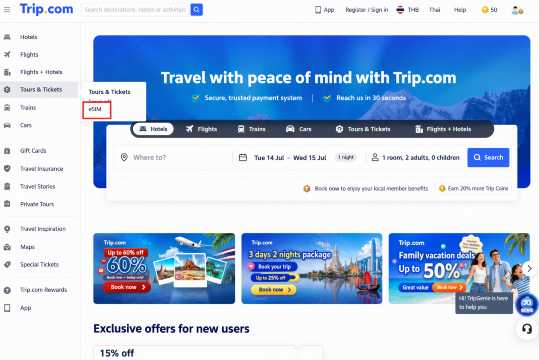
Step 1: Visit the Trip.com app or website
- Go to the Trip.com website, then search for "eSIM" or select the "Travel Essentials" menu to view internet packages for the country you're traveling to.
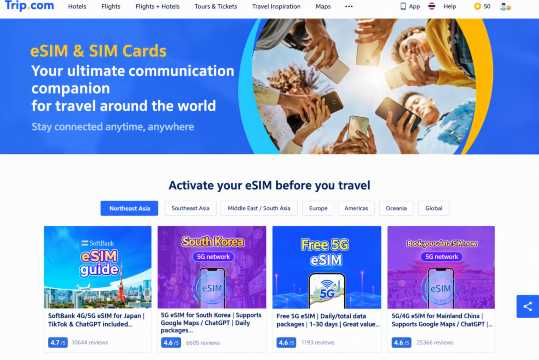
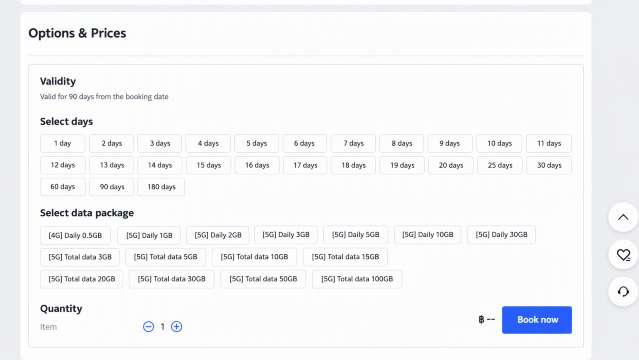
Step 2: Choose your destination and package
Select your destination country, then compare the details of each package, such as
- Number of days
- Internet data allowance
- Unlimited or Fixed Data plans
- Supported networks
- Price
- Package start date
You should choose a package that best fits the number of days you're traveling and your personal usage needs.
Step 3: Review details before ordering
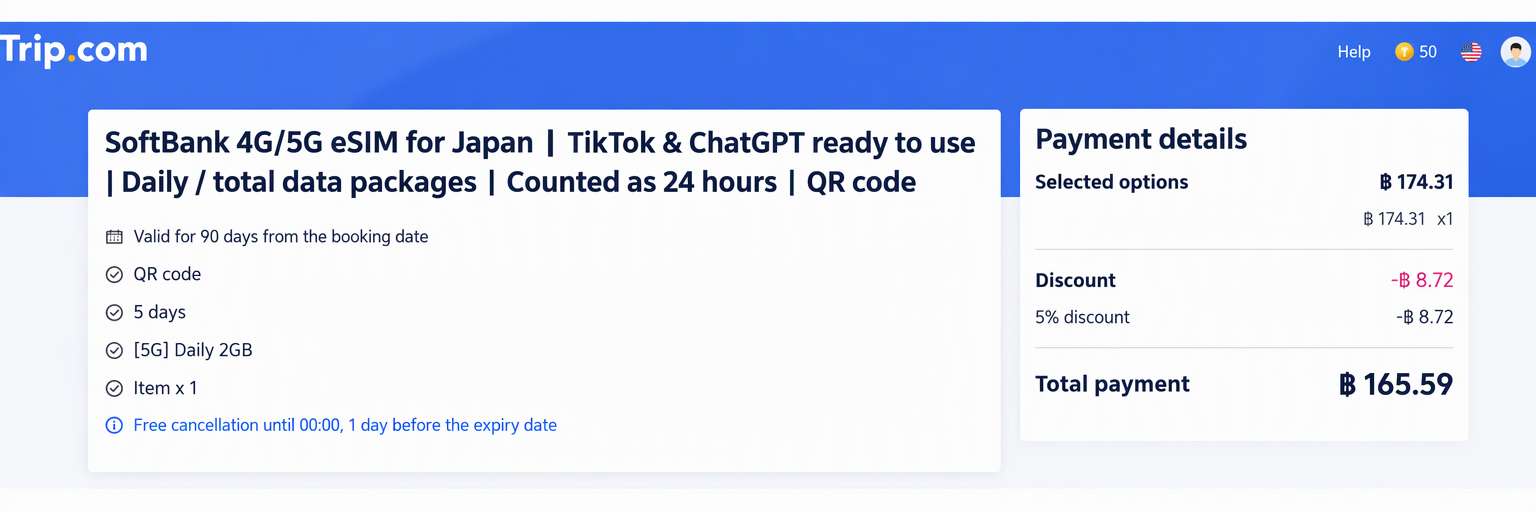
Before you hit buy, be sure to check these important details:
- Does your phone support eSIM?
- Countries covered
- How to count usage days
- Refund policy
- The start of the package validity period (some packages begin counting upon the first network connection)
Step 4: Make a payment
Choose a convenient payment method, such as
- Credit/Debit Card
- Apple Pay or Google Pay (in some countries)
- Supported e-wallets
- Points or discount coupons (if any)
Once your payment is successful, the system will confirm your order immediately.
Step 5: Get your QR Code to install your eSIM
After payment, Trip.com will send your eSIM details via the order page in your account, along with a QR code and installation guide.
Generally received
- QR Code for installation
- Activation Code (some packages)
- User guide
- Purchased package details
We recommend saving the QR Code or downloading it to another device, as the phone you're using for installation won't be able to scan a QR Code displayed on its own screen.
How to install a Trip.com eSIM on iPhone and Android
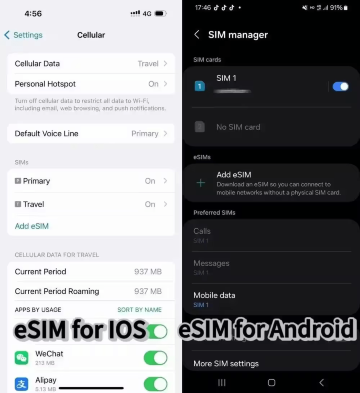
Once you've received your QR code, you can install your eSIM right away, even before you reach your destination! Most packages won't start counting down until you connect to a network in a supported country.
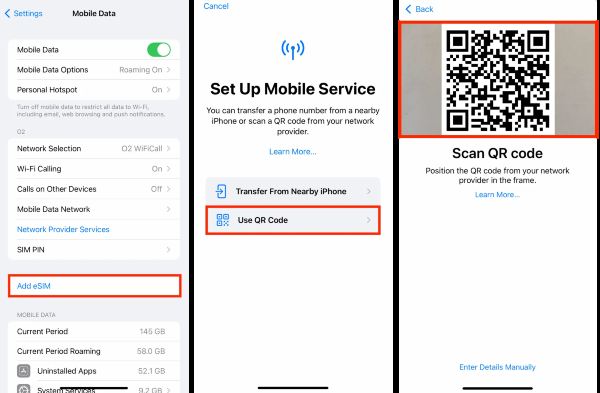
How to install on iPhone
- Go to Settings
- Select Cellular / Mobile Data
- Tap Add eSIM or Add Cellular Plan
- Select Use QR Code
- Scan the QR Code you received from Trip.com
- Wait for the system to install your profile.
- Name your eSIM, such as "Japan Trip" or "Europe eSIM," to distinguish it from your primary SIM.
How to install on Android
Menu locations may vary depending on the manufacturer, such as Samsung, Google Pixel, or Xiaomi, but generally, the steps are as follows:
- Open Settings
- Go to the Connections / Network & Internet / SIM Manager menu
- Select Add eSIM
- Choose to install via QR Code
- Scan QR Code
- Wait for the system to finish downloading your profile.
If the installation is unsuccessful or you encounter any issues, please contact Trip.com Customer Service and provide your order number for assistance.
How to activate your Trip.com eSIM when you arrive abroad
Once you arrive at your destination, you can activate your eSIM to get connected in just a few minutes. Here are the general steps:
- Turn on your device once you arrive at your destination.
- Turn on Data Roaming for your installed eSIM (if your package guide requires it)
- Select your eSIM as the primary SIM for mobile data.
- Turn off data roaming for your primary Thai SIM card to avoid unexpected roaming charges.
- Turn on Airplane Mode for about 10–20 seconds, then turn it off again if you still can't connect to the network.
- Please wait a moment while the device automatically searches for and connects to the network.
Once set up, you'll be ready to hop online instantly, whether you're pulling up maps, chatting with friends, booking a ride, or looking up info on the go.
 203681 booked




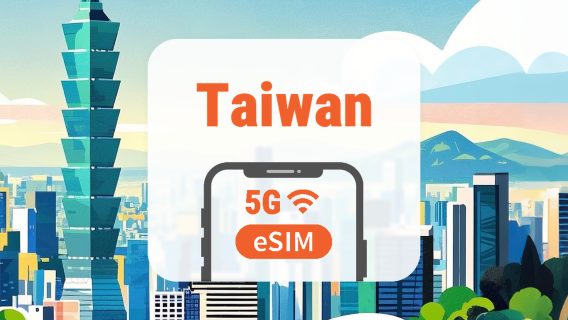

Trip.com eSIM Review from Real Users: Is It Good? Does It Really Work?

Overall, Trip.com's eSIM has received positive feedback from many travellers, with users often highlighting how easy it is to purchase and install, along with the convenience of having internet access in popular destinations.
However, the actual experience can differ depending on the country, selected data plan and local network provider.
One of the main benefits users appreciate is being able to buy their eSIM in advance and activate it when they reach their destination.
Some travellers may encounter connection problems, although these can sometimes be related to phone settings or reduced internet speeds after reaching a plan's data limit.
To avoid surprises, it's worth checking the package details, including its data allowance, speed restrictions and activation requirements, before purchasing.
Pros and cons of Trip.com eSIM you should know before buying
While Trip.com's eSIM is a popular choice, it's worth considering both the pros and cons before purchasing to ensure it fits your travel style.
Pros | Cons |
Shop online 24/7 | Only works with eSIM-compatible phones |
No need to swap out your physical SIM card | Some packages do not support calls and SMS. |
You can install it in advance before your trip. | Be sure to read the package terms and conditions carefully, such as speed throttling after you've used up your data allowance. |
There are packages available for many countries and regions to choose from. | Prices may vary by country and promotional period. |
Compatible with many main SIM models. | If you delete the eSIM from your device, you may not be able to reinstall it using the same QR code. |
Purchase through a platform you're familiar with, complete with user reviews. | Connectivity may vary depending on partner networks in each country. |
Overall, Trip.com's eSIM is a convenient option for travellers who prefer to arrange their mobile data before departure. It saves you the trouble of looking for a SIM card at the airport and makes it easier to get online once you arrive at your destination.
As long as you select a package that matches your travel dates and data usage, and your phone is eSIM-compatible, it can be a practical and affordable way to stay connected overseas.
Comparing Trip.com eSIMs vs. Buying a SIM Card At The Airport

Both Trip.com's eSIM and airport SIM cards are popular options for using the internet abroad, but both have different advantages and limitations.
Choosing which one to use depends on your convenience, budget, and travel style.
Comparison table: Trip.com eSIM vs. airport SIM cards
Topic | eSIM Trip.com | Airport SIM card |
Ease of purchase | Buy online from anywhere before you travel | Must be purchased after arriving at the airport |
Installation | Scan the QR Code and install it yourself | You'll need to swap out your physical SIM card |
Start time | Ready to use the moment you arrive at your destination. | Must be purchased and registered before use |
Keeping your main SIM card safe | You can use a Thai SIM alongside an eSIM on many models. | You might need to remove your primary SIM card. |
Price | Often has promotions and makes it easy to compare prices | Some airports might have higher prices than shops in the city. |
Variety of packages | Available in daily, data-volume based, and multi-country options. | Options may be limited depending on the airport service provider. |
Perfect for multi-country trips | We have Regional eSIMs and Global eSIMs | You'll often need to buy a new SIM card when switching countries. |
Calling via phone number | Most of them are Data Only packages | Many packages include a local phone number for you to use. |
Limitations | Requires an eSIM-compatible phone | Compatible with phones that support standard SIM cards |
For travellers with newer smartphone models, Trip.com eSIM can be a convenient choice. You can purchase it before departure, install it in advance and activate it when you reach your destination.
There are also different packages to choose from, including plans for single-country visits and multi-country trips.
However, buying a physical SIM card at the airport may still be a better option if you need a local phone number or have a device that does not support eSIM technology.









































Tips For Getting The Most Out of Your Trip.com eSIM
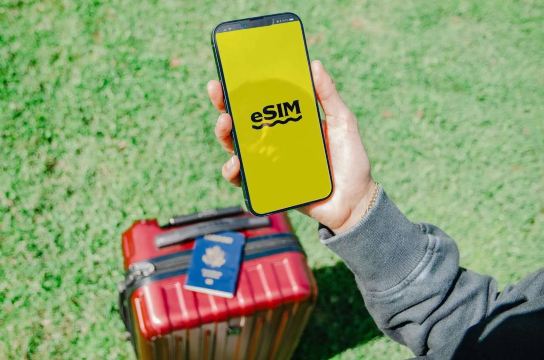
Choosing the right eSIM package for your trip ensures you get the most out of your internet connection, minimizes travel hassles, and saves you money, especially if you're hopping between countries or need to stay connected all day long.
Choosing a suitable eSIM package can help you stay connected throughout your trip without spending more than necessary. It's worth considering your travel duration, destinations and daily data usage, especially if you're visiting several countries or rely on mobile internet throughout the day.
How to Choose the Right Trip.com eSIM Package for Your Trip
Before buying an eSIM, take a moment to compare the available plans. The following factors can help you find one that matches your travel plans and budget.
1. Choose a package based on your trip duration
Consider how many days you'll be travelling before selecting a data plan:
- 1–3 days: Suitable for short holidays, weekend getaways or business trips.
- 4–7 days: A good option for a typical one-week holiday.
- 8–15 days: Ideal for longer holidays or trips covering multiple cities.
- More than 15 days: Consider a longer-validity or unlimited data plan, particularly if you expect to use a lot of mobile data.
2. Choose a package based on the number of countries you're visiting
Your itinerary also determines which type of eSIM is most suitable:
- One country: A Single Country eSIM is usually the more affordable choice if you're only visiting one destination.
- Several countries in the same region: A Regional eSIM is worth considering for trips such as Japan and South Korea or France and Italy. It allows you to use one package across supported destinations without purchasing a separate plan for each country.
- Multiple regions or continents: A Global eSIM may be more suitable, provided it covers all the countries on your itinerary.
3. Choose a plan based on your data usage
Think about how much mobile data you'll need each day and throughout your trip. If you mainly use your phone for messaging, checking maps and browsing, a smaller data package may be sufficient.
However, if you regularly watch videos, upload photos or use social media, consider a plan with a larger data allowance. Choosing slightly more data than you expect to use can also help you avoid running out during your trip.
4. Read the package terms and conditions
Before completing your purchase, check the package details carefully. Pay attention to the data allowance, validity period, supported networks, activation requirements and any speed restrictions.
Some plans may also have fair usage policies or specific conditions for using data across different countries. Checking these details beforehand helps you avoid buying a package that doesn't match your travel needs.
Troubleshooting Trip.com eSIM: What to do if it's not working or you've lost signal
If you've already installed your eSIM but can't connect to the internet, don't worry! In many cases, it's a quick fix that can be solved by simply checking a few basic settings.
1. Make sure your eSIM is activated
Go to the SIM/Mobile Data menu and make sure your eSIM is turned on and set as the primary SIM for mobile data.
2. Turn on Data Roaming
Most travel eSIMs require you to turn on Data Roaming to connect to international networks. This isn't the same as roaming with your home SIM card, so be sure to check the instructions for the package you purchased first.
3. Turn Airplane mode off and on
If you still don't have a signal, try turning on Airplane Mode for about 10-20 seconds and then turning it off again to let your phone search for a new network.
4. Select network manually
In some countries, manually selecting a network provider can help if your device isn't connecting automatically.
5. Restart your phone
Restarting your device after installation or upon arriving at your destination often helps the system fully load your eSIM profile and connect to the network.
6. Check if your data has run out or if your package has expired
If you're having trouble connecting to the internet after a few days, be sure to check if you've used up your data allowance, if your package has expired, or if your speed has been throttled according to your Unlimited plan's terms.
7. Contact Trip.com Customer Service
If you've tried everything and it's still not working, please contact our customer support team. Be sure to have your order number, phone model, country of use, and a screenshot of your eSIM settings (if needed) ready. Our team will be happy to check your package status and guide you through further troubleshooting steps.
As you can see, Trip.com's eSIM is an attractive option for travelers who want convenient international internet access without the hassle of swapping SIM cards, and who appreciate being able to install it in advance via QR code in just a few minutes.
It also offers a wide variety of packages covering Asia, Europe, and the Americas, making it suitable for both short trips and multi-country journeys.
However, you should always check that your phone supports eSIM and choose a package that fits your trip duration and usage needs to get the best value.
If you're looking for a Trip.com eSIM review before making a purchase, this article will help you understand the pros, limitations, and real-world usage, so you can confidently choose the perfect package for your next trip.
FAQ: Trip.com eSIM Review
-
Is Trip.com eSIM reliable?
-
How does Trip.com eSIM work?
-
Can I use Trip.com eSIM before travelling?
-
Does Trip.com eSIM support unlimited data?
-
Can I use Trip.com eSIM for calls and SMS?
Popular Content
-
Popular Picks
-
Top Flight Links
-
Popular Hotels
-
Popular Things to Do
-
Featured guides
-
Trip.com links
- Trip.com Customer Service
- Trip.com VIP Lounge
- Trip.com Cancellation Policy
- Buy Now Pay Later
- Trip.com Contact
- Best Credit Cards
- scoot-baggage-allowance
- How to Use Trip com Promo Codes
- Trip.com Change Passport
- Trip.com Booking Confirmation
- Trip.com Flight Refund
- Trip.com Payment Methods
- Best Day to Book Flights
- Singapore Airlines Change Flight
- How to Book a Student Flight Ticket
- QW907 Flight Status
- 8M370 Flight Status
- CA490 Flight Status
- CZ8302 Flight Status
- ZG053 Flight Status
- CI834 Flight Status
- MU7705 Flight Status
- Plane tickets from Hong Kong to Guam
- Plane tickets from Singapore to Shanghai
- Cheap tickets from Singapore to Bangkok
- Plane tickets from Singapore to Kuala Lumpur
- Cheap flights from Singapore to Manila
- Cheap flights from Singapore to Dhaka
- Cheap flights from Singapore to Seoul
- Cheap flights from Singapore to Tiruchirappalli
- Hotels near Hefeinan Railway Station
- Hotels near Xiaobei Station
- Hotels near Kuanzhai Alley
- Hotels near Beijing Road
- Hotels near Zixiao Palace
- Tokyo Hotels
- Chengdu Hotels
- Kuala Lumpur Hotels
- Phu Quoc Island Hotels
- Taipei Hotels
- Hotel Les Matins de Paris
- Villa K Family Hometel
- Airport International Hotel (Xuzhou Guanyin Airport)
- Ramada by Wyndham Seoul Dongdaemun
- Atour Hotel (Chengdu Taikoo Li)
- Singapore 4G eSIM | Supports Google Maps / ChatGPT | Daily/Total Data Plans | 24-Hour Billing | 1–30 Days | QR Code
- Malaysia 5G eSIM | Supports Google Maps / Tiktok / ChatGPT | Daily / Total Data Plans | 24-Hour Billing | 1–30 Days | QR Code
- Vietnam Airport VIP Fast Track Service
- Huanglongjiuzhai Railway Station - Jiuzhaigou National Park shuttle bus · private charter/shared transfer optional
- Mainland China 5G eSIM | Supports Google Maps / ChatGPT | Daily/Total Data Plans | 24-Hour Billing | 1–365 Days | QR Code
- Foreign Tourist Day Tour: Panda Valley / Dujiangyan / Mt Qingcheng / Blue Tear / Chengdu
- VIP Fast Track service for immigration clearance at Tan Son Nhat Airport in HCM
- Mainland China/Hong Kong/Macau 5G eSIM | 5 Carriers · All AI | Day Pass/Total Data Package | 24-Hour Billing | QR Code
- Fukuoka SIM Card
- Athens SIM Card
- Las Vegas Day Tours
- Vancouver Day Tours
- Bali Cultural Experience
- Taichung Transport Card
- Honolulu Paragliding
- Hong Kong Public Holidays 2027
- China Power Bank Limit
- Trip.com Customer Service
- train to kl from singapore
- 中国地图
- Shanghai Metro
- China Plug
- Thailand Plug
- Taiwan Plug
- Singapore Public Holiday 2027
- Busan Metro
- Vietnam Plug
- China Train Luggage
- universal studios singapore tickets
- Shenzhen Metro
- Big Transport from Tokyo to Fukuoka
- Frankfurt Airport to City
- Osaka Station to Kyoto Station
- Trip.com Promo Code
- Trip.com Flight Deals
- Trip.com Credit Card Promotions
- How to Book Cheap Flights
- Trip.com Member Rewards
- Trip Weekly Hotel Sales
- Online Hotel Booking
- Online Flight Booking
- Trip.com Travel Guide
- Book China Train Tickets
- Trip.com Seat Selection
- Singapore Public Holidays 2027
- Trip.com 优惠码
- Trip.com Travel Guides
- Trip.com Black Friday Sale