🔥Save More with Up to 5% OFF
Use our promo code to enjoy up to 5% OFF (up to S$3) on your attraction tickets, tours and eSIMs! Only for new users!


The Singapore Airlines app is really useful for both frequent and holiday travellers from Singapore.
It makes things easier because you can just use your phone to manage everything, like checking flight updates and storing your boarding pass digitally without print any papers.
In this guide, I will explain the functions of the app on the useful features and how to download that can truly help save time while travelling.

The Singapore Airlines app is the official mobile application from Singapore Airlines that allows travellers to manage flights, check in online, view boarding passes, track KrisFlyer miles, and receive flight notifications.
The app is available on both iPhone and Android devices and is commonly used by Singapore travellers for both regional and long haul flights.
For iPhone and iPad users, the Singapore Airlines app can be downloaded directly from the Apple App Store.
Here is what you need to do:
For Android users the process is just as simple through the Google Play Store.
Steps to install:
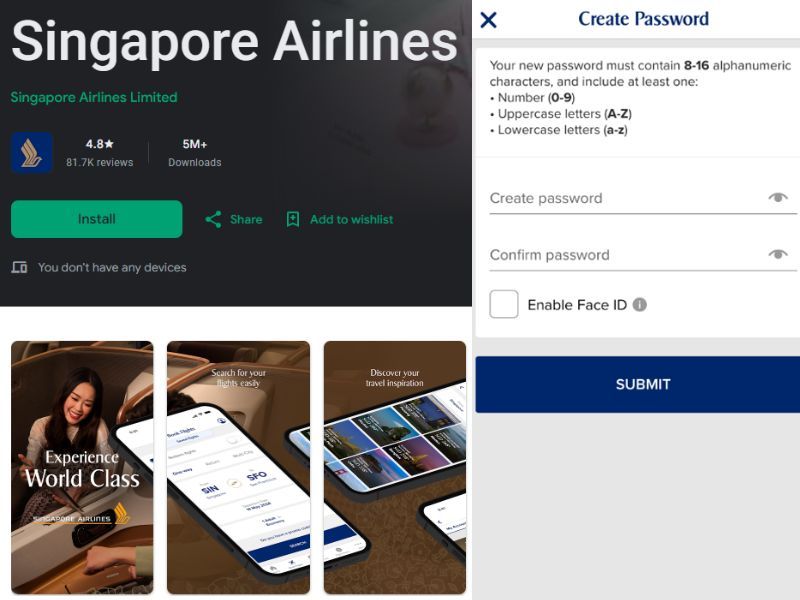
Here is a simple step by step guide for first time users.
Search for the official Singapore Airlines app on:
Users can log in with their KrisFlyer account or continue as a guest.
Creating an account makes it easier to manage future bookings and earn miles automatically.
You can add trips by:
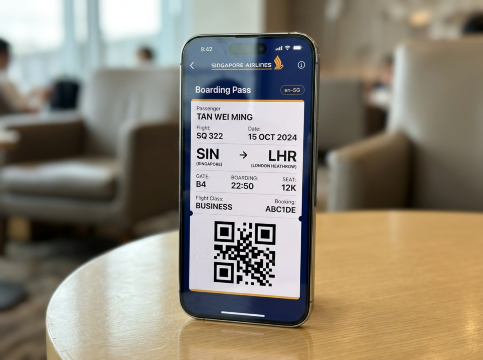
Before departure, complete check in through the app and save your boarding pass digitally.
Keep notifications turned on so you receive instant alerts during your trip.
Use our promo code to enjoy up to 5% OFF (up to S$3) on your attraction tickets, tours and eSIMs! Only for new users!
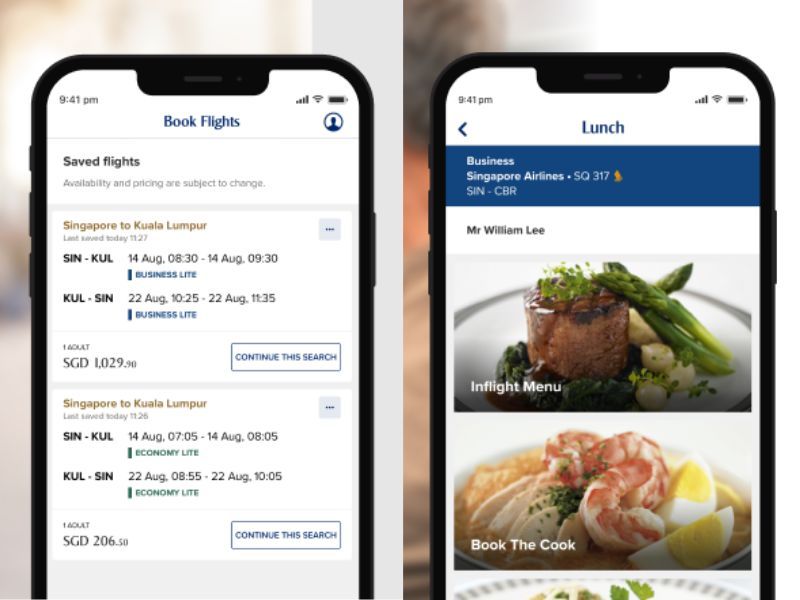
One of the biggest reasons people use the Singapore Airlines app is because it's so convenient that you can book flights anytime without needing a laptop:
You can book:
The mobile check-in feature is really helpful for travellers who want to skip long airport queues. Most passengers can check in directly through the app about 48 hours before the flight.
Once check-in is completed, the digital boarding pass is sent straight to the phone, making the whole process much easier and faster.
This is especially convenient during busy travel periods at Singapore Changi Airport, such as school holidays, long weekends, and festive seasons when the airport gets much more crowded than usual.
These days, it is as easy as simply head straight to baggage drop or immigration without needing to print any documents.
The Singapore Airlines app helps you stay updated with real-time notifications.
Instead of constantly checking airport screens, you can just follow the updates on your phone while you're eating, shopping or waiting at the boarding gate.
Passengers can receive alerts for:
For many Singapore travellers, this feature is really useful when planning reward trips or checking if there is enough miles are available for cabin upgrades.
The app is linked directly to the KrisFlyer programme, so managing the rewards become much more easier in one place.
Inside the app, users can:
For long haul flights, being able to choose seats early can make a huge difference, especially for travellers who prefer window seats, aisle access, or extra legroom for overnight journeys.
The app also gives travellers more control over their flights before departure.
Passengers can:
Here are some practical tips many travellers find useful.
Tip | Benefit |
Screenshot your boarding pass | Helpful if internet connection becomes weak |
Enable notifications | Receive instant flight alerts |
Charge your phone before boarding | Important for digital boarding passes |
Update the app regularly | Prevents bugs and loading issues |
Save passport details early | Faster future bookings |
The answers is yes for people who travel regularly.
The app makes travel more convenient by placing bookings, boarding passes, and flight updates in one place. It is especially helpful for frequent flyers, family holidays, and business trips where smoother airport experiences matter.
Instead of printing multiple documents or checking emails all the time, as travelers can manage almost everything directly from their apps.
The Singapore Airlines app has become a really handy tool for travellers in Singapore.
From mobile check-in to tracking Krisflyer rewards, it helps simplify a lot of parts of the journey.
For people who travel regularly or even just a few times a year, learning how to use the app can save a lot of time and reduce stress during airport travel.
As more airports keeps moving towards digital systems, Singapore Airlines app like this will likely become even more important for future trips.
 NO.1
NO.1




























![Jiufen Old Street + Shifen Old Street + Shifen Waterfall 1-day tour [Depart from Taipei | Guaranteed departure]](https://ak-d.tripcdn.com/images//0584o12000nkigtod37D0_C_568_320.jpg)



![[Exclusive for International Travelers] Taiwan High Speed Rail One-Way Ticket (15% Discount)](https://ak-d.tripcdn.com/images//0583e12000n1aktfl7D21_C_568_320.jpg)








![[Daehan Hanbok] Hanbok Rental at Seoul Gyeongbokgung Palace](https://ak-d.tripcdn.com/images//0580r12000qlh1tt6C5B4_C_568_320.jpg)






![[Expert Guide] Grand Palace + Damnoen Saduak Floating Market + Maeklong Railway Market one-day tour in Bangkok](https://ak-d.tripcdn.com/images//0584s12000nm73makA2D9_C_568_320.jpg)








![Half-Day Tour to Zhujiajiao Ancient Town [Explore the Millennial Water Town with Timeless Charm and Lively Atmosphere]](https://ak-d.tripcdn.com/images/0352m12000pbrd487A4C6_C_568_320.jpg)