Scoot is a Singapore-based low-cost airline under the Singapore Airlines Group, flying out of Changi Airport to a fast‑growing network across Asia-Pacific, the Middle East and Europe.
📒 Understanding Scoot’s Cancellation Policy
Scoot’s cancellation policy is built around non-refundable fares, with limited exceptions and optional flexibility add-ons for more protection.
What “Cancellation” Means with Scoot
- Most Scoot tickets are non-cancellable and non-refundable, unless you meet specific criteria like medical or compassionate reasons, or an airline-initiated significant schedule change (2 hours or more).
- To cancel “for any reason”, you generally need to have bought Scoot’s flexibility product Cancel Your Trip, which lets you cancel and get a refund in Scoot travel vouchers.
The Role of Flexibility Add-ons
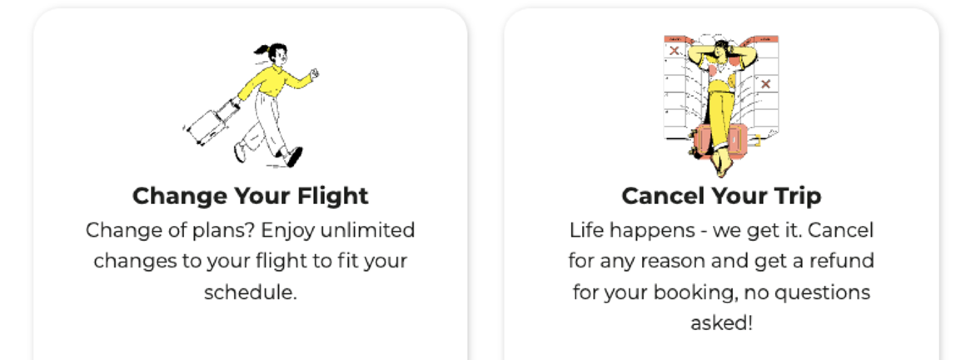
- Cancel Your Trip: A paid add-on that allows you to cancel up to 4 hours before departure (for almost all routes except India) and receive refunds via Scoot travel vouchers.
- Change Your Flight: A paid add-on for unlimited date/time changes with no Scoot change fees (fare difference still applies), but it does not turn your ticket into a cash-refund product.
When Scoot May Allow Refunds Without Add-ons
- Scoot may consider refunds in Scoot travel vouchers if you cannot travel due to serious medical issues or death of the passenger/immediate family, supported by proper documents (e.g. medical certificate, death certificate).
- If Scoot retimes, disrupts, or cancels your flight by 2 hours or more, you will be contacted and offered options, which can include rebooking or vouchers depending on the situation.
Where does Scoot fly? Find out more in our guide article Scoot Destinations from Singapore!
✈️ Scoot Cancellation and Refund Eligibility
Situation | Can you cancel? | Refund / voucher? | Key conditions / proof |
Purchased “Cancel Your Trip” add-on | Yes, before departure | Scoot travel vouchers for ticket value (non-cash) | Add-on must be purchased with booking; cancel within stipulated time before flight. |
Medical circumstances (you or immediate family) | Case-by-case via Scoot review | Scoot travel vouchers if approved | Submit medical certificate with clinic details, date, contact, and “unfit to travel” or diagnosis. |
Compassionate circumstances (death of passenger or immediate family) | Case-by-case via Scoot review | Scoot travel vouchers if approved | Submit death certificate via webform / Live Chat / WhatsApp for Scoot’s assessment. |
Flight disruption or schedule change (2+ hours) | If significantly affected by Scoot | Options may include rebooking and/or vouchers | Scoot notifies you by email/SMS; options depend on disruption severity and route. |
Standard ticket without add-ons (no special reason) | No | No refund | Fare is non-cancellable and non-refundable |
Read our Scoot Baggage Allowance Guide to know more about the size and weight limits on Scoot carry-on and checked baggage.
Check out our Scoot Singapore Terminal Guide for a step-by-step departure guide for your Scoot flight from Singapore Changi.
🎫 Scoot Travel Vouchers Explained

Voucher Validity and Usage
- Validity period: Scoot travel vouchers issued for refunds are typically valid for up to 24 months from the date of issue, giving you time to plan a new trip.
- Where you can use them: Vouchers can usually be used on Scoot-operated flights booked via the Scoot website or mobile app, for base fares, taxes and selected add-ons, but not for third‑party products like hotels or insurance.
- Non-transferable terms: Refund vouchers are non-transferable and tied to the original passenger/booking, which means you generally cannot give or sell them to someone else.
How to apply vouchers online:
- Start a new booking on Scoot website or APP and select your flights.
- At the payment page, choose the “Voucher” option and enter your voucher number or select a saved voucher if you’re logged in; the value will automatically be applied to your booking.
Refund Processing Timelines
- Review time: For medical or compassionate cases, Scoot first checks your documents and eligibility; this review can take several weeks depending on case complexity and volume.
- Voucher issuance: Once approved, Scoot aims to send Scoot Travel Voucher details to your registered email within about 20–30 business days from completion of the refund process.
- What is excluded: Even when a voucher is granted, third‑party products, services and processing fees (such as insurance or external add-ons) are usually not included in the refunded amount.
Earn miles on every trip with Frequent Flyer Programmes—link your account on Trip.com before booking to rack up rewards fast.
🏥 How Do I Request Cancellation Without a Flexibility Add-on?

Step 1 – Prepare Your Supporting Documents
For medical reasons (you or an immediate family member):
- Get a medical certificate from a recognised clinic or hospital.
- Ensure it clearly shows:
- Date of issuance
- Name of the hospital/clinic
- At least one contact detail (phone number, address, email, or website)
- A statement showing the passenger is “unfit for travel/duty/school/work” or a clear diagnosis/appointment note.
For compassionate reasons (death of passenger or immediate family member):
- Obtain a clear copy of the death certificate from the relevant authority.
- Check that names and dates are legible and match the booking details to avoid delays in assessment.
Step 2 – Submit Your Request
Once your documents are ready, you must send them to Scoot for assessment. Use any of these official channels:
- Customer Service Webform: Upload your documents and provide your booking reference and contact details.
- Live Chat (Web): Access via Scoot’s website, attach documents if prompted, and quote your booking reference.
- WhatsApp: Message the official Scoot WhatsApp contact and follow instructions to share your documents and booking details.
These support channels are typically available daily from 7:00am to 1:00am (UTC+8), which suits Singapore-based travellers planning or travelling in the region.
Step 3 – Wait for Review and Voucher Issuance
- After submission, Scoot’s team will review your case and decide if it meets the criteria for a compassionate or medical refund exception.
- If approved, you will receive Scoot Travel Vouchers, usually for the eligible portion of your booking; these vouchers are non-transferable and tied to the passenger.
- Amounts paid to third-party providers (such as insurance, seats, hotels, or payment processing fees) are typically not refundable, even if Scoot issues vouchers for the flight portion.
- Keep an eye on your email and SMS for updates, as Scoot will contact you using the details in your booking profile when your case has been processed.
How to reach Scoot customer service? Check out our Scoot Customer Service Guide to find out more about the hotline, online form, and chat bot service options.
📱 How Do I Request Cancellation Through ‘Cancel Your Trip’ Add-On?

Scoot’s Cancel Your Trip add-on is the main way to give an otherwise non-refundable ticket some flexibility, converting an eligible cancellation into Scoot travel vouchers instead of a full loss.
How does the ‘Cancel Your Trip’ Add-on Work?
Add-on at the time of booking
- Cancel Your Trip must be purchased together with your Scoot ticket during the initial booking on Scoot’s website or app; it usually cannot be added later.
- It applies only to the flight sectors and passengers covered in that booking and does not change third‑party products (like insurance or hotels) into refundable items.
Cancel for almost any reason
- If you decide not to travel, you can cancel your booking before departure (up to the cut-off time stated in the product terms, eg. 4 hours) and receive the refundable portion as Scoot Travel Vouchers instead of cash.
- The add-on is designed for “change of mind” scenarios, so you generally do not need to prove medical or compassionate grounds when using Cancel Your Trip, as long as you meet the timing and eligibility rules in the product conditions.
What you get back
- Approved cancellations under Cancel Your Trip are refunded as non-transferable Scoot Travel Vouchers, which can be used for future Scoot bookings within their validity period.
- Fees for third‑party services and payment processing charges are typically excluded from the voucher value, in line with Scoot’s general refund conditions.
Step-by-step Guide on Scoot APP
Step 1:
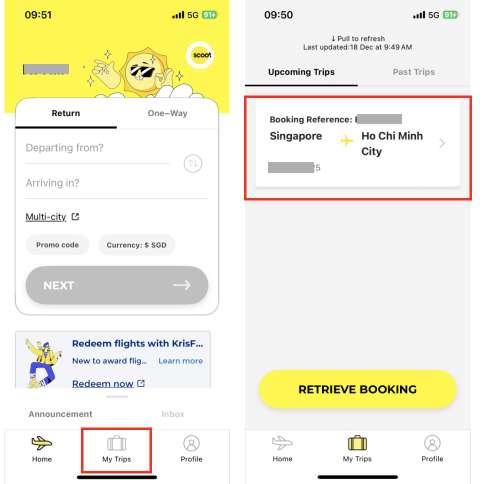
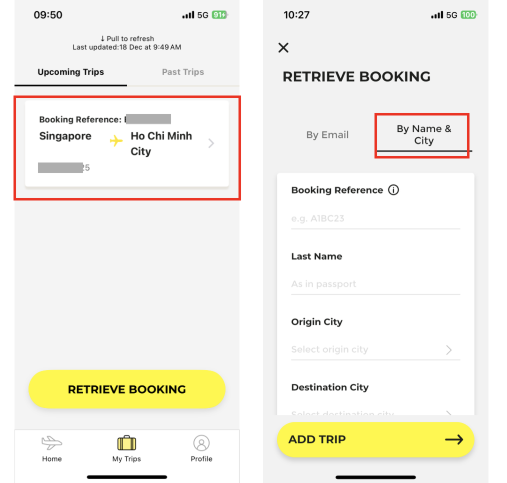
On the Scoot App main page, tap [My Trips] at the bottom of the page. Then, tap your existing booking.

If you booked with a travel agent such as Trip.com, you might see a blank page with no upcoming trips showing up.
Fret not, you can still access Manage Booking and Check-in services on the Scoot App!
To do that, simply tap [Retrieve Booking], then tap [By Name & City] to input your PNR, name, and origin and destination cities.

Step 2:
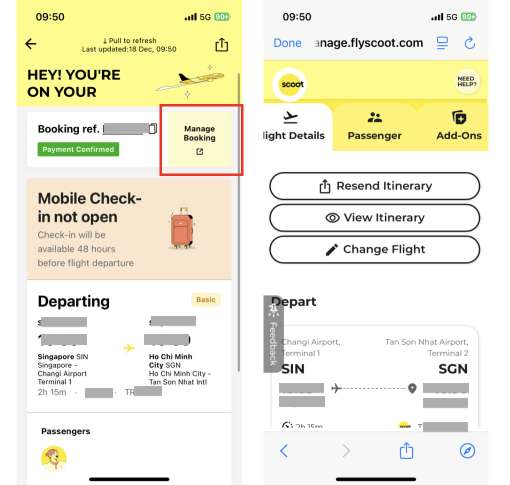
After you tap into your booking, you can tap [Manage Booking] to access different services, such as changing and cancelling your flight.

🛠️ When Scoot Cancels or Changes Your Flight

How Scoot Will Notify You
- If your Scoot flight is affected by a schedule change, delay or cancellation, Scoot will contact you via email and/or SMS using the contact details in your booking, so keeping your phone and email updated is essential.
- You can also proactively check your flight status under “Manage My Booking” or web check-in on Scoot’s site if you suspect a disruption (e.g. bad weather, congestion at Changi).
Your Options When Scoot Retimes or Cancels
Rebooking on another Scoot flight
- For significant disruptions or retimings (for example, a few hours or more), Scoot may offer one-time rebooking to another available flight on the same route, usually at no extra Scoot fare cost.
- This is often the first option presented in disruption emails/SMS, especially for short‑haul routes popular with Singapore travellers.
Refund or Scoot Travel Vouchers
- In some disruption cases, you may be offered a refund (often as Scoot Travel Vouchers) instead of rebooking, especially if the new timings no longer work for you.
Compensation and care (route‑dependent)
- Region‑specific rules apply: for example, flights from the EU may also be covered by EU261, which can entitle eligible passengers to cash refunds or compensation, on top of Scoot’s own disruption policy.
- Scoot’s Disruption Policy and Conditions of Carriage set out the exact options, and any compensation is usually offered once per disrupted journey, even if the same flight is first delayed then cancelled.
Read our Flight Delay Compensation Guide to know more about region-specific statutory rules around the world.
🎁 Pro Tip: Get the Best Scoot Deals on Trip.com
Kick off your Scoot flight booking on Trip.com to enjoy competitive pricing, promotions, and exclusive rewards!
Monthly Campaign Promos

Trip.com shines with its Double Date campaigns running monthly from 1.1 all the way to 12.12, where you can get exclusive promo codes, airline promo fares, and bank card discounts (think DBS, UOB perks for locals) for massive savings that are not available if you book with the airline directly.
Double Up Earning Trip Coins + Airline Miles

Moreover, Trip.com bookings let you earn BOTH Trip Coins + airline miles by adding your frequent flyer details.
Every 100 Trip Coins = 1 USD (~1.3 SGD) and can offset payments at bookings with no minimum spend required.
Earn miles on every trip with Frequent Flyer Programmes—link your account before booking to rack up rewards fast.
Trip Member Rewards

More benefits will be unlocked as you progress through your Trip.com membership tiers! For example, Trip.com Platinum, Diamond, or Diamond+ members can access VIP lounges and start the journey relaxed and refreshed.
Stay Ahead - Join Our Exclusive Telegram Group!

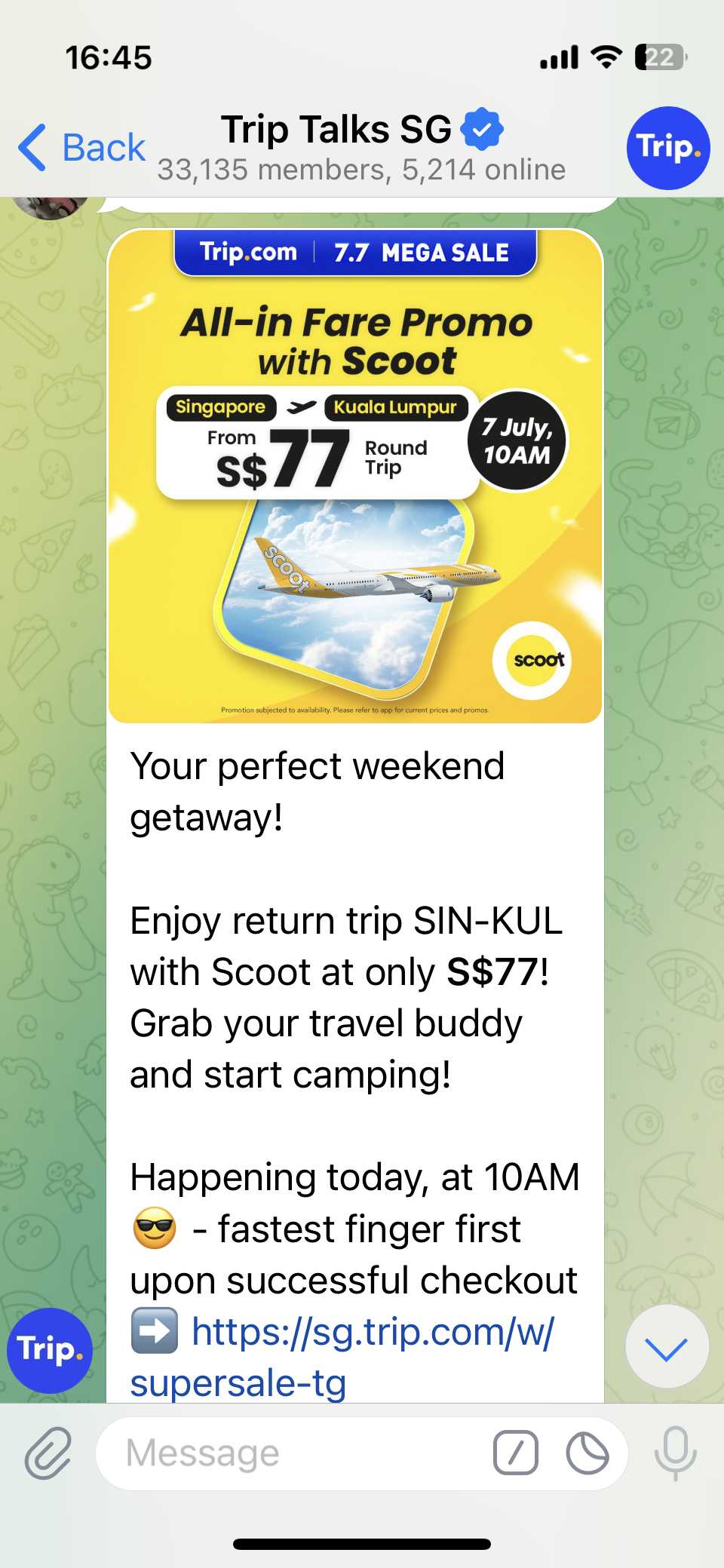
Don’t miss out on the hottest deals and flash sales! Join our Telegram group Trip Talks SG to get instant alerts, exclusive offers, and be first in line for must-grab promo codes. Stay connected, save more!
Download Trip.com App for App-only Discounts!
Download the Trip.com app now and unlock exclusive app-only discounts! Use the QR code to get instant savings on flights and hotels, available for both Android and Apple users.
Ready to fly? Don’t forget to check out our weekly updated deals and promo codes for regional and global destinations—grab the best offers before they’re gone!
Score bigger savings with How to Use Trip.com Promo Codes and stretch your travel budget further.
FAQ: Scoot Cancellation Policy
Can I cancel a non-refundable Scoot ticket?
No, standard Scoot tickets are non-cancellable and non-refundable unless you purchased "Cancel Your Trip" add-on or qualify for medical/compassionate exceptions with proper documentation.How do I know if I’m eligible for a refund?
Check if you have "Cancel Your Trip", face a 2+ hour flight disruption, or can provide a valid medical certificate/death certificate—submit via Scoot's webform for review.Can I transfer my Scoot voucher to someone else?
No, Scoot travel vouchers from refunds are non-transferable and tied to the original passenger name.How long does voucher processing take?
Expect around 20 business days after Scoot approves your documents, though review time varies by case complexity.