Best UK eSIM from S$1.1: Unlimited 4G/5G Data

Touching down in the UK, many Singaporean travellers quickly realise that roaming charges can be expensive and picking up a SIM card at the airport is often inconvenient and overpriced.
If you’re heading to London, Edinburgh, or exploring the British countryside, staying connected from the start is essential. That’s exactly where a UK eSIM comes in.
This guide is designed for travellers from Singapore who want a simple, cost-effective way to stay online in the UK.
What Is a UK eSIM?

An eSIM (embedded SIM) is a digital SIM embedded into your phone that you can activate without a physical card.
It allows you to download a data profile or scan a QR code to start using local mobile data instantly.
For travellers, this means:
| Benefit | Why It Matters for Travellers |
|---|---|
No queues at airport kiosks | Save time after landing and skip long lines at SIM counters |
No lost or tiny SIM cards | No physical SIM to misplace or swap during your trip |
Home SIM stays active | Continue receiving calls and SMS on your regular number |
Instant internet access on arrival | Use maps, ride-hailing, and messages the moment you land |
Why Use an eSIM in the UK?

Here’s why an eSIM for the UK is often better than a traditional SIM or roaming plan:
| Feature | What It Means for Your UK Trip |
|---|---|
🔹 Instant Connectivity | Buy and activate your eSIM before landing so you’re online immediately for airport pickups, maps, and ride-hailing apps. |
🔹 No Physical SIM Swaps | Keep your existing SIM active while your UK eSIM handles data, perfect for receiving calls or SMS from home. |
🔹 Flexible Data Plans | Choose plans ranging from a few days to a month, including options for light users, heavy users, or UK eSIM unlimited data needs. |
🔹 Wide Coverage | Leading eSIM providers connect to major UK networks, delivering reliable data in London, other cities, and even rural areas. |
Download your travel apps before arrival and activate your eSIM once you land so you can start using all these services instantly.
Best eSIM for UK: Top Options
Here’s a quick comparison of the top UK eSIM plans you might consider:
| eSIM Provider | Data Allowance | Validity (Days) | Price (S$) | Network Coverage |
|---|---|---|---|---|
Airalo | 3GB / 5GB / 10GB | 7 / 14 / 30 | $10 / $15 / $25 | Strong city + good rural |
Holafly (Unlimited) | Unlimited | 7 / 14 / 30 | $28 / $45 / $70 | Excellent nationwide |
SimOptions | 5GB / 10GB / 20GB | 7 / 14 / 30 | $18 / $30 / $50 | UK + multi-country Europe |
Ubigi | 3GB / 8GB / 15GB | 7 / 14 / 30 | $12 / $22 / $35 | Reliable UK network |
Truphone | 5GB / 10GB | 14 / 30 | $25 / $40 | Premium coverage & support |
eSIM, SIM and WIFI? What are the differences?
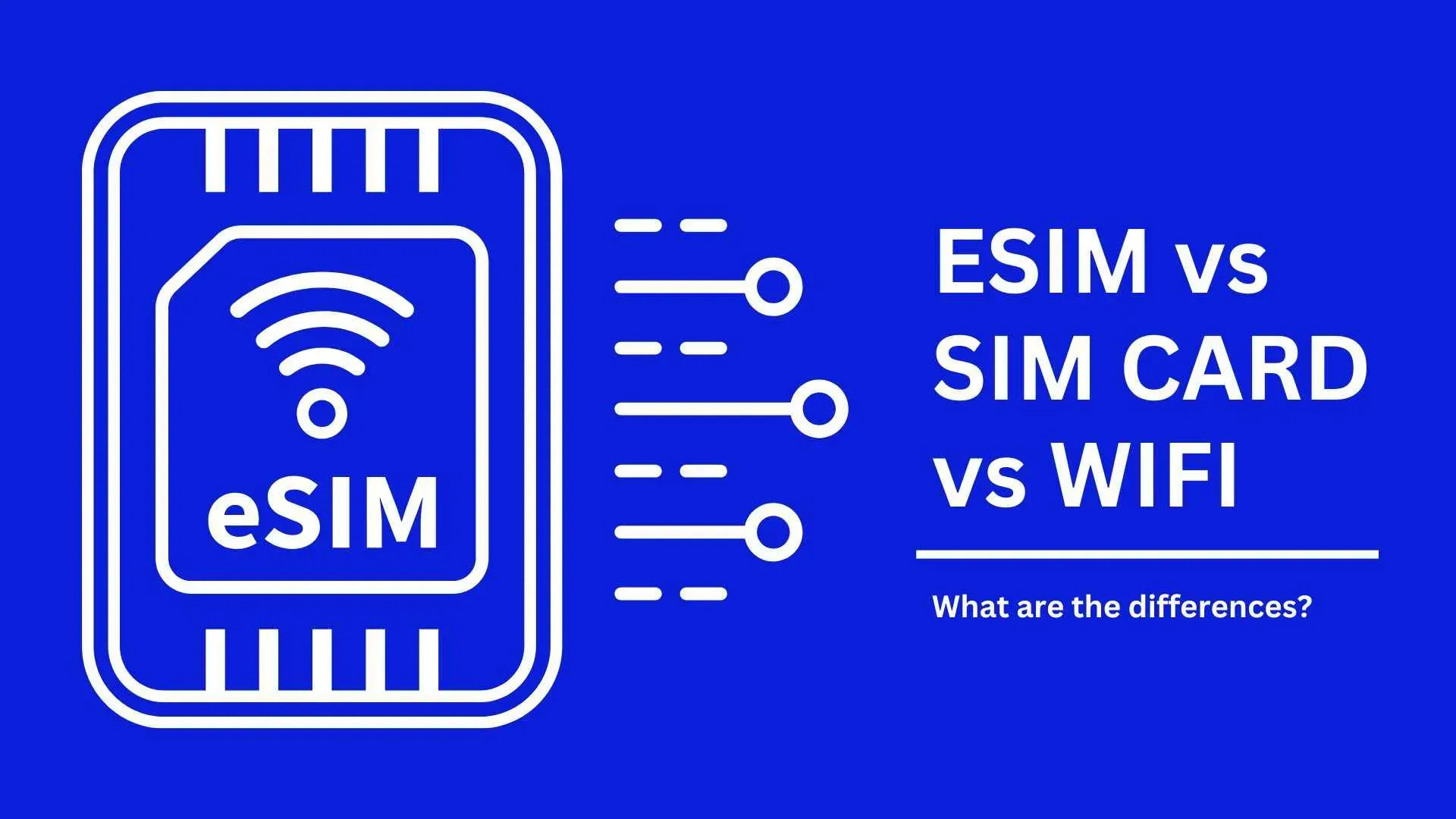
Don’t know the differences among eSIM, SIM and WIFI? Here’s our summary!
Feature | eSIM | SIM | WIFI |
Form | No physical appearance, embedded in the device | Physical card, needs to insert into the device | Wireless |
Activation | ActivationAs per the operator’s instruction, remotely | Manual insertion to activate on the device | Connect through routers |
Compatibility | Not compatible with all devices, mostly with newer devices | Compatible with most devices (phones) | Need WIFI-enabled device |
Mobility | Good for travellers to another country | Need mobile devices and physical card | Limited to the area covered by WIFI |
Data Speed | Typically supports high-speed data | Typically supports high-speed data, but depends on the operator and network | Depends on WIFI router's capabilities |
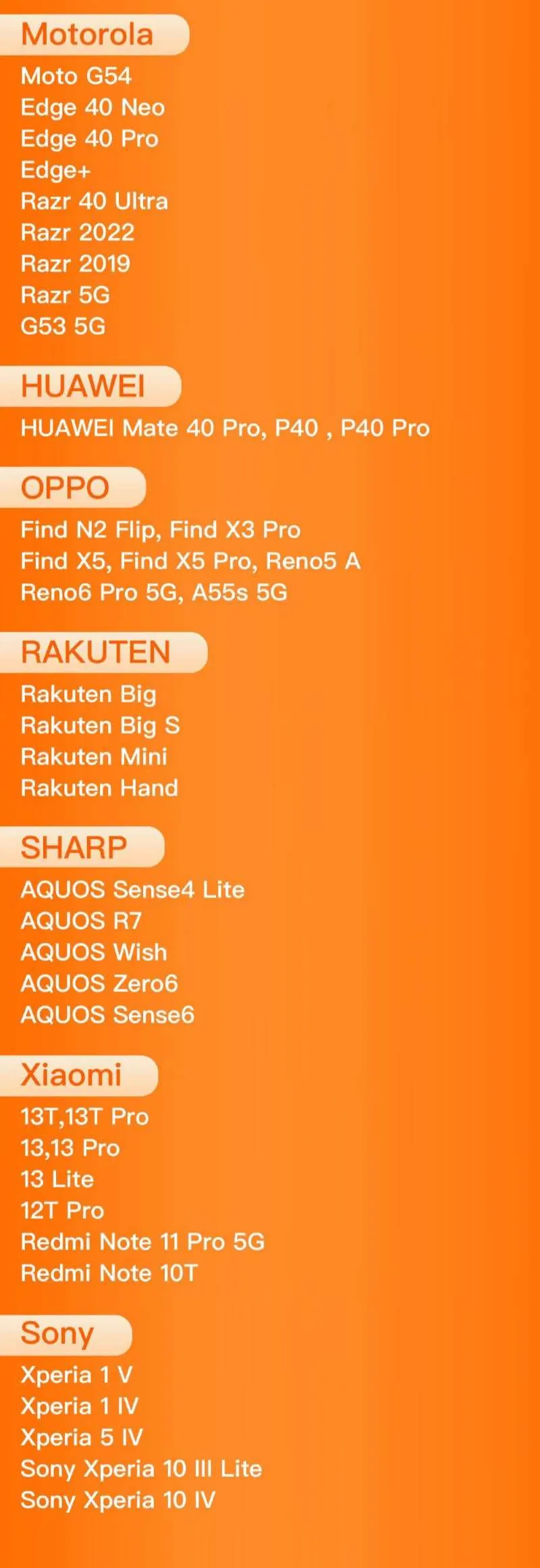
Which phones are UK eSIM compatible with?
Mobile phones vary from country to country. Please first check your phone to see if the phone supports UK eSIM.
Check the compatible models below. 👇
How to use a UK eSIM on the device?
Step 1: Choose the best eSIM plan
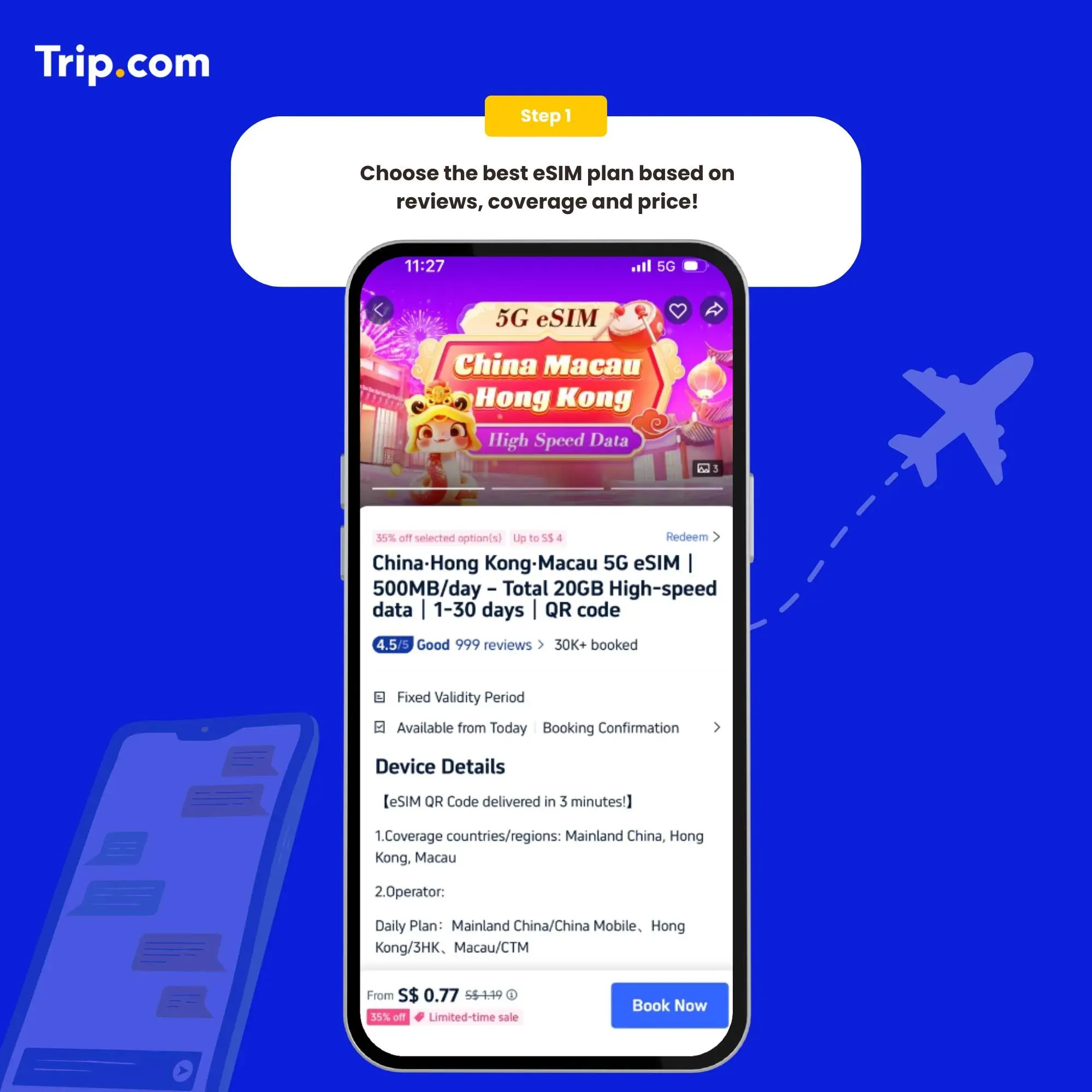
Step 2: Select the data package
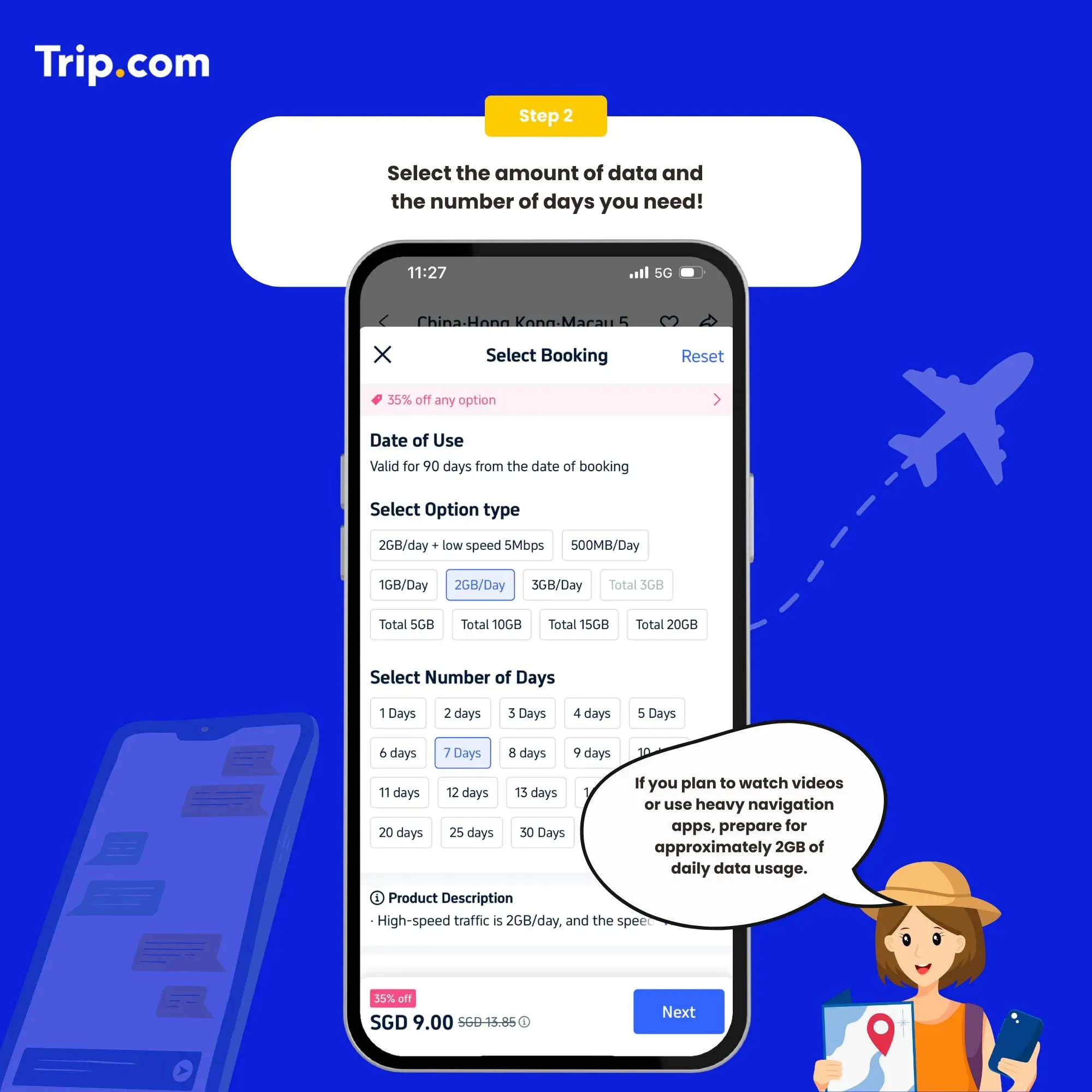
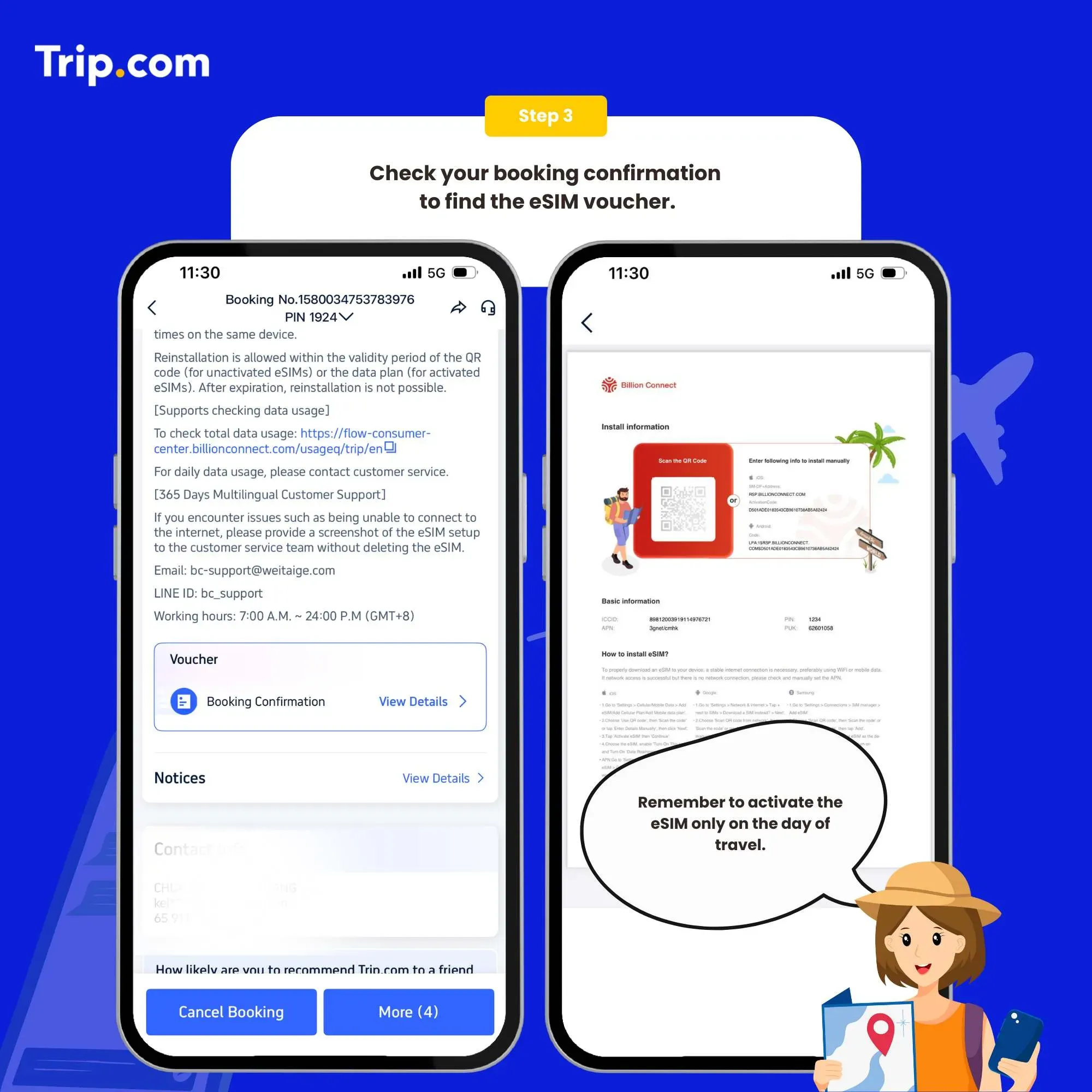
Step 3: Receive your booking confirmation
Open the eSIM activation email, and the eSIM activation QR code will be displayed in this email.
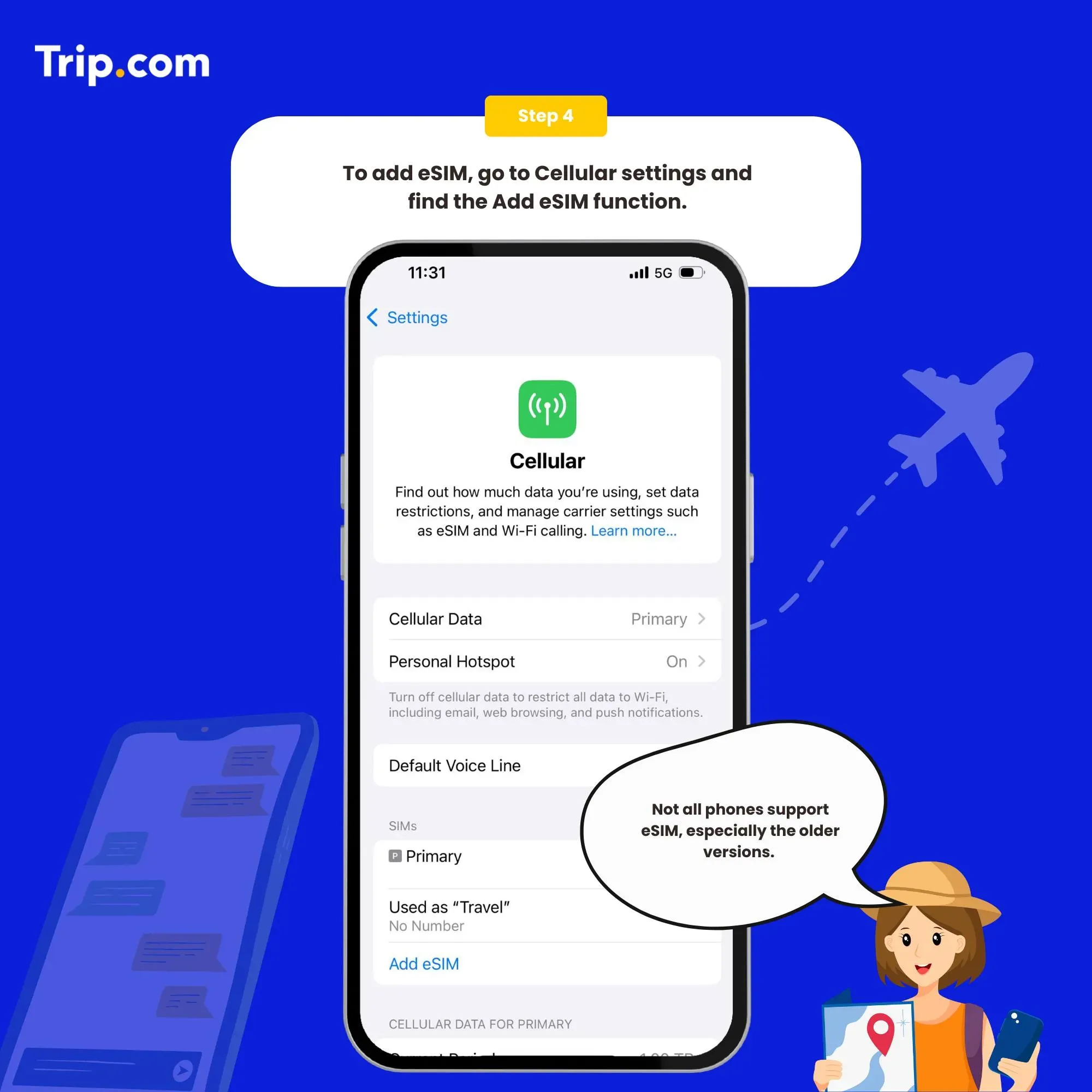
Step 4: Add your eSIM
Click Settings on your mobile phone and open Cellular (iOS) or SIM Card Management (Android).
Click to add a Cellular Plan (iOS) or SIM Card (Android), and then agree to download Cellular Plan (iOS) or SIM Card (Android).
After the download is successful, close the primary card if you already have.
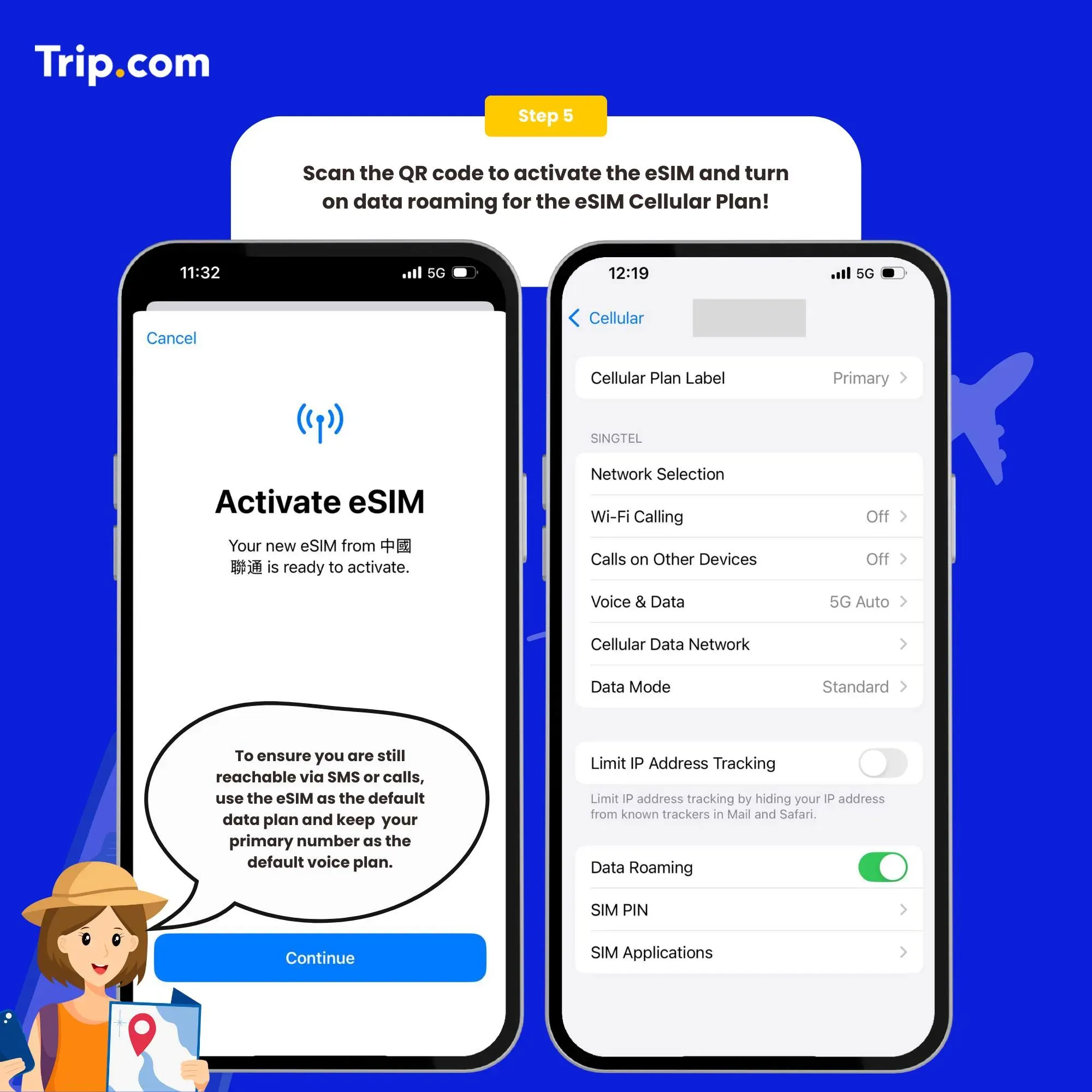
Step 5: Scan the QR code to activate your eSIM
iOS: QR code Installation
- Choose 'Use QR code' then scan the code.
- Tap 'Activate eSIM' then 'Continue'.
- Select a label or input a custom label for subsequent use.
- Select your eSIM as the default network for 'Cellular Data', do not turn on 'Allow Cellular Data Switching'.
- Choose the eSIM, enable 'Turn On This Line', and turn on ‘Data Roaming’.
- If your eSIM connects to an incorrect network, go to 'Network Selection' and select the correct network.
iOS: Manual Installation
- Choose 'Use QR code' then tap 'Enter Details Manually' at the bottom, Enter 'SM-DP+ Address' and 'Activation Code', then click 'Next'.
- Tap 'Activate eSIM' then 'Continue'.
- Select a label or input a custom label for subsequent use.
- Select your eSIM as the default network for 'Cellular Data', do not turn on 'Allow Cellular Data Switching'.
- Choose the eSIM, enable 'Turn On This Line', and turn on ‘Data Roaming’.
- If your eSIM connects to an incorrect network, go to 'Network Selection' and select the correct network.
Android: Step 1 Installation
QR code Installation
- Go to 'Settings', tap 'Network & internet', then tap + next to SIMs.
- Tap 'Download a SIM instead?', then tap 'Next' in the following page.
- When you see 'Scan QR code from network', use your phone to scan the QR code, then tap 'Download'.
- When screen shows “Download Complete”, tap 'Settings'.
Manual Installation
- Go to 'Settings', tap 'Network & internet', then tap + next to SIMs.
- Tap 'Download a SIM instead?', then tap 'Next' in the following page.
- Tap 'Need help?', then tap 'Enter it manually'.
- Enter the code for Android, tap 'Continue' then tap 'Download'.
- When screen shows “Download Complete”, tap 'Settings'.
Android: Step 2 Setting up data access
- Choose the eSIM from SIMs.
- Turn on 'Use Sim' and select 'Yes'.
- Turn on 'Mobile data'.
- Turn on 'Roaming' then select 'OK'.
- If your eSIM connects to an incorrect network, tap 'SIMs' then tap 'Automatically select network' in the next page to select the correct network manually.
You can now connect to the Internet and enjoy the convenience of eSIM as per your selected plan.
UK eSIM Unlimited Data

If you plan to stream videos, upload photos, use navigation constantly, or work remotely, an eSIM UK unlimited data plan (like those offered by Holafly and some plans from other providers) might be worth it.
These plans ensure you never run out of data or worry about overages, perfect for heavy internet usage while exploring.
eSIM UK vs Traditional SIM & Roaming
Feature | UK eSIM | Physical SIM | Roaming |
|---|---|---|---|
Setup before arrival | ✅ | ❌ | Varies |
Keep your home SIM | ✅ | ❌ | ❌ |
No roaming charges | ✅ | ❌ | ❌ |
Instant activation | ✅ | ❌ | ⚠️ |
Multi-country option | ⭐⭐ | ⭐ | ⭐ |
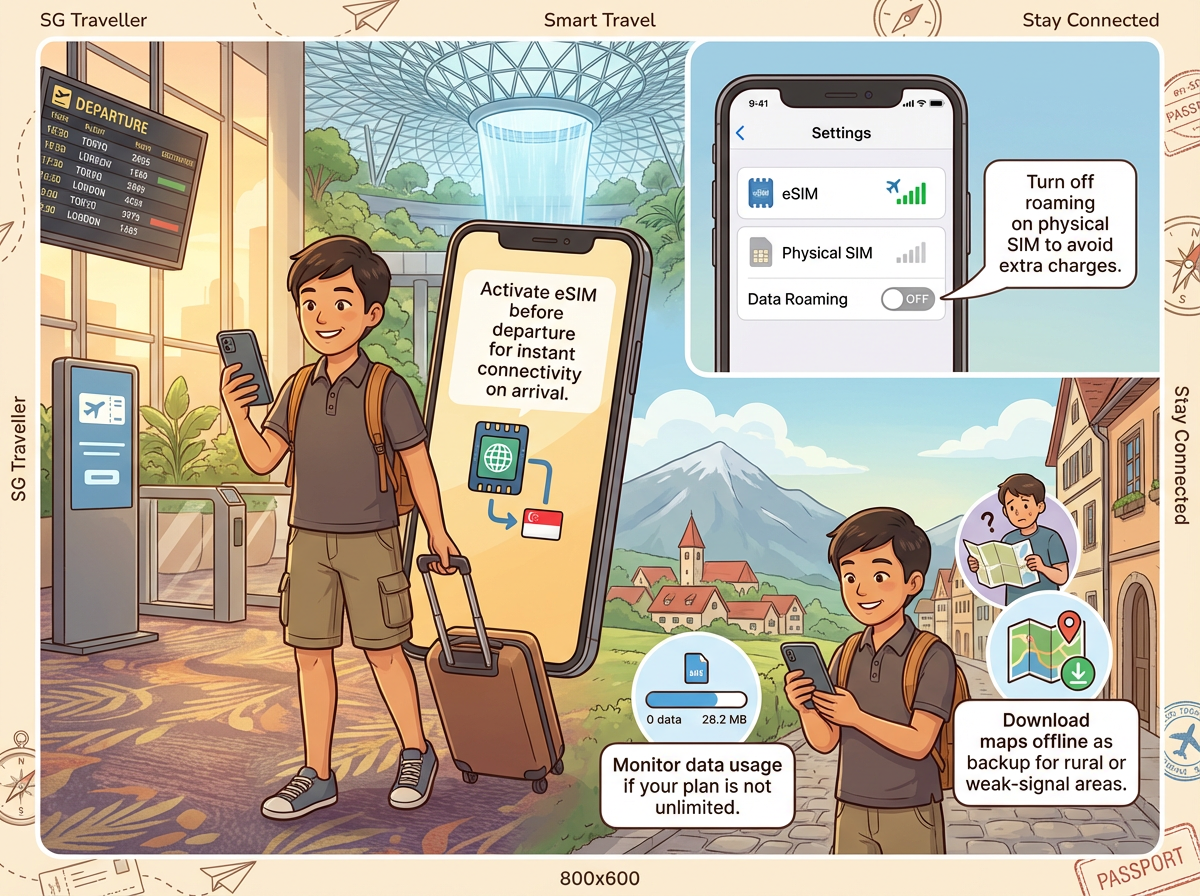
Tips for Using Your UK eSIM
📌 Final Thoughts

A UK eSIM is one of the smartest travel accessories you can add to your itinerary.
With easy setup, flexible plans, and reliable coverage, it takes the stress out of staying connected, whether you’re wandering London’s museums, hiking in the Lake District, or relaxing on Brighton Beach.
If you want seamless data without physical SIM swaps, choosing the best eSIM for the UK ensures you’re always online, informed, and ready to explore.
FAQ about using UK eSIM
-
Can I use a UK eSIM with any device?
-
Do I need the Internet to activate a UK eSIM?
-
Can I keep my existing phone number with a UK eSIM?
Trending Searches
-
Popular Content
-
Top Flight Links
-
Popular Hotels
-
Popular Things to Do
-
Featured guides
-
Trip.com links
- Trip.com Customer Service
- Trip.com VIP Lounge
- Buy Now Pay Later
- Singapore Airlines Baggage Allowance
- Trip.com Cancellation Policy
- Trip.com Contact
- Best Credit Cards
- scoot-baggage-allowance
- How to Use Trip com Promo Codes
- luggage size cabin
- How to Book a Student Flight Ticket
- Best Day to Book Flights
- Flight Classes Explained
- Singapore Airlines Change Flight
- Trip.com Flight Refund
- MU7705 Flight Status
- CA490 Flight Status
- ZG053 Flight Status
- SQ869 Flight Status
- CA1651 Flight Status
- MU2434 Flight Status
- VN654 Flight Status
- Cheap flights from Singapore to Kuala Lumpur
- Cheap tickets from Singapore to Fukuoka
- Plane tickets from Singapore to Shanghai
- Plane tickets from Singapore to Bangkok
- Cheap tickets from Singapore to Seoul
- Cheap tickets from Singapore to Manila
- Cheap flights from Singapore to Hanoi
- Cheap flights from Singapore to Tokyo
- Hotels near Johor Bahru Senai International Airport
- Hotels near Hefeinan Railway Station
- Hotels near Hongcun Aju Theater
- Hotels near Zixiao Palace
- Hotels near Beijing Road
- Chengdu Hotels
- Kuala Lumpur Hotels
- Kunming Hotels
- Hong Kong Hotels
- Phu Quoc Island Hotels
- Hotel Les Matins de Paris
- Mercure Guangzhou Beijing Road Pedestrian Street Hotel
- Ramada by Wyndham Seoul Dongdaemun
- Atour Hotel (Chengdu Taikoo Li)
- Crystal Hotel Guangzhou BeijingRoad PedestrianStreet
- Singapore 4G eSIM | Supports Google Maps / ChatGPT | Daily/Total Data Plans | 24-Hour Billing | 1–30 Days | QR Code
- Malaysia 5G eSIM | Supports mainstream apps including TikTok, Google Maps & ChatGPT | Day Pass/Total Package | 24H Billing | 1-30 days | QR code
- Vietnam Airport VIP Fast Track Service
- VIP Fast Track service for immigration clearance at Tan Son Nhat Airport in HCM
- Huanglongjiuzhai Railway Station - Jiuzhaigou | Departure/Return | Rideshare/Private Charter | Bus/Nanny/5-9 Seater Business | Shuttle Bus | Vehicle Type Optional | Any Combination | T
- Mainland China/Hong Kong/Macau 5G eSIM | Dual Network | Day Pass/Total Data Package | 24-Hour Billing | QR Code
- Mainland China 5G eSIM | ChatGPT Available | Day Pass/Total Data | 24-Hour Billing | 1-365 Days | QR Code
- Mainland China 5G eSIM | Supports Google Maps / ChatGPT | Daily/Total Data Plans | 24-Hour Billing | 1–365 Days | QR Code
- Yogyakarta Connectivity Solutions
- Chongqing Travel Essentials
- Interlaken Day Tours
- Cambodia Day Tours
- Indonesia Activities
- Seville Activities
- Incheon Spa & Massage
- China Power Bank Limit
- Trip.com Customer Service
- train to kl from singapore
- Shanghai Metro
- China Train Map
- China Entry Requirements
- train from singapore to jb
- Thailand Plug
- Renew Autopass Singapore
- Vietnam Arrival Card
- China Plug
- Singapore Malaysia Cross Border Taxi
- universal studios singapore tickets
- 泰国插头
- Singapore Public Holiday 2027
- Frankfurt Airport to City
- Osaka Station to Kyoto Station
- Bangkok to Pattaya
- Trip.com Promo Code
- Trip.com Flight Deals
- Trip.com Credit Card Promotions
- How to Book Cheap Hotels
- How to Book Cheap Flights
- Trip.com Member Rewards
- Trip Weekly Hotel Sales
- Online Hotel Booking
- Online Flight Booking
- Trip.com Travel Guide
- Book China Train Tickets
- Trip.com Seat Selection
- Singapore Public Holidays 2027
- Trip.com 优惠码
- Trip.com Travel Guides
- Trip.com 10.10 Mega Sale