Best eSIM for Singapore Travellers

Stay connected in Singapore for less than S$0.22 per day.
Recommended eSIMs Options for Singapore Travel!

1GB 3 Days

  • Data1GB Daily
  • Validity3 Days
  • PriceFrom S$2.1

1GB 5 Days

  • Data1GB Daily
  • Validity5 Days
  • PriceFrom S$3.18

1GB 7 Days

  • Data1GB Daily
  • Validity7 Days
  • PriceFrom S$4.45

2GB 3 Day

  • Data2GB Daily
  • Validity3 Days
  • PriceFrom S$3.04

2GB 5 Days

  • Data2GB Daily
  • Validity5 Days
  • PriceFrom S$5.07

2GB 7 Days

  • Data2GB Daily
  • Validity7 Days
  • PriceFrom S$7.11

🔥Save More with an Extra 5% Off – New Users Only

Use our promo code to enjoy an extra 5% off (up to S$4) on your attraction tickets, eSIMs, and tours!

⏳ Redeem within 3 days of claiming

Need other flexible options? Customise & select from our featured Singapore eSIMs products!

Singapore 5G eSIM

  • CoverageSingapore
  • Data500M to 100GB
  • Validity1 to 30 Days
  • PriceFrom S$0.22
  • Reviews (4.7 ★)212 reviews
  • Bookings5,000+ bookings

Southeast Asia 5G eSIM

  • CoverageSingapore/Malaysia/Indonesia
  • Data500M to 100GB
  • Validity1 to 30 Days
  • PriceFrom S$0.38
  • Reviews (4.6 ★)1,990 reviews
  • Bookings51,000+ bookings

Singapore eSIM

  • CoverageSingapore
  • Data500M to 100GB
  • Validity1 to 30 Days
  • PriceFrom S$0.22
  • Reviews (4.7 ★)889 reviews
  • Bookings24,000+ bookings
Singapore eSIM

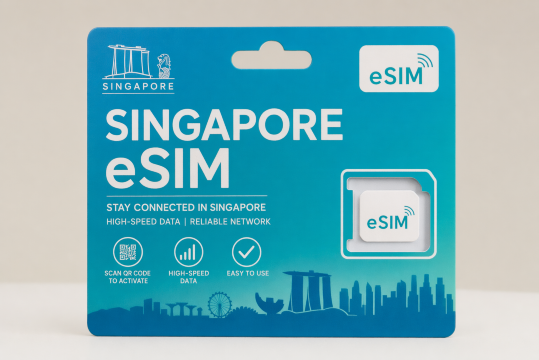
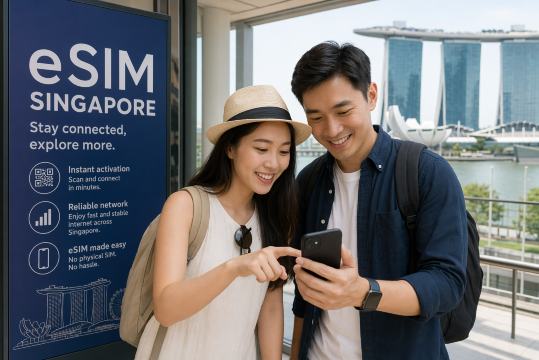
In a city as tech-savvy as Singapore, staying connected is a must. However, international travellers often face the challenge of dealing with roaming charges or scrambling for a local SIM card when they arrive. For Singaporean travellers, an eSIM offers a hassle-free solution. With a Singapore eSIM, you can skip the hassle of buying and swapping physical SIM cards. Enjoy seamless high-speed 4G/5G data on your iPhone, Samsung, or other devices.

The best eSIM for Singapore ensures you stay connected from the moment you land. Here’s everything you need to know about using an eSIM in Singapore.

What is eSIM?

eSIM, also known as embedded SIM, is a digital SIM card that can be activated remotely without needing a physical SIM card. It is embedded directly into your device.

With an eSIM, you can easily switch between mobile plans or add new ones. Thus, eSIM is a flexible option for staying connected, especially when travelling abroad.

Must-have Apps for tourists in Singapore

Use essential apps in Singapore

Singapore may be small in size, but it’s packed with essential apps that make navigating the city easy and convenient. Whether you’re ordering food, booking a ride, or exploring tourist attractions, the right apps will save you time and help you enjoy the best Singapore has to offer. From mobile payments to local transport systems, these apps will keep you connected and ready to explore the Lion City.

Category

Recommended Apps

Payment apps

PayNow, GrabPay, Apple Pay, Google Pay

Transport apps

Grab, SG MRT, Singapore Bus App

Map/navigation apps

Google Maps, Citymapper, SG MRT App

Translation apps

Google Translate, SayHi Transla

Food delivery/discovery

GrabFood, Foodpanda, Deliveroo

Attraction booking

Trip.com

Communication apps

WhatsApp, Telegram, Facebook Messenger

💡 Pro tip for using Apps in Singapore

Singapore’s public transport system is highly efficient, so make sure to download the SG MRT and Singapore Bus App to track your routes in real-time. If you’re using mobile payments, PayNow is accepted almost everywhere, but ensure your bank account is linked. Don’t forget to activate your eSIM as soon as you land to avoid any connectivity issues while exploring the city.

What are the differences between eSIM, SIM, and Wi-Fi?

Differences between eSIM, SIM, and Wi-Fi

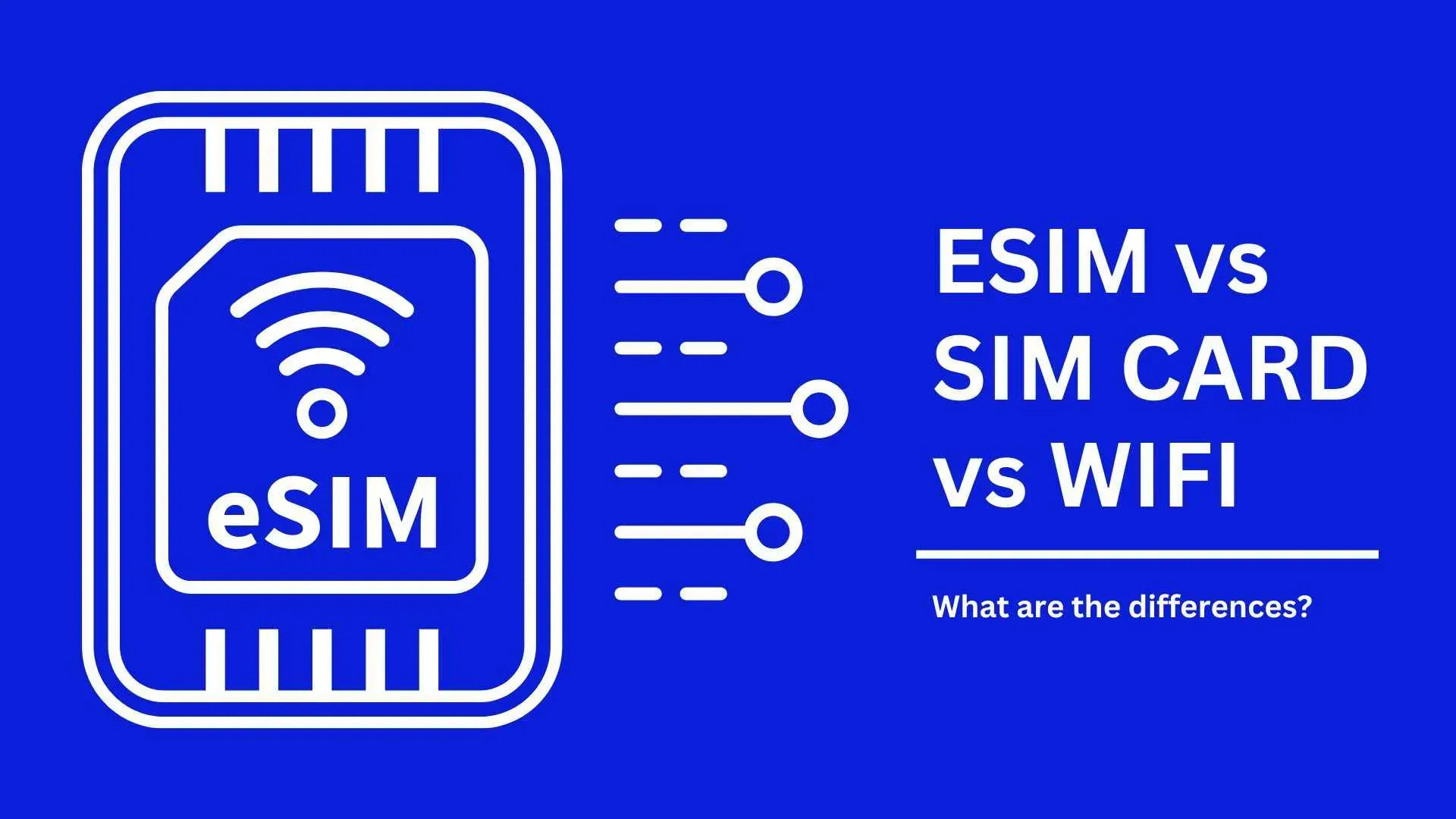
When it comes to staying connected, especially while travelling, you have several options: eSIM, physical SIM cards, and Wi-Fi. Let’s break down the key differences between eSIM, SIM, and Wi-Fi to help you choose the right one for your connectivity

Feature

eSIM

SIM

Wi-Fi

Form

Digital, embedded in the device

Physical card

Requires hotspot or connection

Setup

Instant and remote activation

Manual insertion

Requires available networks and password

Convenience

No need to swap or replace

Need to swap between devices

Limited to hotspots

Travel-Friendly

Ideal for international travel

Need to buy local SIMs

Connect in specific areas

Compatibility

Compatible with some new devices

Compatible with most devices

Compatible with devices with Wi-Fi feature

Different providers of eSIM Singapore

Using phone in Singapore

Airalo

Airalo is a global eSIM provider that offers eSIMs for Singapore with competitive pricing. It's especially popular with tourists who want a quick, hassle-free way to stay connected while travelling.

GigSky

GigSky offers global eSIM services, and their Singapore plans are tailored for short-term visitors who need data connectivity for travel. It’s a convenient option for travellers who want flexible data packages.

Ubigi

Ubigi is another international eSIM provider with plans for Singapore eSIM. They offer high-speed data and easy activation. It is suitable for travellers needing quick and reliable connectivity.

Trip.com

Trip.com is a one-stop travel service provider with a huge selection of hotels, flights, and attractions across the globe. You can have multiple plans for your needs, including data package, validity period, quantity and more. What you can choose is flexible and customisable!

🔥SKULLPANDA CAGE-UNCAGE Showcase Makes International Debut at the National Museum of Singapore

The showcase marks the first tripartite collaboration between POP MART, the Singapore Tourism Board and the National Museum of Singapore, and invites new and longtime fans to experience the artistic vision behind the character while strengthening Singapore's position as a dynamic cultural destination.

SKULLPANDA CAGE-UNCAGE at the National Museum of Singapore

How to set up eSIM?

How to set up eSIM?

Before setting up: Check whether your phone can use eSIM

Mobile phones vary from country to country. Please make sure your mobile phone supports eSIM before purchasing.

  • Make sure your device is not a network-locked phone

Query method: Check with the operator whether your device is network locked.

  • Make sure your device supports eSIM function

Query method: Dial *#06# in the phone call interface. Generally, if there is an EID, it means that eSIM is supported. If there is no EID, eSIM cannot be used.

This ensures a seamless experience when activating and managing your eSIM, allowing you to enjoy the benefits without any compatibility issues.

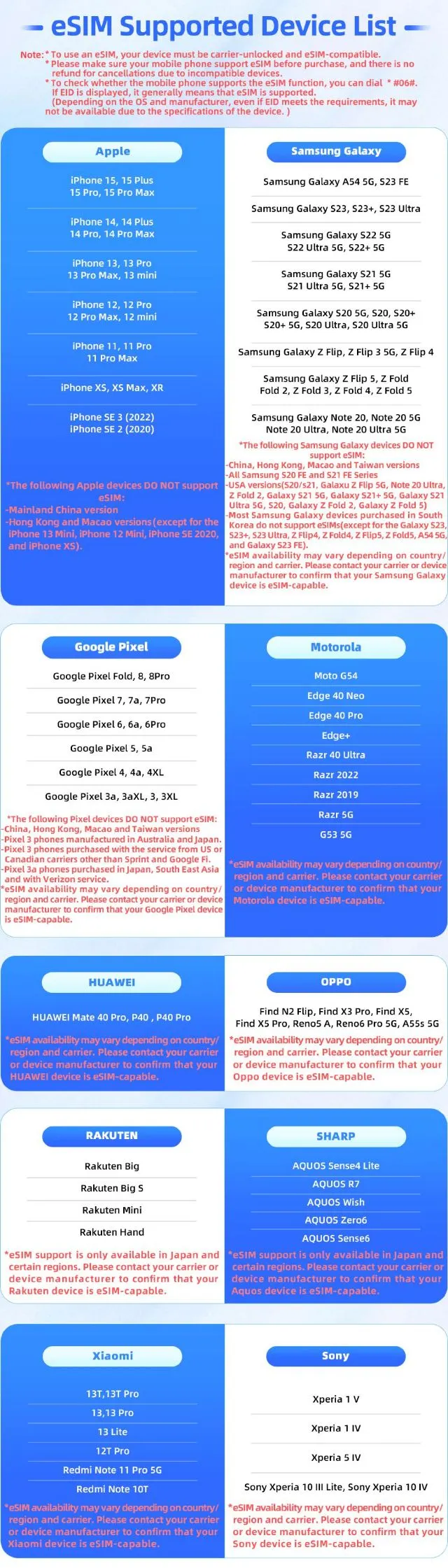
You can also check the compatible models below.👇

eSIM Singapore Compatible Devices

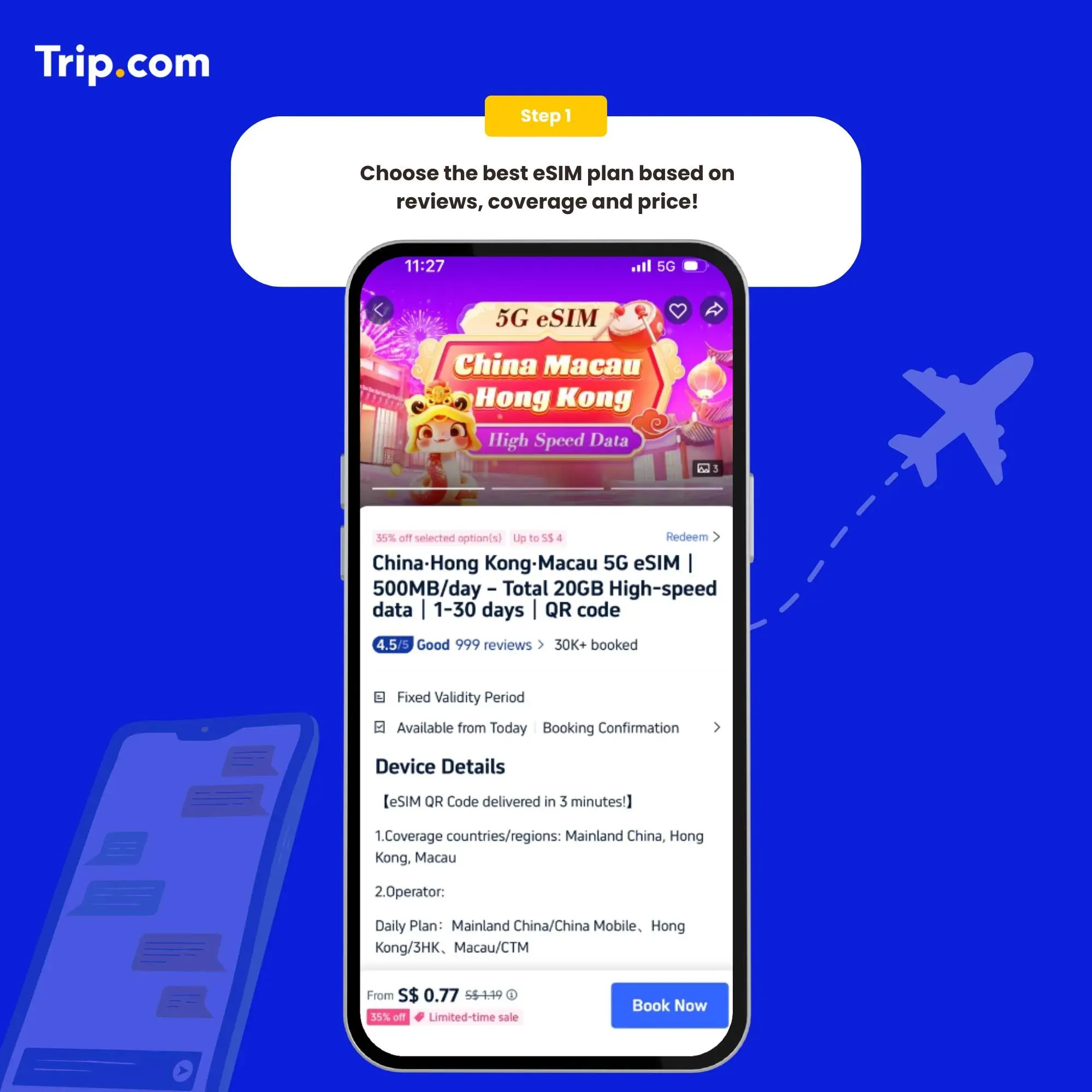
1. Choose the best eSIM plan

Choose the best eSIM plan

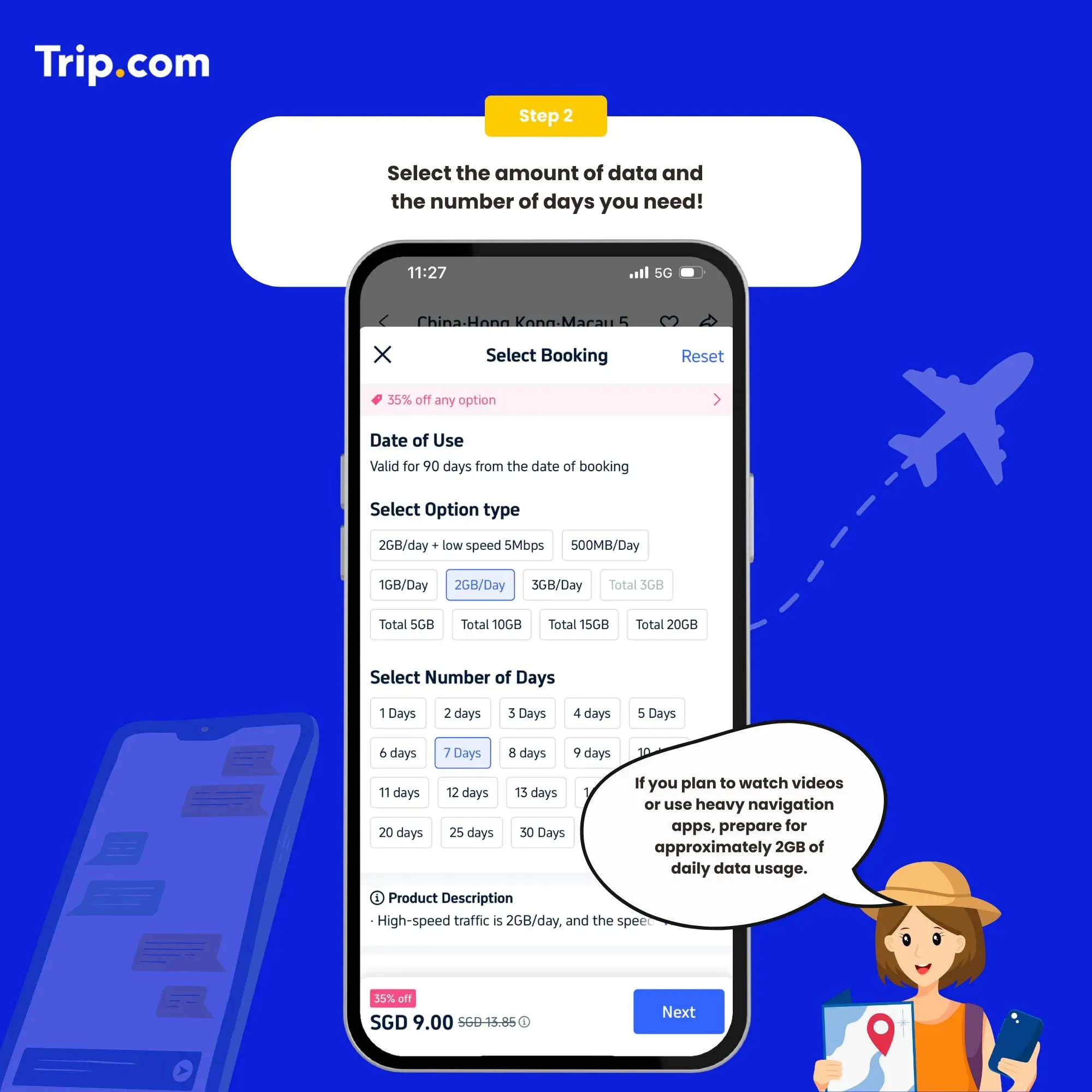
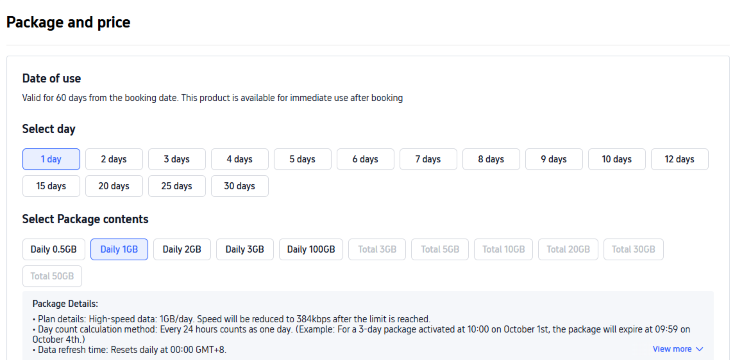
2. Select the data package

Select the data package

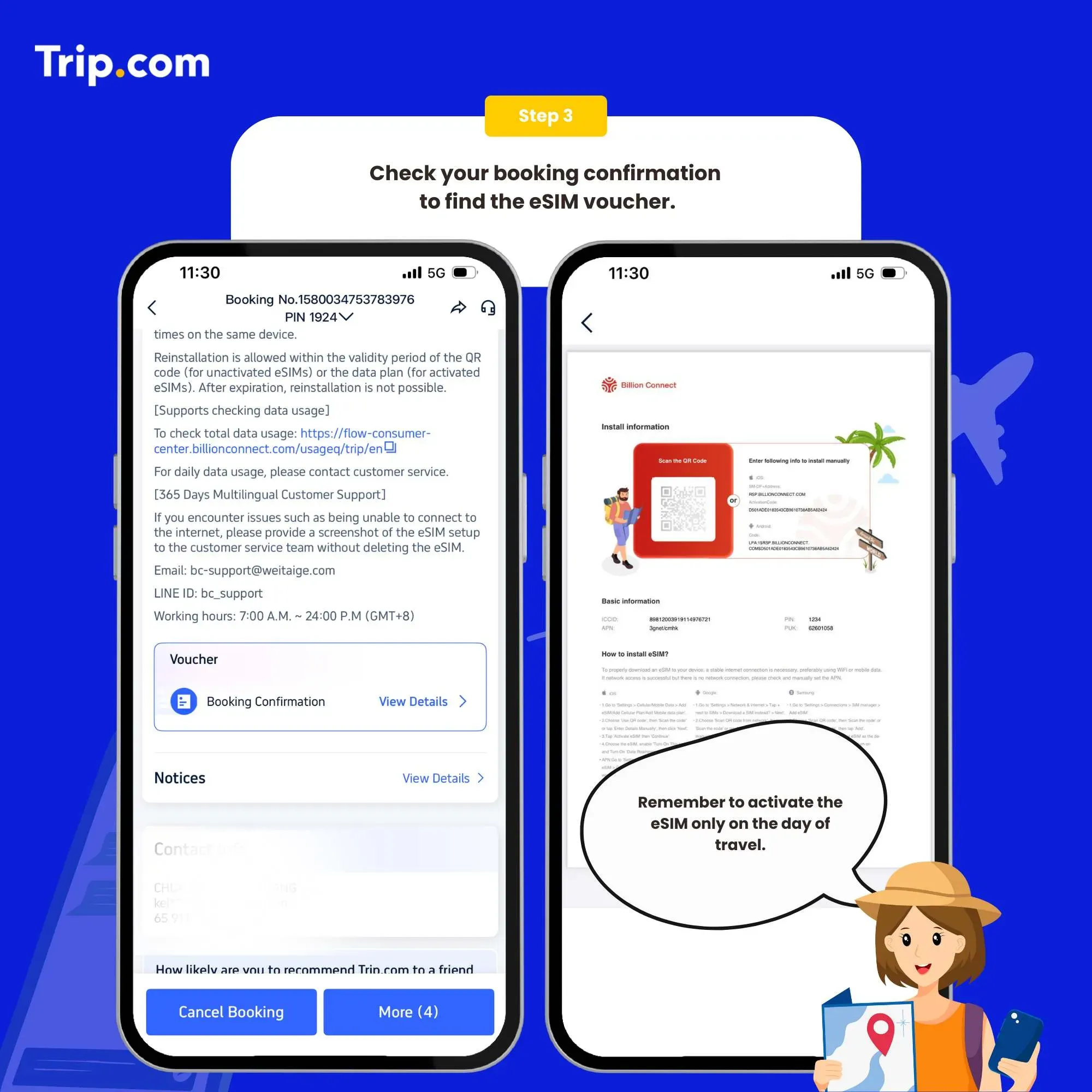
3. Receive activation email

You’ll receive the eSIM activation email and a QR code with installation instructions. You must have a network to install eSIM. Please ensure that there is available WiFi or mobile data before installation.

Receive activation email

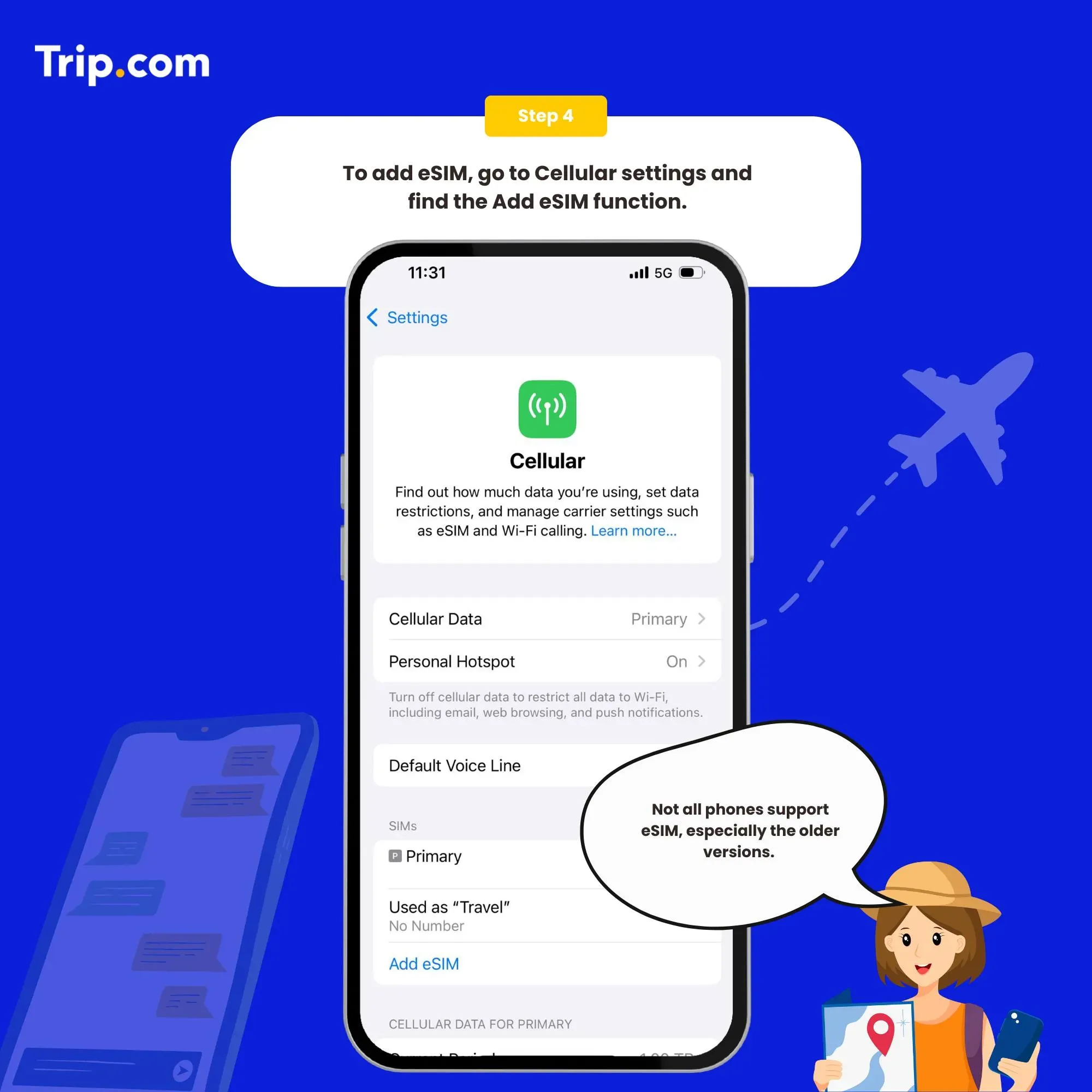
4. Add you eSIM

Set as the instructions:

  1. System - Settings - Cellular (iOS) / SIM Card Management (Andriod)
  2. Add a Cellular Plan (iOS) / SIM Card (Android)
  3. Agree to download Cellular Plan (iOS) or SIM Card (Android)
Add you eSIM

5. Connect the Internet

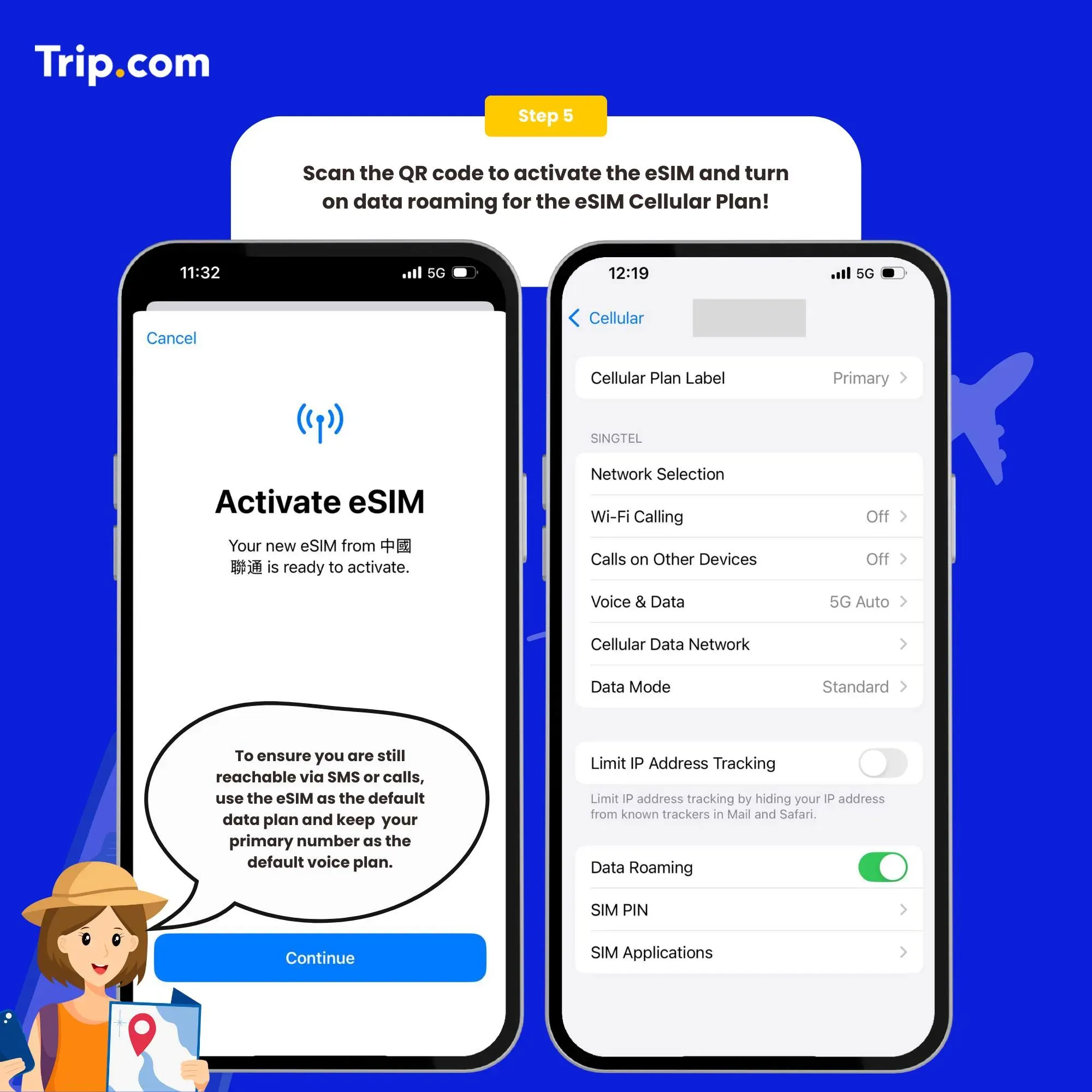
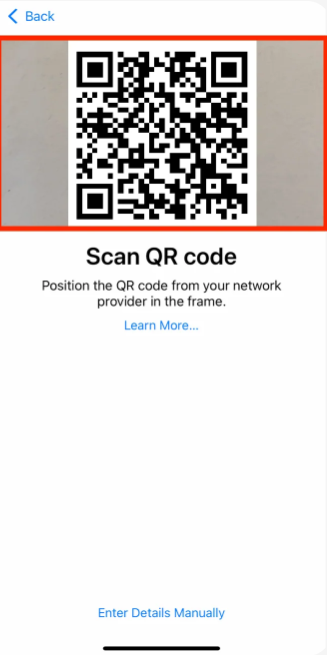
Scan the QR code for activation (or enter SM-DP +Address and Activation Code manually)

After the download is successful, close the primary card if you already have. Enable the Cellular Plan (iOS) or SIM Card (Android).

We recommend that you disable eSIM until you reach your destination. After arriving at the destination, please open your eSIM, turn on roaming to connect to the network and then surf the Internet normally.

Connect the Internet

How to close?

Open the Cellular (iOS) or SIM Card Management (Android), and click to turn off the Cellular Plan (iOS) or SIM Card (Android) (the steps of enabling and disabling are the same).

Note

  • If there is no network after enabling, please turn on the airplane mode and then turn off or restart the phone.
  • If there are problems such as activation failure, please contact Customer Service without deleting the eSIM.(The eSIM can only be installed one time by one phone or one device. If removed, it cannot be added again and must be purchased again.)

You can now connect to the Internet and enjoy the convenience of eSIM as per your selected plan.
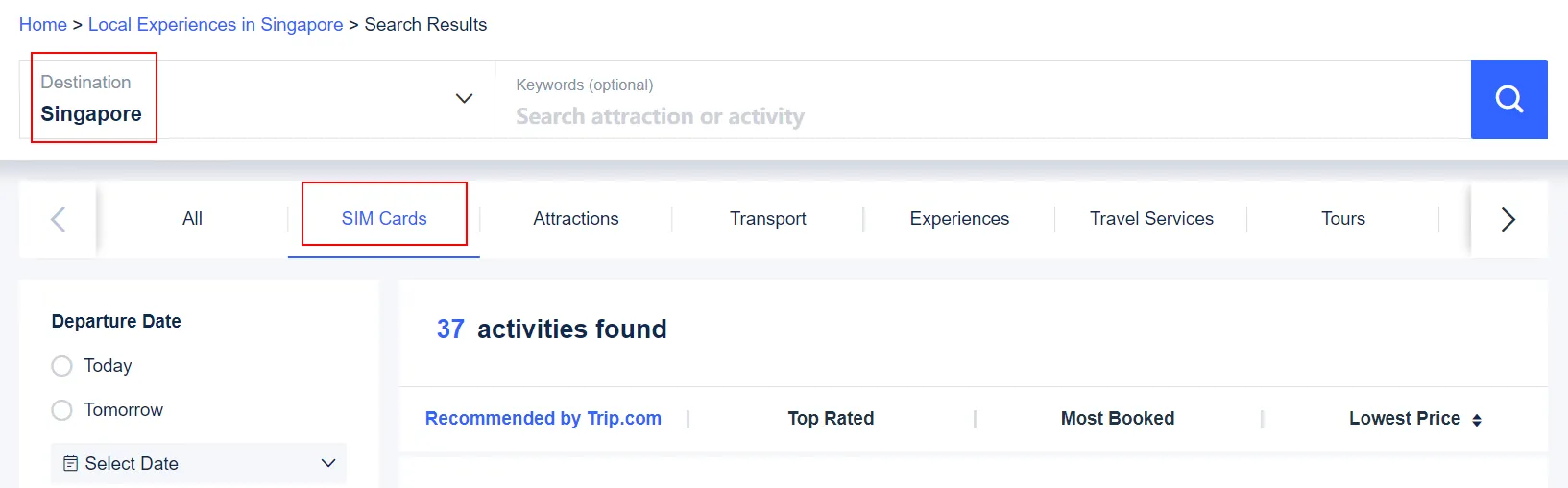
How to buy eSIM on Trip.com?

1. Search for Singapore eSIM options

Use the search bar to look for "Singapore" or navigate to the "SIM Cards" section. You can also click here for a quick access.

How to buy eSIM in Singapore

2. Select your eSIM plan

Browse through the available eSIM plans for Singapore. Compare the options based on data rating, reviews, booked and price.

How to buy eSIM in Singapore

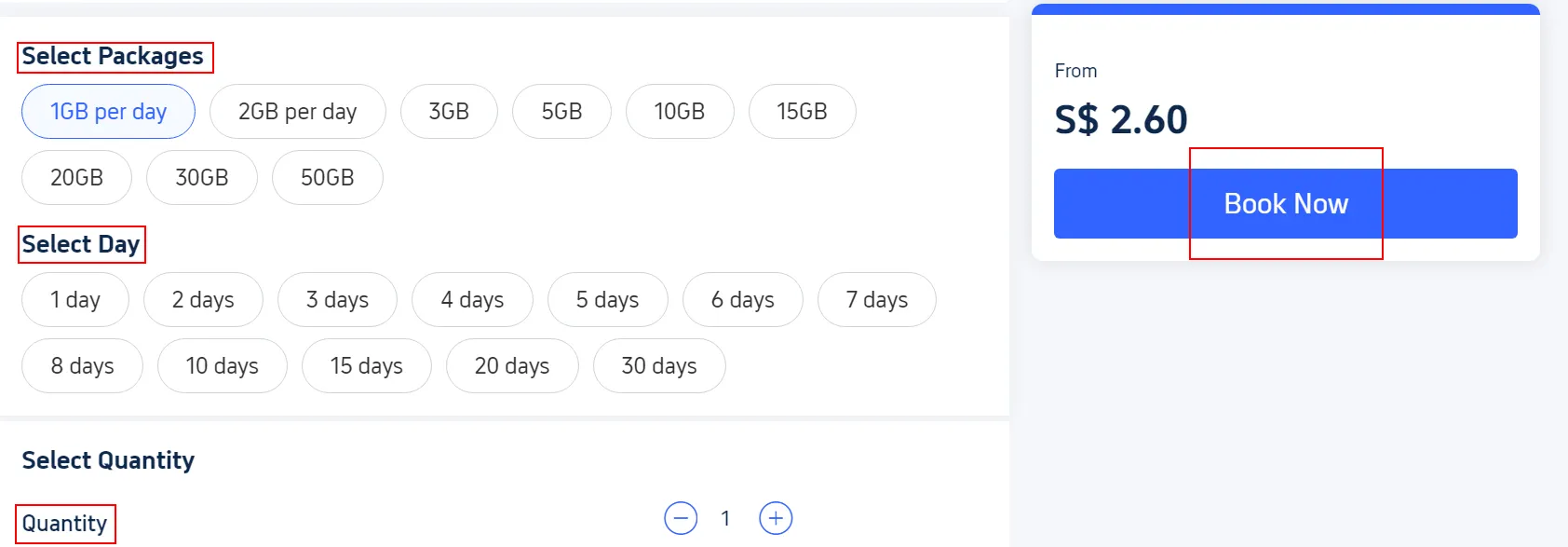
3. Choose and purchase

Select the data plan, validity and quantity that fits your needs and click “Book Now”. Follow the checkout process to fill in some necessary information, and then complete your purchase.

How to buy eSIM in Singapore

4. Receive eSIM details

After completing the purchase, you will receive an email or in-app notification with the eSIM activation details, including a QR code.

How to choose the best eSIMs for Singapore?

Using phone by the sea

Compare data plans

Look for eSIM providers that offer data plans aligned with your usage needs. Compare the amount of data and validity period.

Consider activation and support

Choose a provider that offers a straightforward activation process. Many providers offer instant activation via a QR code. Good customer support is important in case you encounter any issues.

Read the reviews

Before choosing an eSIM provider, it's important to read reviews from other users. Reviews can give you insight into the provider’s reliability, customer service quality, and overall user experience.

Recommended eSIM Singapore 1 Day Plan

For a one-day trip to Singapore, the eSIM Singapore 1 Day Plan with 1GB/2GB of data should be more than enough for most travellers. It covers typical usage like Google Maps, social media updates, food delivery apps, and streaming music or videos. If you're planning to stay connected for a mix of navigation, browsing, and occasional video calls, this plan offers just the right balance of data without overpaying for unnecessary extra.

Who is suitable for using eSIM?

Using phone in the city

Frequent travellers

If you travel frequently between Singapore and other countries, eSIMs provide a hassle-free solution to maintain connectivity. Singapore eSIMs offer an easy way to stay connected without needing to swap physical SIM cards.

Digital nomads

Digital nomads who travel frequently or work remotely can use eSIMs to maintain a consistent mobile data connection across different countries. eSIMs allow for easy switching between different carriers and plans when travelling.

Budget travellers

Many eSIM plans are designed to be affordable for short-term use, with competitive data packages and no roaming charges.

3 Advantages of using eSIM

Using phone at night

Instant activation and usage

With an eSIM, there's no need to handle physical SIM cards. You can activate your eSIM instantly through a QR code or app, and get immediate connectivity upon arrival.

Flexibility with multiple plans

eSIMs allow you to manage multiple mobile plans on a single device. You can easily switch between different data plans or operators. It’s very useful for frequent travellers travel among different countries.

No risk of loss or damage

eSIMs simplify staying connected across borders through remote activation, allowing you to seamlessly switch between data plans as you travel. So there is no need to worry about loss or damage compared to SIM cards.

3 Disadvantages of using eSIM

Using phone by the sea

Limited device compatibility

Not all devices support eSIM. Older models may not be compatible, limiting options for users. It's essential to check if your device is eSIM-capable before purchasing.

Limited to one device

eSIMs are embedded directly in a single device. This means you can't easily move the eSIM between different devices. If you use multiple devices during your trip to Singapore, this could be a drawback.

No phone number included

eSIM data plans might not come with a phone number, or you might have to pay extra for one. This can be inconvenient if you need a local number. SIM cards will be a good choice if you need a local phone number.

FAQ about eSIM Singapore

  • Are there any limitations with Singapore eSIMs?

    Some potential limitations of eSIM include device compatibility, and no phone number included. Not all devices support eSIMs, and most of the eSIM plans don’t contain voices and messages compared to physical SIM cards.
  • Can I switch Singapore eSIM providers or plans?

    Yes. You may need to deactivate the current eSIM profile and install a new one. Ensure you follow the activation and deactivation instructions provided by your new eSIM provider.
  • Can I use Singapore eSIM outside of Singapore?

    Installation is possible, but usage is not. If you install it outside of your intended usage location, do not use the eSIM line until you arrive in Singapore, and switch lines after arrival.

Other Popular eSIMs

Leona

Leona

Traveller, Writer, Cat Lover, Sea Lover

Always on the hunt for smart travel! I love exploring new places, testing out travel products, and finding little hacks that make every trip smoother.

310 articles
TravelChinaSingapore
>>
eSIM Singapore