Add Extra Baggage to Your Flight Booking: Step-by-Step Guide

When planning a trip, one of the most common questions travelers face is: “Do I have enough baggage allowance?” Airlines typically include a standard allowance, but if you’re packing more than expected, you’ll need to add extra baggage to your flight booking. Doing it the right way can save you money, time, and stress at the airport.
Fly from Singapore

Why Add Extra Baggage in Advance?
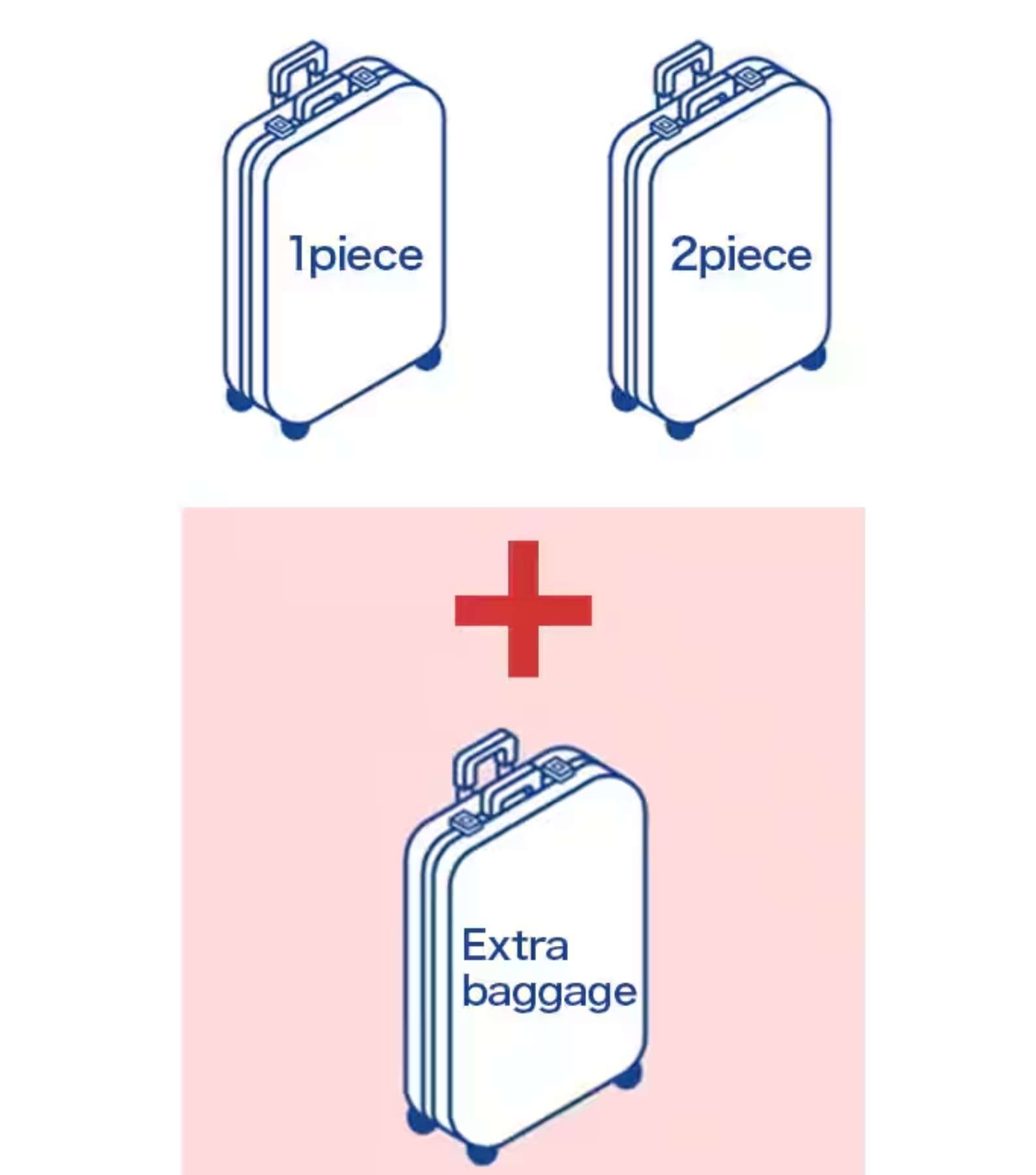
Cheaper than at the airport
Pre-purchasing extra baggage online is usually much more affordable than paying at the check-in counter.
Convenience
You avoid last-minute surprises and the hassle of repacking at the airport.
Flexibility
Most airlines allow you to add baggage at any time before check-in, either during booking or after via their website/app.
at any time
Peace of mind
You’ll know your luggage is covered, especially if you’re shopping overseas or carrying bulky items.
How to Add Extra Baggage with Trip.com
When booking your ticket on platforms like Trip.com, you’ll see baggage options such as extra baggage cost before checkout. Select the weight or number of bags you need and pay upfront.
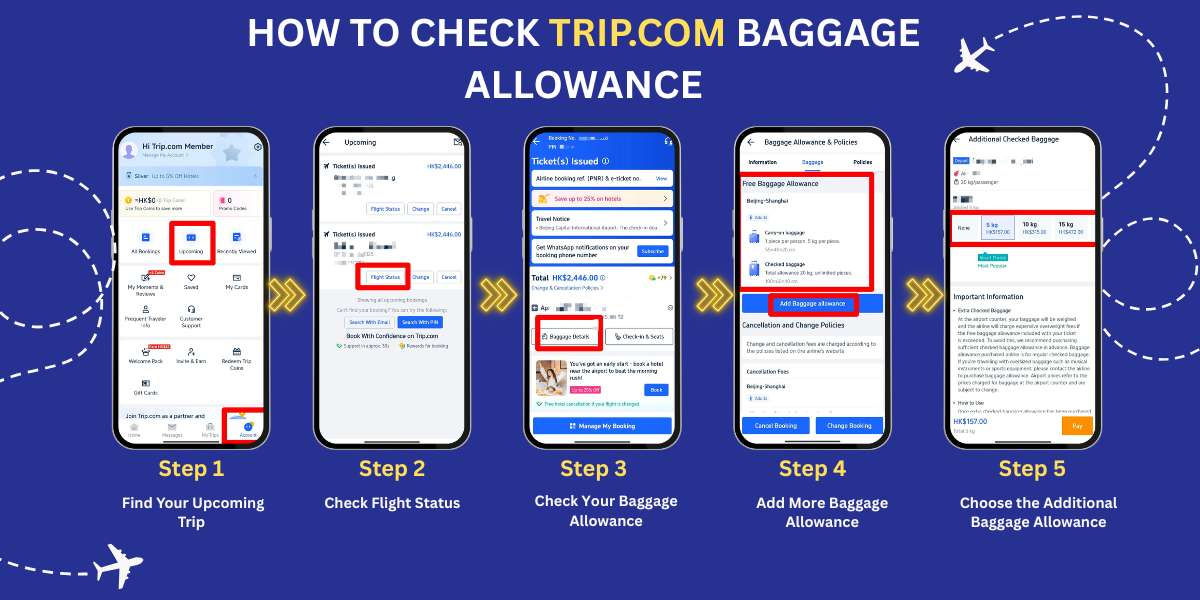
Find your upcoming trip
- Open the Trip.com App: Start by opening the Trip.com app on your phone.
- Tap the Account Icon: At the bottom of the screen, you'll see an icon labeled Account. Tap on it to go to your account page.
- Locate the "Upcoming" Section: On your account page, there is a button in the center that says Upcoming. Tap this to view your upcoming trips.
Go to check flight status
- Select Your Flight: You will see a list of flights you have booked. Find the one you want to check and tap on it.
- Review Ticket Information: After selecting your flight, you will see basic details about your ticket.
- Tap "Flight Status": To view more information, tap on the Flight Status button.
Check and add more baggage allowance if needed
- Find Baggage Details: On the next page, which shows more detailed ticket information, look for a button labeled Baggage Details. Tap it to view your baggage allowance.
- View What’s Included: On the Baggage Details page, you will see the amount of free baggage included with your ticket. This will show both carry-on and checked baggage allowances, such as the number of bags and weight limits.
- Check the Free Baggage Allowance: For example, it might state that you are allowed one carry-on bag up to 7 kg and checked baggage up to 25-30 kg.
Choose the additional baggage allowance
- Select Extra Baggage: You will see different options for adding more baggage. You can choose how many additional kilograms you need, and the app will show you the cost for each option.
- Smart Choice Option: The app may suggest a Smart Choice option, which is a popular baggage allowance selection chosen by other travelers.
Tips to Save on Extra Baggage

Pre-purchase early
Airlines usually offer discounted rates for passengers who purchase extra baggage through their website, mobile app, or booking platforms like Trip.com before departure.
Buying in advance can save you up compared to paying at the airport, where fees are often much higher. Not only does this help you save money, but it also guarantees your extra allowance, especially on busy routes where baggage space may be limited.
Check credit cards & loyalty programs
KrisFlyer elite memberships (Elite Gold, Elite Silver, PPS Club) do provide additional baggage allowance on Singapore Airlines flights
Pack smart
Weigh your luggage at home with a portable scale to avoid overpaying. You can always check Singapore Airlines extra baggage charges per kg before making purchase
What If You Forget to Add Extra Baggage?

If you arrive at the airport overweight, you’ll have to pay excess baggage fees, which are often much higher than online pre-purchase rates. In some cases, airlines may even reject overweight bags if the flight is full. Always plan ahead to avoid unnecessary stress.
Enjoy Your Trip!
Adding extra baggage to your flight booking is simple, affordable, and saves you the headache of paying steep fees at the airport. Whether you’re booking with Trip.com, directly with the airline, or through a mobile app, always secure your baggage allowance in advance for a smoother journey.
FAQ: Adding Extra Baggage to Flight Booking
-
Can I transfer baggage allowance to another passenger?
-
Do credit cards or loyalty programs offer free baggage?
-
Can I add extra baggage after booking?
Find Cheap Travel Deals & Explore Destinations on Trip.com
-
Popular Content
-
Top Flight Links
-
Popular Hotels
-
Popular Things to Do
-
Featured guides
-
Trip.com links
- Trip.com Customer Service
- Trip.com VIP Lounge
- Buy Now Pay Later
- Trip.com Contact
- Trip.com Cancellation Policy
- How to Use Trip com Promo Codes
- Best Credit Cards
- Singapore Airlines Baggage Allowance
- scoot-baggage-allowance
- luggage size cabin
- How to Book a Student Flight Ticket
- Singapore Airlines Change Flight
- Best Day to Book Flights
- Trip.com Flight Refund
- Flight Classes Explained
- CA490 Flight Status
- SQ869 Flight Status
- MU7705 Flight Status
- ZG053 Flight Status
- MU2434 Flight Status
- QG523 Flight Status
- CA1651 Flight Status
- Plane tickets from Singapore to Kuala Lumpur
- Plane tickets from Singapore to Fukuoka
- Cheap flights from Singapore to Shanghai
- Plane tickets from Singapore to Bangkok
- Cheap flights from Singapore to Seoul
- Cheap flights from Singapore to Manila
- Cheap flights from Singapore to Tokyo
- Plane tickets from Singapore to Chengdu
- Hotels near Hefeinan Railway Station
- Hotels near Johor Bahru Senai International Airport
- Hotels near Hongcun Aju Theater
- Hotels near Zixiao Palace
- Hotels near Beijing Road
- Chengdu Hotels
- Tokyo Hotels
- Kuala Lumpur Hotels
- Kunming Hotels
- Phu Quoc Island Hotels
- Hotel Les Matins de Paris
- Ramada by Wyndham Seoul Dongdaemun
- Mercure Guangzhou Beijing Road Pedestrian Street Hotel
- Airport International Hotel (Xuzhou Guanyin Airport)
- Atour Hotel (Chengdu Taikoo Li)
- Malaysia 5G eSIM | Supports mainstream apps including TikTok, Google Maps & ChatGPT | Day Pass/Total Package | 24H Billing | 1-30 days | QR code
- Singapore 4G eSIM | Supports Google Maps / ChatGPT | Daily/Total Data Plans | 24-Hour Billing | 1–30 Days | QR Code
- Vietnam Airport VIP Fast Track Service
- VIP Fast Track service for immigration clearance at Tan Son Nhat Airport in HCM
- Foreign Tourist Day Tour: Panda Valley / Dujiangyan / Mt Qingcheng / Blue Tear / Chengdu
- Huanglongjiuzhai Railway Station - Jiuzhaigou | Departure/Return | Rideshare/Private Charter | Bus/Nanny/5-9 Seater Business | Shuttle Bus | Vehicle Type Optional | Any Combination | T
- Guilin Yangshuo Impression Liu Sanjie Landscape Performance + Complimentary Exclusive Coffee Drink - Pick Up at Designated Restaurant
- Mainland China 5G eSIM | Dual Network • All AI & TikTok | 1–365 Days | QR Code
- Kota Kinabalu SIM Card
- Henan SIM Card
- Seville Day Tours
- Nha Trang Travel Essentials
- Barcelona Pocket Wifi Router
- Windsor Sports & Adventure
- Xi'an Activities
- China Power Bank Limit
- Trip.com Customer Service
- train to kl from singapore
- Shanghai Metro
- China Train Map
- China Entry Requirements
- Hong Kong Public Holidays 2027
- train from singapore to jb
- China Plug
- Thailand Plug
- universal studios singapore tickets
- Renew Autopass Singapore
- Taiwan Plug
- Vietnam Arrival Card
- Singapore Malaysia Cross Border Taxi
- Big Transport from Tokyo to Fukuoka
- Osaka Station to Kyoto Station
- Bangkok to Pattaya
- Trip.com Promo Code
- Trip.com Flight Deals
- Trip.com Credit Card Promotions
- How to Book Cheap Hotels
- How to Book Cheap Flights
- Trip.com Member Rewards
- Trip Weekly Hotel Sales
- Online Hotel Booking
- Online Flight Booking
- Trip.com Travel Guide
- Book China Train Tickets
- Trip.com Seat Selection
- Singapore Public Holidays 2027
- Trip.com 优惠码
- Trip.com Travel Guides
- Trip.com 10.10 Mega Sale