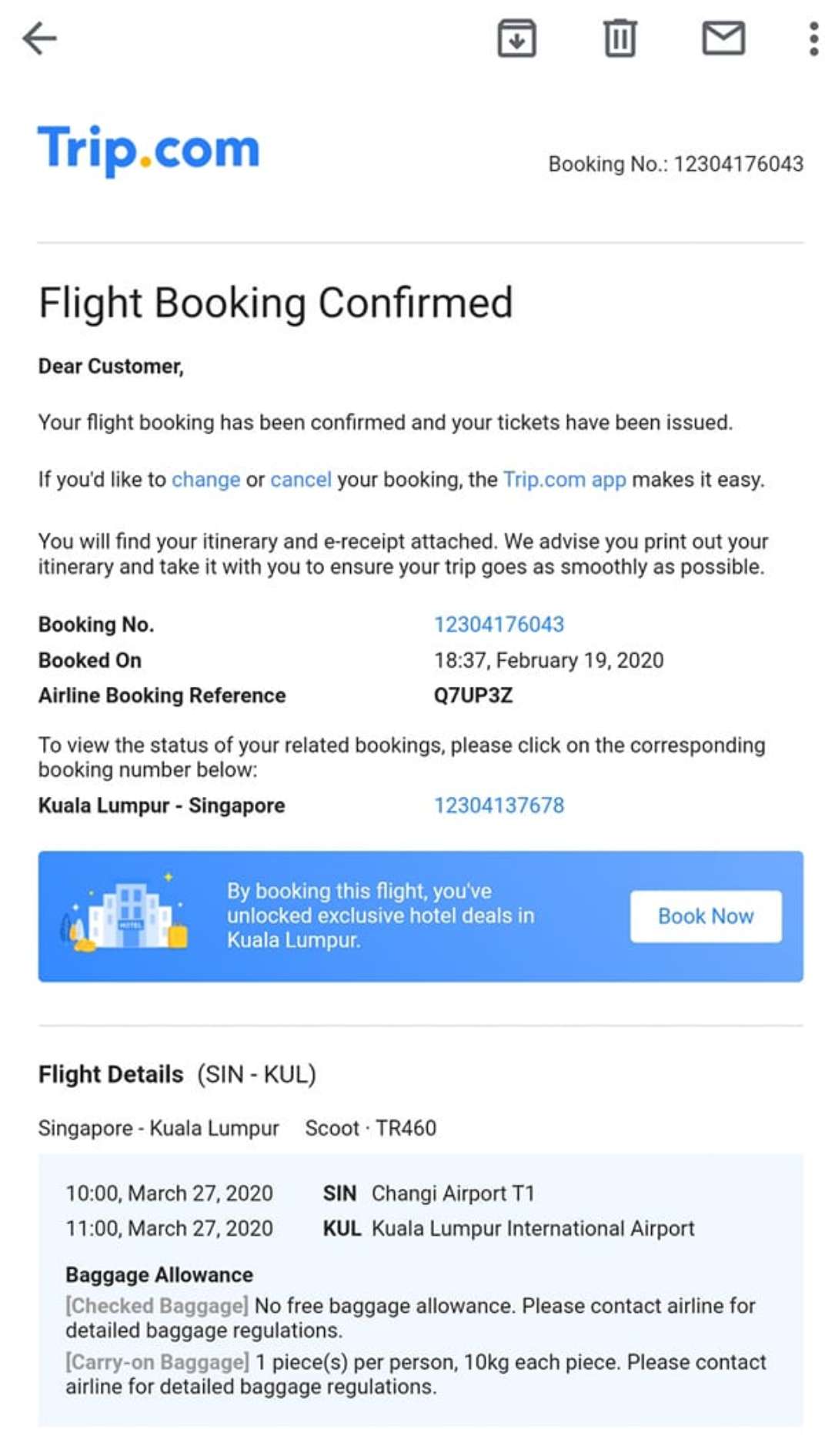


When you book a flight online whether through Trip.com, Singapore Airlines, Scoot, or other travel sites, you’ll receive a flight ticket confirmation message. This message confirms that your booking is successful and contains all the essential details you’ll need for your trip.
What Is a Flight Ticket Confirmation Message?

A flight ticket confirmation message is an email or SMS sent after you book your flight. It serves as your official booking record and usually includes:
- Passenger details (name, contact info)
- Flight number and airline
- Departure and arrival airports
- Date and time of travel
- Booking reference or PNR code
- Payment confirmation
- E-ticket number
Why Is It Important?

Check-in
You’ll need your booking reference (PNR) or e-ticket number to check in, whether you’re doing it online before your flight or directly at the airport counter. These details act as proof of your reservation and link your ticket to the airline’s system. Without them, the airline staff may not be able to retrieve your booking. It’s a good idea to keep a copy of your Trip.com flight confirmation email, SMS, or app booking page handy so you can quickly provide the reference number when requested. This will make your check-in smoother and help avoid delays.
Travel updates
Airlines always link any flight changes, delays, or cancellations to your booking reference (PNR). This means that if your flight schedule is updated, or in the event of a cancellation, the notification you receive by email, SMS, or app alert will include this reference number. Keeping track of your booking reference makes it easier to confirm updates, rebook your flight, or request a refund through Trip.com or directly with the airline.
Visa and entry requirements
Some countries require travelers to present a flight ticket confirmation or proof of onward travel when applying for a visa or during immigration checks upon arrival. Having a copy of your Trip.com flight confirmation, either printed or saved on your phone, can help you clear these formalities without issues. Immigration officers may ask for it to ensure you have a valid return or onward journey, while visa authorities often require it as part of the application process. To avoid delays, it’s always a good idea to keep both a digital copy and a printed copy of your e-ticket handy when traveling abroad.
How to Check Flight Confirmation Ticket in Trip.com

Check Your Email or SMS
After booking, Trip.com sends a flight confirmation email to the address you provided. If you don’t see it in your inbox, check your spam, promotions, or junk folder.

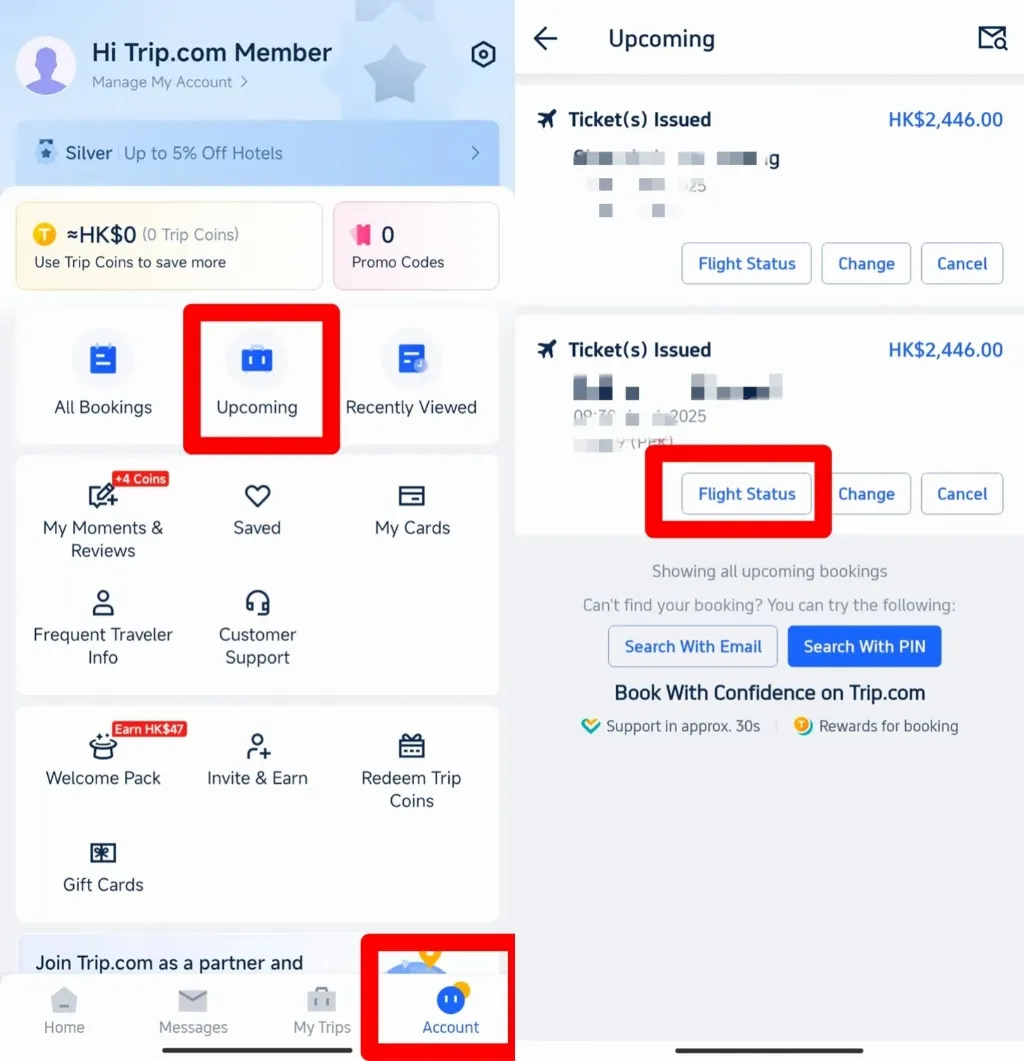
Log Into the Trip.com App
- Open the Trip.com mobile app (iOS or Android).
- Go to “My Bookings” to view your confirmation booked flight ticket.
- Select your flight to view the e-ticket, PNR, and payment status.
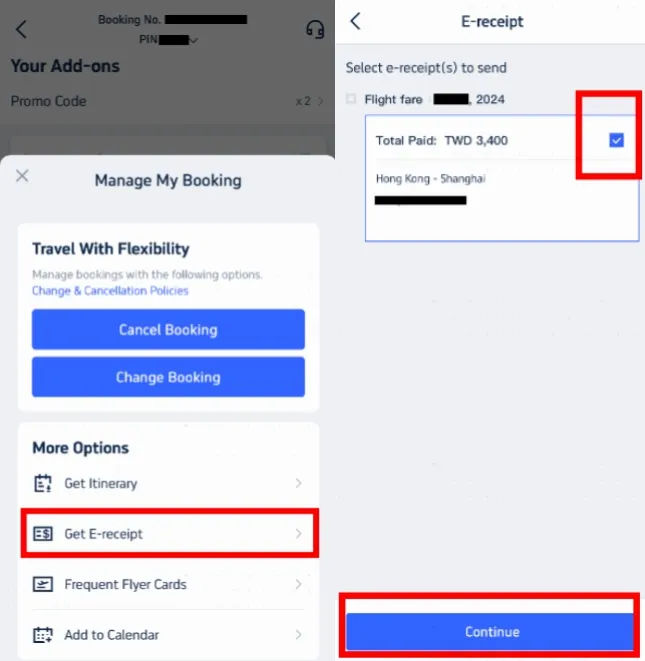
- You can also download or share your e-ticket directly from the app.


Enjoy Your Flight with Trip.com

Checking and keeping your Trip.com flight confirmation is one of the most important steps after booking a ticket. Your booking reference and e-ticket number not only help with online check-in and airport procedures but also ensure you receive timely updates about any flight changes or cancellations. Always save a copy of your confirmation email and, if possible, keep both a digital and printed copy for visa applications or immigration checks. By knowing where to find your confirmation—whether in your inbox, the Trip.com app, or website—you’ll travel with greater peace of mind and be fully prepared for your journey.
Top Hotels in Singapore
FAQ: Flight Confirmation Message
Do I need to print my Trip.com flight confirmation?
Not always—most airlines accept a mobile e-ticket during check-in. However, it’s recommended to carry a printed copy if you’re applying for a visa or traveling to countries where immigration requires proof of onward or return travel.Can I use my Trip.com flight confirmation for visa applications?
Yes. Many countries require a confirmed flight ticket for visa applications. Simply download or print your Trip.com confirmation email showing your flight details and booking reference.What is a booking reference (PNR) and why is it important?
A booking reference, also called a PNR code, is a unique identifier for your ticket. Airlines use it to send you updates about flight changes, delays, or cancellations. You’ll also need it to check in online or at the airport.


NO.1