AirAsia MOVE App: How to Book, Select Seats & Online Check In

The AirAsia MOVE app (formerly AirAsia Superapp) is a one-stop travel platform designed to make booking flights, hotels, rides, and travel services easier in a single place.
Whether you’re planning a quick getaway or a multi-city trip, the app lets you search and manage bookings, check-in for flights, and access exclusive deals from AirAsia and partner airlines.
In this guide, we’ll walk you through how the AirAsia MOVE app works, its key features, and how it can simplify your travel experience from start to finish.
Fly from Singapore

📱 How Do I Book a Flight & Select Seats on AirAsia MOVE App?
Step 1:
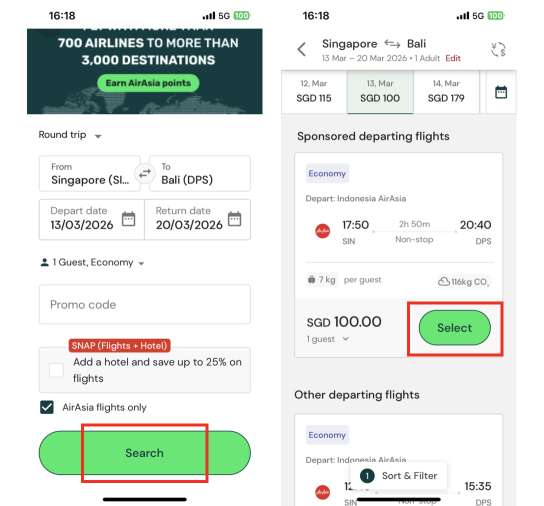
At the flight search page, key in your desired travel dates, class, and pax, and tap [Search]. Choose your preferred departure flight and return flight by tapping [Select].
Step 2:
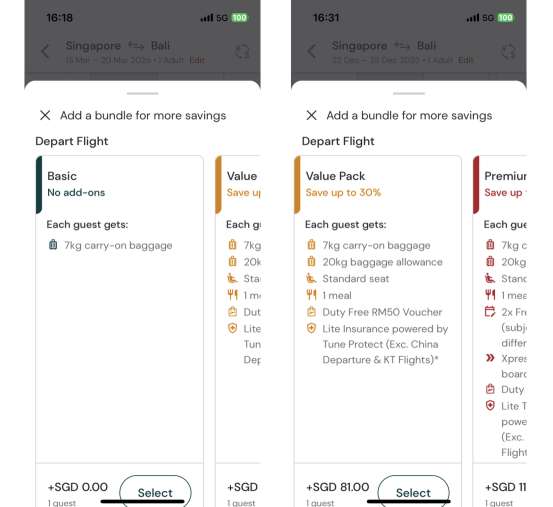
View bundle fare cards with different add-on services, such as baggage allowance, seats, and meals. Select your preferred bundle fare.
Step 3:
Key in passenger details. You can add on extra baggage allowance, meal, or seat selection on this page.
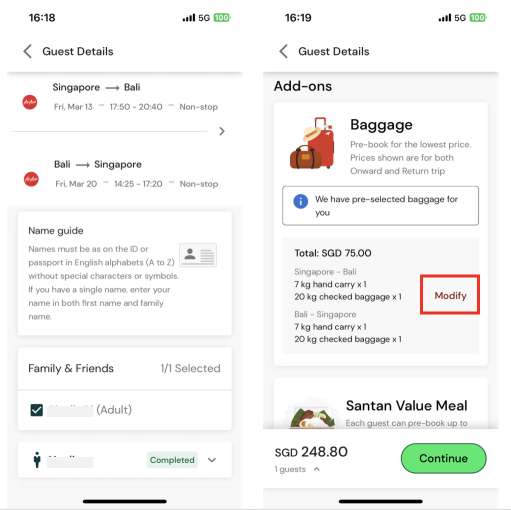
Different seats are priced differently depending on their location. ‘Hot seat’ refers to seats in the forward cabin for quicker disembarkation.
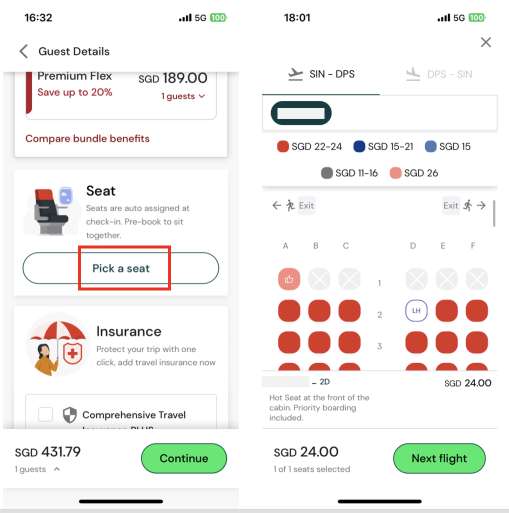
Proceed to payment and the flight booking process will be done.
Flying with hand luggage? Check out our guide on Carry-on Baggage Restrictions to pack smart and avoid fees at check-in.
Unsure about cabin options? Check our Flight Classes Explained guide to pick the perfect seat for your budget and comfort.
🌟 Pro Tip: Why You Should Always Compare Prices on Trip.com First
Kick off your AirAsia flight booking on Trip.com to enjoy competitive pricing, promotions, and exclusive rewards!
Monthly Campaign Promos
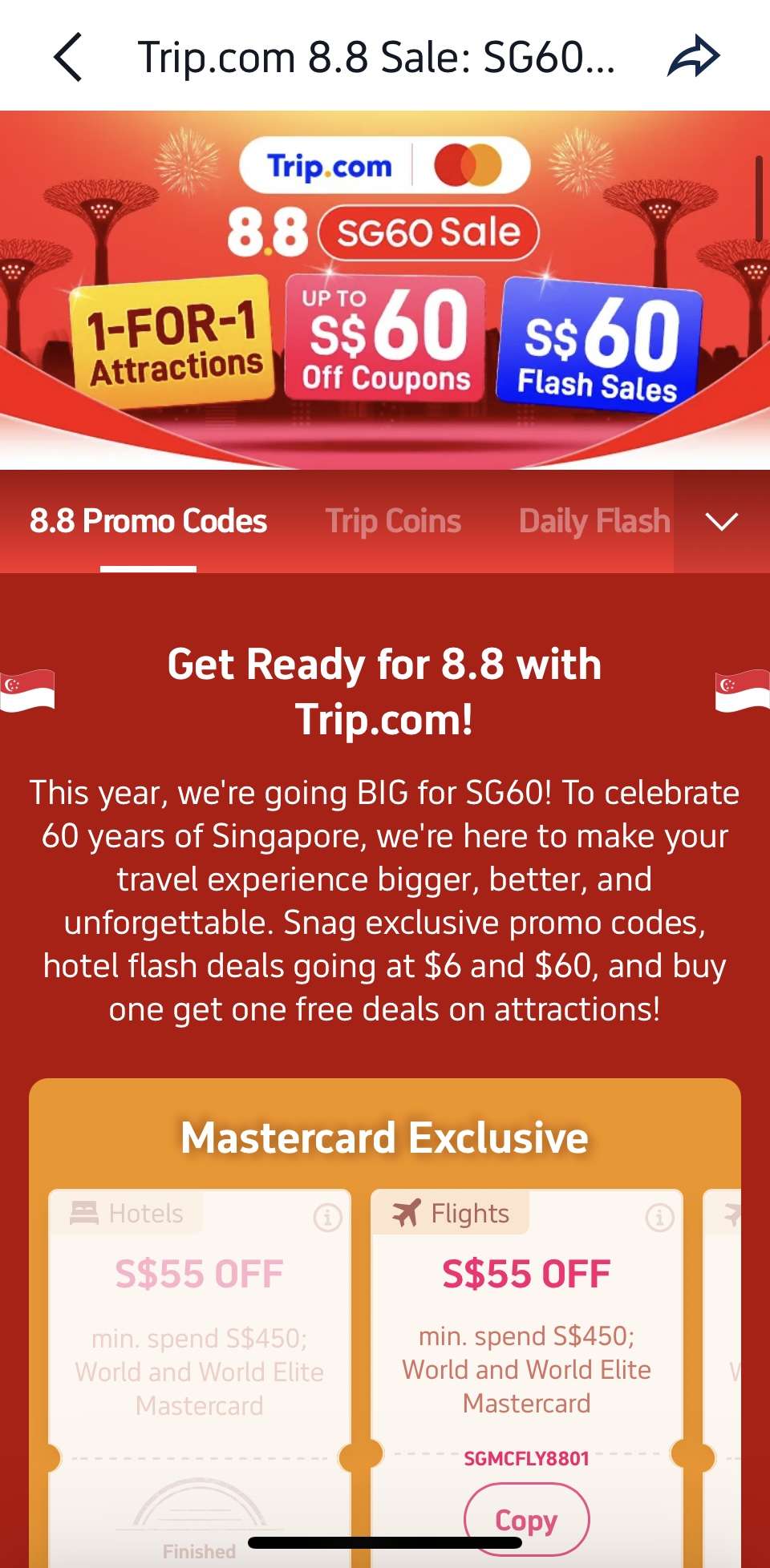
Trip.com shines with its Double Date campaigns running monthly from 1.1 all the way to 12.12, where you can get exclusive promo codes, airline promo fares, and bank card discounts (think DBS, UOB perks for locals) for massive savings that are not available if you book with the airline directly.
Double Up Earning Trip Coins + Airline Miles
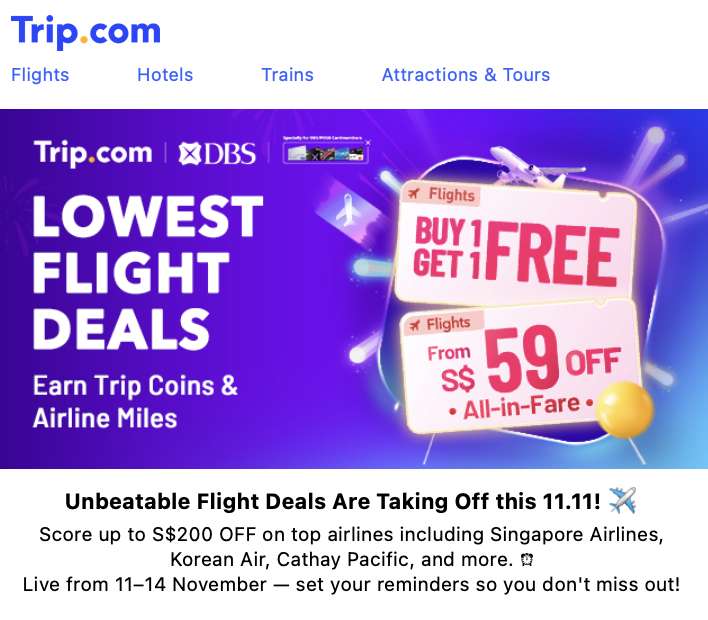
Moreover, Trip.com bookings let you earn both Trip Coins + airline miles by adding your frequent flyer details.
Every 100 Trip Coins = 1 USD (~1.3 SGD) and can offset payments at bookings with no minimum spend required.
Earn miles on every trip with Frequent Flyer Programmes—link your account before booking to rack up rewards fast.
Trip Member Rewards

More benefits will be unlocked as you progress through your Trip.com membership tiers! For example, Trip.com Platinum, Diamond, or Diamond+ members can access VIP lounges and start the journey relaxed and refreshed.
Stay Ahead - Join Our Exclusive Telegram Group!
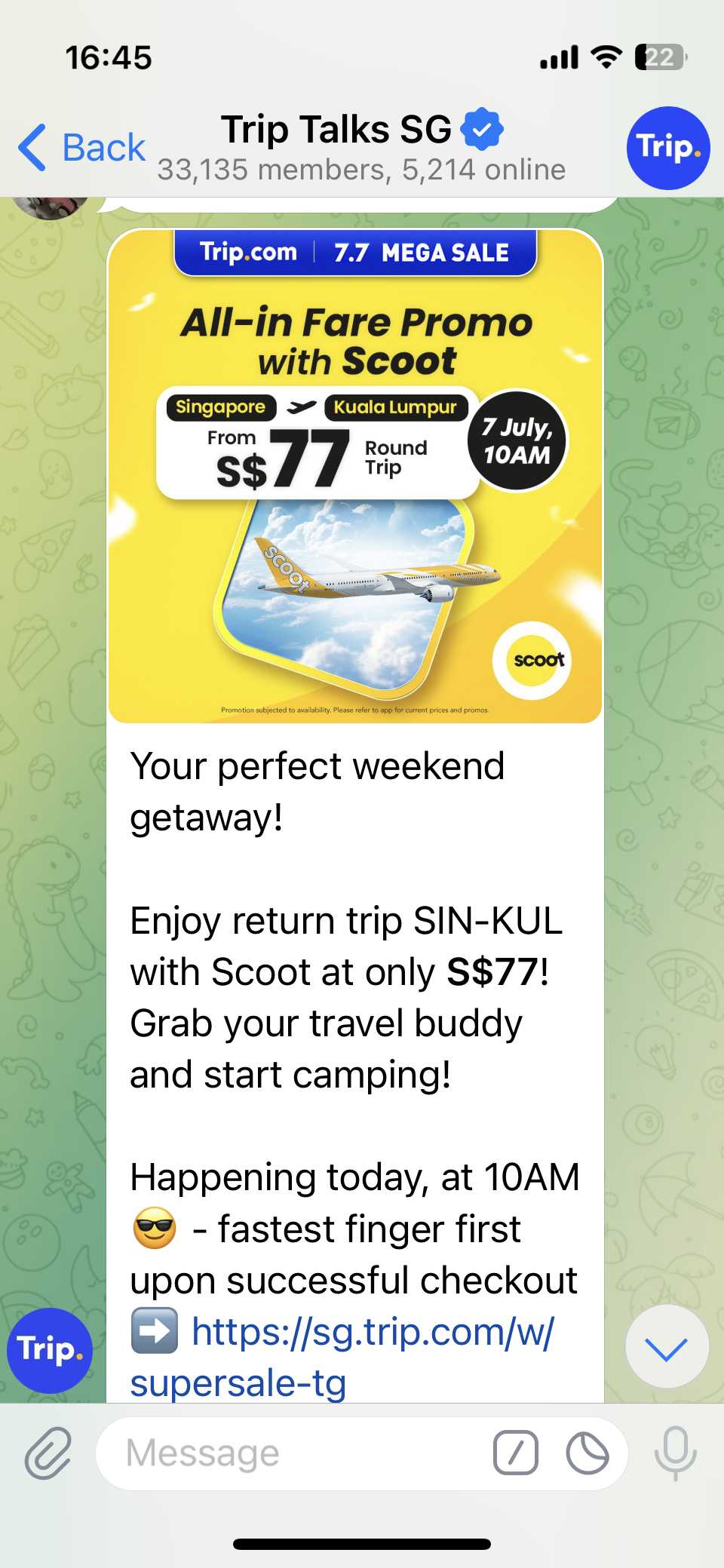
Don’t miss out on the hottest deals and flash sales! Join our Telegram group Trip Talks SG to get instant alerts, exclusive offers, and be first in line for must-grab promo codes. Stay connected, save more!
Download Trip.com App for App-only Discounts!
Download the Trip.com app now and unlock exclusive app-only discounts! Use the QR code to get instant savings on flights and hotels, available for both Android and Apple users.
🎫 How Do I Find My Booking Number (PNR) on AirAsia MOVE App?
- Email: Check booking confirmation email for a 6-character code (e.g., A12BC3).
- AirAsia MOVE App/Website: On the account page, go to "Purchases" to find your booking and the booking number.
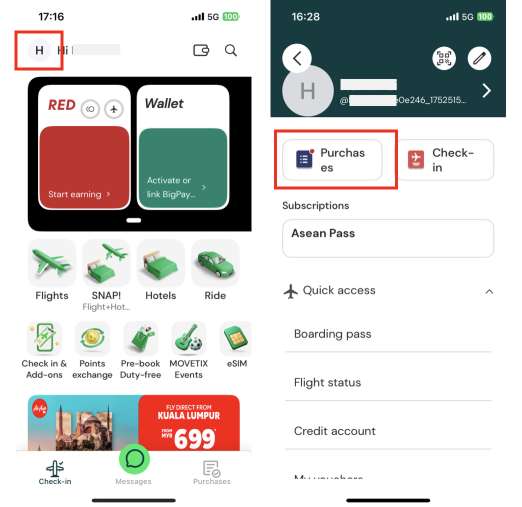
✈️ How Do I Check In Online on AirAsia MOVE App?
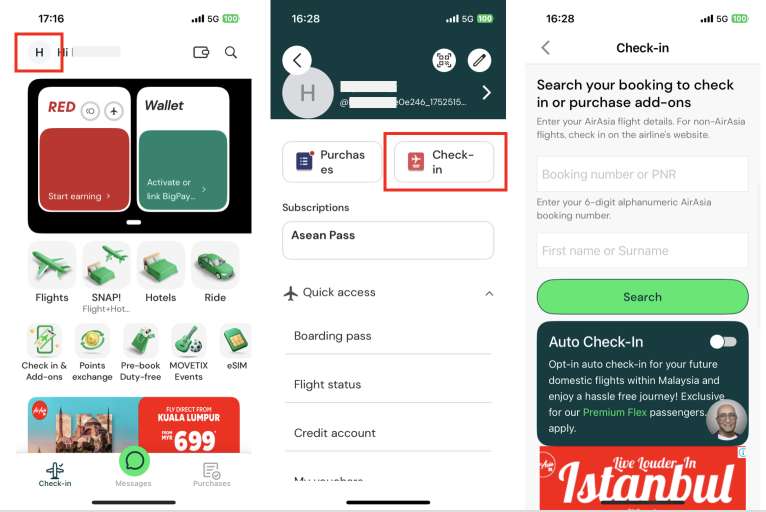
Step 1: At the app main page, click your profile photo in the top left corner to go to the account page.
Step 2: Tap [Check-In] on your account page.
Step 3: Key in your booking number(or PNR) and your name to check in or to purchase add-on services to add to your existing booking.
Ready to fly? Don’t forget to check out our weekly updated deals and promo codes for regional and global destinations—grab the best offers before they’re gone!
Score bigger savings with How to Use Trip.com Promo Codes and stretch your travel budget further.
FAQ: AirAsia MOVE App
-
How do I check in online via AirAsia MOVE App?
-
Can I add baggage after booking on AirAsia MOVE App?
-
What if I book AirAsia on Trip.com – can I still use AirAsia MOVE App?
Find Cheap Travel Deals & Explore Destinations on Trip.com
-
Popular Content
-
Top Flight Links
-
Popular Hotels
-
Popular Things to Do
-
Featured guides
-
Trip.com links
- Trip.com Customer Service
- Trip.com VIP Lounge
- Buy Now Pay Later
- Trip.com Contact
- Trip.com Cancellation Policy
- How to Use Trip com Promo Codes
- Best Credit Cards
- Singapore Airlines Baggage Allowance
- scoot-baggage-allowance
- luggage size cabin
- How to Book a Student Flight Ticket
- Singapore Airlines Change Flight
- Best Day to Book Flights
- Trip.com Flight Refund
- Flight Classes Explained
- CA490 Flight Status
- SQ869 Flight Status
- MU7705 Flight Status
- ZG053 Flight Status
- MU2434 Flight Status
- QG523 Flight Status
- CA1651 Flight Status
- Plane tickets from Singapore to Kuala Lumpur
- Plane tickets from Singapore to Fukuoka
- Cheap flights from Singapore to Shanghai
- Plane tickets from Singapore to Bangkok
- Cheap flights from Singapore to Seoul
- Cheap flights from Singapore to Manila
- Cheap flights from Singapore to Tokyo
- Plane tickets from Singapore to Chengdu
- Hotels near Hefeinan Railway Station
- Hotels near Johor Bahru Senai International Airport
- Hotels near Hongcun Aju Theater
- Hotels near Zixiao Palace
- Hotels near Beijing Road
- Chengdu Hotels
- Tokyo Hotels
- Kuala Lumpur Hotels
- Kunming Hotels
- Phu Quoc Island Hotels
- Hotel Les Matins de Paris
- Ramada by Wyndham Seoul Dongdaemun
- Mercure Guangzhou Beijing Road Pedestrian Street Hotel
- Airport International Hotel (Xuzhou Guanyin Airport)
- Atour Hotel (Chengdu Taikoo Li)
- Malaysia 5G eSIM | Supports mainstream apps including TikTok, Google Maps & ChatGPT | Day Pass/Total Package | 24H Billing | 1-30 days | QR code
- Singapore 4G eSIM | Supports Google Maps / ChatGPT | Daily/Total Data Plans | 24-Hour Billing | 1–30 Days | QR Code
- Vietnam Airport VIP Fast Track Service
- VIP Fast Track service for immigration clearance at Tan Son Nhat Airport in HCM
- Foreign Tourist Day Tour: Panda Valley / Dujiangyan / Mt Qingcheng / Blue Tear / Chengdu
- Huanglongjiuzhai Railway Station - Jiuzhaigou | Departure/Return | Rideshare/Private Charter | Bus/Nanny/5-9 Seater Business | Shuttle Bus | Vehicle Type Optional | Any Combination | T
- Guilin Yangshuo Impression Liu Sanjie Landscape Performance + Complimentary Exclusive Coffee Drink - Pick Up at Designated Restaurant
- Mainland China 5G eSIM | Dual Network • All AI & TikTok | 1–365 Days | QR Code
- New Delhi Airport Services
- Bohol Island Local Tour Guides
- Vancouver Group Tours
- Bali Day Tours
- Sattahip Driving Experience
- Macau Cultural Experience
- Hua Hin Activities
- China Power Bank Limit
- Trip.com Customer Service
- train to kl from singapore
- Shanghai Metro
- China Train Map
- China Entry Requirements
- Hong Kong Public Holidays 2027
- train from singapore to jb
- China Plug
- Thailand Plug
- universal studios singapore tickets
- Renew Autopass Singapore
- Taiwan Plug
- Vietnam Arrival Card
- Singapore Malaysia Cross Border Taxi
- Big Transport from Tokyo to Fukuoka
- Frankfurt Airport to City
- Osaka Station to Kyoto Station
- Trip.com Promo Code
- Trip.com Flight Deals
- Trip.com Credit Card Promotions
- How to Book Cheap Hotels
- How to Book Cheap Flights
- Trip.com Member Rewards
- Trip Weekly Hotel Sales
- Online Hotel Booking
- Online Flight Booking
- Trip.com Travel Guide
- Book China Train Tickets
- Trip.com Seat Selection
- Singapore Public Holidays 2027
- Trip.com 优惠码
- Trip.com Travel Guides
- Trip.com 10.10 Mega Sale