If you are planning a trip to China, you will probably find one of the problems is the language barrier that Singaporean travellers have to deal with. This is where Baidu Translate comes in. You might use Google Translate at home. Because of the internet rules in China, it does not work unless you have VPN.
Baidu Translate is made for people travelling to China. It works well without a VPN and it has special features that are just for translating Chinese into English and English into Chinese.
Key Features That Make Baidu Translate Stand Out
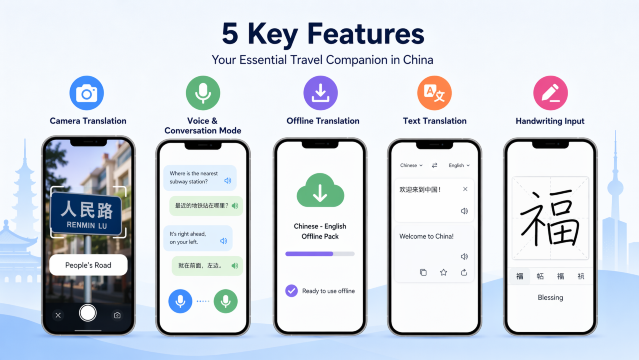
Baidu Translate has great features. As a traveller, here are the ones you will probably use the most:
1. Camera Translation
Point your phone camera at any text, like menus, street signs or product labels. Baidu Translate will show you the translation right away. You can also use it to translate text that's already in an image.
2. Voice & Conversation Mode
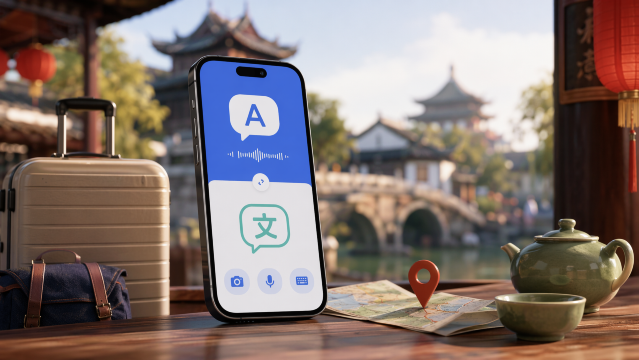
When you speak into your phone in English, Baidu Translate will speak back in Chinese. This is really helpful. Then if the other person speaks in Chinese. You get to see and hear the English translation of what Baidu Translate says. It is pretty cool to have Baidu Translate like an interpreter that you can carry with you all the time.
3. Offline Translation
Don't have internet? That's okay. You can download the offline pack before your trip. This way, you can translate text without a connection.
Tip: Download the pack when you are still using Wi-Fi in Singapore. The pack can be quite big.
4. Text Translation
The classic: type or paste Chinese text, get English translation, and vice versa. Baidu Translate supports over 200 languages, and can also translate full documents like PDFs and Word files.
5. Handwriting Input
Can't type a Chinese character? Draw it with your finger on the screen, and Baidu Translate will recognise it and translate it. This is surprisingly useful when you're trying to look up a character you see on a sign but can't type.
👍Pro Tip: When planning your visit, consider booking your flights to China early to snag the best deals and keep an eye out for promotions.
How to Use Baidu Translate?
Step 1: Download the App
For iOS users (iPhone/iPad):
Open the App Store
Search for "百度翻译" or "Baidu Translate"
Tap "Get" to download (it's free!)
For Android users:
Open your app store
Search for "Baidu Translate"
Download the official app by Baidu
Note: If you're already in China, you may need to use a Chinese app store like Huawei AppGallery or Xiaomi App Store
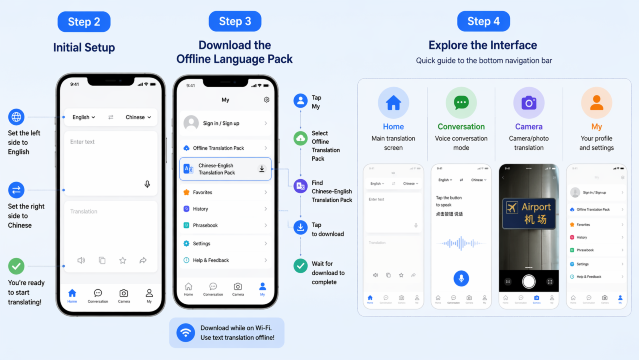
Step 2: Initial Setup
When you first open Baidu Translate, you'll see a mostly Chinese interface.
Skip the login (you can use most features without an account)
Look for the language selector at the top of the screen
Set the left side to English (英语)
Set the right side to Chinese (中文)
You're ready to start translating!
Step 3: Download the Offline Language Pack
This is crucial for travel. Do this while you're still on Wi-Fi:
Tap the "我的" (My) icon in the bottom right corner
Look for "离线翻译包" (Offline Translation Pack)
Find "中英翻译包" (Chinese-English Translation Pack)
Tap the download button
Wait for the download to complete (it may take a few minutes)
Once downloaded, you can use text translation even without internet.
Step 4: Explore the Interface
Here's a quick guide to the bottom navigation bar:
首页 (Home): Main translation screen
对话 (Conversation): Voice conversation mode
拍照 (Camera): Camera/photo translation
我的 (My): Your profile and settings
👀Pro Tip: To stay connected throughout your visit, consider getting a China eSIM. Just activate and go!
🔥Save More with Up to 5% OFF
Use our promo code to enjoy up to 5% OFF (up to S$3)on your attraction tickets, tours and eSIMs! Only for new users!

Why Baidu Translate is a Must-Have for China Travel?
No VPN Required
The biggest reason for this is that Google Translate are not available in China. You can try to use, but it does not always work well, especially when you are not in a big city.
Baidu Translate is different because it is run by Baidu on their servers in China. This means Baidu Translate works great on the Wi-Fi with a phone. You do not have to mess around with settings or worry about your connection stopping all the time.
Superior Chinese-English Translation Accuracy
Baidu is China's search engine and it has put a lot of money into making AI translation better. Baidu Translate often outperforms international competitors, especially with:
Colloquial Chinese and local slang
Regional dialects and accents
Chinese place names and cultural references
Menu items and food descriptions
Built for the Chinese Travel Experience
Unlike Western translation apps, Baidu Translate is designed with Chinese daily life in mind. It recognises common Chinese fonts, understands the way locals actually speak, and even integrates with other Chinese apps and services.
Baidu Translate Pricing: Free vs Paid
Baidu Translate's core features are completely free, which is amazing for travellers. However, there are paid upgrades if you want an ad-free experience or additional features.
Feature
Free Version
VIP Membership
Super VIP
Text translation
✅ Unlimited
✅ Unlimited
✅ Unlimited
Camera translation
✅ Basic
✅ Enhanced
✅ Premium
Voice translation
✅ Basic
✅ Enhanced
✅ Premium
Offline translation
✅ Basic packs
✅ Full access
✅ Full access
Advertisements
❌ Yes (some)
✅ No ads
✅ No ads
Document translation
❌ Limited
✅ Unlimited
✅ Unlimited
AI advanced translation
❌
✅
✅
Price
S$0
~S$4.70/month
~S$13/month
Notes on pricing:
Prices are approximate and converted from Chinese Yuan (RMB).
The free version is perfectly adequate for most travellers.
Offline language packs for Chinese-English are available for free with basic functionality.
Paid subscriptions are more geared towards regular users, students, and business travellers.
Th recommendation for Singaporean travellers: Stick with the free version. It has everything you need for a typical holiday in China. Save your money for more important things.
💡 Pro Tip: If you’re travelling onwards to other cities in China, consider using China high-speed rail. It's fast, comfortable, and efficient!
🔥Get 3% Off Your First Train Ticket Booking!
As a special treat, Trip.com is offering a 3% discount on your first train ticket booking. Simply claim your coupon and enjoy a seamless travel experience.
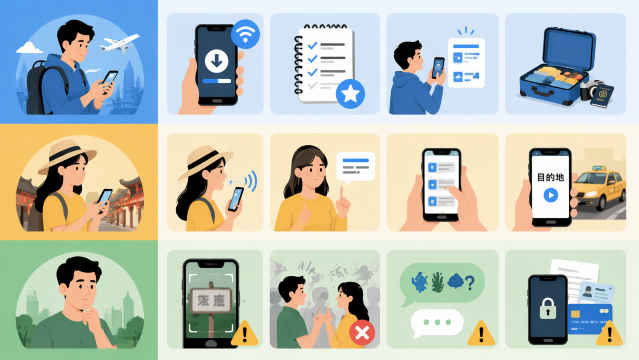
Download the app and offline packs now. Do not wait until you are in China.
You can save phrases. For example "Where is the toilet?". How much does this cost?" This way you can access them quickly.
Practice with the camera mode. Get used to how it works before you really need it.
During Your Trip
It's best to speak clearly and slowly. This helps voice translation work well. Voice translation works best with clear speech.
Try to use sentences. This will help you get accuracy.
For important things like addresses, show the Chinese text on your screen instead of relying on the voice output
Things to Watch Out For
When you use a camera to translate, it does not always get everything right. You should always double-check the important information.
When you use voice translarion, it may struggles with background noise, so it is an idea to find a quiet spot if you are having a conversation.
The camera and voice translation also have a time with some slang and idioms. Some slang and idioms do not translate well, so it is an idea to keep your language simple and straightforward when you talk.
You should also think about privacy considerations when using a translation app.
👉Pro Tip: For a convenient stay, look for China hotels in advance to secure the best rates.
Is Baidu Translate Worth It?
For any person who is going to China, Baidu Translate is an useful tool. It works even when you do not have a VPN. It also has some features that can help you with things in China. I think Baidu Translate will really help you when you are in China. Safe travels, and enjoy your trip to China!

Yes! The core features, text, camera, and voice translation, are all completely free. There are paid upgrades, but most travellers won't need them.
Does Baidu Translate work without internet?
Yes, but you need to download the offline language packs first. We highly recommend doing this before your trip. Text translation works well offline, and camera translation also has an offline mode.
Is Baidu Translate better than Google Translate for China?
For use in China, absolutely. The biggest advantage is that Baidu Translate works without a VPN, which Google Translate doesn't. For Chinese-English translation specifically, Baidu is often more accurate with colloquial language and cultural references.
Can I use Baidu Translate to have full conversations?
Yes! The conversation mode works surprisingly well for simple, clear conversations. It's perfect for taxi rides, ordering food, and asking for directions. For more complex discussions, you might need to type things out or use simpler language.
Do I need to create an account to use Baidu Translate?
No, you can use all the basic features without signing up. Creating an account lets you save your translation history and sync across devices, but it's optional.
Disclaimer: This article has been provided by an individual contributor or third party platform. If there is any discrepancy regarding the copyright, please contact us directly and we will delete the content immediately.