Trip.com E-Receipt Guide : Download, Uses & Reimbursement Tips

By Trip.com
June 24, 2026
When booking flights or hotels on Trip.com, you may need an official e-receipt for business claims, visa applications, or personal record-keeping. Fortunately, Trip.com makes it simple to access and download your electronic receipt directly from the website or app.
In this guide, we’ll explain what a Trip.com e-receipt is, how to download it, and when you might need it.
Hotels in Singapore
 NO.1
NO.1








What is a Trip.com E-Receipt?
A Trip.com e-receipt is an official digital receipt that confirms your completed booking and payment. Unlike the confirmation email, which shows your itinerary, the e-receipt serves as proof of payment and can be used for:
Business expense claims
If you travel for work, your Trip.com e-receipt is essential for filing business expense claims. Most companies require official receipts to verify travel costs before they can reimburse you.
Visa applications
When applying for a visa, many embassies require proof of travel bookings and payment to ensure that applicants have sufficient funds and genuine travel plans. A Trip.com e-receipt is widely accepted as part of this documentation.
Travel reimbursement
If you’re traveling for work, your Trip.com e-receipt is crucial for claiming travel reimbursements claim from your employer. Most HR or finance teams require an official receipt before approving repayment, as it serves as verifiable proof of payment.
Personal records
Your Trip.com e-receipt isn’t just useful for business or visa purposes, it’s also a great tool for personal financial management. Keeping e-receipts helps you stay organized and provides an official record of your travel spending.
How to Download Your Trip.com E-Receipt
Via Trip.com Website
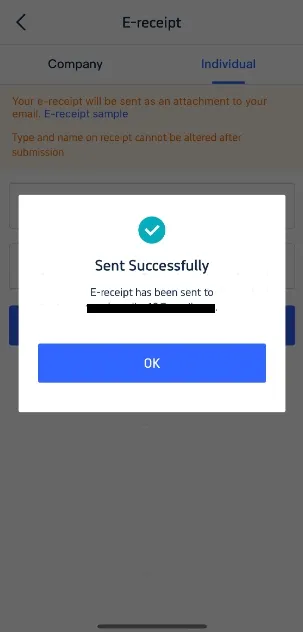
Step 1: Log in to your Trip.com account then go to “My Bookings" and select the flight or hotel reservation you want the receipt for.
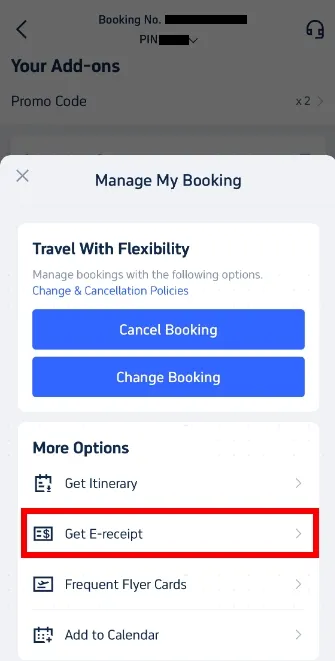
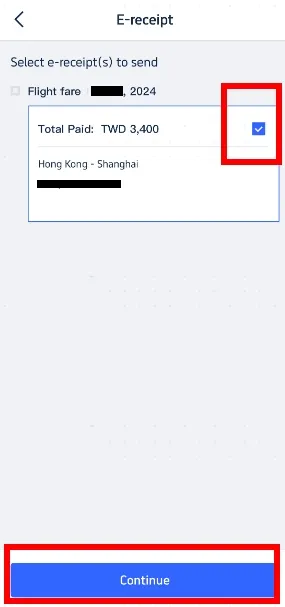
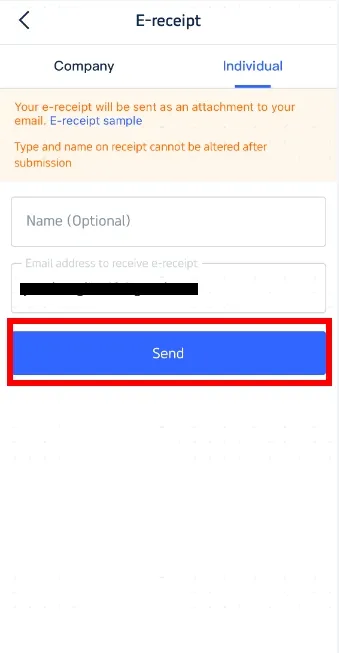
Step 2: Click “E-Receipt” to send email of receipt or “Download Receipt.” and save it as a PDF for printing or sharing.
How Long Does It Take to Get a Trip.com E-Receipt?
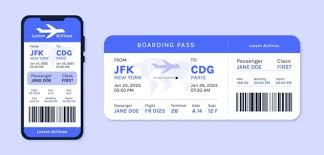
- You can receive flight ticket payment receipt instantly available after your payment is confirmed.
- Always check both your Trip.com account and confirmation email for updates.
Why Keep Your Trip.com E-Receipt?
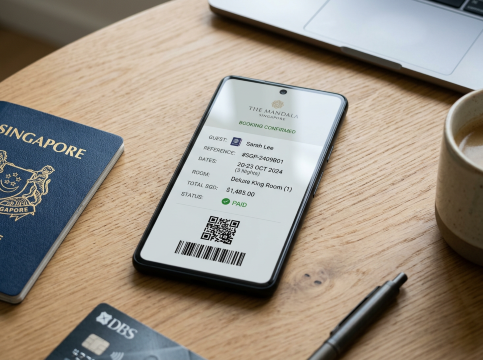
Some countries require proof of purchase for immigration checks
In some countries, immigration officers may ask for proof of purchase to confirm that your travel plans are genuine and fully paid for. A hotel reservation receipt and airline flight ticket receipt serves as valid documentation, showing your name, booking details, and payment confirmation.
Employers often need official receipts for reimbursement
Employers often require official receipts before approving travel reimbursements. A Trip.com e-receipt provides exactly that a formal record of your booking with details like your name, booking ID, dates, and payment amount.
Unlike a simple booking confirmation, the e-receipt is recognized as proof of payment, making it easier for finance or HR teams to process your claim without delays. Submitting this document ensures smoother reimbursement and avoids back-and-forth requests for additional proof.
Helps you track travel expenses for personal finance or tax claims
A Trip.com e-receipt isn’t only useful for official purposes, it also helps you stay on top of your personal finances. By keeping receipts from your bookings, you can easily track how much you’ve spent on flights, hotels, and other travel services. This makes it simpler to manage your monthly budget and adjust future travel plans.
For freelancers, business owners, or anyone who files tax claims, e-receipts also serve as valid documentation of deductible expenses. Having clear records of your travel costs ensures you’re well-prepared for audits or year-end reporting.
Serves as a backup if you misplace your confirmation email
A Trip.com e-receipt also acts as a reliable backup document in case you misplace or delete your original booking confirmation email. Since the e-receipt contains all the essential details including booking ID, travel dates, payment confirmation, and passenger information, it can serve as proof of purchase whenever you need to verify your booking.
This backup is especially helpful if:
- You’re checking in at the airport and can’t find your confirmation email.
- You need to provide proof of travel for visa or immigration purposes.
- You want extra assurance in case of any system or email issues.
Conclusion
Your Trip.com e-receipt is more than just a record of your booking, it’s an essential travel document for business, visas, reimbursements, and peace of mind.
Whether you access it via the Trip.com app, website, or customer service, downloading and keeping a copy ensures you’re always prepared for travel formalities and financial claims.
FAQ: Trip.com E-Receipt
-
Is an e-receipt the same as a booking confirmation?
-
Do embassies accept Trip.com e-receipts for visa applications?
-
Can I get an e-receipt if I booked without a Trip.com account?
Find Cheap Travel Deals & Explore Destinations on Trip.com
-
Popular Content
-
Top Flight Links
-
Popular Hotels
-
Popular Things to Do
-
Featured guides
-
Trip.com links
- Trip.com Customer Service
- Trip.com VIP Lounge
- Buy Now Pay Later
- Trip.com Contact
- Best Credit Cards
- Trip.com Cancellation Policy
- How to Use Trip com Promo Codes
- Singapore Airlines Baggage Allowance
- scoot-baggage-allowance
- How to Book a Student Flight Ticket
- Singapore Airlines Change Flight
- luggage size cabin
- Best Day to Book Flights
- Trip.com Flight Refund
- Flight Classes Explained
- MU2434 Flight Status
- CA490 Flight Status
- CZ8302 Flight Status
- MU7705 Flight Status
- ZG053 Flight Status
- TK066 Flight Status
- QG523 Flight Status
- Cheap flights from Singapore to Shanghai
- Plane tickets from Singapore to Fukuoka
- Plane tickets from Singapore to Bangkok
- Plane tickets from Singapore to Kuala Lumpur
- Plane tickets from Singapore to Seoul
- Cheap flights from Singapore to Manila
- Plane tickets from Singapore to Tokyo
- Cheap flights from Singapore to Bengaluru
- Hotels near Hefeinan Railway Station
- Hotels near Hongcun Aju Theater
- Hotels near Zixiao Palace
- Hotels near Johor Bahru Senai International Airport
- Hotels near Beijing Road
- Chengdu Hotels
- Tokyo Hotels
- Kuala Lumpur Hotels
- Kunming Hotels
- Hong Kong Hotels
- Hotel Les Matins de Paris
- Airport International Hotel (Xuzhou Guanyin Airport)
- Ramada by Wyndham Seoul Dongdaemun
- Mercure Guangzhou Beijing Road Pedestrian Street Hotel
- Atour Hotel (Chengdu Taikoo Li)
- Malaysia 5G eSIM | Supports Google Maps / Tiktok / ChatGPT | Daily / Total Data Plans | 24-Hour Billing | 1–30 Days | QR Code
- Singapore 4G eSIM | Supports Google Maps / ChatGPT | Daily/Total Data Plans | 24-Hour Billing | 1–30 Days | QR Code
- Vietnam Airport VIP Fast Track Service
- VIP Fast Track service for immigration clearance at Tan Son Nhat Airport in HCM
- Foreign Tourist Day Tour: Panda Valley / Dujiangyan / Mt Qingcheng / Blue Tear / Chengdu
- Mainland China 5G eSIM | 3 Carriers · All AI & TikTok | 1–365 Days | QR Code
- Mainland China/Hong Kong/Macau 5G eSIM | 5 Carriers · All AI | Day Pass/Total Data Package | 24-Hour Billing | QR Code
- Singapore - Bintan Resorts Ferry Ticket
- Madrid Travel Essentials
- Jinghong Day Tours
- Istanbul Day Tours
- Switzerland Group Tours
- Austria Transportation
- Honolulu Transportation
- Shanghai Transportation
- Grab Singapore
- Glamping JB
- UOB Visa Signature
- Singapore Airlines New Long-Haul Business Class
- HSBC Travel Credit Card
- Singapore Airlines Western Sydney Airport
- chinese new year getaway
- Johor Bahru Night Market
- Cheap Hotels in Shanghai
- JB Kids Activities
- Indonesia Public Holiday 2027
- penang night market
- Night Markets in Singapore
- Rabbit Card Bangkok
- Best Time to Visit Urumqi
- Hotels near Adisutjipto International Airport
- Hotels in Sydney CBD
- Hotels in Top of Taishan
- Trip.com Promo Code
- Trip.com Flight Deals
- Trip.com Credit Card Promotions
- How to Book Cheap Hotels
- How to Book Cheap Flights
- Trip.com Member Rewards
- Trip Weekly Hotel Sales
- Online Hotel Booking
- Online Flight Booking
- Trip.com Travel Guide
- Book China Train Tickets
- Trip.com Seat Selection
- Singapore Public Holidays 2027
- Trip.com 优惠码
- Trip.com Travel Guides
- Trip.com 10.10 Mega Sale