Trip.com Flight Booking Process – Easy Step-by-Step Guide

Author's Profile Picture
Trip.com Flight Booking Process

Want to hop on a plane and travel hassle-free? This article walks you through everything you need to know about booking flights with Trip.com, including how to score budget-friendly fares, how to access your e-ticket, and how to change your flight—plus other helpful info you might need.
Flights to Taipei
Flights to Jeju Island
Flights to Seoul
Flights to Tokyo
Flights to Bangkok
Flights to Shanghai
Flights to Beijing
See All Flights
Hong Kong
HKG
Taipei
TPE
Tue, Mar 17
Tue, Mar 17
One way
16% off
From 171,200KRW 144,200
Hong Kong
HKG
Taipei
TPE
Fri, Mar 13
Sat, Mar 14
One way
16% off
From 171,200KRW 144,200
Hong Kong
HKG
Taipei
TPE
Mon, Mar 23
Mon, Mar 23
One way
16% off
From 171,200KRW 144,200
Hong Kong
HKG
Taipei
TPE
Thu, Mar 19
Thu, Mar 19
One way
16% off
From 171,200KRW 144,200
Hong Kong
HKG
Taipei
TPE
Tue, Mar 10
Tue, Mar 10
One way
16% off
From 171,200KRW 144,200
Hong Kong
HKG
Taipei
TPE
Tue, Mar 24
Tue, Mar 24
One way
16% off
From 171,200KRW 144,200
Hong Kong
HKG
Taipei
TPE
Wed, Mar 4
Wed, Mar 4
One way
11% off
From 171,200KRW 152,400
Hong Kong
HKG
Taipei
TPE
Wed, Mar 18
Wed, Mar 18
One way
8% off
From 171,200KRW 157,500
Taipei Hotels
Seoul Hotels
Bangkok Hotels
Shanghai Hotels
See All Hotels
NO.1
2.5/101 review
Come Inn Taipei I
Hotel in Taipei
Wi-Fi
Non-smoking room
NO.2
Good Life Hotel Shang Hwa
Hotel in Taipei
Parking
Luggage storage
NO.3
6/104 reviews
Come Inn Taipei IV
Hotel in Taipei
Non-smoking room
NO.4
8.2/1017 reviews
W.S. Stay
Hotel in Taipei
Wi-Fi
Non-smoking room
NO.5
8.4/105 reviews
CK Serviced Residence
Hotel in Taipei
Luggage storage
Swimming Pools
NO.6
7.6/1027 reviews
Jacky Home Taipei Ximenting
Hotel in Taipei
Luggage storage
Non-smoking room
NO.7
10/100 reviews
WATER AB
Hotel in Taipei
Non-smoking room
NO.8
Ningxia Stay
Hotel in Taipei
Wi-Fi
Non-smoking room

How to Book a Flight on Trip.com

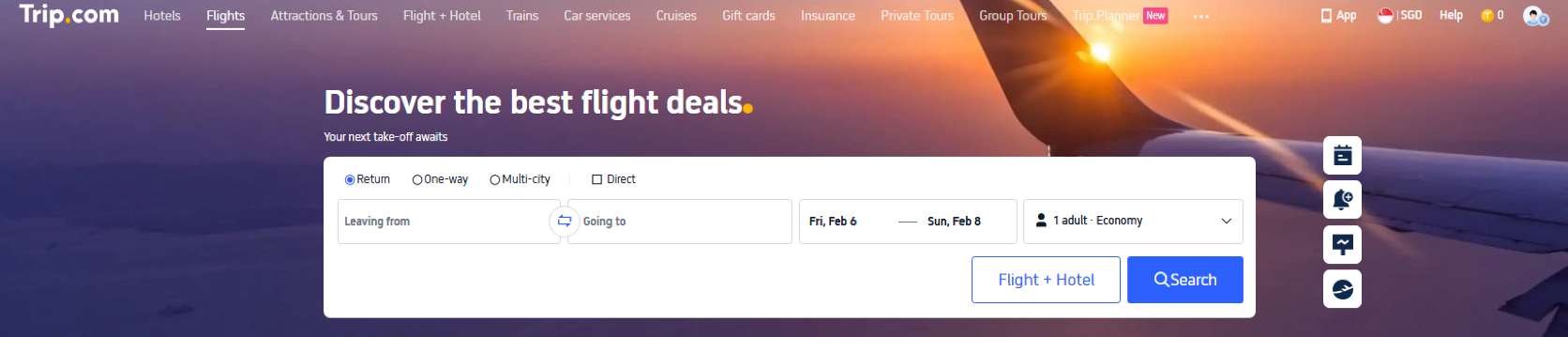
Step 1: Search for Flights

  • First, select Round Trip or One Way, the number of travelers, and your cabin class.
  • Next, select your departure city, destination, departure date, and local departure time;
  • Finally, search for flights and prices.
Flight Booking Trip.com

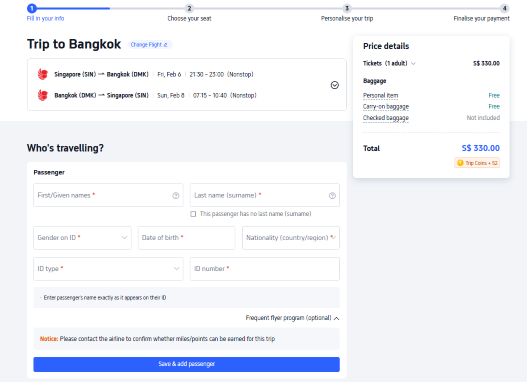
Step 2: Enter Passenger Information

  • After selecting your flight and fare, enter traveler information on the next page.
Passenger Flight Information

Step 3: Select add-on services

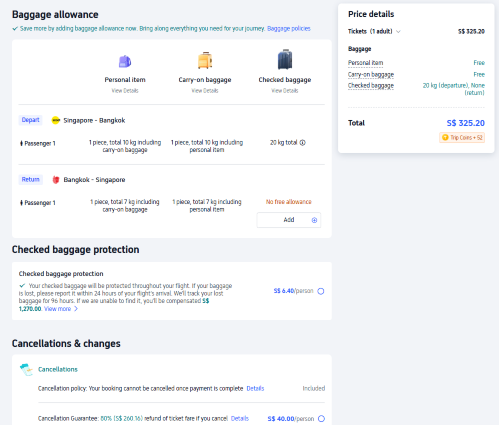
  • If you'd like, you can choose to purchase value-added services on this page, including Baggage Allowance, Baggage Protection, Insurance, and Flight Perks.
Add On

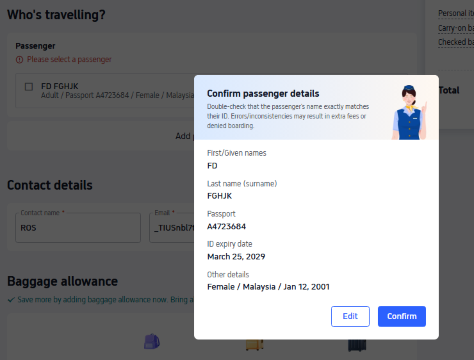
Step 4: Double-check passenger details

  • After you’ve entered the passenger information and added any optional value-added services, click 【Next】 at the bottom of the page to proceed to the payment page.

    Double Check Passenger Info

Step 5: Payment

  • Choose your payment method, then click Pay to complete your payment.

Step 6: Flight Ticket Issuance

  • Once your ticket is issued, we will send a Ticket Confirmation Email to your contact email address.

Important Information

  • If you can’t find the flight you’re looking for online, it may be sold out. We recommend exploring other suitable flights or adjusting your travel dates.

How to Book Affordable Flights on Trip.com

Trip.com offers plenty of smart ways to help you save even more when you book flights. Keep an eye out for our flash airfare deals, subscribe to price alerts to get notified when fares drop, and download the Trip.com App to enjoy even more savings.

Join the Trip.com membership program to unlock exclusive member-only offers. Plus, you can earn Trip Coins and use them on your next booking.

And if anything comes up during your trip, don’t worry—Trip.com’s award-winning 24/7 customer service is always here to help.

✨ Stay in the loop on special deals for public holidays and major festivals

Major airlines often launch limited-time deals and promotions before and after public holidays and major celebrations. If you’re planning a trip, keep an eye out in advance to snag great savings.

✨ Track Flight Prices

With Flight Tracking, you’ll get instant alerts the moment the price on your favorite flight drops. You can fine-tune your alert details anytime so you never miss a deal—stay on top of fare changes and snag the perfect ticket quickly and efficiently.

✨ Subscribe to Trip.com’s promotional emails

Subscribe to Trip.com’s promotional emails to get the latest deals anytime, including offers on flights, hotels, credit cards, and more.

How to Get Your E-ticket on Trip.com

As the name suggests, an electronic ticket is a paperless ticket—the digital version of a traditional paper ticket. The main advantage is that there’s no need to print it, and all the necessary details are securely stored in the airline’s database.

When you book a flight on Trip.com, your Trip.com e-ticket serves as the contract between you and the airline. Your ticket details are securely stored, and you can retrieve your e-ticket using your Passenger Name Record (PNR) or booking reference number.

That way, you can simply use your passport to check in and pass through security, streamlining the boarding process.
Flight Status on Trip.com

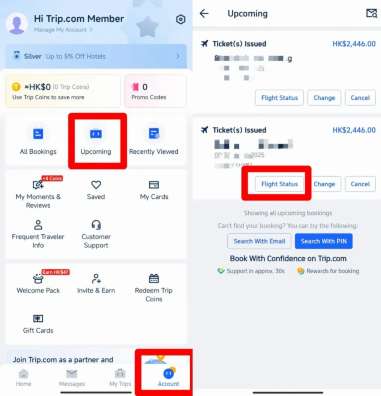
Step 1: Sign in to the Trip.com mobile app and go to "All Orders".

  • Open the Trip.com mobile app, log in to your account, and tap "All Bookings".
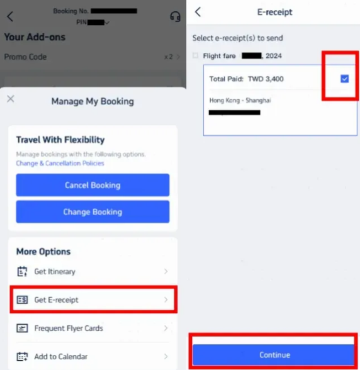
  • After selecting your booking, click "Manage My Booking".
  • Under the "More Options" section, locate and click the "Get E-Receipt" button.
Manage Booking

Step 2: Select e-receipt

  • On the receipts page, select the flight e-receipt you want to retrieve.
  • Select the relevant electronic receipt, then click "Continue".
E-ticket on Email

Step 3: Enter receipt details

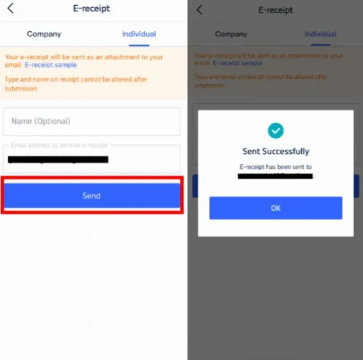
  • If you are an individual, please select "Individual".
  • Enter your name (optional) and the email address where you'd like to receive your electronic receipt.
  • Please note that the type and name on the receipt cannot be changed after submission.
  • Click "Send"

Step 4: Confirm and receive your e-receipt

  • You'll receive a confirmation message letting you know your e-receipt has been sent successfully.
  • Tap “Got it” and check your email to download your e-receipt
  • This e-receipt is your Trip.com e-ticket.
See All Attractions
327186 booked
4.6/512901 reviews
Mainland China/Hong Kong/Macau 5G eSIM | Day Pass/Total Data Package | 24-Hour Billing | In-App Installation | 1-30 Days | QR Code
SIM card
KRW 677
7279 booked
4.5/5309 reviews
Bahrain/Saudi Arabia/UAE/Qatar/Kuwait | Day Pass/Total Package | 24H | 1-30 days | QR code
SIM card
KRW 2,675
12364 booked
4.6/5467 reviews
USA/Canada 5G eSIM | Day Pass/Total Data Package | 1-30 Days | 24-Hour Billing | QR Code
SIM card
KRW 367
58401 booked
4.7/52820 reviews
Europe 4G/5G eSIM | TikTok & ChatGPT Available | Day Pass/Total Data Package | 24-Hour Billing | 1-30 Days | QR Code
SIM card
KRW 138

How to Print Your E‑Ticket on Trip.com

E-ticket Printing

After you book a flight on Trip.com, Trip.com will send you an email with your Trip.com e-ticket attached. You can open the document and print it with a printer.

Please note that while most domestic flights don’t require printed e-tickets, it’s a good idea to keep a digital copy on your device so you can easily access it when needed. If you’re flying internationally, we recommend bringing a printed copy of your e-ticket to show at checkpoints along the way.

Step 1: Download your e-ticket

Open your email and download the attached e-ticket file to your device.

Step 2: Print your e-ticket

Open the downloaded file and print it out.
How to Check In Online on Trip.com

Online check-in

Option 1: Check in while booking your flight

  • On the Flights homepage, enter your departure city, destination, travel date, and number of travelers. Click Search, then choose your flight.
  • Once you’ve filled in the passenger information and contact details on the booking page, click Submit;
  • Once you’re on the “Add-ons” page, check whether 【Priority Boarding】 is available, then continue to the next page to complete your payment.

Important Information🚨

  • Before you add the check-in service, please take a moment to read the terms carefully;
  • Trip.com will automatically check you in 12 hours before your flight and email you your electronic boarding pass.

Option 2: Check in after booking your flight

  • Once your ticket is issued, go to the Flight Orders list, find the corresponding order, and open it.
  • Click 【Check in and choose seats】 to try checking in.

Option 3: Check in on the airline’s official website

  • If you’re unable to complete online check-in on Trip.com, simply visit the airline’s official website within the timeframe they specify and proceed by entering your airline booking reference and the passenger’s name, along with any other required details.

Option 4: Check In at the Airport

  • Please print the e-ticket we sent you and keep it with you, just in case. As a general guideline, arrive at the airport 3 hours before international flights and 2 hours before domestic flights. To stay on top of any schedule changes, please reconfirm your check-in time with the airline.

Important Information🚨

  • Right now, Trip.com only supports online check-in for select airlines.
  • Some airlines offer paid check-in at the airport or online; please refer to your booking for the exact options shown.
  • Most airlines (including low-cost carriers) require a booking reference to check in for international flights. You can find it in your booking under the Order Status column, in the "Airline Order Reference Number and E-ticket Number" section.
💡 Pro Tip: Turn on flight price alerts in Trip.com to catch the best fares before they’re gone.
See All Attractions
147 booked
4.3/59 reviews
Macau International Airport Plaza Premium Lounge/Plaza Premium First (PPL/PPL First MFM)
Travel extras
4389 booked
4.3/5197 reviews
Plaza Premium Lounge (PPL TPE) at Taiwan Taoyuan International Airport
Travel extras
KRW 36,524
1938 booked
4.6/5134 reviews
Taoyuan International Airport | Terminal 2 VIP Lounge Service | Oriental Club Lounge
Travel extras
KRW 29,585
34 booked
4.3/53 reviews
Plaza Premium Lounge (PPL NGO) at Chubu Centrair International Airport, Nagoya
Travel extras
KRW 47,199

Trip.com is Your Go-To Travel Companion

Trip.com Ad Image

Trip.com is always ready to handle any unexpected twists along the way. Our professional customer support team is available 24/7 to deliver the best assistance and solutions. We also provide multilingual support, including Cantonese, English, and Korean.

Leave all your travel questions—not just flight seat selection—to Trip.com! 💪

FAQs: Trip.com Flight Booking Process

  • How do I book a flight on Trip.com?

    Search your route, compare prices, select your flight, enter passenger details, choose add-ons, and complete payment.
  • Can I choose seats and add baggage during booking?

    Yes. Most airlines allow seat selection, baggage, and meals during checkout.
  • How will I receive my e-ticket?

    After your ticket is issued, you will receive an email with your e-ticket number and itinerary or can be retrieved via Trip.com apps.
  • What payment methods are accepted on Trip.com?

    Trip.com supports credit/debit cards, online banking, and selected local payment options.
Disclaimer: This article has been provided by an individual contributor or third party platform. If there is any discrepancy regarding the copyright, please contact us directly and we will delete the content immediately.
Daisy

Daisy

Travel Lover

I’m a travel lover who can never say no to good food, stunning beaches, and the beauty of nature. Sharing my adventures and travel tips, I hope to inspire you to explore, taste, and unwind wherever you go.

124 articles
Travel EnthusiastFoodieNature Lover
>
Trip.com Flight Booking Process
aaaa