Trip.com Airport Transfer: Reliable Rides from Airport to City

By Trip.com
October 15, 2026

Traveling can be stressful, from long flights to crowded terminals but getting from the airport to your hotel shouldn’t be. With Trip.com Airport Transfer, travelers can enjoy a smooth, safe, and reliable connection between the airport and their destination.
Covering more than 500+ airports globally, Trip.com offers travelers a fast, safe, and cashless transfer experience, perfect for families, business travelers, or solo adventurers.
Fly from Singapore

🚘 What Is Trip.com Airport Transfer?

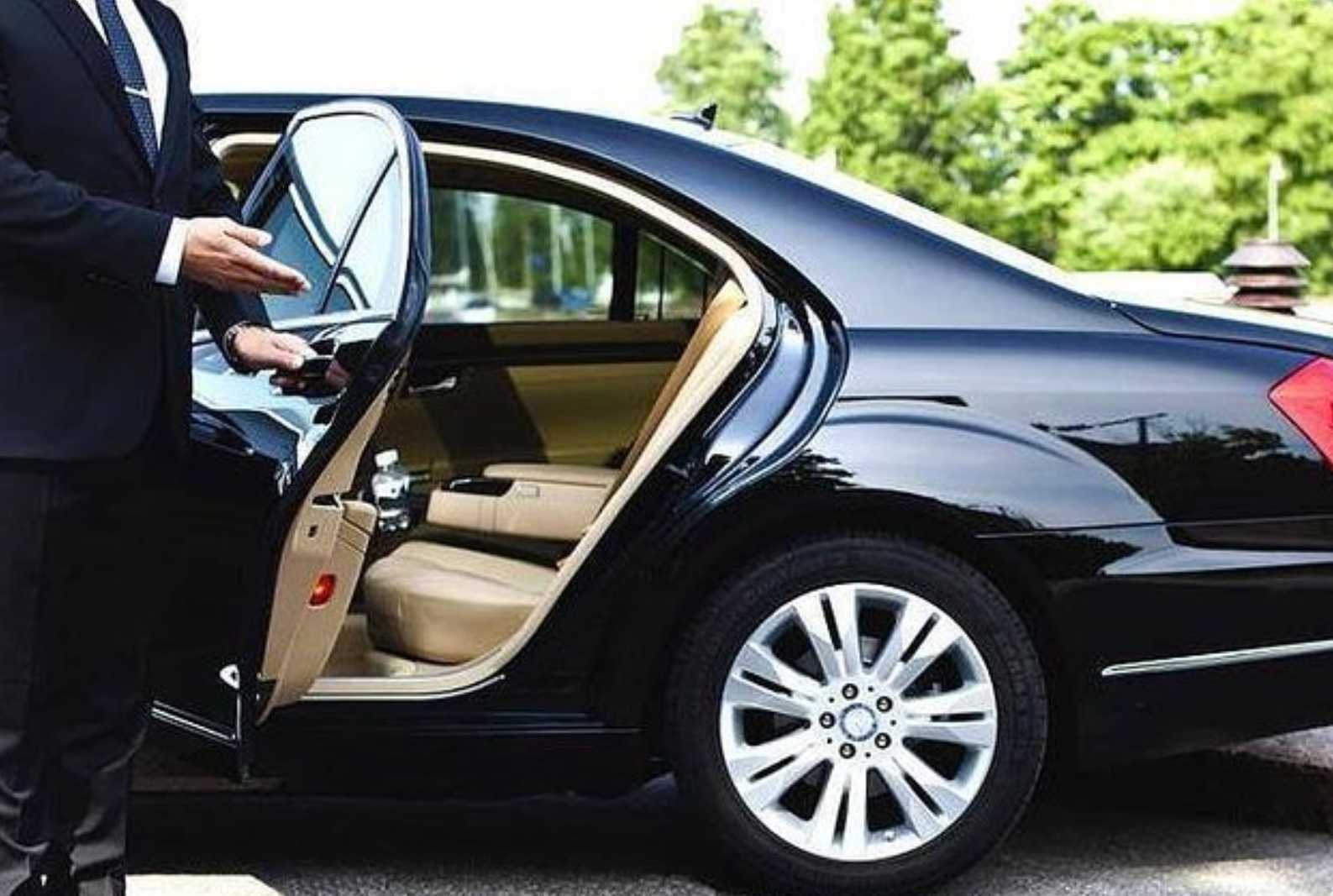
Trip.com Airport Transfer is a pre-booked transport service that connects you directly from the airport to your hotel or city center. You can choose from a variety of vehicle types whether it is economy, business, or luxury, depending on your needs and budget.
Whether you’re landing at Singapore Changi, Tokyo Narita, or London Heathrow, Trip.com ensures a professional driver, fixed price, and meet-and-greet service at the arrival hall.
🌍 Key Features

Feature | Details |
|---|---|
Global Coverage | Available in over 600 airports across Asia, Europe, and beyond. |
Vehicle Options | Choose Economy, Business, MPV, or Luxury vehicles to match your travel style. |
Meet-and-Greet | Your driver meets you with a name sign right at the arrivals area. |
Transparent Pricing | No hidden costs or surge pricing — all fares are shown upfront. |
24/7 Customer Support | Trip.com offers live chat and multilingual help anytime. |
Flight Monitoring | Drivers track flight delays for timely pickups. |
💸 Trip.com Airport Transfer Prices

Prices vary by location and vehicle type but are generally cheaper than hotel-arranged transfers and more reliable than local taxis.
Vehicle Type | Suitable For | Approx. Price (SGD) |
|---|---|---|
Economy Car | 1–2 passengers | S$43 – S$45 |
MPV / Minivan | Family or small groups | S$60 – S$120 |
Business / Premium | Executive or VIP travel | S$80 – S$150 |
📲 How to Book Trip.com Airport Transfer
On Trip.com website:
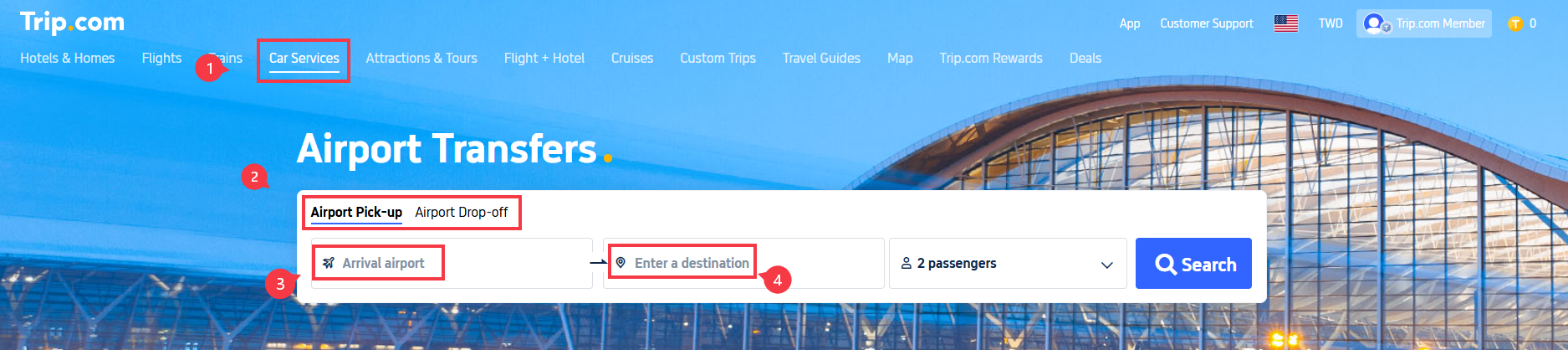
Step 1: Start on Trip.com’s Homepage
- Go to Trip.com’s homepage and select “Car Services” from the menu.
- Click on “Airport Transfer”.
- Choose between “Airport Pick-up” (for arrival) or “Airport Drop-off” (for departure).
Step 2: Enter Flight Details
For Airport Pick-up (arrival):
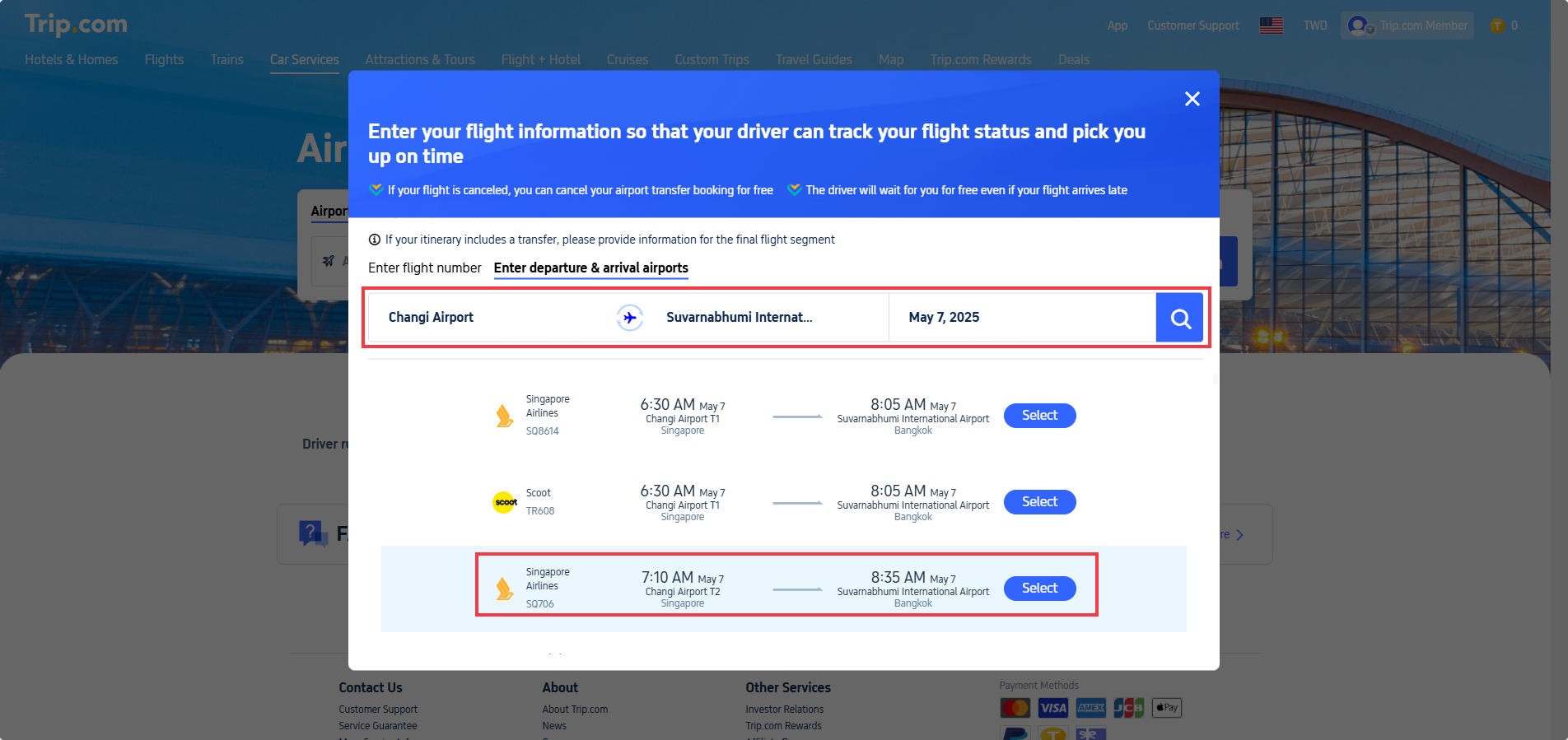
- Select your arrival airport.
- On the flight information page:
- Option 1: Enter your flight number (recommended for accuracy).
- Option 2: Manually input Departure Airport, Arrival Airport, and Departure Date (local time).
- Click the “Search” icon and select your flight from the results.
Step 3: Enter Destination & Choose Your Car
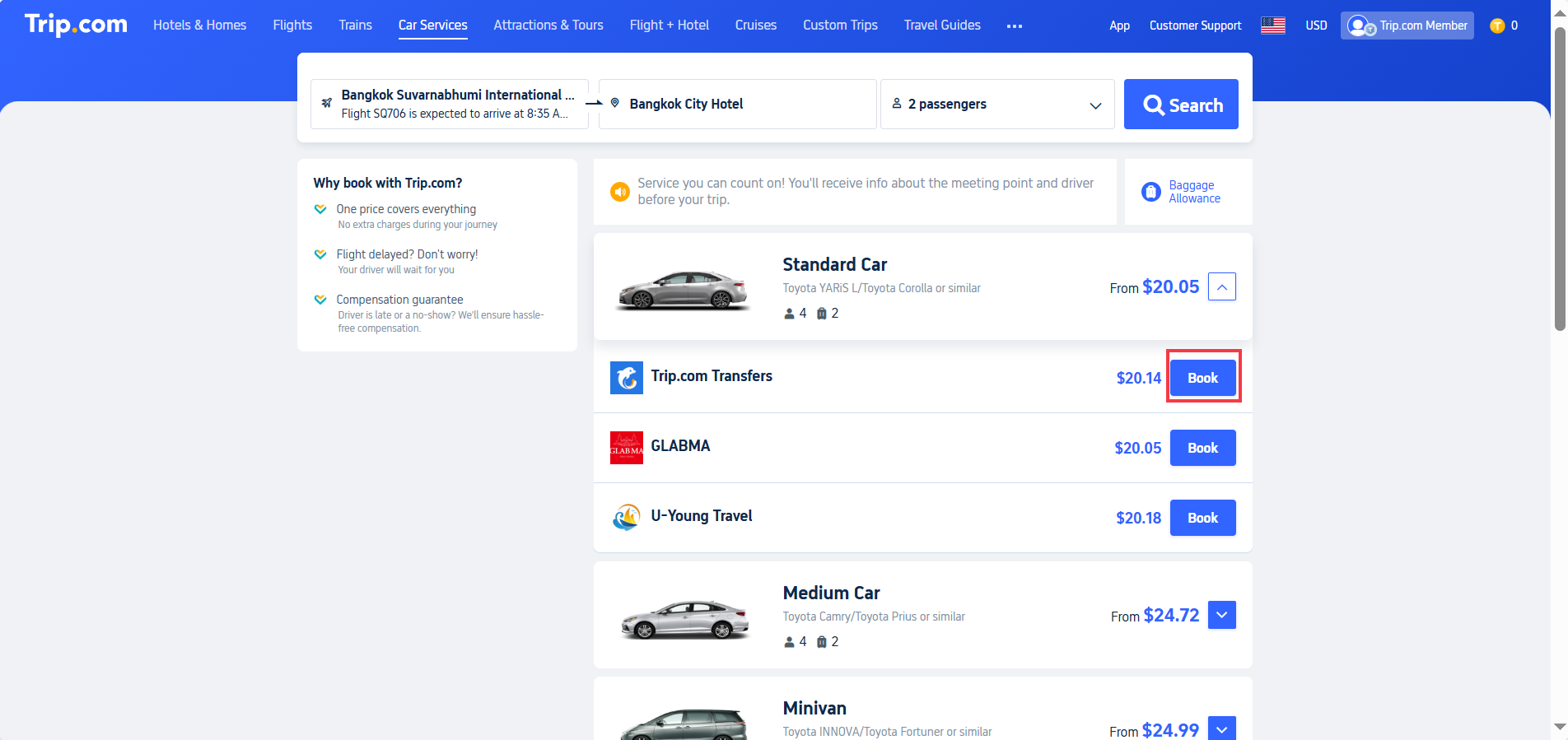
- Return to the airport transfer page and “Enter a destination” (e.g., your hotel name/address in the arrival city).
- Click “Search” to view available cars.
- Filter options by:
- Car type (Standard, SUV, Luxury).
- Passenger capacity (e.g., Max. 4 passengers).
- Supplier (select preferred provider).
- Click “Book” once you’ve chosen your vehicle.
Step 4: Confirm Booking & Payment
Review the booking details on the final page:
- Enter contact information (ensure it’s correct for driver communication).
- Apply a promo code (if available) for discounts.
- Click “Continue to Pay” to complete your booking.

Cheap Flights with Trip.com


On Trip.com apps:
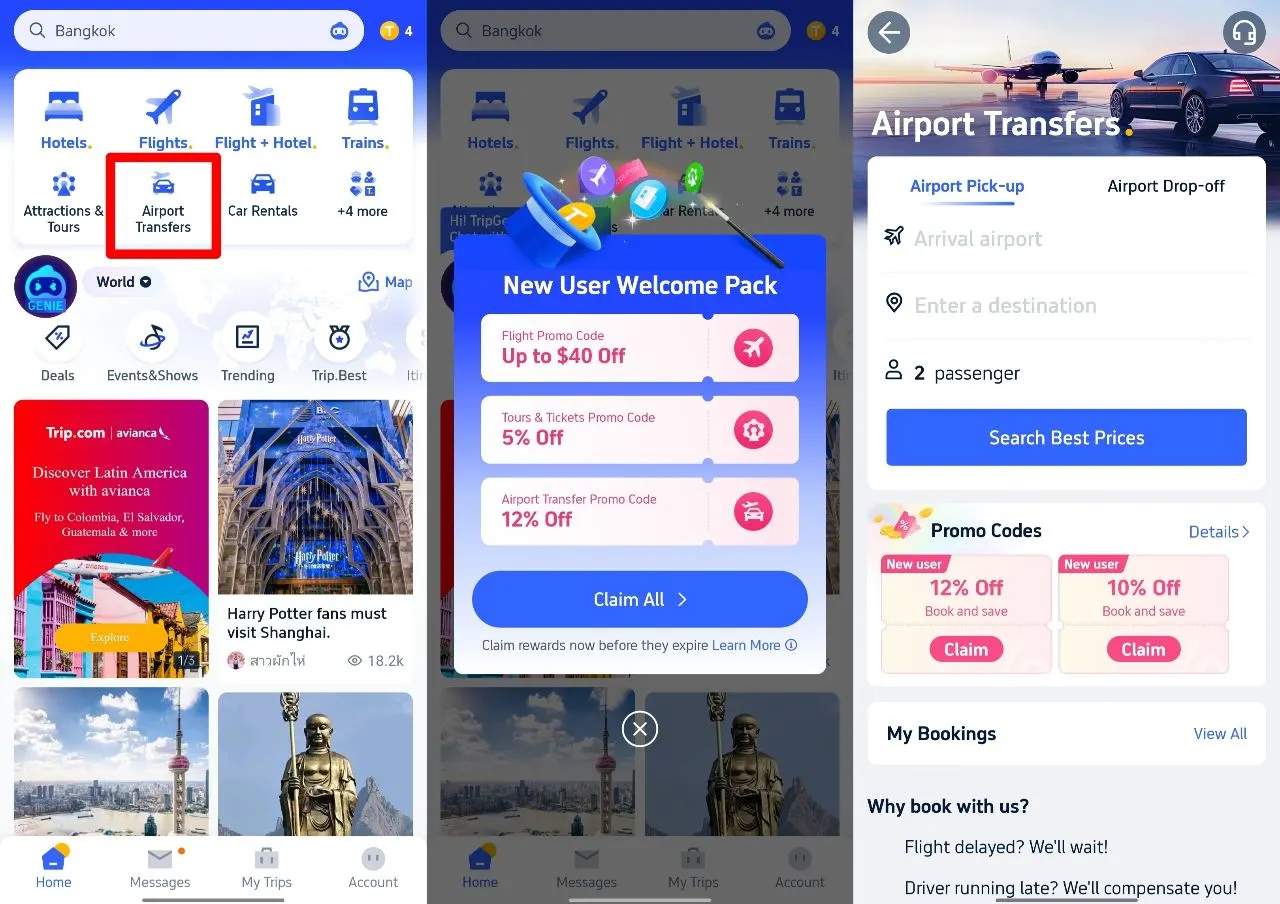
Step 1: Download Trip.com app & select 'airport transfer'
Step 2: Claim Airport Transfer Promo Code
Step 3: After choosing the right car, enter promo code in the payment page
Trip.com Airport Transfer Cancellation Policy: What You Need to Know

Free Cancellation Window
- You can cancel your booking without penalty up until the deadline shown on your booking confirmation like above.
- Tip: Cancellation deadlines are based on your pickup's local time—double-check your confirmation email!
Flight Disruptions
Delayed Flights? No Problem! Your driver automatically adjusts pickup times based on your flight status. Example: If your flight arrives at 11:00 AM instead of 10:00 AM, your pickup shifts from 10:40 AM to 11:40 AM. Check the updated time in your Trip.com order details. Canceled or Diverted Flights? If your booking is canceled by the supplier after it has been confirmed, Trip.com will refund your booking in full and provide additional compensation. For flight delays, drivers will wait automatically.
Late Cancellations
- Free cancellation 24 hours before pick-up time', implying cancellations within 24 hours may incur fees.
Driver Waiting Time Policy
- Free Waiting Period (typically 1-2 hours) starts at your scheduled pickup time (or adjusted time for delays).
- Example: Pickup at 10:40 AM = Driver waits until 12:40 PM for free.
- Need More Time?
- Contact your driver—they may extend service for an extra cash fee.
Adding Stops Mid-Route
- Not Standard: Most transfers are direct to your destination.
- Special Requests? Ask your driver—they might accommodate for an additional cash charge.
Book Hotels with Trip.com
 NO.1
NO.1








How to Track Your Trip.com Airport Transfer Driver
Pre-Arrival:
Receive driver contact + license plate via email/app 24h before pickup.
At the Airport:
- Open Trip.com app → "My Orders" → Live driver GPS tracking.
- No signal? Head to the designated meeting point (e.g., "Arrivals Level, Door 2").
Issues?
Call Trip.com’s 24/7 support for instant assistance.
Top Things To do with Trip.com


![[Official ticket] Limited-time offer from 30% off | Hong Kong airport express e-ticket | Enter with QR code](https://ak-d.tripcdn.com/images/0353z12000sziqo298E45_C_568_320.jpg)


![Lijiang Jade Dragon Snow Mountain Cableway + Blue Moon Valley + Impression Lijiang + Sunrise over Golden Snow Mountain Day Trip [Guaranteed Ticket]](https://ak-d.tripcdn.com/images/0353f12000mv99k2m00B0_C_568_320.jpg)

![Lijiang Yulong Snow Mountain + Blue Moon Valley + golden sunshine 1-day tour [pure fun | 8-person group | guaranteed ticket with large oxygen bottle]](https://ak-d.tripcdn.com/images/0353412000pl6mt0xCE70_C_568_320.jpg)
🗣️ Trip.com Airport Transfer Review

Travelers around the world have rated Trip.com Airport Transfer as one of the most convenient and trustworthy ways to reach their destination.
👍 What Travelers Love:
- Reliable service: Drivers are on time, even with flight delays.
- Professional drivers: Friendly and fluent in English in major cities.
- Comfortable rides: Clean vehicles with air-conditioning and luggage space.
- Instant confirmation: Easy to manage bookings via the Trip.com app.
Example Review:
🚗 Trip.com Airport Transfer vs Taxi vs E-Hailing: Comparison
Factor | Trip.com Airport Transfer | Traditional Taxi | E-Hailing (Grab, etc.) |
|---|---|---|---|
Pricing / Cost Predictability | Fixed price when you book; fare is agreed in advance so less risk of surprises. | Metered fare or fixed airport coupon; cost can vary with traffic, route taken, tolls; additional fees sometimes. | Price estimate shown before booking, but surge / demand / traffic can increase fare. |
Convenience & Comfort | High: pre-booked, driver usually meets you (meet & greet), help with luggage, vehicle options (sometimes premium). | Medium: you hail or use taxi stand; comfort depends on taxi quality; may not have advanced booking; luggage may be less considered. | High: order via app from wherever you are, choose vehicle size; more flexibility if many drivers available. |
Availability | Best when booked in advance; service available in many airports worldwide. Might have fewer options in remote areas. | Always available in many major airports or cities, especially at official ranks. Waiting time can vary. | Strong availability in urban and popular destinations; during peak times or bad weather, fewer cars or surge. |
Speed & Waiting Time | Prearranged ride reduces waiting / searching time; driver is ready when you land or close to arrival. | You may queue at taxi rank, may need to find official taxi counter; more prone to delays if many people arriving. | You generally wait for the nearest driver; app shows estimated arrival, but delays possible. |
Transparent Information | You get driver details, vehicle type, fixed price, sometimes flight tracking. | Less information ahead; you pay what meter shows or what coupon states; less visibility of driver info beforehand. | Good transparency—fare estimate, driver rating, car type, plate number visible in app. |
Handling Flight Delays | Usually built-in: as Trip.com transfers are booked with flight number, the driver tracks delays. | Taxi drivers may or may not wait; if flight is delayed, you may incur waiting or extra charges. | E-hailing drivers may come later, but you’ll have to re-request if delay is long; surge pricing or availability might change. |
Best For Which Travelers | Ideal for tourists, families, people arriving late/night, those wanting a smoother/less stressful arrival. | Good for quick grab if arriving on time, minimal luggage, or familiar with local taxi system. | Great when apps are reliable; for flexibility, last-minute rides, or when taxis aren’t available; also useful when you want to compare cost. |
Potential Drawbacks | Costs higher than very basic taxi sometimes; less flexibility to change route once booked; extra cost for premium service. | Possible overcharging, unclear fares in unfamiliar places; less control over comfort. | Surge pricing, cancellation fees, driver cancellations or delays, price fluctuation in bad weather/peak. |
🧭 Example Routes
Route | Duration | Cost (SGD) | Notes |
|---|---|---|---|
Tokyo Narita → Shinjuku | ~90 mins | S$120 – S$160 | Ideal for first-time visitors; varies rates by provider |
Bangkok Suvarnabhumi → Sukhumvit | ~45 mins | S$35 – S$55 | 24-hour service with English-speaking drivers. |
Singapore Changi → Marina Bay | ~30 mins | S$43 – S$45 | Reliable option after late-night flights. |
⏱ Why Choose Trip.com Airport Transfer?

✅ No waiting or taxi queues
Your driver meets you directly at the arrival hall with a name sign, so there’s no need to search for transport or wait in long queues after your flight.
✅ Transparent pricing
All fares are fixed and shown upfront when you book through the Trip.com Airport Transfer service. No hidden charges, meter surprises, or last-minute surge fees — what you see is what you pay.
✅ Perfect for late-night or early-morning arrivals
Drivers monitor your flight status in real time, so even if your plane is delayed or lands early, your ride will still be waiting for you at the right time.
✅ Safe and professional service
All Trip.com drivers are verified, licensed professionals who follow local transport regulations. Vehicles are clean, comfortable, and well-maintained for a smooth ride.
✅ Ideal for families and groups
Choose from a range of vehicles including vans and MPVs. Child or baby seats can be added upon request, making it a family-friendly option.
✅ Convenient for tourists and business travelers alike
Pre-book your transfer in advance and skip the stress of arranging local transport upon arrival. Perfect for those who prefer seamless travel from the airport to the hotel.
✅ Wide global coverage
Trip.com Airport Transfer is available in hundreds of cities and airports worldwide, so you can use the same trusted platform whether you’re flying into Singapore, Tokyo, or London.
✅ Support and reliability
24/7 customer support via the Trip.com app ensures assistance anytime, anywhere in case of flight changes or driver communication.
🏁 Conclusion

The Trip.com Airport Transfer service is a traveler’s best friend for a stress-free, fixed-price airport ride anywhere in the world. With promo codes for extra savings, professional drivers, and excellent customer reviews, it’s no surprise that thousands of travelers trust Trip.com for their airport journeys every day.
So the next time you land, skip the taxi queue, pre-book your Trip.com airport transfer, and enjoy the peace of mind you deserve.
Read more:
FAQ: Trip.com Airport Transfer
-
How do I apply a Trip.com airport transfer promo code?
-
Can I cancel my booking?
-
Does Trip.com monitor flight delays?
-
Are transfers available 24/7?
-
How do I contact my driver?
Find Cheap Travel Deals & Explore Destinations on Trip.com
-
Popular Content
-
Top Flight Links
-
Popular Hotels
-
Popular Things to Do
-
Featured guides
-
Trip.com links
- Trip.com Customer Service
- Trip.com VIP Lounge
- Buy Now Pay Later
- Trip.com Contact
- Trip.com Cancellation Policy
- How to Use Trip com Promo Codes
- Best Credit Cards
- Singapore Airlines Baggage Allowance
- scoot-baggage-allowance
- luggage size cabin
- How to Book a Student Flight Ticket
- Singapore Airlines Change Flight
- Best Day to Book Flights
- Trip.com Flight Refund
- Flight Classes Explained
- CA490 Flight Status
- SQ869 Flight Status
- MU7705 Flight Status
- ZG053 Flight Status
- MU2434 Flight Status
- QG523 Flight Status
- CA1651 Flight Status
- Plane tickets from Singapore to Kuala Lumpur
- Plane tickets from Singapore to Fukuoka
- Cheap flights from Singapore to Shanghai
- Plane tickets from Singapore to Bangkok
- Cheap flights from Singapore to Seoul
- Cheap flights from Singapore to Manila
- Cheap flights from Singapore to Tokyo
- Plane tickets from Singapore to Chengdu
- Hotels near Hefeinan Railway Station
- Hotels near Johor Bahru Senai International Airport
- Hotels near Hongcun Aju Theater
- Hotels near Zixiao Palace
- Hotels near Beijing Road
- Chengdu Hotels
- Tokyo Hotels
- Kuala Lumpur Hotels
- Kunming Hotels
- Phu Quoc Island Hotels
- Hotel Les Matins de Paris
- Ramada by Wyndham Seoul Dongdaemun
- Mercure Guangzhou Beijing Road Pedestrian Street Hotel
- Airport International Hotel (Xuzhou Guanyin Airport)
- Atour Hotel (Chengdu Taikoo Li)
- Malaysia 5G eSIM | Supports mainstream apps including TikTok, Google Maps & ChatGPT | Day Pass/Total Package | 24H Billing | 1-30 days | QR code
- Singapore 4G eSIM | Supports Google Maps / ChatGPT | Daily/Total Data Plans | 24-Hour Billing | 1–30 Days | QR Code
- Vietnam Airport VIP Fast Track Service
- VIP Fast Track service for immigration clearance at Tan Son Nhat Airport in HCM
- Foreign Tourist Day Tour: Panda Valley / Dujiangyan / Mt Qingcheng / Blue Tear / Chengdu
- Huanglongjiuzhai Railway Station - Jiuzhaigou | Departure/Return | Rideshare/Private Charter | Bus/Nanny/5-9 Seater Business | Shuttle Bus | Vehicle Type Optional | Any Combination | T
- Guilin Yangshuo Impression Liu Sanjie Landscape Performance + Complimentary Exclusive Coffee Drink - Pick Up at Designated Restaurant
- Mainland China 5G eSIM | Dual Network • All AI & TikTok | 1–365 Days | QR Code
- Sapporo City Pass
- Vietnam Group Tours
- San Diego Day Tours
- Gyeongju Day Tours
- Sydney Flight Experience
- Guangdong Boat Tickets
- France Hot Air Balloon
- China Power Bank Limit
- Trip.com Customer Service
- train to kl from singapore
- Shanghai Metro
- China Train Map
- China Entry Requirements
- Hong Kong Public Holidays 2027
- train from singapore to jb
- China Plug
- Thailand Plug
- universal studios singapore tickets
- Renew Autopass Singapore
- Taiwan Plug
- Vietnam Arrival Card
- Singapore Malaysia Cross Border Taxi
- Big Transport from Tokyo to Fukuoka
- Osaka Station to Kyoto Station
- Bangkok to Pattaya
- Trip.com Promo Code
- Trip.com Flight Deals
- Trip.com Credit Card Promotions
- How to Book Cheap Hotels
- How to Book Cheap Flights
- Trip.com Member Rewards
- Trip Weekly Hotel Sales
- Online Hotel Booking
- Online Flight Booking
- Trip.com Travel Guide
- Book China Train Tickets
- Trip.com Seat Selection
- Singapore Public Holidays 2027
- Trip.com 优惠码
- Trip.com Travel Guides
- Trip.com 10.10 Mega Sale