How to Book China Train Tickets on Trip.com: Complete Guide

Author's Profile Picture
Trip.com China Train

Travelling around China by train is one of the easiest ways to explore the country, especially with its extensive high-speed rail network connecting major cities such as Beijing, Shanghai, Guangzhou and Chengdu.

Instead of queuing at train stations or navigating Chinese-language booking platforms, you can book your tickets conveniently through Trip.com.

Trip.com makes booking China train tickets easier for international travellers, allowing you to search train schedules, compare departure times, select your preferred seats and book using a foreign passport.

Whether you're travelling between cities for sightseeing or business, this guide covers everything you need to know about booking China train tickets on Trip.com, including ticket prices, passport requirements, seat selection, cancellations and useful travel tips.

Trip.com China Train - Promo Code & Discounts

🔥Get 3% Off Your First Train Ticket Booking!

As a special treat, Trip.com is offering a 3% discount on your first train ticket booking. Simply claim your coupon and enjoy a seamless travel experience.


How to Book Trip.com China High-Speed Train for Foreigners

Need to book train tickets in China but don't speak Chinese? Don't worry! You don't have to navigate complicated Chinese-language websites or worry about the booking process.

With Trip.com, international travellers can easily search for train routes, check departure schedules, compare ticket prices and book their preferred journeys in English.

Whether you're travelling from Shanghai to Beijing, Guangzhou to Shenzhen or exploring multiple cities across China, Trip.com makes it easier to arrange your train journeys in one place.

You can also book tickets using your foreign passport, choose your preferred seat where available and manage your bookings online.
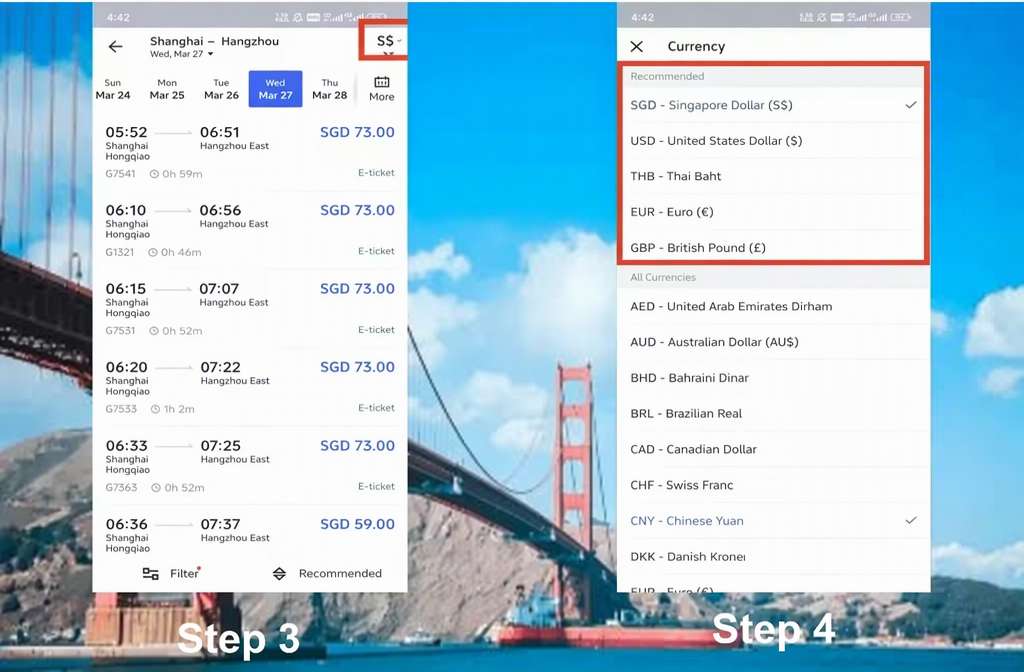
Find Your Train​

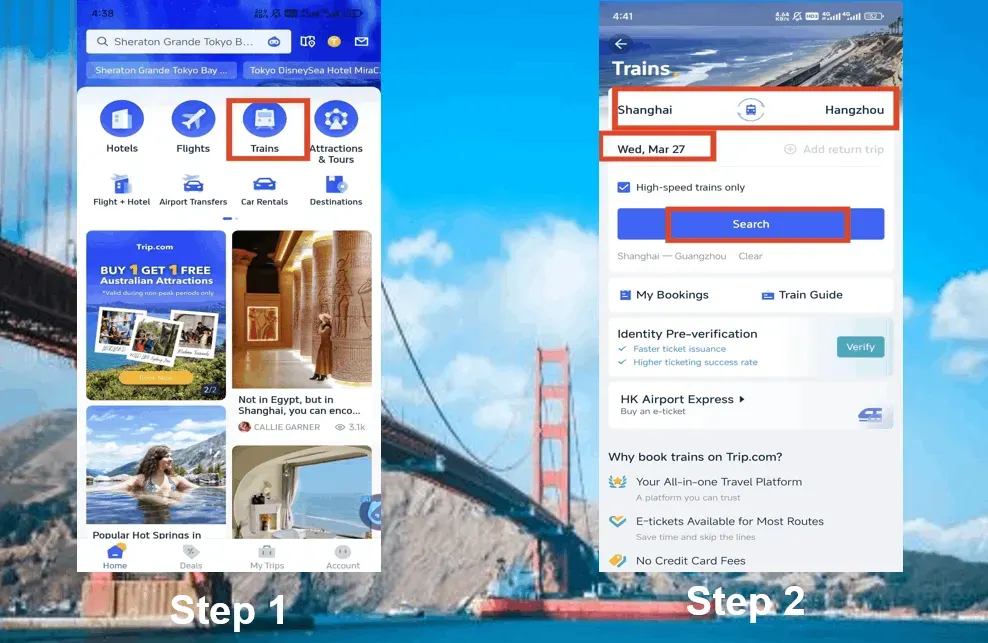
  • Go to ​Trip.com​ (website or app).
  • Enter your ​departure city​ (e.g., "Beijing") and ​destination​ (e.g., "Shanghai").
  • Pick your ​travel date. Pro tip: Tickets open ​15 days early—book ASAP for peak seasons (Chinese New Year, Golden Week).
How to Book Trip.com China Train - Step by Step

How to Book Trip.com China Train - Step by Step

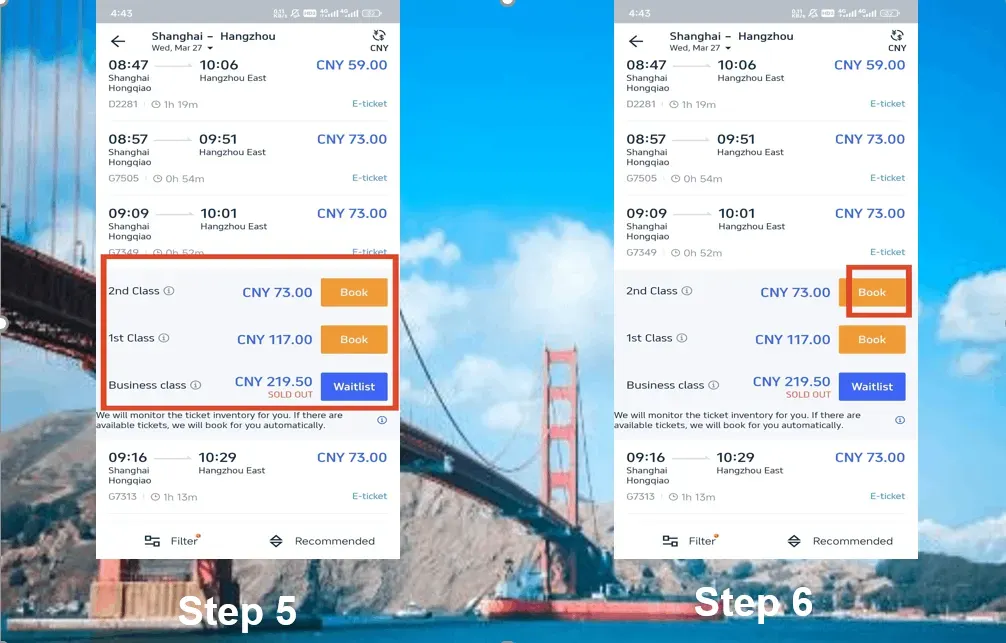
Pick Your Train & Seat Class​

  • ​G trains​ = Fastest (300+ km/h).
  • ​D trains​ = Slightly slower (200-250 km/h).
  • ​Z/T/K trains​ = Slow but cheap (hard/soft sleepers).

​Seat options:​​

  • ​Second class​ (cheapest, fine for short trips).
  • ​First class​ (wider seats, quieter).
  • ​Business class​ (if you wanna flex).

​

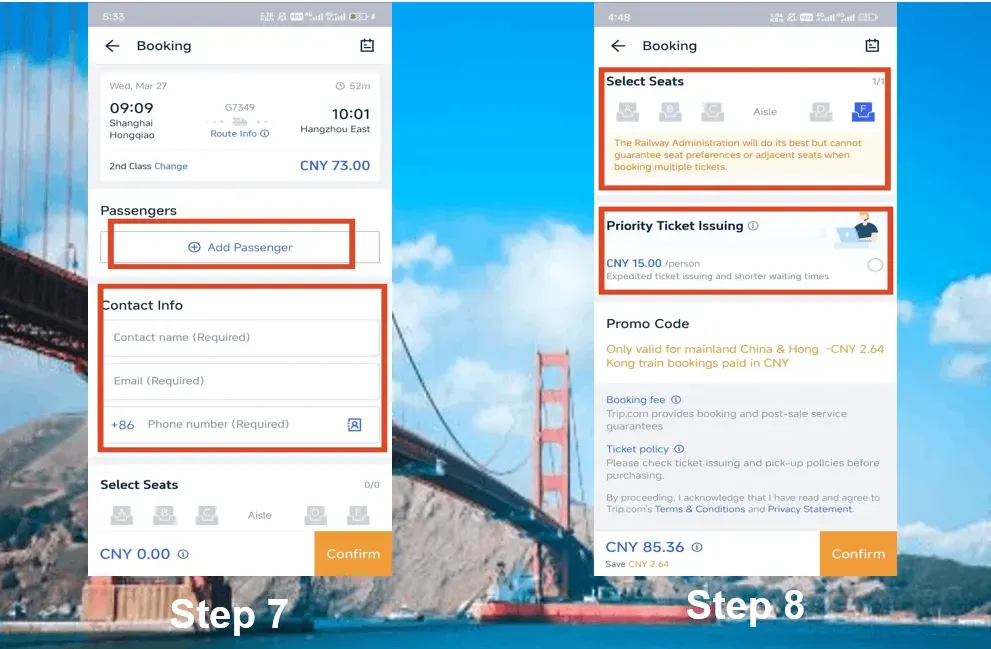
Choose Your Seat (If You Can)​​

  • Window (A/F) = Best views.
  • Aisle (C/D) = Easy bathroom access.
  • Middle (B) = Avoid if possible.
How to Book Trip.com China Train - Step by Step

Enter Passenger Info​

  • ​Full name​ (exactly as on passport).
  • ​Passport number​ (double-check this!).
  • ​Email & phone​ (for e-ticket confirmation).

​
How to Book Trip.com China Train - Step by Step

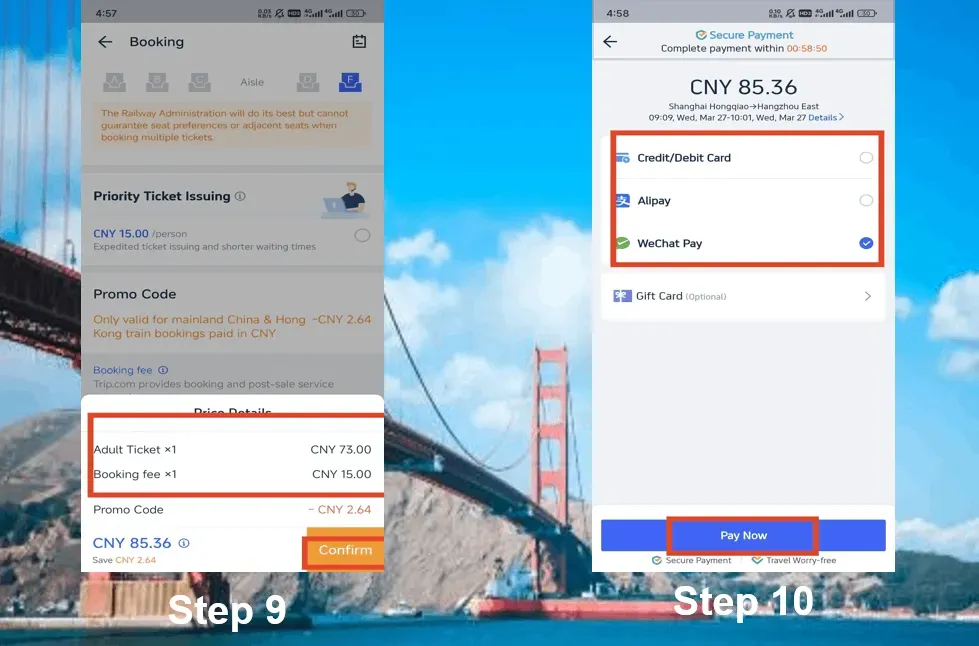
​Pay & Get Your Ticket​

  • ​Payment methods: Visa, Mastercard, PayPal, Alipay, WeChat Pay.
  • ​E-ticket: No pickup needed, scan your passport directly at most major stations; manual passport verification may be required at smaller regional stations.
How to Book Trip.com China Train - Step by Step

Choosing the Right Seat Types

How to Actually Choose Seats on Trip.com​

  1. After picking your train, tap ​​“Seat Selection”​​ (if available, mostly available).
  2. ​High-speed trains: Pick aisle/window preference. Exact seats are random.
  3. ​Sleepers: Book early (15-day window) to lock lower berths.

Trip.com China Train Seats for High-Speed Trains (G/D)​

Second Class (Cheap but Crowded)​​

  • ​What you get: 5 seats per row (3+2), decent legroom, power outlets.
  • ​Best for: Short trips (<4hrs), solo travelers, penny-pinchers.
  • ​Avoid if: You’re taller than 5’9” or hate shoulder-to-shoulder vibes.

First Class (Worth the Splurge?)​​

  • ​What you get: 4 seats per row (2+2), wider seats, quieter cabin.
  • ​Best for: 4+ hour trips, workaholics needing laptop space.
  • ​Pro tip: Snag seats ​F​ (window) or ​D​ (aisle) for max comfort.

Business Class (Baller Status)​​

  • ​What you get: 3 seats per row (1+2), lie-flat seats on some routes, free snacks.
  • ​Best for: Beijing-Shanghai (4.5hrs), treating yourself, or jetlag recovery.
Trip.com China Train - Choosing the Right Seat Types

Trip.com China Train Seats for Regular Trains (Z/T/K)​

Hard Seat (¥100, Hard Lessons)​​

  • ​What you get: Bench seating, zero privacy, chaotic energy.
  • ​Best for: Masochists or 3-hour daytime trips.
  • ​Reality check: No AC on some older trains. Summer = sweat fest.

Hard Sleeper (Budget Overnight)​​

  • ​What you get: Open bunks (6 per compartment), no door, shared outlets.
  • ​Best for: Overnight trips when you’re under 30 and can sleep anywhere.
  • ​Grab lower berths: Upper bunks = coffin vibes, middle = no view.

Soft Sleeper (Overnight VIP)​​

  • ​What you get: 4-bunk cabin with a door, bedding, and privacy.
  • ​Best for: 12hr+ journeys, light sleepers, or avoiding snoring strangers.

🔥Save More with Up to 5% OFF

Use our promo code to enjoy up to 5% OFF (up to S$3) on your attraction tickets, tours and eSIMs! Only for new users!
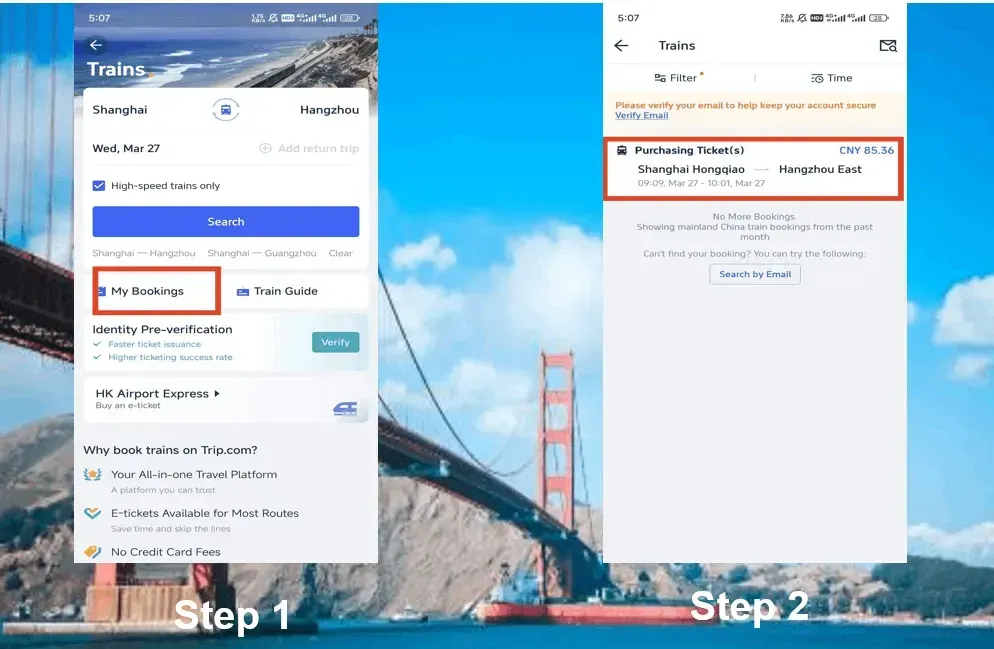
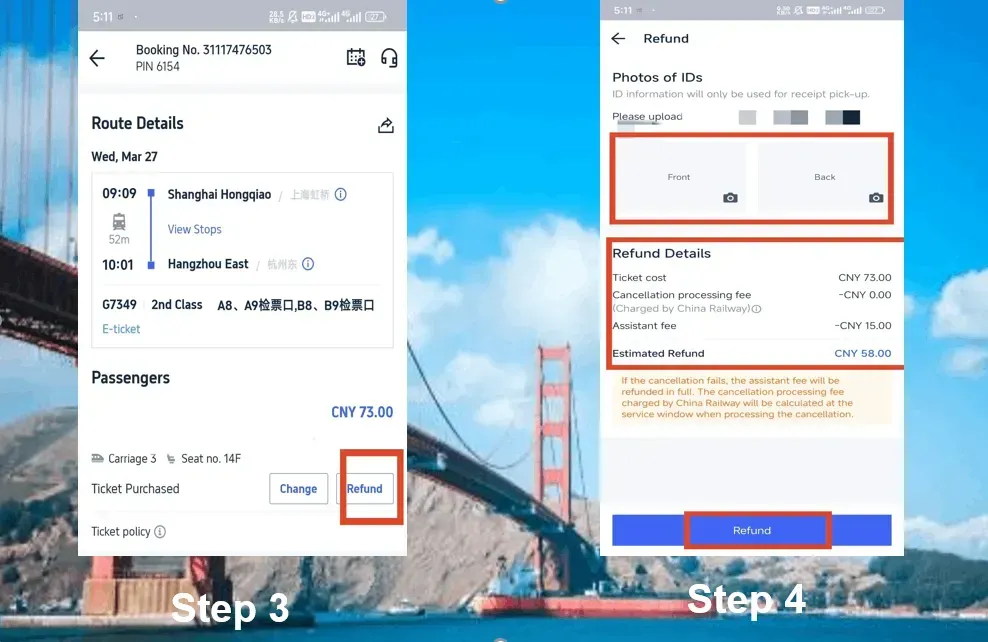
​How to Cancel China Train Tickets on Trip.com

​Step 1: Find Your Booking​

  • Open the Trip.com app → Tap ​​“Train”​​ → Go to ​​“My Bookings”​.
  • Pro tip: Filter by “Upcoming” to skip past old trips.
​How to Cancel China Train Tickets on Trip.com

​Step 2: Pick the Train to Cancel​

  • Tap the booking you want to cancel. ​Double-check the departure time—messing this up could cost you.
  • Warning: If your train’s already departed, you’re stuck with the ticket.

​Step 3: Hit “Refund” & Brace for Fees​

  • Tap the ​​“Refund”​​ button.
  • Trip.com will show the ​refundable amount​ minus their service fee (usually 3-5%).
  • Example: A ¥500 ticket canceled 2 days early gets you back ~¥475.

Step 4: Upload Your ID​

  • You’ll need to upload ​front/back photos of your passport​ (yes, even for e-tickets).
  • Why? Chinese railways require verification. Blurry pics = delays.

​

Step 5: Confirm & Wait for Cash​

  • Review the refund details → Tap ​​“Confirm”​.
  • Refunds hit your bank/PayPal in ​7-15 days​ (longer for international cards).
​How to Cancel China Train Tickets on Trip.com

​Why Book High-Speed Trains on Trip.com?

  • English-language booking platform – Search for train routes, check schedules and complete your booking without dealing with Chinese-language websites.
  • Supports international bank cards – Pay conveniently using accepted foreign credit or debit cards.
  • Book tickets online – Skip the ticket counter queues and arrange your train journey before arriving at the station.

​

​Why Book High-speed Trains on Trip.com?

✅Explore More in Beijing

✅Explore More in Shanghai

Trip.com China Train vs 12306 - Which is Better for Foreigners?​

Trip.com China Train vs 12306 - Which Should You Use?​

Two of the most popular train apps are the official 12306 app and the international-friendly Trip.com app.

Here’s a quick comparison to help you decide which one suits you best:

​

​

Trip.com

​

​

12306 (Official Site)​

​

​

Language

​

Full English support

Chinese-only (clunky translation tools)

​

Foreign Cards

​

Accepts Visa, Mastercard, PayPal, etc.

Requires Chinese bank account/Alipay

​

E-Tickets

​

Automatically issued (use passport to board)

Must collect paper ticket at station

​

Fees

​

~3% service fee + card processing fee/

But you can often use discounts, so it's actually cheaper

No fees, but insane to navigate in English

​

Customer Support

​

24/7 English chat/email

Mandarin-only hotline

​

Best For

​

Foreigners, first-timers, anyone who hates stress

Locals or Mandarin speakers on a budget

FAQ: Trip.com China Trains

Disclaimer: This article has been provided by an individual contributor or third party platform. If there is any discrepancy regarding the copyright, please contact us directly and we will delete the content immediately.
Alex

Alex

Asia Explorer

View profile

Hi, I’m Alex! I started travelling as a way to take a break from my busy work life, but over the years, it became my passion. From weekend getaways around Asia to longer journeys exploring different cities, I love researching hidden gems, trying local food, and creating practical travel plans. Through my travel guides, I hope to share tips and useful recommendations to help fellow travellers plan meaningful adventures.

99 articles
Asia Travel Travel Planning Hidden Gems
> >
Trip.com China Train