Flight Ticketing Status: Confirm, Pending or Issued

By Trip.com
June 24, 2026
Planning a trip? Knowing whether your ticket issuance is crucial for your trip.
This article offers a step-by-step guide to check Trip.com ticket issued status for your upcoming vacation!
to Bangkok
to Manila
to Shanghai
to Tokyo
to Seoul
See all flights


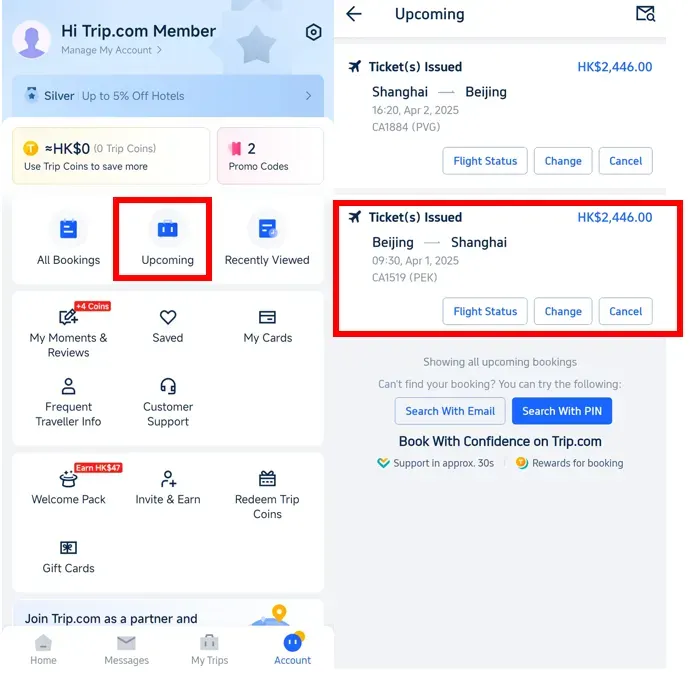
Step 1: Enter the Trip.com App to Find the Flight Booking
- Log into Trip.com account and tap " Upcoming" to find the flight booking, then click on it to check Trip.com issued status.
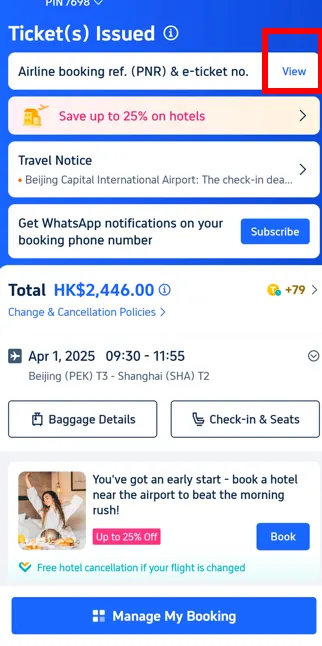
Step 2: Check Trip.com Issued Status
- Click on "View" to check whether your trip.com ticket is issued or not.
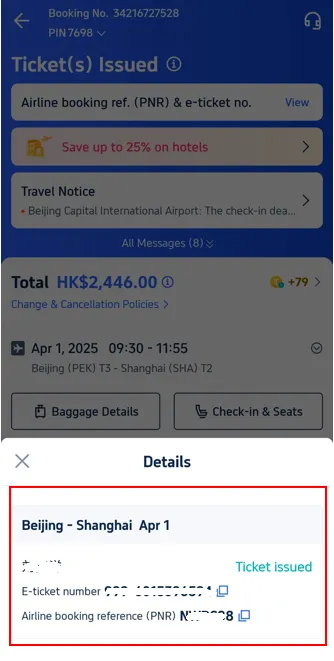
Step 3: Confirm Trip.com Issued Status
- Check the details to confirm your ticket have been issued.
How Long Does It Take for Trip.com to Issue a Ticket?
If you book between the hours of 06:00 and 23:25 (GMT+8), Trip.com will notify your ticket availability via email as quickly as possible.
What is the Flight Booking Number (PNR)?
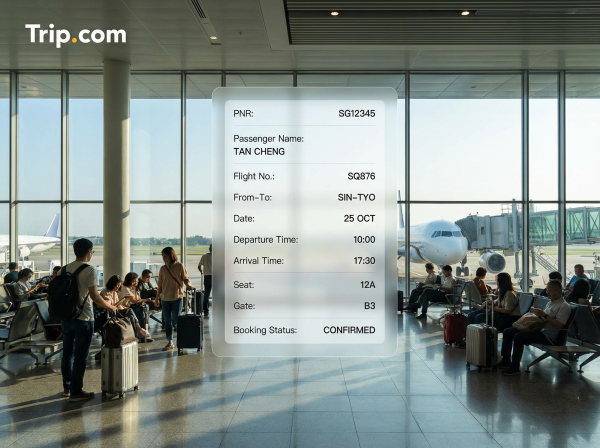
A PNR (Passenger Name Record) is a booking number used to identify the passenger and flight in the airline's system. This code is generated immediately after you successfully book your ticket with Trip.com .
Your flight booking number (PNR) acts like a "personal reference number" that contains all the travel information in one place, from the passenger's name, flight route, dates and times, to additional services such as seat selection or in-flight meals.
Simply put, if you have a PNR, it means your booking has been successfully recorded; you only need to wait for the airline to issue the ticket.
Understand the difference between airline booking numbers (PNRs) and other ticket codes.
Many people often confuse PNR (Passenger Name Record) , airline booking code , and e-ticket number. The table below will help to clarify the difference.
What It Means | Where to See | |
|---|---|---|
Booking number (PNR) | The booking code issued by Trip.com is used to confirm your booking with the travel agent . | You will receive a booking confirmation email from Trip.com or on the “All Bookings” page in the app. |
Airline Confirmation Code | A code issued directly by the airline is used to check flight details or check in on the airline's website. | This information can be found in your Trip.com booking details or in an email from the airline. |
E-ticket Number | The 13-digit electronic ticket number confirms that payment and ticket issuance have been completed. | It appears in the final ticket notification email from Trip.com . |
Start Your Travel with Trip.com!
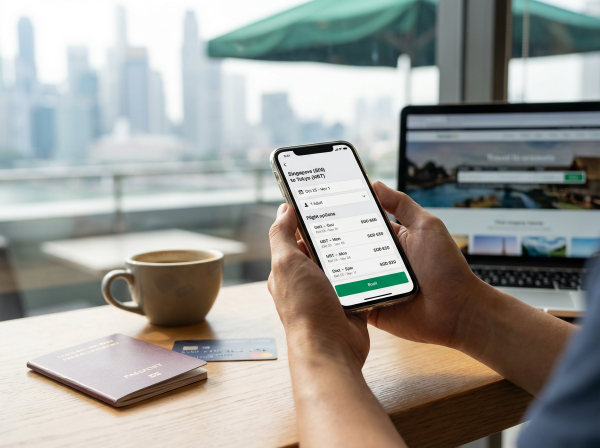
Trip.com is an international online travel agency that offers 24/7 customer service in multiple languages. It offers easy booking services for flights, hotels, and tours and activities.
As Platimum & Diamond Members of Trip.com, you can access a free airport lounge, earn more Trip coins, save more on hotel booking, reduce refund fees for trains, etc.
Read More
Trip.com Hotel Refund Guide: Policy, Status & How Long It Takes
Need to cancel a Trip.com hotel booking? Our step-by-step guide covers the refund policy, processing times, and how to check your refund status.
October 17, 2026
How to Change & Rebook Flights on Trip.com
Learn how to change flights on trip.com (flight dates included), rebook booked trips, and reschedule flights after booking.
October 17, 2026
How to Get Trip.com Flight Cancellation: A Step-to-Step Guide
This article will introduce Trip.com Flight Cancellation Policy and offer a step-to-step guide on how to cancel your flight booking!
October 17, 2026
FAQs: Ticket Issued Status on Trip.com
-
What does “Ticket Issued” mean on Trip.com?
-
How long does it take for a ticket to be issued on Trip.com?
-
What if my status is “Pending” or “Processing”?
-
How can I check my ticketing status on Trip.com?
-
What should I do if my ticket is stuck on pending?
Disclaimer: This article has been provided by an individual contributor or third party platform. If there is any discrepancy regarding the copyright, please contact us directly and we will delete the content immediately.
Find Cheap Travel Deals & Explore Destinations on Trip.com
-
Popular Content
-
Top Flight Links
-
Popular Hotels
-
Popular Things to Do
-
Featured guides
-
Trip.com links
- Trip.com Customer Service
- Trip.com VIP Lounge
- Buy Now Pay Later
- Trip.com Contact
- Trip.com Cancellation Policy
- How to Use Trip com Promo Codes
- Best Credit Cards
- Singapore Airlines Baggage Allowance
- scoot-baggage-allowance
- luggage size cabin
- How to Book a Student Flight Ticket
- Singapore Airlines Change Flight
- Best Day to Book Flights
- Trip.com Flight Refund
- Flight Classes Explained
- CA490 Flight Status
- SQ869 Flight Status
- MU7705 Flight Status
- ZG053 Flight Status
- MU2434 Flight Status
- QG523 Flight Status
- CA1651 Flight Status
- Plane tickets from Singapore to Kuala Lumpur
- Plane tickets from Singapore to Fukuoka
- Cheap flights from Singapore to Shanghai
- Plane tickets from Singapore to Bangkok
- Cheap flights from Singapore to Seoul
- Cheap flights from Singapore to Manila
- Cheap flights from Singapore to Tokyo
- Plane tickets from Singapore to Chengdu
- Hotels near Hefeinan Railway Station
- Hotels near Johor Bahru Senai International Airport
- Hotels near Hongcun Aju Theater
- Hotels near Zixiao Palace
- Hotels near Beijing Road
- Chengdu Hotels
- Tokyo Hotels
- Kuala Lumpur Hotels
- Kunming Hotels
- Phu Quoc Island Hotels
- Hotel Les Matins de Paris
- Ramada by Wyndham Seoul Dongdaemun
- Mercure Guangzhou Beijing Road Pedestrian Street Hotel
- Airport International Hotel (Xuzhou Guanyin Airport)
- Atour Hotel (Chengdu Taikoo Li)
- Malaysia 5G eSIM | Supports mainstream apps including TikTok, Google Maps & ChatGPT | Day Pass/Total Package | 24H Billing | 1-30 days | QR code
- Singapore 4G eSIM | Supports Google Maps / ChatGPT | Daily/Total Data Plans | 24-Hour Billing | 1–30 Days | QR Code
- Vietnam Airport VIP Fast Track Service
- VIP Fast Track service for immigration clearance at Tan Son Nhat Airport in HCM
- Foreign Tourist Day Tour: Panda Valley / Dujiangyan / Mt Qingcheng / Blue Tear / Chengdu
- Huanglongjiuzhai Railway Station - Jiuzhaigou | Departure/Return | Rideshare/Private Charter | Bus/Nanny/5-9 Seater Business | Shuttle Bus | Vehicle Type Optional | Any Combination | T
- Guilin Yangshuo Impression Liu Sanjie Landscape Performance + Complimentary Exclusive Coffee Drink - Pick Up at Designated Restaurant
- Mainland China 5G eSIM | Dual Network • All AI & TikTok | 1–365 Days | QR Code
- Zhuhai City Pass
- Uzbekistan SIM Card
- Inner Mongolia Day Tours
- Jiangsu Connectivity Solutions
- Lijiang Costume Experience
- Okinawa City Flight Experience
- Kyrgyzstan Cultural Experience
- China Power Bank Limit
- Trip.com Customer Service
- train to kl from singapore
- Shanghai Metro
- China Train Map
- China Entry Requirements
- Hong Kong Public Holidays 2027
- train from singapore to jb
- China Plug
- Thailand Plug
- universal studios singapore tickets
- Renew Autopass Singapore
- Taiwan Plug
- Vietnam Arrival Card
- Singapore Malaysia Cross Border Taxi
- Frankfurt Airport to City
- Osaka Station to Kyoto Station
- Bangkok to Pattaya
- Trip.com Promo Code
- Trip.com Flight Deals
- Trip.com Credit Card Promotions
- How to Book Cheap Hotels
- How to Book Cheap Flights
- Trip.com Member Rewards
- Trip Weekly Hotel Sales
- Online Hotel Booking
- Online Flight Booking
- Trip.com Travel Guide
- Book China Train Tickets
- Trip.com Seat Selection
- Singapore Public Holidays 2027
- Trip.com 优惠码
- Trip.com Travel Guides
- Trip.com 10.10 Mega Sale