
How to use Trip.com Price Alert to help you book the cheapest flights!

By Trip.com
June 24, 2026

Ever wondered when is the best time to score the cheapest flight tickets? The truth is, finding affordable fares requires time and constant monitoring, as prices can fluctuate often. But if you're in Singapore and looking to save on flights, Trip.com offers a super handy tool to make things simpler — the Trip.com Price Alert.
With this feature, you’ll get notified the moment discounted flight tickets are available, without having to keep checking the prices constantly. Here’s our easy guide on how to use Trip.com Price Alerts — we'll explain what it is, how to set it up, and share a few extra tips to help you book the most affordable flights possible from Singapore!


Trip.com Price Alerts | Basics
Trip.com Price Alerts are a fantastic way for Singaporean travellers to stay on top of flight price changes. Simply set your preferred destination, travel dates, and budget range, and Trip.com will take care of the rest. When there's a price drop, you’ll receive an instant notification, either via email or push notifications on the Trip.com app. It's a simple and effective way to ensure you never miss out on a great flight deal!
Trip.com Price Alerts | How to Use Trip.com Price Alerts
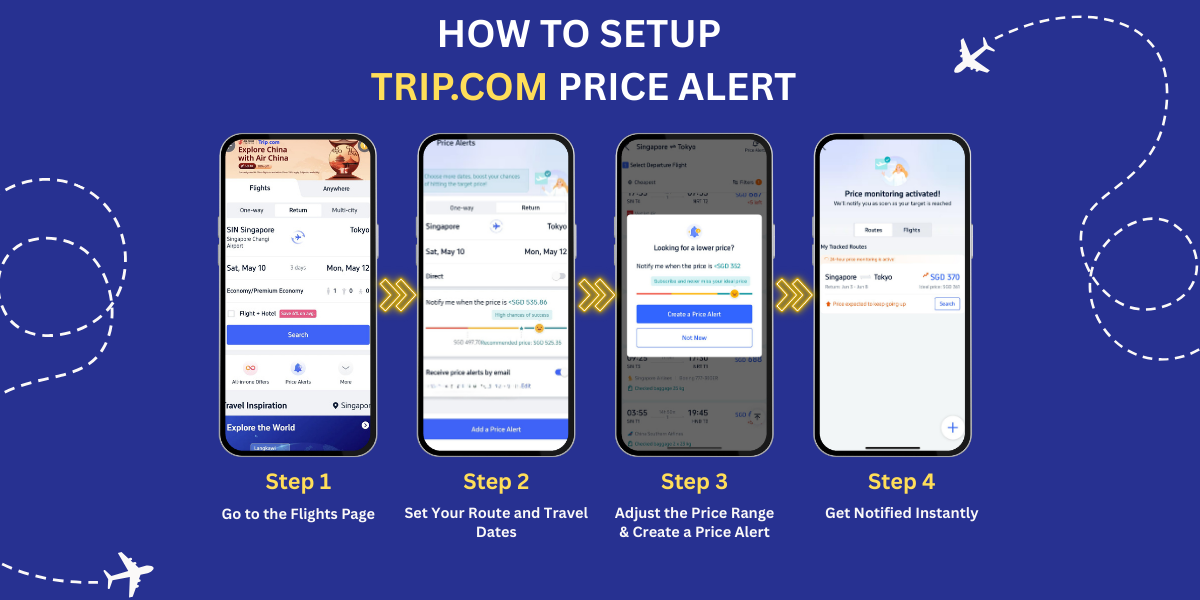
Trip.com Price Alert Step #1: Go to the Flights Page
Start by opening the Trip.com website or mobile app. Click on the “Flights” page, and you’ll see a “Price Alert” button at the bottom of the screen, just below the search bar. Click on it to begin.
Trip.com Price Alert Step #2: Set Your Route and Travel Dates
Once you click the Price Alert button, you’ll be directed to the settings page. Here, enters your departure city, destination, travel dates, and any other relevant flight details.
Trip.com Price Alert Step #3: Adjust the Price Range
Use the price slider to set your budget for the trip. Trip.com will also show you the success rate of getting tickets within that price range:
- Red: Low success rate
- Yellow: Medium success rate
- Green: High success rate
Trip.com Price Alert Step #4: Get Notified Instantly
Choose to receive price alerts via email or through push notifications on the Trip.com app. This way, you don’t need to constantly monitor the flight prices yourself. Trip.com will notify you when prices drop.
Important Tip: Getting a notification doesn’t mean the fare will stay the same — so check the ticket right away and book as soon as you're ready to lock in the deal.
Trip.com Price Alerts | How to Buy Cheap Flights (Singapore Version)

Source: iStock
Step 1 – Book at the Right Time
To score the best airfares, timing is key! For international flights from Singapore, the most affordable rates are typically available about one to four months in advance. You’re also more likely to find great deals early in the morning, particularly on Tuesdays just after midnight. If you're making a last-minute booking for a same-day flight, try checking around midnight or early morning — airlines often release discounted fares at unconventional hours!
Step 2 – Avoid Peak Travel Periods
Air ticket prices tend to rise during school holidays, festive seasons (like Chinese New Year, Hari Raya, or Christmas), and weekends. To save more, plan your trips during off-peak periods such as the off-peak periods (non-holiday), when airlines often offer seasonal promotions and lower fares.
Step 3 – Track Prices with Trip.com Price Alerts
Use the Trip.com Price Alert tool to track fare changes for your selected route and travel dates. Simply set your budget, and you’ll be notified when the price drops to your desired range — no need to check constantly!
Step 4 – Subscribe to Trip.com’s Special Offers
On the Price Alert page, don’t forget to subscribe to Trip.com’s latest deal notifications. You’ll receive timely updates on the best discounts and offers, ensuring you never miss a great deal again.
Trip.com Price Alerts Summary
Finally, always remember that flight prices can change at any moment due to demand, promotions, and seat availability. But with the help of Trip.com Price Alerts, along with a few smart booking strategies, Singapore travellers can easily grab great flight deals. Don’t wait — turn on Trip.com Price Alerts now in the Trip.com app and start saving on your next trip!
FAQs About Trip.com Price Alert
-
What is Trip.com Price Alert?
-
Do I need an account to use Price Alert?
-
How will I receive price notifications?
-
Can I track multiple flights or hotels at the same time?
-
Is Price Alert free to use?
Trending
-
Popular Content
-
Top Flight Links
-
Popular Hotels
-
Popular Things to Do
-
Featured guides
-
Trip.com links
- Trip.com Customer Service
- Trip.com VIP Lounge
- Buy Now Pay Later
- Singapore Airlines Baggage Allowance
- Trip.com Contact
- Trip.com Cancellation Policy
- How to Use Trip com Promo Codes
- scoot-baggage-allowance
- Best Credit Cards
- luggage size cabin
- How to Book a Student Flight Ticket
- Best Day to Book Flights
- Flight Classes Explained
- Singapore Airlines Change Flight
- Trip.com Flight Refund
- JT924 Flight Status
- MU7705 Flight Status
- CA490 Flight Status
- SQ869 Flight Status
- ZG053 Flight Status
- MU2434 Flight Status
- CA1651 Flight Status
- Cheap tickets from Singapore to Kuala Lumpur
- Cheap flights from Singapore to Fukuoka
- Cheap tickets from Singapore to Bangkok
- Cheap flights from Singapore to Shanghai
- Cheap tickets from Singapore to Seoul
- Plane tickets from Singapore to Manila
- Cheap flights from Singapore to Hanoi
- Cheap flights from Singapore to Tokyo
- Hotels near Johor Bahru Senai International Airport
- Hotels near Hefeinan Railway Station
- Hotels near Hongcun Aju Theater
- Hotels near Zixiao Palace
- Hotels near Beijing Road
- Kuala Lumpur Hotels
- Chengdu Hotels
- Kunming Hotels
- Hong Kong Hotels
- Phu Quoc Island Hotels
- Hotel Les Matins de Paris
- Mercure Guangzhou Beijing Road Pedestrian Street Hotel
- Ramada by Wyndham Seoul Dongdaemun
- Atour Hotel (Chengdu Taikoo Li)
- Crystal Hotel Guangzhou BeijingRoad PedestrianStreet
- Singapore 4G eSIM | Supports Google Maps / ChatGPT | Daily/Total Data Plans | 24-Hour Billing | 1–30 Days | QR Code
- Malaysia 5G eSIM | Supports mainstream apps including TikTok, Google Maps & ChatGPT | Day Pass/Total Package | 24H Billing | 1-30 days | QR code
- Vietnam Airport VIP Fast Track Service
- VIP Fast Track service for immigration clearance at Tan Son Nhat Airport in HCM
- Huanglongjiuzhai Railway Station - Jiuzhaigou | Departure/Return | Rideshare/Private Charter | Bus/Nanny/5-9 Seater Business | Shuttle Bus | Vehicle Type Optional | Any Combination | T
- Mainland China/Hong Kong/Macau 5G eSIM | Dual Network | Day Pass/Total Data Package | 24-Hour Billing | QR Code
- Mainland China 5G eSIM | Supports Google Maps / ChatGPT | Daily/Total Data Plans | 24-Hour Billing | 1–365 Days | QR Code
- Mainland China 5G eSIM | ChatGPT Available | Day Pass/Total Data | 24-Hour Billing | 1-365 Days | QR Code
- Maldives SIM Card
- Frankfurt Day Tours
- Kenya Group Tours
- Dengfeng Day Tours
- Kathmandu Cultural Experience
- Shanghai Driving Experience
- Singapore Transportation
- China Power Bank Limit
- Trip.com Customer Service
- train to kl from singapore
- Shanghai Metro
- China Entry Requirements
- China Train Map
- train from singapore to jb
- Renew Autopass Singapore
- Thailand Plug
- universal studios singapore tickets
- Vietnam Arrival Card
- Singapore Malaysia Cross Border Taxi
- 泰国插头
- What to Buy in Shenzhen
- China Plug
- Frankfurt Airport to City
- Osaka Station to Kyoto Station
- Bangkok to Pattaya
- Trip.com Promo Code
- Trip.com Flight Deals
- Trip.com Credit Card Promotions
- How to Book Cheap Hotels
- How to Book Cheap Flights
- Trip.com Member Rewards
- Trip Weekly Hotel Sales
- Online Hotel Booking
- Online Flight Booking
- Trip.com Travel Guide
- Book China Train Tickets
- Trip.com Seat Selection
- Singapore Public Holidays 2027
- Trip.com 优惠码
- Trip.com Travel Guides
- Trip.com 10.10 Mega Sale