

Planning a trip to Mainland China, whether it's a shopping getaway to Shenzhen or a longer holiday in Beijing, Shanghai or Chengdu? Besides booking your flights, hotels and high-speed train tickets, getting your payment methods ready should be part of your pre-trip checklist.
Unlike Singapore, where cash, cards and mobile wallets are commonly used, everyday payments in China rely heavily on QR codes. From shopping malls and restaurants to street food stalls and public transport, Alipay and WeChat Pay are widely used across the country.
For Singaporean travellers, a few questions are worth sorting out before departure: Which is easier to use, Alipay or WeChat Pay? Can you register with a Singapore mobile number? Can you link your Singapore-issued Visa or Mastercard? And can you use local e-wallets such as DBS PayLah! or OCBC for payments in China?
This guide compares Alipay and WeChat Pay, covering payment fees, overseas bank card setup, public transport, restaurant payments and their key differences. We'll also look at alternative payment options available to Singaporeans, so you can prepare your digital wallet before your China adventure.


Can Singaporeans Use AlipayHK and WeChat Pay Directly in Mainland China?
If you already use DBS PayLah!, OCBC Digital, Changi Pay or other mobile payment apps in Singapore, you might be wondering whether you can use them directly in Mainland China.
The good news is that you may not need to set up a completely new payment account. Some Singapore payment services support cross-border QR payments in China, allowing you to pay participating merchants without first transferring money into a separate Chinese wallet.
Alternatively, you can download the Mainland China versions of Alipay and WeChat, then link an eligible Singapore-issued Visa or Mastercard.
Singapore E-Wallets vs Alipay and WeChat Pay
There are two main ways Singaporeans can make mobile payments in China. Here's how they compare:
Comparison | Singapore payment apps | Mainland China Alipay and WeChat Pay |
|---|---|---|
Examples | DBS PayLah!, OCBC, Changi Pay | Alipay and WeChat Pay |
Account registration | Use your existing Singapore account | Register using an eligible international mobile number |
Payment source | Depends on the Singapore wallet and linked funding source | Eligible international Visa, Mastercard and other supported bank cards |
Payment currency | RMB is displayed, with conversion and settlement handled according to the wallet's terms | Payments are made in RMB, with foreign currency conversion handled according to the card network and issuing bank |
Merchant acceptance | Participating merchants that support the relevant cross-border payment network | Broad acceptance across participating Alipay and WeChat Pay merchants |
Additional fees | Depends on the Singapore wallet's terms | A 3% platform service fee generally applies to individual transactions above RMB200 when using an overseas bank card |
Best for | Travellers who prefer using their existing Singapore payment apps | Travellers who want access to China's local payment ecosystem |
Which Singapore Payment Apps Can You Use in China?
Some Singapore payment services support QR payments at participating merchants in Mainland China.
- DBS PayLah!: Recently, DBS has announced that PayLah! users can make QR payments at more than 100 million Alipay and Weixin Pay partner merchants across Mainland China.
- OCBC: OCBC is listed among the Singapore payment services supported for cross-border QR payments in China. Check the latest availability and activation requirements in the app.
- Changi Pay: Supports cross-border QR payments at participating merchants in China, subject to the wallet's terms and merchant acceptance.
📢Important: Cross-border payment support does not mean every merchant will accept every Singapore wallet. Check the supported QR network, payment limits and exchange rate before travelling.
Should You Still Download Alipay and WeChat Pay?
Yes, especially if you are planning a longer trip or visiting several Chinese cities.
Although Singapore payment apps are becoming more convenient for overseas QR payments, having Alipay and WeChat Pay gives you additional flexibility.
Here are a few things to know:
- You can register with an overseas mobile number. You generally do not need a Mainland China phone number, as long as your number can receive the required verification SMS.
- You can link an eligible Singapore-issued bank card. Supported international card networks include Visa and Mastercard, although acceptance depends on your card issuer and the payment platform.
- You can pay using QR codes. Depending on the merchant, you can scan its payment QR code or show your own payment code for the cashier to scan.
- Some services may not work with international cards. Features such as money transfers and red packets may have restrictions, even if ordinary purchases are supported.
Alipay and WeChat Pay Limits and Fees Overview
If you're using the Mainland China version of the app to link an international credit card issued in Hong Kong, like Visa / Mastercard, here are the latest 2026 rules on fees and transaction limits:
Fees and Limits for Linking a Hong Kong Credit Card
Comparison items | Alipay (Mainland China version) | WeChat Pay (Mainland China version) |
|---|---|---|
Supported card types | Supports Visa / Mastercard / UnionPay cards issued in Singapore | Supports Visa / Mastercard / UnionPay cards issued in Singapore |
Single transaction of RMB 200 or less | No platform service fee | No platform service fee |
Single transaction over RMB 200 | A 3% platform service fee will be charged on the total transaction amount | A 3% platform service fee will be charged on the total transaction amount |
Per-transaction limit | Equivalent to USD 5,000 | Equivalent to USD 5,000 |
Annual cumulative transaction limit | Equivalent to USD 50,000 | Equivalent to USD 50,000 |
Mainland China bank account requirements | Optional | Optional |
Note: The 3% mentioned above is a service fee charged by the payment platform and does not include any foreign transaction fee (CBF) your Hong Kong card issuer may charge. The actual amount charged will be based on your credit card statement.
What does "A 3% handling fee applies to any single transaction of RMB 200 or more" mean?
When you use Alipay or WeChat Pay with a Hong Kong credit card linked, there’s no fee on single transactions of RMB 200 or less; for any single purchase of RMB 201 or more, a 3% service fee is applied to the entire transaction amount, not just the portion over RMB 200.
- Spend RMB 150: Service fee is RMB 0
- Purchase of RMB 200: Service fee is RMB 0
- Spend RMB 300: Service fee is RMB 9 (RMB 300 × 3%)
- Spend RMB 1,000: Service fee is RMB 30 (RMB 1,000 × 3%)
So if you come across purchases at a restaurant or mall that can be settled separately, feel free to politely ask the staff whether you can split the payment to reduce transaction fees.
Alipay vs WeChat Pay: Which Is Easier to Use?
When deciding which is easier to use WeChat Pay or Alipay the key is how you’ll actually use them on the road. The two apps differ significantly in what they’re built for and how well they suit travelers:
Comparison dimensions | Alipay | WeChat Pay |
|---|---|---|
Key Strengths | Focused on integrating payments, public transit, and business travel services | Social ecosystem, food-ordering mini programs, and small-business coverage |
Interface user-friendliness | Comes with an international interface, and English support is solid | Mostly in Chinese; some mini apps don’t offer a bilingual interface |
Public Transportation | Transit QR codes offer wide coverage across major cities nationwide, and getting started is a breeze. | You'll need to use each city's transit app to ride |
Order food and drinks | Supports QR code ordering in some places, but it's less widespread than WeChat. | QR code ordering is mainstream at restaurants in Mainland China (via WeChat mini programs) |
Comprehensive Travel Integration | Tickets to attractions, food delivery, and ride-hailing—all in one place | You'll need to individually search for and authorize the relevant mini programs |
Pros and Cons of Alipay
- Pros: The traveler registration process is clear, with excellent support for identity verification for non-mainland residents. Plus, the transit QR code and Didi (ride-hailing) features are seamlessly integrated, making everything a breeze to use.
- Cons: At some small sole-proprietor stalls or in private payment situations, if the other party only shows a personal payment QR code, the payment might not go through when using a Hong Kong credit card.
Pros and Cons of WeChat Pay
- Advantages: Hugely popular across mainland China's dining scene. Most tabletop QR codes for ordering link directly to WeChat Mini Programs, letting you order and pay in one smooth go.
- Disadvantages: Security and risk control reviews for new accounts are relatively strict; if you encounter cross-border security verification, the resolution process can be relatively complicated.
5 Must-have Digital Payment Tools and Cash Guide
When traveling to Mainland China, never rely on a single e-wallet. We recommend preparing in the following order of priority:
Payment Methods | Applicable Scenarios | Fees and Costs | Pros | Cons |
|---|---|---|---|---|
Alipay | Everyday retail purchases, public transit (subway/bus QR ride codes), ride-hailing (DiDi), attraction ticket bookings | • Single transaction of RMB 200 or less: No platform service fee | • Clear interface, supports quick verification with a Singapore passport and a Hong Kong phone number | Some street stalls or independent operators’ personal payment QR codes don’t support payments made with Hong Kong credit cards. |
WeChat Pay | QR code ordering for dine-in at restaurants (WeChat mini programs), small businesses, tea shops, and convenience store purchases | • Single transaction of RMB 200 or less: No platform service fee | • Deeply integrated with WeChat mini programs, it's the go-to way for QR code ordering at restaurants across Mainland China | • Account security and risk control reviews are relatively strict |
Renminbi (RMB) cash | Street stalls, small purchases, remote attractions, an emergency backup when your phone runs out of battery or the network goes down | It depends on the exchange rate markup at Hong Kong money changers or banks before you depart; withdrawing cash from ATMs in mainland China will incur foreign ATM withdrawal fees | • No need to rely on your smartphone, internet connection, or power | • Carrying lots of cash comes with a risk of losing it |
Physical Hong Kong credit card | Check-in deposits and checkout at international star-rated hotels, major department stores, and spending on high-end luxury brands | According to the rules set by Hong Kong card issuers (Visa / Mastercard foreign transaction fees are typically around 1.95%; UnionPay cards usually don't charge foreign transaction fees) | • No need to link a mobile app ahead of time | Adoption is extremely limited; most small and mid-sized restaurants, taxis, and neighborhood mom-and-pop shops generally can’t process foreign-issued physical cards. |
Digital Renminbi (e-CNY) | Large shopping malls, official attractions, select public transportation pilot programs, and duty-free shops that accept the digital renminbi (e-CNY) | Top up via the official "Digital RMB" app; generally settled at the real-time official exchange rate, with no transfer or transaction fees | • Issued by the People's Bank of China, with a high level of security | • Merchant acceptance still lags behind Alipay and WeChat Pay |

 515 booked







Alipay vs WeChat Pay: Which is More Convenient for Getting Around?
When it comes to getting around, Alipay’s user experience is significantly better than WeChat Pay’s.
1. City Subway and Public Buses
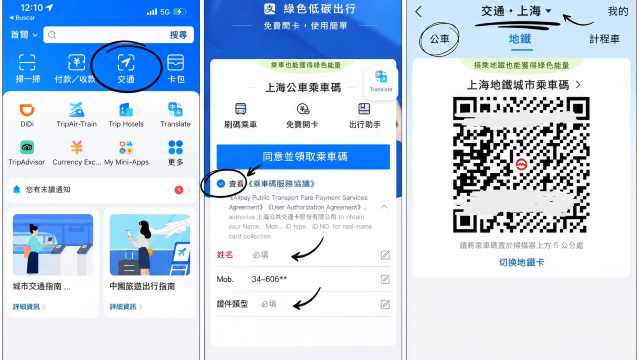
- Alipay: On the home screen, open the "Travel" section and switch to your current city to get the local "metro ride code" or "bus code." Simply scan at the gate and the fare will be automatically charged to your linked Hong Kong credit card. In addition, AlipayHK now supports the "Cross-border Transit Code" in Greater Bay Area cities like Shenzhen and Guangzhou.
- WeChat Pay "Transit Code": WeChat also supports a Transit Code, but most of them operate independently as "WeChat Mini Programs" run by each city's transit operator (for example, "Shenzhen Tong+"). Whenever you arrive in a new city, you'll usually need to search for and authorize that city's dedicated mini program.
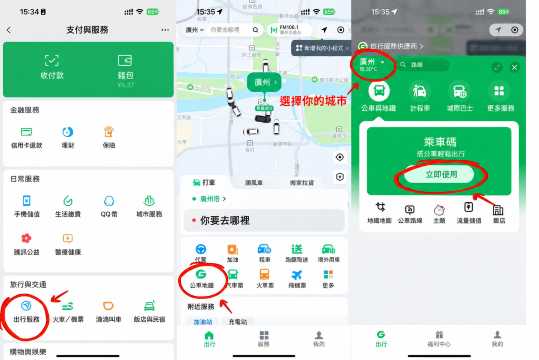
- Heads up: Transit QR codes are city-specific. A code activated in Guangzhou won’t work directly in Shanghai or Beijing. Each time you arrive at a new destination, you’ll need to activate that city’s transit QR code again.
2. Ride-hailing (DiDi): both are similarly supported
If you’re not planning to take public transit, using a rideshare is a very cost-effective option.
- Both Alipay and WeChat have the DiDi Chuxing mini program deeply integrated within their apps.
- Hong Kong travelers can just enter their destination on the map in either Traditional or Simplified Chinese, and the system will automatically estimate the fare and route. Once a driver accepts the ride, payment is automatically settled in the app when the trip ends—so there’s no cash to handle and no language barriers to worry about.
3. Hailing a taxi curbside (cruising taxi): We recommend keeping two wallets handy
When you hail a traditional taxi on the street, you'll find that drivers can vary in the ways they prefer to accept payment:
- Some older drivers are in the habit of displaying their personal WeChat Pay QR code inside the vehicle, while others provide an Alipay QR code or an aggregated QR code.
- Since personal payment QR codes aren’t guaranteed to go through when paying with Hong Kong credit cards, it’s a good idea to have two apps ready when you’re taking a regular taxi and keep a little RMB cash on you.
📌Getting around recap: If you’ll mainly be taking the city subway, buses, and ride-hailing, Alipay’s flow is more consistent and setup is smoother; but if you’ll frequently need to pay individual drivers directly, having both apps ready is the most thorough plan.
🔥Get 3% Off Your First Train Ticket Booking!
As a special treat, Trip.com is offering a 3% discount on your first train ticket booking. Simply claim your coupon and enjoy a seamless travel experience.
Alipay vs WeChat Pay: Which is Better for Shopping?

When you're shopping at brick-and-mortar malls, chain convenience stores, or online in Mainland China, Alipay and WeChat Pay are neck and neck in popularity, but each plays a distinct role in different business ecosystems:
1. Large department stores, shopping malls, and chain retailers
At major shopping malls (like The MixC in Shenzhen and Plaza 66 in Shanghai) and at large chain convenience stores, checkout counters always support both Alipay and WeChat Pay.
- Fee reminder: Always double-check the total at checkout. If a single purchase exceeds RMB 200, paying through the app with a linked Hong Kong credit card will incur a 3% platform service fee.
- Physical card alternative: When shopping at high-ticket luxury boutiques, proactively ask the staff if they have an international physical POS terminal; pay by swiping a Hong Kong Visa / Mastercard / UnionPay card directly, and you may be able to avoid that 3% platform surcharge.
2. Taobao, Tmall, and other Alibaba e-commerce platforms: Alipay holds an absolute advantage
If you’re shopping through Alibaba platforms like Taobao, Tmall, or Freshippo (Hema Fresh) while traveling, Alipay is the best and most compatible way to pay. Checkout and order syncing are seamless, and after-sales refunds will be sent back via the original route to Alipay or your linked card.
3. JD.com and other e-commerce platforms
On platforms like JD.com, in addition to their own payment methods, WeChat Pay is usually supported, while whether Alipay is accepted depends on the specific settlement terms. Before shopping online, Hong Kong travelers should rely on the final payment options shown on the checkout page.
4. Wet market vendors, street-side stalls, and creative markets
At night market food stalls, street vendors, or small local shops, you'll find that most owners simply use a printed static QR code to accept payments.
- A significant proportion of merchants in this category are classified as 'personal accounts'.
- If you’re using a Hong Kong–issued credit card to scan some personal payment QR codes, you might often see a message like "This merchant doesn’t support credit card payments" or have the transaction declined. When that happens, try switching to a different app; if it still doesn’t go through, just pay in cash and get your change.
🔥Save More with Up to 5% OFF
Use our promo code to enjoy up to 5% OFF (up to S$3) on your attraction tickets, tours and eSIMs! Only for new users!
Alipay vs WeChat Pay: Dining Out and QR Code Ordering Compared
In dining settings, the answer to "Which is easier to use—WeChat Pay or Alipay?" is crystal clear: WeChat Pay holds an overwhelming advantage in the dining ecosystem.
1. Large chain restaurants and Chinese banquet restaurants
Big-name restaurant chains (like Haidilao and Tai Er Chinese Sauerkraut Fish) usually offer a variety of ways to order and pay—show your payment QR code at the counter, use a self-checkout kiosk, or pay on a tablet. Both Alipay and WeChat Pay work seamlessly.
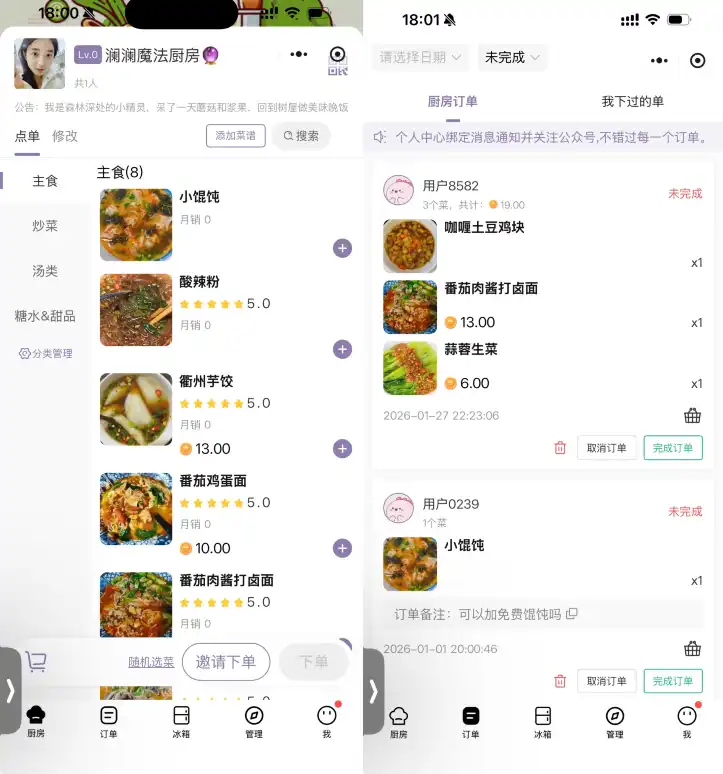
2. Small and mid-sized restaurants and regional eateries: WeChat mini programs are by far the norm
These days across mainland China, the vast majority of small and mid-sized restaurants have ditched paper menus altogether and instead put a QR code in the corner of the table:
- Once seated, you'll need to scan a QR code with your phone to open the WeChat mini program, then use your phone to browse the menu, choose portion sizes, add any dietary notes, and place your order.
- Many restaurants require you to place your order and pay first; only then will the kitchen print the ticket and start cooking.
- Here’s the catch: If your phone only has Alipay, scanning the QR code on the table will often show "Please scan with WeChat" or the link won’t open. Even if the cashier at that restaurant accepts Alipay, you still can’t complete the initial QR code ordering step on your phone.
- Tip: If you're heading to Mainland China for the food, make sure your phone has WeChat installed and WeChat Pay enabled.
3. Street Food and Tea Shops
When you’re picking up street snacks or stopping by an independent tea shop, some merchants offer a unified aggregate QR code (meaning it works whether you scan with Alipay or WeChat). However, chain brands like HEYTEA and Nayuki’s Tea likewise rely on WeChat Mini Programs for online queuing and ordering ahead for pickup, making WeChat undeniably more practical for dining.
Alipay Setup Guide: Registration, Real-Name Verification, and Card Linking for Singaporean Travelers
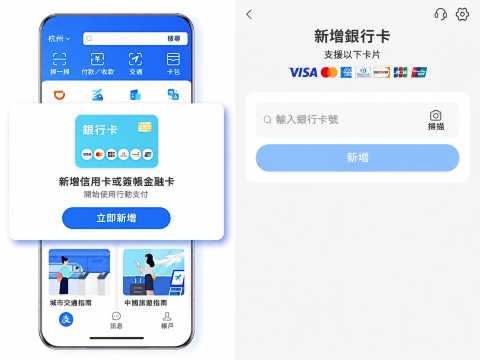
Singapore travellers can set up Alipay before departing for mainland China. The app allows eligible international users to link overseas bank cards and make cashless payments at participating merchants across China.
You do not need a mainland Chinese phone number or bank account to get started. Here's how to register and prepare your Alipay account using your Singapore mobile number and bank card.
Step 1: Download the app and sign up with your Singapore phone number
- Search for Alipay in the Apple App Store or Google Play Store and download the official app.
- Open the app and select the option to register using your mobile phone number.
- Choose Singapore (+65) as your country or region code.
- Enter your Singapore mobile number and request an SMS verification code.
- Enter the code received on your phone to complete registration.
Make sure you enter your mobile number correctly, as you may need it for account verification and security notifications.
Step 2: Complete real-name verification with your passport
Alipay may require overseas users to complete real-name verification before accessing certain payment features or higher transaction limits.
For Singaporeans, a valid Singapore passport is generally the most relevant identity document to prepare.
- Open Alipay and tap Me at the bottom-right corner.
- Go to your profile or Account and Security / Identity Information section. The menu wording may vary depending on your app version.
- Look for the real-name verification option and select passport as your identification document.
- Follow the instructions to photograph or upload your passport's information page.
- Check that your personal details, including your full name and passport number, match your passport.
- Complete any additional facial recognition or verification steps requested by the app.
Once submitted, wait for Alipay to process your information. Verification times can vary, and you may be asked to provide additional details if necessary.
Step 3: Link your Singapore bank card
Once your account is ready, you can link an eligible Singapore-issued international bank card to Alipay.
Commonly supported international card networks include Visa, Mastercard and UnionPay, although acceptance depends on your card issuer and Alipay's current requirements.
- Open Alipay and tap Me.
- Select Bank Cards, followed by Add Bank Card.
- Enter your eligible Singapore-issued Visa, Mastercard or UnionPay card details.
- Follow the instructions to verify your card. You may be asked to provide your cardholder name, card number, expiry date and other required information.
- Complete any additional verification requested by your bank, such as a one-time password (OTP) or 3D Secure authentication.
After successful verification, your bank card should appear under the Bank Cards section.
📢Important: Not all Singapore bank cards are eligible for Alipay linking. Check with your bank if your card cannot be added. Some cards may also have overseas online transaction restrictions that need to be enabled before use.
Step 4: Make payments in China Using Alipay
Once your bank card is linked, you can use Alipay to pay at participating merchants throughout mainland China. There are two common ways to make payments.
Option 1: Show Your Payment Code (Pay)
This method allows merchants to scan your personal Alipay payment QR code.
- Open Alipay and tap Pay on the home screen.
- Your personal payment QR code will appear.
- Show the QR code to the cashier for scanning.
- Wait for the payment confirmation before leaving.
This method is commonly used at convenience stores, supermarkets, shopping malls and restaur
Option 2: Scan the Merchant's QR Code (Scan)
You can also scan a merchant's QR code to make a payment directly.
- Open Alipay and tap Scan on the home screen.
- Point your phone camera at the merchant's payment QR code.
- Enter the payment amount if prompted.
- Check the payment details and confirm your linked bank card as the payment method if necessary.
- Complete any required payment verification and wait for the confirmation.
The payment process may differ slightly depending on the merchant and transaction type.
WeChat Pay Setup Guide for Singaporeans: Registration, Real-Name Verification, and Card Linking
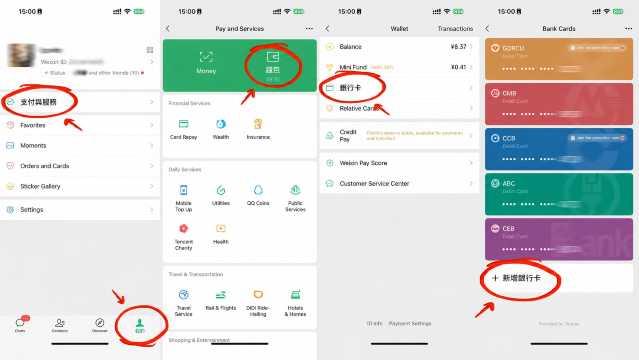
Besides Alipay, WeChat Pay is another convenient payment option for Singaporeans travelling to mainland China. Integrated into the WeChat messaging app, it allows users to pay at participating shops, restaurants, supermarkets and other merchants.
You can prepare your WeChat account and link an eligible Singapore-issued international bank card before departure. Here's how to get started.
Step 1: Download WeChat and complete your account registration
- Download the official WeChat app from the Apple App Store or Google Play Store.
- Open the app and select Sign Up or Register.
- Choose the option to register using your mobile phone number.
- Select Singapore (+65) as your country or region code and enter your Singapore mobile number.
- Create a password and follow the on-screen instructions.
- Complete the required security verification, which may include an SMS verification code or a security check.
Depending on WeChat's security requirements, you may also be asked to complete additional account verification. In some cases, this can involve assistance from an existing WeChat user who meets the platform's eligibility requirements.
Step 2: Activate WeChat Pay and access the Wallet feature
After registering your WeChat account, the next step is to activate WeChat Pay.
- Open WeChat and tap Me at the bottom-right corner.
- Select Services.
- Look for Wallet or the payment-related options.
- Follow the instructions to activate WeChat Pay if prompted.
If you cannot find the Wallet or Services section, your account may not yet have access to the payment feature. Availability can depend on your account region, eligibility and verification status.
Once activated, you can proceed to add an eligible international bank card.
Step 3: Link your Singapore bank card and complete real-name verification
WeChat Pay supports eligible international bank cards, including selected Visa, Mastercard and UnionPay cards issued outside mainland China.
To link your Singapore bank card:
- Open WeChat and go to Me > Services > Wallet.
- Select Bank Cards, followed by Add a Bank Card.
- Enter your Singapore-issued Visa, Mastercard or UnionPay card details.
- Provide the required information, which may include your card number, expiry date, cardholder name and other security details.
- Follow the on-screen instructions to complete any required identity verification.
- If prompted, submit your passport information and complete the additional verification steps.
- Complete your bank's card authentication process, such as an SMS one-time password (OTP) or 3D Secure verification.
Once your card has been successfully linked, it should appear under the Bank Cards section of your Wallet.
📢Important: WeChat Pay's verification requirements may differ depending on your account and card. Some users may be asked to complete real-name verification using their passport, while others may encounter additional security checks. Make sure your personal information matches your bank records to avoid verification problems.
Step 4: Make payments and order foods using WeChat Pay
After linking your bank card, you can use WeChat Pay at participating merchants in mainland China. There are two common ways to pay.
Option 1: Show your payments code (Receive & Pay)
This option allows merchants to scan your personal payment QR code. This method is useful at supermarkets, convenience stores, shopping malls and restaurants.
- Open WeChat and go to Me > Services.
- Select Money or Receive & Pay, depending on your app version.
- Your personal payment QR code will appear.
- Show the code to the cashier for scanning.
- Wait for the payment confirmation.
Option 2: Scan the merchant's QR code
You can also scan a merchant's QR code to make payments.
- Open WeChat and tap the + icon in the top-right corner.
- Select Scan.
- Point your camera at the merchant's payment QR code.
- Enter the payment amount if prompted.
- Check the transaction details and confirm the payment using your linked card or another available payment method.
Option 3: Order food through restaurant mini programs
Some restaurants in China use WeChat Mini Programs for digital menus, ordering and payment.
Here's how to use them:
- Look for the restaurant's QR code on your table or at the entrance.
- Open WeChat and tap Scan.
- Scan the restaurant's QR code to open its Mini Program.
- Browse the menu and select your dishes.
- Confirm your order and proceed to payment.
- Select an eligible linked payment method and complete the transaction if international card payment is supported.
Mini Programs can make ordering more convenient, especially at restaurants where customers place orders directly from their phones. However, not every Mini Program supports international bank cards, so check the available payment options before confirming your order.
Common Alipay and WeChat Pay Payment Problems in China and How to Fix Them
Alipay and WeChat Pay make travelling around Mainland China much easier, but having a Singapore-issued Visa or Mastercard linked to your account does not guarantee that every payment will go through.
If your QR code payment gets declined at a restaurant, shopping mall or tourist attraction, here are some common reasons and what you can do.
1. The merchant does not accept foreign bank cards
- Why it happens: Not every merchant supports payments made through international bank cards linked to Alipay or WeChat Pay. Smaller shops, street stalls and local vendors may have different payment arrangements.
- How to fix it: Ask whether the merchant accepts Alipay or WeChat Pay linked to an overseas card. If it does not work, try the other payment app, use a physical bank card if accepted, or pay in RMB cash.
2. Your Singapore-issued bank card is declined
- Why it happens: Your Singapore bank may flag an unfamiliar transaction in China as suspicious. Your bank card may also have overseas spending restrictions or security controls.
- How to fix it: Check your banking app for declined transaction alerts and confirm that overseas transactions are enabled. If the issue continues, contact your card issuer through its official hotline or app.
Tip: Before your trip, check your bank's overseas transaction settings and make sure you can receive verification messages while travelling.
3. Your payment exceeds the transaction limit or incurs an extra fee
- Why it happens: Alipay and WeChat Pay have transaction limits for international bank cards. A service fee may also apply when making larger payments.
- How to fix it: Check the payment amount and any fee displayed before confirming. If the transaction exceeds your available limit, use another accepted payment method rather than repeatedly attempting the same payment.
For international or Singapore bank cards, a 3% service fee generally applies to individual transactions above RMB200 (S$38.60), while transactions of RMB200 (S$38.60) or less are generally exempt. The applicable limits and fees should be checked in the payment app before purchase.
4. Your internet connection is unstable
- Why it happens: Weak mobile data or Wi-Fi connections in underground shopping centres, crowded attractions and subway stations can interrupt QR code payments.
- How to fix it: Switch to a more stable connection and reopen the payment page. If the payment is taking too long, check your transaction history before trying again to avoid paying twice.
5. Your account requires additional security verification
- Why it happens: Alipay or WeChat Pay may request additional identity or security checks when you register, link a new bank card or make an unusual transaction.
- How to fix it: Follow the verification instructions in the official app. Have your Singapore passport and the bank card linked to your account ready if additional information is requested. If you are still unable to make payments, contact the platform's official customer support.
Traveling to Mainland China: Essential Pre-Departure Checklist & Curated Must-Have Apps
China is increasingly cashless, and mobile payments are widely used for shopping, dining, transport and everyday purchases. For Singaporeans visiting for the first time, preparing a few things before departure can make the journey much smoother.
Essential Packing List
What to prepare | Why it matters |
|---|---|
Valid Singapore passport | Required for immigration, hotel check-in and other identity checks. |
Alipay and WeChat Pay | Set up your accounts and link an eligible international bank card before departure. |
RMB cash | Keep some Chinese yuan for small shops, markets and situations where mobile payments are unavailable. |
Singapore bank cards | Bring at least one physical Visa or Mastercard as a backup, and check overseas spending settings. |
China travel eSIM or roaming plan | Arrange mobile internet access before departure so you can use payment, navigation and booking apps. |
Portable charger | Useful for keeping your phone charged throughout a full day of sightseeing and mobile payments. |
Useful Apps for Getting Around Mainland China
Besides Alipay and Wechat Pay, there are several apps worth downloading before your trip. They can help with transport, food, navigation and sightseeing.
App | Main use | Why Singaporeans should download it |
|---|---|---|
Trip.com | Flights, hotels, high-speed trains and attraction tickets | Book your travel essentials in advance, compare prices and manage your bookings in one place. |
Alipay | Mobile payments and transport | Link an eligible Singapore-issued international bank card to pay at participating merchants. You can also access supported transport services. |
Messaging, WeChat Pay and mini programs | Useful for communicating with local contacts and accessing restaurant ordering or other services through mini programs. | |
Amap (Gaode Maps) | Navigation and public transport | Helpful for finding walking routes, subway stations and directions around Chinese cities. |
Baidu Maps | Navigation and location searches | A useful alternative for finding local businesses, attractions and directions. |
DiDi | Ride-hailing | Book a car through the app instead of having to explain your destination to a taxi driver. |
Dianping | Restaurant reviews and local recommendations | Discover popular restaurants, local food spots and places to visit. |
Meituan | Food delivery and local services | Convenient for ordering food and exploring local deals, although some services may require additional account or payment verification. |
Recommended Places to Stay in Mainland China’s Top Cities































































🔥Exclusive Hotels Deal: Up to 10% OFF for New Users
Discover the world with Trip.com! Book the perfect hotel anywhere in the world and get an unbeatable 10% discount if you're a first-time user! Download our app now and start planning your next trip with ease.
Which Is Better to Use WeChat Pay or Alipay?
So, should you download Alipay or WeChat Pay before travelling to Mainland China? The good news is that you don't necessarily have to choose just one. Both apps are useful, and having both gives you more flexibility when making payments.
What you need | Recommended app | Why |
|---|---|---|
Everyday shopping and dining | Alipay | Convenient for scanning merchant QR codes and making payments with eligible overseas bank cards. |
Public transport | Alipay | Offers access to supported transport payment services in many Chinese cities. |
Restaurant ordering | WeChat Pay | Useful for restaurants that use WeChat mini programs for digital menus and ordering. |
Messaging and communication | Widely used for communicating with local businesses, tour operators and contacts. | |
Backup mobile payment | Both | If one app or linked card encounters a problem, you can try the other. |
For Singaporeans, set up both Alipay and WeChat Pay before your trip. Alipay is a convenient starting point for everyday payments, while WeChat is useful for accessing local services and mini programs.
Before departure, remember to:
- Link an eligible Singapore-issued Visa or Mastercard to both apps.
- Complete any required identity verification using your Singapore passport.
- Check your bank's overseas transaction settings.
- Bring some RMB cash and a physical bank card as backup.
- Download useful travel apps and arrange your China eSIM or roaming plan.
For a smoother trip, you can also use Trip.com to book your China flights, hotels, high-speed train tickets and attraction passes in advance. This helps you organise your itinerary before arrival, leaving you more time to explore China's cities, enjoy local food and experience the attractions.
FAQs: Alipay vs WeChat Pay
-
Is Alipay better than WeChat Pay for tourists in Singapore?
-
Can I use WeChat Pay in Singapore without a Chinese bank card?
-
Do I have to pay foreign transaction fees when using Alipay or WeChat Pay in Singapore?
-
Which is more secure, Alipay or WeChat Pay?
-
Can I use Alipay to pay for public transport in Singapore?