How to Use Meituan Bike in China: App, Price & Guide 2026
By Leona
July 15, 2026
If you are going to China and want to see cities like a local, Meituan Bike (美团单车) is one of the best ways to get around. It is very convenient and cheap. You can forget about subways and pricey taxi rides. There are yellow shared bikes all over the place.
What Is Meituan Bike?
Meituan Bike is China‘s bike-sharing platform. It is run by the Meituan Group. Here is what you should know:
The bike sharing system covers over two hundred cities in China. It has good coverage in the big cities. You can find bikes basically in every city.
They have kinds of bikes. You can get a bike or an electric bike.
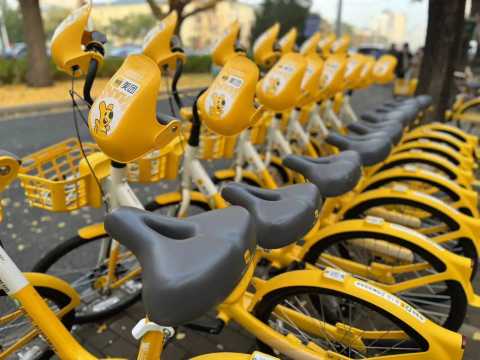
The bikes are easy to find. You can find them near metro stations, shopping malls and tourist places.
👍Pro Tip: When planning your visit, consider booking your flights to China early to snag the best deals and keep an eye out for promotions.
The 60-minute starting duration is actually a recent change (it used to be 30 minutes), so you get more value for your money now.
Membership Plans (Best for Frequent Riders)
If you're planning to ride multiple times per day during your trip, a membership card will save you money.
Plan Type
Original Price (RMB)
Typical Discounted Price (RMB)
Approx. SGD
What You Get
7-day pass
¥15
¥7.9-10
~S$1.49-1.89
Unlimited rides (first 60 min free each ride)
30-day pass
¥35
¥15.8-16.8
~S$2.98-3.17
Unlimited rides (first 60 min free each ride)
30-day (3 rides/day)
¥25
¥15-19
~S$2.83-3.58
3 rides per day, first 60 min free
👉Pro Tip: For a convenient stay, look for China hotels in advance to secure the best rates.
How to Use Meituan Bike in China?
Now for the important part: how do you actually use this thing as a foreigner? Don't worry, we've got you covered.
Option 1: The Meituan App (Recommended for Longer Trips)
If you're staying in China for more than a few days, downloading the full Meituan app is worth it. Here's how to set it up:
Step 1: Download the App
Search for "美团" or "Meituan" on the App Store or Google Play.
Download the official Meituan app (look for the yellow kangaroo logo).
Step 2: Register an Account
Open the app and select your language (English is available, though the translation can be patchy in places).
Enter your mobile number. Your Singapore number works! Just make sure roaming is enabled to receive the SMS verification code.
Enter the verification code sent to your phone.
Step 3: Complete Identity Verification
This is mandatory for all bike-sharing users in China.
You'll need to upload a clear photo of your passport.
Step 4: Set Up Payment
Option A: Alipay — If you already have Alipay set up with your international card, you can link it directly.
Option B: WeChat Pay — Similarly, if you've got WeChat Pay working, that works too.
Option C: Direct card binding — Some versions of the app let you add a Visa or Mastercard directly.
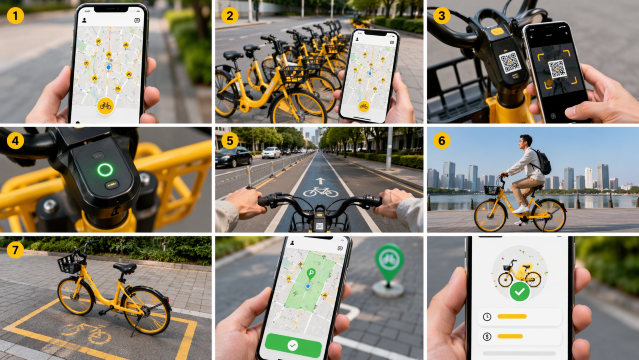
Step 5: Find and Unlock a Bike
Open the Meituan app and tap the "骑车" (Ride).
The map will show all available bikes near your current location.
Walk to the nearest bike (they're hard to miss — bright yellow!)
Tap "扫码骑行" (Scan to Ride) in the app.
Point your camera at the QR code on the handlebars or rear fender.
You'll hear a click — the lock has opened, and your ride has started.
Step 6: Ride Safely
Stick to bike lanes where available (most major roads have them).
Be aware of traffic — Chinese driving takes some getting used to.
For e-bikes: The electric assist kicks in automatically when you pedal. It's gentle, not scooter-fast, but makes a huge difference on longer rides or slight hills.
Step 7: Park and End Your Ride
This is crucial: You must park in a designated bike-sharing zone, or you can check the app for parking zones.
Wait for the app to confirm your ride has ended, and you'll see the total duration and cost.
Don't just walk away! Always check the app to make sure the ride has properly ended. If it hasn't, the meter keeps running.
Option 2: WeChat Mini-Program (Best for Short Trips)
If you don't want to download another app, you can use the Meituan Bike mini-program within WeChat. This is great if you already use WeChat for other things.
How to access it:
Open WeChat.
Search for "美团单车" (Meituan Bike) in the search bar.
Tap the mini-program result
Follow the same registration and verification steps as above.
You're ready to ride!
Option 3: Alipay Mini-Program
Similarly, you can find Meituan Bike in Alipay's mini-program section. This is ideal if Alipay is your main payment method in China.
How to access it:
Open Alipay.
Search for "美团单车" or look in the "Transport" section.
Open the mini-program.
Register and verify (if you haven't already).
Start riding.
👀Pro Tip: To stay connected throughout your visit, consider getting a China eSIM. Just activate and go!
🔥Save More with Up to 5% OFF
Use our promo code to enjoy up to 5% OFF (up to S$3)on your attraction tickets, tours and eSIMs! Only for new users!

Alipay is China's dominant digital wallet, and their international version works beautifully for tourists.
How to set it up:
Download Alipay before your trip.
Sign up with your passport details.
Go to "Me" > "Wallet" > "Cards".
Add your Singapore Visa or Mastercard.
You'll need to top up your prepaid wallet.
Once your wallet has funds, you can use it for Meituan Bike and almost everything else.
2. WeChat Pay
WeChat Pay is the other major digital wallet in China. It's similar to Alipay, but with more of a social element (since WeChat is also China's biggest messaging app).
Setup process:
Download WeChat.
Go to "Me" > "Services" > "Wallet".
Add your international card.
Follow the verification prompts.
3. Direct Card Binding in Meituan
Some versions of the Meituan app let you bind a foreign credit card directly. This would be the simplest option, but unfortunately:
It's not available in all regions.
The success rate is lower than using Alipay or WeChat.
You might encounter error messages in Chinese that are hard to troubleshoot.
💡 Pro Tip: If you’re travelling onwards to other cities in China, consider using China high-speed rail. It's fast, comfortable, and efficient!
🔥Get 3% Off Your First Train Ticket Booking!
As a special treat, Trip.com is offering a 3% discount on your first train ticket booking. Simply claim your coupon and enjoy a seamless travel experience.
Here are the most common issues and how to solve them:
"I scanned the QR code, but the bike won't unlock"
Check your internet connection. Make sure you have data signal.
The QR code might be damaged, or the bike might have a dead battery. Just move to the next one.
Restart the app: Sometimes the app just needs a quick reboot.
"I locked the bike, but the app still says I'm riding"
Wait 30 seconds: Sometimes there's a delay between the lock closing and the app registering it.
Move the bike slightly: The GPS might not be picking up the bike's location accurately. Wiggle it a bit and wait.
Contact customer service: If it's still not working after a minute, tap "Customer Service" (客服) in the app. Explain the issue. They can manually end the ride for you.
"I got charged extra — what happened?"
Check the ride duration: Did you ride longer than 60 minutes? The extra time adds up.
Parking fine: Did you park outside a designated zone? Check your ride history for any penalty charges.
Dispute it: If you think the charge is wrong, contact customer service. They're usually pretty good about refunding erroneous charges.
"The app is all in Chinese. I can't read anything"
Change the language: Go to "My" > "Settings" > "Language" and select English. It's not a perfect translation, but it's workable.
Use screenshot translation: If you get stuck on a specific screen, take a screenshot and use translate app camera feature.
Ask a local: Chinese people are generally very helpful, and most younger people speak at least basic English. If you're really stuck, just show your phone to someone nearby.
So what are you waiting for? Grab your phone, find a yellow bike, and start exploring!

No. Each account can only unlock one bike at a time. If you're travelling with a partner or friend, each person will need their own account with their own passport verification and payment method.
Are there any age restrictions?
Minors under 12 are prohibited from riding shared bikes and it requires to be at least 16 years old to register and ride.
What happens if the bike gets stolen while I'm using it?
As long as you properly lock it and end your ride through the app, you're not responsible for anything that happens to it afterwards. If you leave it unlocked mid-ride and someone takes it, technically you could be liable, but in practice, customer service is usually understanding if you report it promptly.
Can I take the bike on the subway?
No, shared bikes aren't allowed on public transport. They're designed for point-to-point trips within the city.
Disclaimer: This article has been provided by an individual contributor or third party platform. If there is any discrepancy regarding the copyright, please contact us directly and we will delete the content immediately.