
Pullman Properties in Bangkok
Select your dates to see the latest prices and availability for Pullman properties in Bangkok.
Swipe up to see more
Filter by:
Hotel star rating
≤2345
Guest Rating
Amazing 9+Great 8+Good 7+Pleasant 6+Brand
OYO HotelsUrban Hospitality GroupAspira hotelsBAIYOKE GROUP OF HOTELSKINGSTON HOTELS GROUPMercure
Explore Top 2 Pullman Properties in Bangkok
Find our top picks for Pullman properties in Bangkok.
Recommended
Lowest price
Closest to downtown
Top reviewed


Hotel near Silom/Sathorn,Bangkok 5.4% of visitors choose this area
MMarco Laos 2026.09.04
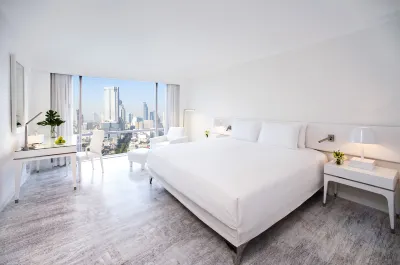
Pullman Bangkok Hotel G remains one of my absolute go-to spots whenever I visit the city. Set right in the heart of Silom, the location is unbeatable—close to vibrant dining, nightlife, shopping, and convenient transit links to anywhere in Bangkok.
The rooms here stand out for their size and comfort. They are notably spacious, well-designed, and leave plenty of breathing room to unpack and relax without feeling cramped. The beds are plush, everything feels thoughtfully arranged, and the high-floor skyline views over Bangkok are simply spectacular, day or night.
For amenities, the fitness center is bright, well-equipped, and a genuine pleasure to work out in. The swimming pool area is decent and clean, though it sits in the shade for much of the day and runs on the smaller side, making it less of a centerpiece if you are looking to sunbathe all afternoon.
Overall, between the prime Silom location, generous room layouts, and top-tier city panoramas, it delivers an effortless, stylish stay. I look forward to returning every time I pass through Bangkok.
Very Good
1240 reviews
8.6/10
Price from
€ 64
per night

Hotel near Siam,Bangkok 39.8% of visitors choose this area
Sstellay 2026.08.01
The room's ceiling was a bit low, and the interior was quite basic. The bedding wasn't very comfortable (old linens, soft pillows), and there were signs of wear and tear. Ventilation was poor, making clothes prone to smelling after washing.
Breakfast was discounted for guests, and the price was the same for adults and children, offering good overall value for money.
The pool was quite large, but the service and facilities were rudimentary. In the changing rooms, two sets of staff came in to change towels and empty bins while I was showering, completely disregarding guests wrapped in towels and trying to hide in a corner as they came and went multiple times.
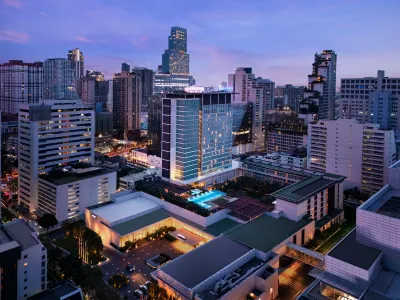
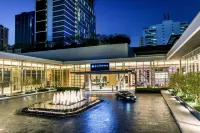
The hotel's most outstanding feature is the lobby, with its modern minimalist style and Japanese garden water feature, surpassing the public areas of most Pullmans. It's about a 10-minute walk to the BTS stations in front and behind. There's a food court on the upper floor of the duty-free shop next door, and if you walk through King Power to the back street, you'll find coffee shops and 7-Eleven. Both BTS stations also have popular Thai restaurants and coffee shops nearby. I probably won't stay here again.
Great
1820 reviews
9.2/10
Price from
€ 91
per night
FAQs About Pullman Properties in Bangkok
How do I book a hotel on Trip.com?
To book a hotel on Trip.com, simply enter your destination, travel dates, and the number of guests on the page. Then, browse through the available hotels and select the one you want to book. Follow the prompts to enter your payment information and complete the booking.
How do I get hotel deals on Trip.com?
There are several ways to find affordable hotels on Trip.com. You can narrow down your search results by filtering hotels according to your preferred price range, or you can sort the results by price to view the cheapest options first.
Where can I find hotel deals on Trip.com?
Trip.com offers a wide variety of hotel deals and promotions that are available throughout the year. You can easily find these special offers on our deals page. What's more, if you are a member of our loyalty program, you can sign in to your account and discover exclusive discounted rates at hotel list pages.
How can I get lower prices for hotels?
Sometimes booking hotels midweek is cheaper, but it also depends on the season.
How many hotels are listed on Trip.com?
With over 1,500,000 hotels across 230+ countries and regions, Trip.com has options for every traveller. Unsure where to stay? Explore the site for great ideas and find the perfect stay!
Can I cancel or change my hotel bookings on Trip.com?
It depends on the hotel policy and date of cancellation. Please check the policy section of the related hotel pages. To cancel or change your bookings, sign in to your Trip.com account, go to "My Bookings", and follow the instructions.
How do I contact Trip.com customer support?
You can contact Trip.com's 24/7 customer support by visiting the Help Center on Trip.com and submitting a request. You can also contact us by phone or service chat, depending on your location.
Explore More of Bangkok
Hotel Brands
A-ONE Hotels in BangkokHyatt Place Hotels in BangkokEasy Planet Hotels Hotels in BangkokInterContinental Hotels in BangkokShama Hotels in BangkokKempinski Hotels in BangkokKINGSTON HOTELS GROUP Hotels in BangkokiCheck Inn Hotels Hotels in BangkokPullman Hotels in BangkokSureStay Signature Collection Hotels in Bangkok
More Accommodation Types
Hotels near Top Attractions
Hotels near Wat Phra Chetuphon Wimon Mangkhalaram RajwaramahawihanHotels near SathornHotels near Erawan ShrineHotels near Lumphini ParkHotels near Chinatown Bangkok (Yaowarat)Hotels near The Grand PalaceHotels near Wat ArunHotels near Nana PlazaHotels near Chulalongkorn UniversityHotels near Khao San RoadHotels near Sala DaengHotels near SurasakHotels near RatchathewiHotels near RamkhamhaengHotels near Thong Lo BTS Station
Most Viewed Hotels
Grande Centre Point Hotel Terminal 21Grande Centre Point Hotel Ratchadamri BangkokCentara Watergate Pavilion Hotel BangkokSolaria Nishitetsu Hotel BangkokVELA Dhi GLOW PratunamChatrium Grand BangkokKromo Bangkok, Curio Collection by HiltonCentara Grand at CentralWorldCentre Point Plus Hotel PratunamSindhorn Midtown Hotel Bangkok, Vignette Collection by IHGBaiyoke Sky Hotel BangkokFour Points by Sheraton Bangkok Ploenchit SukhumvitNovotel Bangkok Platinum Pratunamlyf Sukhumvit 8 BangkokMoxy Bangkok RatchaprasongSKYVIEW Hotel Bangkok - Em DistrictHoliday Inn BANGKOK by IHGAmari BangkokNovotel Bangkok on Siam SquareThe Berkeley Hotel Pratunam Bangkok