China&Hong Kong&Macau:eSIM | 5G/4G | 3–60 Flexible Validity | Total Data | Supports Hotspot | QR
View all 20 photos

China&Hong Kong&Macau:eSIM | 5G/4G | 3–60 Flexible Validity | Total Data | Supports Hotspot | QR

Beijing, etc.
Use anytime during validity
Service language: English
Book now for today
Instant confirmation
Free cancellation by 01:00, 1 day before the date of use
From
MYR 8.85

Highlights

Enjoy the ultimate freedom with top-tier data plans (including Mainland China, Hong Kong and Macau, Hainan Island)
Valid for 30 days from the order date
Supports Hotspot Sharing

Last updated on 25 November 2026

Prices start from MYR 8.85 per person, offering great value for your next unforgettable experience

Plan your trip with 34 available packages, including options like China&Hong Kong&Macau:eSIM | 5G/4G | 3–60 Flexible Validity | Total Data | Supports Hotspot | QR-3 Days-1GB

Only 100 spots left! Book now to secure your spot. Available from 25 November 2026.

Product details

Where can I get the QR code?

After your booking is successful, customer service will send you the QR code and activation code right away. If you haven't received it, please contact customer service.

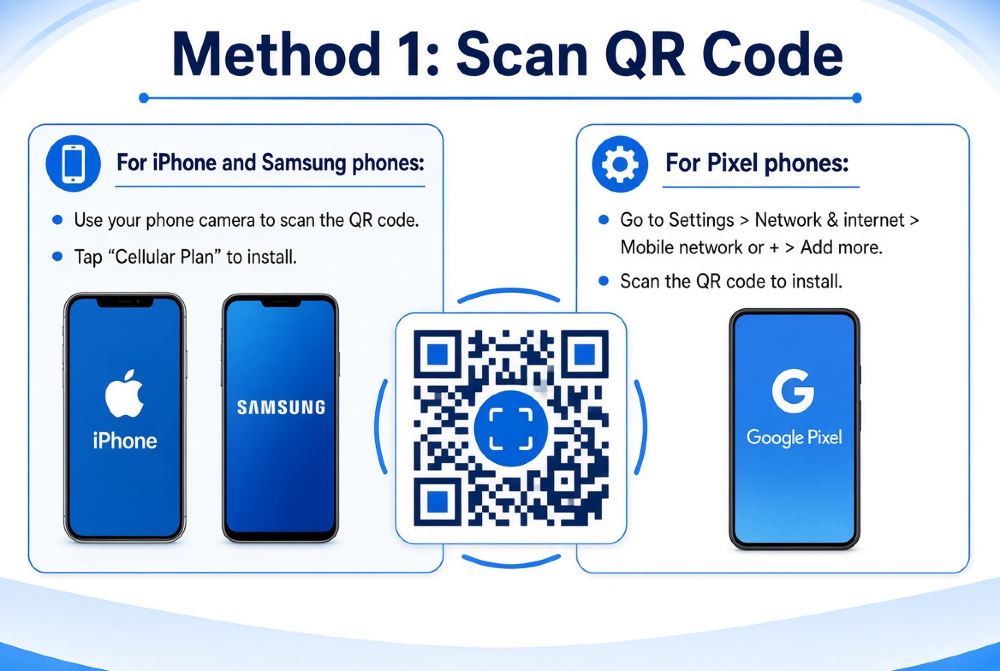
Scan the QR code

iPhone and Samsung:

Use your phone's camera to scan the QR code.

Tap 'Cellular Plan' to complete the setup.

Pixel:

Go to Settings > Network & Internet > Mobile Network or > Add more.

Scan the QR code to complete the setup.

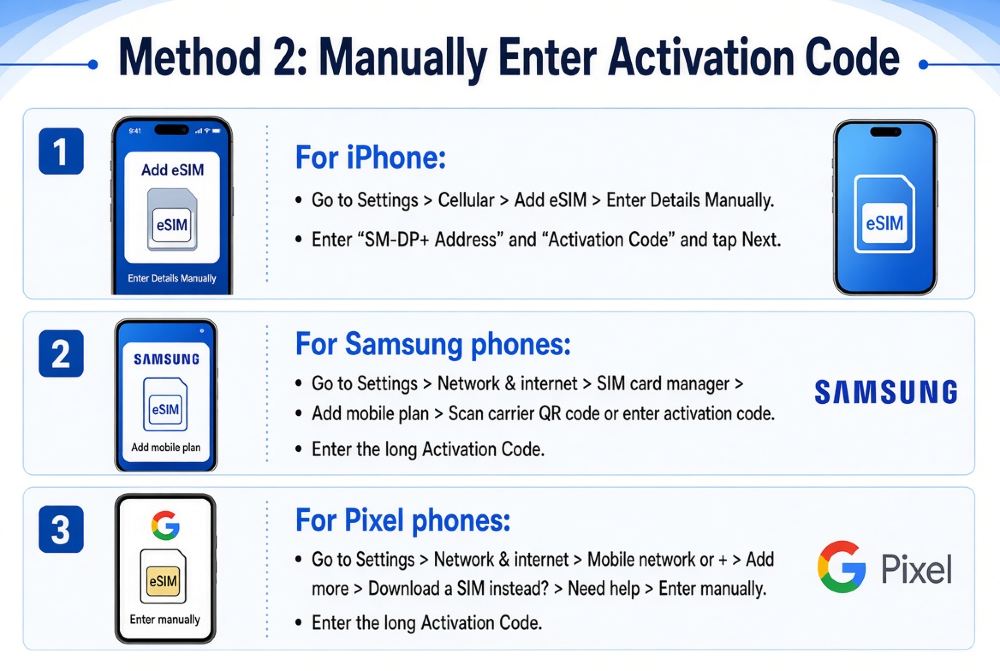
Manually Enter Activation Code

iPhone:

Go to Settings > Cellular > Add eSIM > Enter Details Manually.

Enter the “SM-DP Address” and “Activation Code,” then tap “Next.”

Samsung:

Go to Settings > Network & Internet > SIM Card Manager > Add Mobile Plan > Scan Carrier QR Code or Enter Activation Code.

Enter the full “Activation Code.”

Pixel:

Go to Settings > Network & Internet > Mobile Network or > Add More > Switch to Download SIM? > Need Help > Enter Manually.

Enter the full “Activation Code.”
Show less
Validity period
Valid for 30 days from the specified date, Valid for 1 use(s) only
What's included
Hotspot Sharing
Internet speeds up to 5G
For use in Mainland China (including Hong Kong and Macau)
Make calls and send text messages
How to use
Pick a data plan that suits your needs and length of stay, so you get the right amount of data for your activities.
 
1. Once you place an order, we'll send you a QR code and activation code via online messaging the day before (to prevent early activation).
 
2. Install and activate the app before your trip, so you can get online as soon as you land.
 
3. Pick the device you want to install the app on: Android or iOS.
 
4. Can't scan it? Just choose 'Enter activation code manually.'
 
5. Running into connection issues? Hit us up via the platform's chat, and we'll sort it out right away.
Change & cancellation policies
If a cancellation request is submitted before 01:00, 1 day(s) prior to the date of use, no cancellation fee will be charged.
If a cancellation request is submitted after 01:00 1 day(s) before the date of use, a fee of 100% will be charged.
This product cannot be canceled after activation.
If a discount is applied, the cancellation fee will be calculated based on the original price before the discount and will not exceed the amount paid.
Partial refund is not available.
Important note

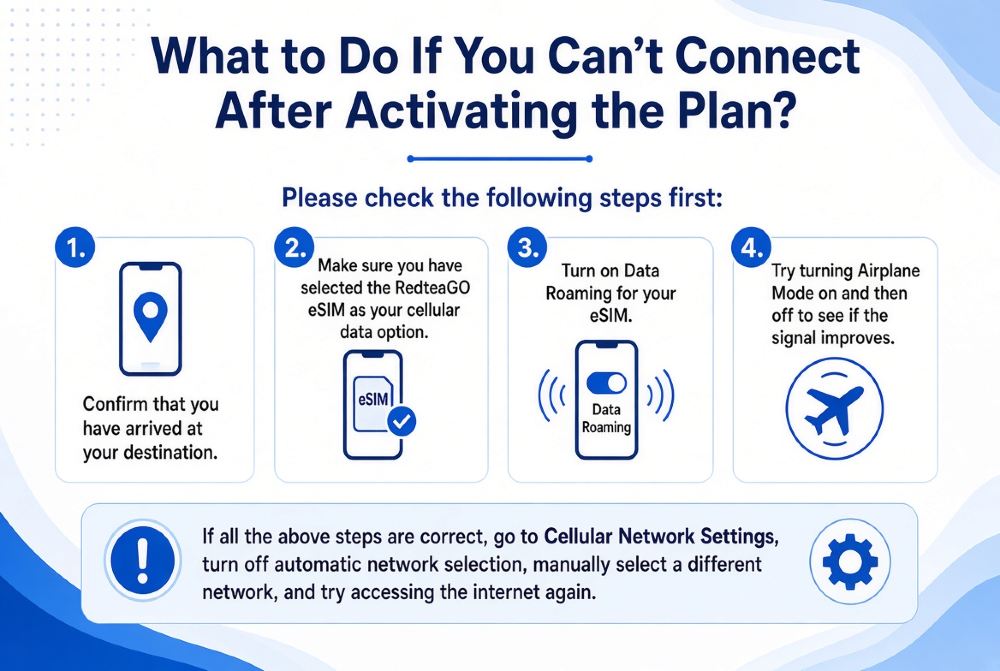
What should I do if I can't connect to the network after activating the package?


You need to first check the following things:


1. Make sure you have arrived at your destination.

2. Ensure you have selected RedteaGO eSIM as your cellular data option.

3. Turn on data roaming for your eSIM.

4. Try turning airplane mode on and off to see if the signal improves.


If all the above steps are correct, go to 'Cellular Network Settings,' turn off the automatic network selection, manually choose a different network, and then try accessing the internet again.

FAQ