Japan 5G eSIM | Daily Package | 1GB/Day | 1-14 Days | Self-billing | QR Code

Japan 5G eSIM | Daily Package | 1GB/Day | 1-14 Days | Self-billing | QR Code

4.6/5
Good
(78 reviews)
1K+ booked
Use anytime during validity
Book now for today
Booking confirmation
Free cancellation by 00:00, 1 day before the expiration date
From
CAD 1.10

Last updated on 29 November 2026

Prices start from 1,10 CAD per person, offering great value for your next unforgettable experience

Rated 4,6 out of 5 by 78 verified travellers

Plan your trip with 11 available packages, including options like Japan 5G eSIM | Daily Package | 1GB/Day | 1-14 Days | Self-billing | QR Code-QR code-1 day-5G Network - Daily - 1GB

Only 100 spots left! Book now to secure your spot. Available from 29 November 2026.

Choose from 11 flexible data plans and stay connected during your trip

Device info

Product Description

Coverage

Destination: Japan

Local network operators: Docomo (5G), KDDI (5G), SoftBank (5G), and Rakuten (5G).

After installation and activation, the eSIM connects automatically, or you can manually select an operator.

Data roaming must be enabled after activation to connect. The eSIM connects automatically after installation and activation, or you can manually select an operator.

Set the APN to MB or mobile.three.com.hk.

After purchase, the eSIM QR code will be emailed to you within 3 minutes.
Product details

Show less
Validity period
Valid for 60 days from the booking date, Valid for 1 use(s) only
What's included
eSIM plan data allowance
How to use
Instructions for Use
Activation
After activation, validity is counted by calendar day; the activation day counts as day 1.
If you have questions during use, contact us via WhatsApp at +852 92901111 or email cs.support@multi-byte.com. Support is available 24 hours a day, year-round.
[Installing the eSIM]
If you use an iPhone with iOS 17.4 or later, you can install the eSIM with one tap in the Trip.com app. If this does not work, ensure that both the app and iOS are up to date.
• iPhone: Settings > Cellular or Mobile Data > Add eSIM.
• Android: Settings > Network & Internet > SIMs > Add eSIM (steps may vary by device).
1. Open the QR code attachment in your Trip.com app booking and print it or save it to another device in advance. On iOS 17 or later and some Android phones, the QR code image can be saved directly to the phone.
2. Open Cellular settings (iOS) or SIM card management (Android).
3. While your phone is connected to the internet, select Add Cellular Plan (iOS) or Add SIM (Android), then scan the QR code to install.
4. If you cannot scan the code, enter the SM-DP+ Address and Activation Code from your booking voucher to install.
5. If step 3 or 4 fails, your phone may be locked to your home carrier and unable to use another carrier's network. Contact your carrier to unlock it before using the eSIM.
[Using the eSIM]
1. Turn off your primary SIM and turn on the eSIM.
2. Enable Cellular service (iOS) or the SIM card (Android).
3. Turn on data roaming.
4. If you still cannot connect, configure the APN as described below and restart your phone.
[About the APN]
1. For an eSIM covering multiple countries or regions, manually switch the APN if you cannot connect after arriving in a new destination. It normally switches automatically.
2. Settings path: Cellular number > Cellular Data Network, Mobile Network > Mobile Data Network, or Cellular Service > Cellular Data Network.
3. Enter the APN: MB.
4. Restart your phone.
Change & cancellation policies
If a cancellation request is submitted before 00:00, 1 day(s) prior to the expiration date, no cancellation fee will be charged.
If a cancellation request is submitted after 00:00 1 day(s) before the expiration date, a fee of 100% will be charged.
This product cannot be canceled after activation.
If a discount is applied, the cancellation fee will be calculated based on the original price before the discount and will not exceed the amount paid.
Partial refund is not available.
Important note

[eSIM Requirements]

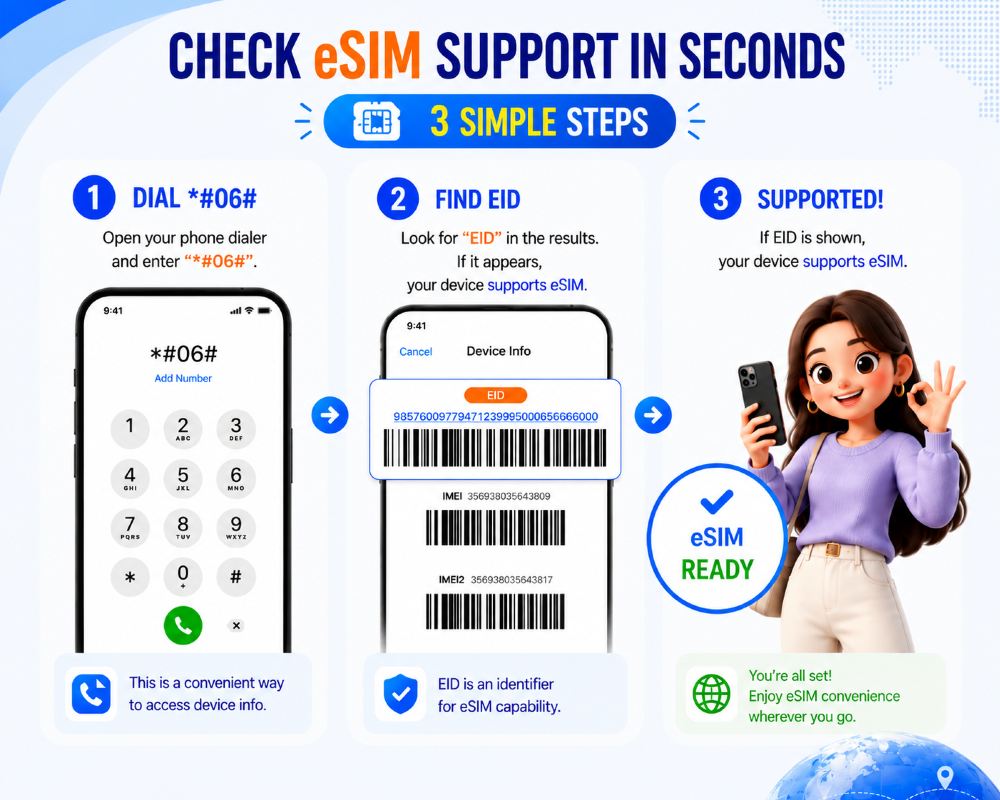
1. Your device must support eSIM. To check, dial *#06#. An EID generally indicates that eSIM is supported; without an EID, the device cannot use eSIM.

2. Your phone must be unlocked. Ask your carrier whether your device is network locked.

Please check that both requirements are met before purchasing.

[Installing the eSIM]

An internet connection is required to install the eSIM. We recommend installing it 6–12 hours before departure.

[Enable Data Roaming]

Make sure data roaming is enabled for the eSIM.

[Do Not Delete the eSIM After Installation]

Each QR code can be installed only once. If the eSIM is deleted from your device, we cannot provide assistance.

FAQ