Japan DOCOMO 5G eSIM | Native IP • All AI & TikTok | 1–30 Days | QR Code

Japan DOCOMO 5G eSIM | Native IP • All AI & TikTok | 1–30 Days | QR Code

4.4/5
Average
(874 reviews)
28K+ booked
Use anytime during validity
Book now for today
Booking confirmation
Free cancellation by 00:00, 1 day before the expiration date
From
SAR 0.42
Limited-time sale
50% off

Last updated on 25 November 2026

Prices start from SAR 0.42 per person, offering great value for your next unforgettable experience

Rated 4.4 out of 5 by 874 verified travellers

Plan your trip with 157 available packages, including options like Japan DOCOMO 5G eSIM | Native IP • All AI & TikTok | 1–30 Days | QR Code-QR code-1 day-Daily 1GB

Only 100 spots left! Book now to secure your spot. Available from 25 November 2026.

Choose from 16 flexible data plans and stay connected during your trip

Device info

Note: Android users must manually configure the APN settings before using this eSIM.

• Coverage: Japan

• Carrier: NTT DOCOMO (Local IP · Native Network)

• Network Type: 5G

Product details

Show less
Validity period
Valid for 30 days from the booking date, Valid for 1 use(s) only
What's included
eSIM + Data
Hotspot Sharing
Voice
SMS
How to use
[Attention] Android users must set the APN to a.apn02.net to access mobile data.
 
[Step 1: Installation]
Make sure your device has a stable internet connection.
 
▶ One-Tap Installation
Trip.com App > Account > All Bookings > One-tap install on this phone
 
▶ QR Code / Manual Setup
Scan the QR code on your eSIM voucher, or enter the SM-DP+ address and activation code manually.
• iPhone: Settings > Cellular / Mobile Service > Add eSIM
• Android: Settings > Connections > SIM Manager > Add eSIM
 
[Step 2: Activation]
① Turn on the eSIM in your device settings.
② Select this eSIM for mobile data.
③ Android: Set the APN to a.apn02.net if it is not already configured.
 
APN Settings & Personal Hotspot:
• Android: Settings > Connections > Mobile Networks > Access Point Names (APN)
• iPhone: Settings > Cellular / Mobile Service > DOCOMO eSIM > Cellular Data Network > Personal Hotspot (APN: a.apn02.net)
 
Menu names may vary by device and region.
 
[Troubleshooting]
① Make sure the eSIM is enabled and selected for mobile data.
② Check the APN: a.apn02.net (all lowercase, no spaces).
③ Turn off any active VPN.
④ Restart your device.
⑤ If you still cannot connect, disable automatic network selection and manually select DOCOMO.
 
Need help? Contact our 24/7 support team.
 
[eSIM Status & Data Usage]
https://search.t-sim.hk/d/trip/en
Change & cancellation policies
If a cancellation request is submitted before 00:00, 1 day(s) prior to the expiration date, no cancellation fee will be charged.
If a cancellation request is submitted after 00:00 1 day(s) before the expiration date, a fee of 100% will be charged.
This product cannot be canceled after activation.
If a discount is applied, the cancellation fee will be calculated based on the original price before the discount and will not exceed the amount paid.
Partial refund is not available.
Important note

■ Important Notice | APN Settings

• Android users must configure the APN to access mobile data. iPhone users should check the APN settings if Personal Hotspot is missing or not working.

• Required APN: a.apn02.net (all lowercase, no spaces). See installation instructions for setup details.


■ Installation & Usage

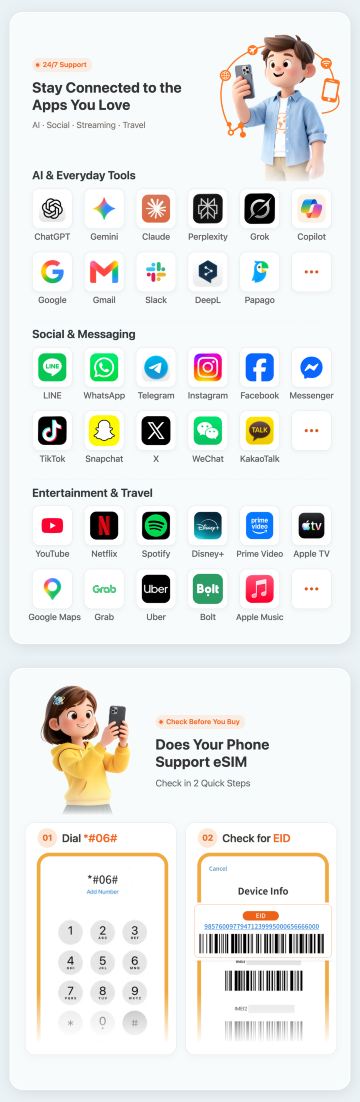
• This eSIM requires an eSIM-compatible, carrier-unlocked device. If your device is incompatible and the plan has not been activated, you can request a refund directly through your order page.

• If installation fails, check whether the eSIM is already installed. Scanning the QR code again may cause an installation error.

• This eSIM cannot be transferred to another device. If deleted, it can be reinstalled on the original device. The validity period of an activated plan will continue to run.

• You can install the eSIM before departure, but we recommend turning it on after arriving in Japan to avoid starting the validity period early.

• Data-only eSIM. No phone number, voice calls, or SMS.


■ Network & Service Information

• Internet speeds and 4G/5G availability depend on device compatibility, network coverage, and local conditions.

• This eSIM uses a Japanese local IP address. Some banking, streaming, and other apps may be subject to overseas access or regional restrictions.

• Need help? Contact our 24/7 support team through your order page.

FAQ