How to Book China Train Tickets in Advance: Trip.com Reservation Request
Pre-book China train tickets 16 to 60 days ahead


Planning a trip to China weeks or even months in advance? You've booked your flights, picked your hotels and planned your itinerary, but what about your train tickets? China's official ticket sales open within a 15-day booking window (including the day of departure), which can be frustrating when you're planning a trip weeks or even months ahead.
Whether you're visiting China for the first time or heading home for the holidays, you can plan ahead without worrying about ticket release times. And if we can't secure your tickets, you'll receive a full refund. Submit your Reservation Request today!
What is Trip.com Reservation Request for China trains?
Reservation Request is an automated advance booking service that lets you pre-order China train tickets before they officially go on sale. Instead of waiting for the regular booking window to open, you can select your preferred train, travel date and seat class 16 to 60 days before departure.
Once you've submitted your request and completed payment, Trip.com will hold your order and automatically attempt to purchase your tickets as soon as China Railway releases them, with no further action required from you.
You can also include alternative trains and seat classes in your Reservation Request to increase your chances of securing tickets, particularly during busy holiday periods. While ticket issuance is not guaranteed, you'll receive an email confirming your booking outcome within two hours of official ticket sales opening. If we can't secure your tickets, you'll receive a full refund, including the processing fee.
Please note that Reservation Request currently supports one-way journeys only. If you're planning a return trip or a journey involving connecting trains, you'll need to submit a separate request for each leg.
How the Reservation Request timeline works
You don't need to set an alarm or keep refreshing the booking page when China train tickets go on sale. Once you've submitted your Reservation Request, Trip.com takes care of the booking process and keeps you updated along the way.
Here's what happens once you're ready to plan your train journey:
- 16 to 60 days before departure: Pick your preferred train and seat class, fill in your passenger details and complete payment. We'll keep your Reservation Request on file until tickets officially go on sale.
- On the ticket release day: We'll automatically try to secure your tickets as soon as China Railway opens sales. There's no need to set an alarm, log in or keep refreshing the booking page. We'll handle the booking for you.
- Within two hours of official ticket sales opening: Check your inbox for your booking result. If your tickets are successfully purchased, you'll receive an email with your confirmed ticket details. If we're unable to secure them, we'll automatically cancel your order and issue a full refund, including the processing fee.
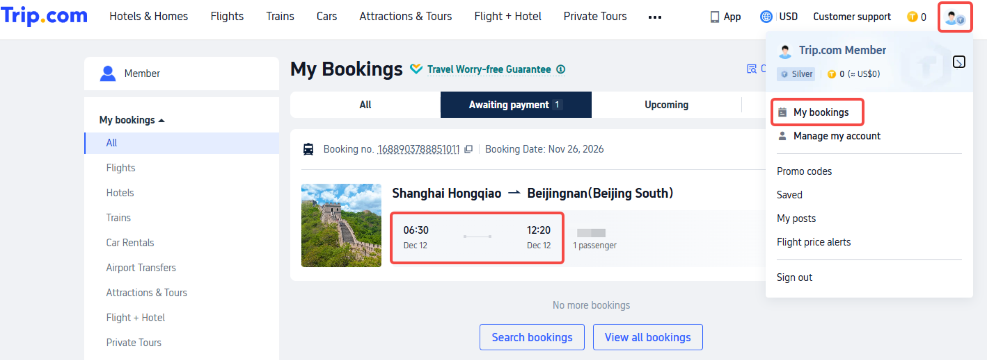
Want to know how your booking is progressing? You can check your Reservation Request status anytime through My Bookings on the Trip.com website or app. A dedicated progress bar on your order details page shows key milestones, from the official ticket release date to the booking result notification and ticket issuance.
Reservation Request vs. Standard tickets vs. Waitlisting: what's the difference?
Not sure which booking option to choose? It all comes down to how far ahead you're planning your trip and whether your preferred train still has seats available. Here's how the three booking options on Trip.com compare.
Feature | Standard tickets | Reservation Request | Ticket waitlist |
|---|---|---|---|
Ticket status | Officially on sale with available seats | Not yet on sale | Sold out after official release |
Booking timing | Within the 15-day sales window | 16 to 60 days before departure | After tickets sell out |
Booking certainty | High (Instant ticket issuance) | Medium (Subject to availability at release) | Low (Depends on seats becoming available) |
How it works | Direct booking & ticket confirmation | Automatic booking attempt when sales open | Continuous monitoring for available seats |
Who it's for | Travellers ready to book available tickets | Travellers planning their trips in advance | Travellers hoping to secure sold-out tickets |
Step-by-step: how to place a Reservation Request on Trip.com
Ready to book your China train tickets in advance? Here's how to place a Reservation Request in five simple steps, using Beijing to Shanghai as an example.
Step 1: search for your route and travel date
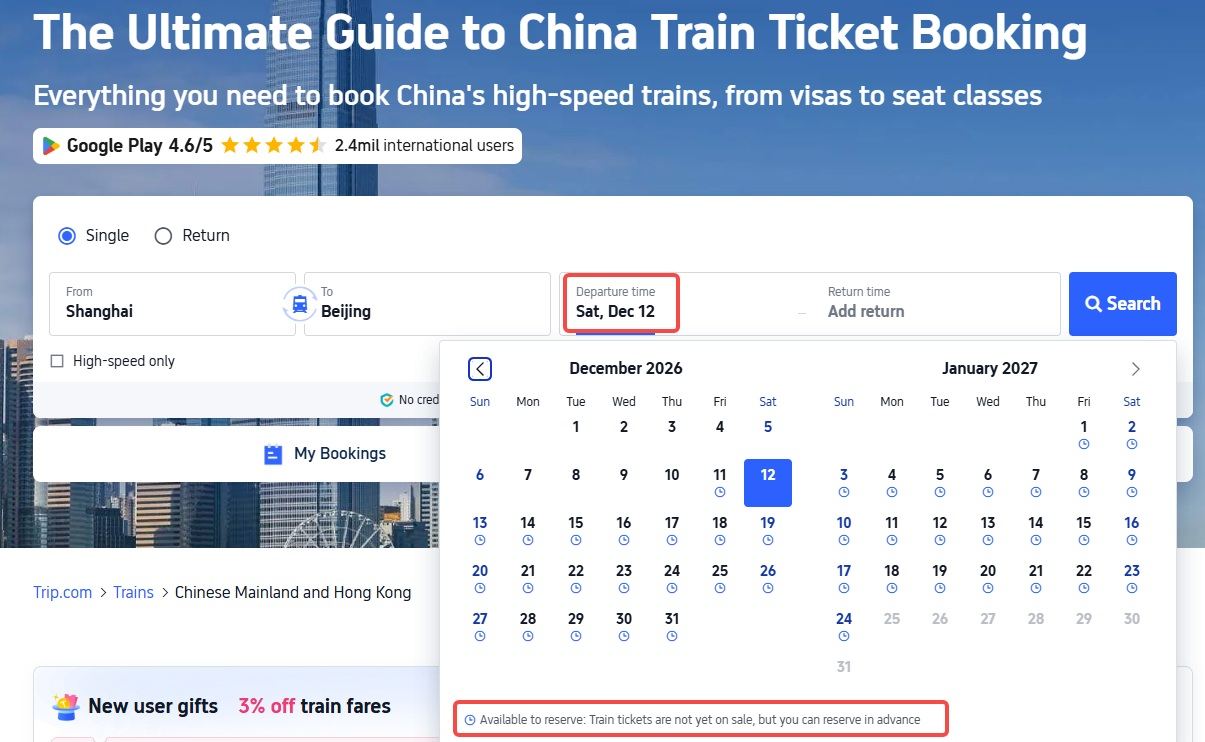
Step 2: select your train and seat class
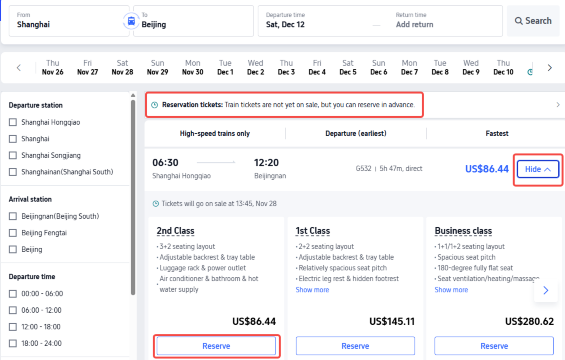
Step 3: add passenger details
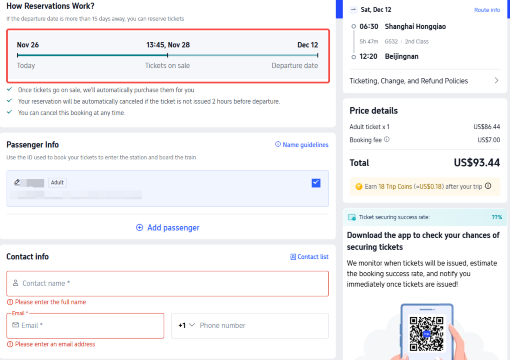
Step 4: complete your payment
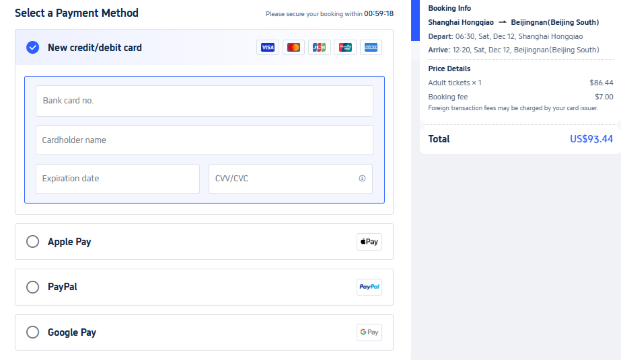
Step 5: track your booking progress
Reservation Request ticket changes, cancellations and refunds
Travel plans don't always go as expected, especially when you're booking weeks in advance. Here's what you need to know about changing or cancelling your Reservation Request and getting your money back.
Before your tickets are purchased
Changed your travel plans? You can cancel your Reservation Request at any time before your tickets are successfully purchased. You'll receive a full refund, including the processing fee, through your original payment method.
After your tickets are purchased
Once your tickets have been purchased, changes and refunds are subject to Trip.com's standard China train ticket policies. Depending on when you change or cancel your tickets, additional fees may apply. Please check the specific ticket conditions displayed at the time of booking.
If your requested tickets sell out
If we're unable to secure your tickets, your booking will be automatically cancelled and you'll receive a full refund, including the processing fee. We'll notify you by email within two hours of official ticket sales opening. There's no need to request a refund manually.
If train schedules change
China Railway may adjust its train schedules between the time you submit your Reservation Request and when your tickets are issued. This means your final departure and arrival times may differ from those originally displayed. Always check the schedule on your confirmed tickets before travelling, as these are the times that apply to your journey.
How to change your confirmed train tickets
If you need to change your tickets after they've been issued, go to My Bookings on the Trip.com website or app to request a change. Alternatively, you can visit a railway station ticket counter with the original travel ID used for your booking. All changes are subject to ticket availability and applicable ticket policies.
Frequently asked questions about China train Reservation Request
When do China train tickets officially go on sale?
China train tickets typically go on sale within a 15-day booking window (including the day of departure), with the 15-day booking window including the day of travel. The exact ticket release time varies by departure station.
With Trip.com's Reservation Request, you can submit your booking up to 60 days in advance without having to keep track of ticket release times.
Is ticket issuance guaranteed with Reservation Request?
No. Although Trip.com's automated system attempts to secure your tickets as soon as official sales open, popular trains can sell out within seconds during peak holiday periods.
You can include alternative trains or seat classes in your Reservation Request to improve your chances of securing tickets. If we're unable to purchase your tickets, we'll automatically issue a full refund, including the processing fee.
Can foreign passport holders use the Reservation Request service?
Yes. You can use your foreign passport to pre-order China train tickets directly on Trip.com. Simply enter your passenger details exactly as they appear on your passport when placing your Reservation Request. Once your e-tickets are issued, bring the original passport used for your booking when travelling.
What happens to my money if the Reservation Request fails?
If your Reservation Request fails, your order is automatically cancelled and you receive a full refund, including the processing fee, back to your original payment method. You will also receive an email update within two hours of official ticket sales opening, after which you can try Trip.com's waitlist feature or search for alternative trains, departure times or travel dates.









- What is Trip.com Reservation Request for China trains?
- How the Reservation Request timeline works
- Reservation Request vs. Standard tickets vs. Waitlisting: what's the difference?
- Step-by-step: how to place a Reservation Request on Trip.com
- Reservation Request ticket changes, cancellations and refunds
- Frequently asked questions about China train Reservation Request







- South Western Railway (SWR) engineering works (November 2026)Published: November 23, 2026
- c2c engineering works (November 2026)Published: November 23, 2026
- Thameslink engineering works (November 2026)Published: November 23, 2026
- Southeastern engineering works (November 2026): is my train running?Published: November 23, 2026
- LNER engineering works (updated November 2026)Published: November 23, 2026
- Avanti West Coast upcoming engineering works 2026: is my train running?Published: November 23, 2026
- Avanti West Coast upcoming engineering works 2026: is my train running?Published: November 23, 2026
- Southern rail engineering works (November 2026)Published: November 23, 2026
- Getting the train or tube to Somerset House: Nearest station and popular routesPublished: November 23, 2026
- Getting the train to Sky Garden: closest station & routesPublished: November 23, 2026
- Getting the train to Chatsworth House: closest station and popular routesPublished: November 23, 2026
- Getting the train to Victoria and Albert Museum (V&A): closest station & popular routesPublished: November 23, 2026